Date-Time Formatting and Time-Zone Portability in Web Applications
Keep instants, calendar dates, time zones, and locale presentation separate so browser date formatting remains correct across regions and daylight-saving changes.
Want the structured docs for Platform?
This article lives in the editorial library. For step-by-step setup, reference material, and ongoing updates, jump into the docs section.
Reliable browser date formatting starts with a clear value model. Store an instant when an event is a point on a timeline, store a calendar date when the event belongs to a day, and choose an explicit time-zone policy before calling Intl.DateTimeFormat. A locale controls language and ordering; it does not decide which zone an appointment uses. Keeping those decisions separate prevents off-by-one dates, daylight-saving surprises, and displays that change meaning between browsers.
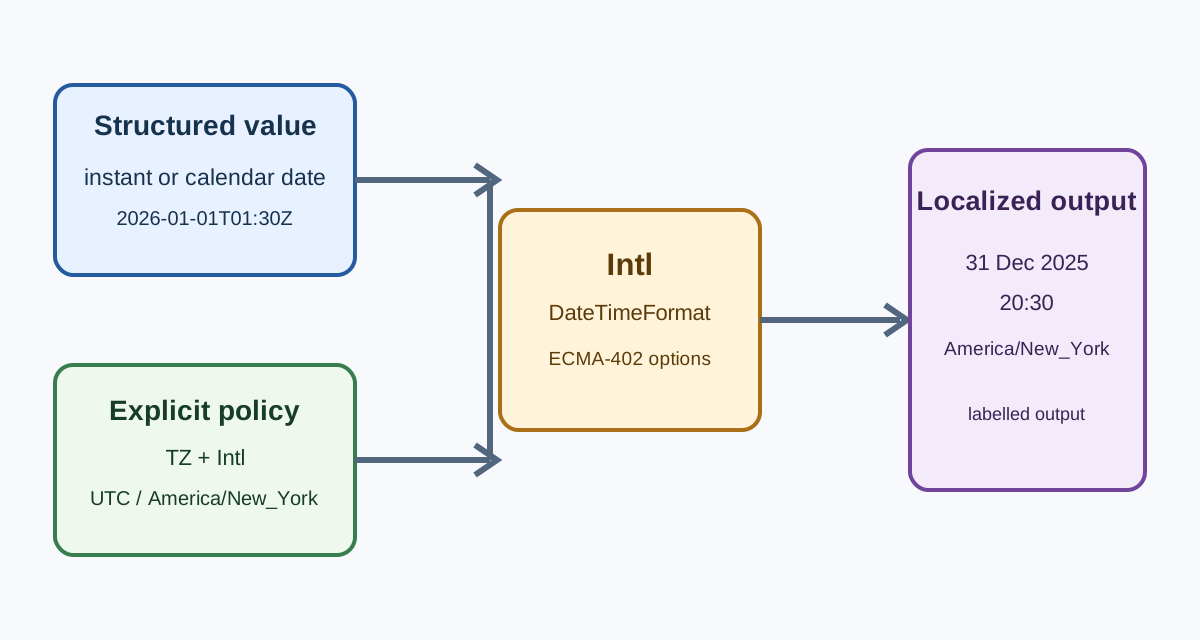
The ECMA-402 Internationalization API defines language-sensitive formatting services. MDN documents the browser-facing Intl.DateTimeFormat interface and its options. The W3C time-zone guidance explains why a date and a time zone are separate pieces of information. Together, these sources support a portable presentation layer, not a promise that every runtime emits identical punctuation or abbreviations.
Name the value before formatting it
An instant identifies one point in global time. An ISO value such as 2026-01-01T01:30:00Z represents the same instant wherever it is viewed. The trailing Z states UTC; an explicit numeric offset states another relationship to UTC. An event feed, audit record, payment authorization, or message delivery time usually needs this kind of value because people may view it in different places.
A calendar date has a different meaning. A birthday, a hotel check-in date, a school holiday, and a billing period can mean “the day named by the business” without referring to one moment at midnight. Converting such a value to an instant and then applying a viewer's zone can move it to the previous or next day. Keep the date as a date in storage and formatting rules when no time of day is part of the domain.
Local wall time is a third case. “09:00 at the Berlin office” needs a zone and a rule for resolving daylight-saving transitions. It is not equivalent to “09:00 in the viewer's current zone.” A scheduling service should define whether the venue zone, the participant's selected zone, or a fixed reporting zone controls the display. Formatting cannot repair a missing scheduling decision.
Do not pass ambiguous strings to the JavaScript parser and hope that the browser chooses the intended meaning. Define an input contract, validate it, and preserve the original structured fields. For an instant, use a documented serialized form with an offset or UTC marker. For a calendar date, use a date-only field and avoid silently appending midnight. For a local appointment, retain the local fields and the IANA zone that gives them meaning.
Choose the time-zone policy explicitly
Intl.DateTimeFormat can format an instant with an explicit timeZone option. Supplying timeZone: 'UTC' gives a stable reporting view. Supplying timeZone: 'America/New_York' gives the civil-time view for that named region, including the rules represented by the runtime's time-zone data. Omitting the option generally uses the runtime's default zone, which may be appropriate for a viewer-facing clock but is unsafe for a report that promises one fixed zone.
The product should own the source of a chosen zone. A user may select a zone in profile settings, a meeting may carry the venue zone, or an organization may define a reporting zone. A browser-exposed preference can be a convenient default, but it is not proof of residence, nationality, or identity. Give the user a visible way to inspect and change the choice when the zone affects a decision.
Keep the zone with the rendered value when confusion would be costly. A short time such as “8:30 PM” is not enough for a cross-region meeting, legal deadline, or financial cut-off. Include a zone name, offset, or a clear surrounding label. If the interface shows a participant's local time, say whose local time it is. If it shows the venue time, name the venue or zone. The display should not require a person to infer context from the browser.
Time-zone identifiers are data, not formatting decoration. Store an IANA identifier when recurring civil events depend on regional rules. A raw offset such as -05:00 cannot express a future daylight-saving change or historical rule change. Conversely, an offset may be exactly what a signed protocol or an immutable audit record requires. Choose the representation that matches the domain and document any conversion at the boundary.
Format with ECMA-402 without hard-coding punctuation
Create a formatter from the selected locale, options, and zone. For example, a receipt may request numeric year, month, and day plus an explicit currency elsewhere; a meeting view may request weekday, hour, minute, and timeZoneName. The formatter decides ordering, digits, punctuation, and localized names. The application decides which fields carry meaning and which labels surround them.
Locale negotiation and time-zone selection are independent. A user can read Spanish labels while viewing an event in America/Toronto, or read French labels while a report remains fixed in UTC. Do not use a language tag as a substitute for a zone, and do not use a zone as a substitute for language. A locale also does not translate application copy, legal text, or user-generated content.
Avoid tests that assert one exact string for every browser release. ECMA-402 specifies behavior and options, but locale data and typography can evolve. Grouping marks, non-breaking spaces, punctuation, weekday abbreviations, and zone names may vary while the underlying date and selected zone remain correct. Test structured inputs, selected options, and user-visible meaning. Keep exact snapshots only for text the application explicitly owns.
Use formatToParts() when the layout needs semantic control. It can expose fields such as day, month, year, hour, and timeZoneName so the interface can associate labels or style parts without parsing punctuation. Treat the returned parts as structured output, not as a stable list whose order is identical in every locale. Preserve the formatter's locale order unless the product has a strong accessibility reason to arrange fields differently.
Keep machine data separate from human output. APIs, databases, URL parameters, logs, and signatures need stable contracts. A localized string is for reading, not for round-tripping back into a timestamp. If a user edits a date, show the accepted input format and parse it with a domain-specific rule. Do not split on /, assume month-first ordering, or infer a zone from an abbreviation.
Treat daylight-saving and calendar boundaries as normal cases
Daylight-saving transitions create local times that do not exist and times that occur twice. A clock can jump from 01:59 to 03:00, or repeat an hour with two different instants. A scheduling product must choose a rule for a nonexistent local time and a disambiguation rule for a repeated one. It should communicate that decision before saving the appointment. Intl.DateTimeFormat can display a resolved instant; it does not define the scheduling policy that produced it.
Test transitions using real IANA zones rather than a fixed offset. Include a spring transition, an autumn transition, and a date outside the transition season. Test events immediately before and after the boundary, recurring events, and an appointment entered in a zone that differs from the viewer's zone. Verify both the stored instant or local-date fields and the visible zone context.
Calendar systems also matter. The default Gregorian presentation is not the only valid calendar in ECMA-402. If a product offers a calendar choice, store the underlying value independently and make the selected calendar visible. Do not assume that a localized month name can be parsed back to a Gregorian date. A calendar date without a time zone remains a calendar date even when a formatter can show it alongside a time.
Leap days and month lengths expose the same modeling problem. Adding 24 hours to an instant is not always the same as moving a recurring event to “tomorrow” in a civil calendar. Define whether recurrence follows elapsed duration or calendar arithmetic. Format the resulting value only after that rule has been applied. A screenshot that looks plausible cannot prove that recurrence semantics are correct.
Build a portable fallback path
Feature-detect the formatter features the product uses and keep a readable baseline when an option is unavailable. A fallback may use a server-rendered value, a simpler Intl configuration, or a structured date with an explicit UTC label. The fallback must preserve the value and context; it should never silently replace a venue time with the viewer's local time or drop the date zone from a deadline.
Locale fallback should be deliberate. List supported locales, resolve a requested tag to one of them, and expose the active choice to the user. If a regional variant is unavailable, a language-level fallback can retain understandable text while keeping the selected time-zone policy unchanged. Do not fabricate a regional locale from a guessed location. Do not force a language switch merely because a browser preference changed.
Time-zone data can change with operating-system and browser updates. When a jurisdiction changes its rules, a future display may legitimately differ from an older display. Store the original instant and the zone identifier so the value can be re-rendered under current rules. For regulated or signed records, preserve the rendered evidence and the data-version context required by the workflow. Do not treat a changed abbreviation as proof that the stored instant changed.
A server and browser should agree on the value before they negotiate presentation. Hydration bugs often occur when a server formats in UTC and the browser immediately formats in its default zone. Send structured data or a declared display zone, then render one policy on both sides. If a deliberate client-only conversion is required, reserve space and announce the final context so the transition does not look like a changed record.
Make date displays accessible and actionable
A date or time is useful only when a person can understand what decision it supports. Label a due date, departure time, renewal date, or measurement with its role. Include the zone when a cross-region interpretation is possible. Avoid relying on color, a tooltip, or an unlabeled abbreviation to carry essential context.
Use semantic labels and readable text around formatted parts. A table header can identify the zone and event type; a form label can show the accepted date shape; an accessible name can include the full date when a compact visual form omits the year. Support zoom and text resizing, and allow long localized names to wrap without hiding adjacent controls. Check right-to-left layouts and screen-reader pronunciation for localized month and zone names.
When a user changes language or zone, preserve the underlying task. A form should retain its value, a meeting should retain its event identity, and a saved report should state which zone it uses. Explain whether the change affects only presentation or also changes the scheduled event. Do not commit a new appointment merely because a preview was converted for viewing.
Errors should describe the contract. Tell a person whether the field expects a calendar date, an offset-bearing instant, or a local time plus zone. Show an example in the active language and explain ambiguous or nonexistent times near a transition. A generic “invalid date” message leaves users unable to correct the value and encourages unsafe guessing.
Test portability with user tasks
Create fixtures around outcomes instead of collecting every possible locale string. Keep one fixed instant, one date-only value, one venue appointment, and one recurring event. Render the instant in UTC and in a named regional zone. Render the date-only value without applying a viewer zone. Exercise a transition boundary and an unsupported locale. Each assertion should check the value, zone policy, and accessibility context.
For a stable instant fixture, use 2026-01-01T01:30:00Z. UTC represents 1 January 2026 at 01:30, while America/New_York represents 31 December 2025 at 20:30. Both outputs refer to the same stored instant and identify their zone context. Punctuation and spacing may differ. A changed day, hour, or missing zone label is a product failure.
For a date-only fixture, use a business date such as 2026-01-01 and assert that it remains 1 January in every supported viewer zone. The implementation should not append midnight UTC and then convert it. For a recurring event, assert the documented civil-time rule across a daylight-saving boundary. For a fallback, assert that the amount of context stays the same when a preferred locale or formatter option is unavailable.
Record browser release, operating-system time-zone data, selected locale, input value, and the application policy when investigating a display issue. These details reproduce a user-facing result without building a general browser inventory. Keep diagnostics for the support purpose and avoid reusing locale or zone choices as a hidden identity signal.
Date-time portability is a product contract: structured values establish meaning, an explicit zone policy establishes context, and ECMA-402 supplies localized presentation. When those layers stay separate, a browser update can change punctuation without changing the event, and a user's language or viewing zone can change without corrupting stored data. The result is clearer scheduling, safer reports, and fallbacks that remain useful when locale data or formatter features differ.
Keep the contract visible in code review. Name fields instant, calendarDate, localTime, and timeZone instead of passing anonymous strings between services. A reviewer can then ask whether a conversion is intentional. Make the display policy an input to the view or formatter rather than a hidden global derived from the host machine. This also makes previews, exports, and notifications agree about which zone they use.
Notifications deserve the same care as pages. An email or push message may be read hours later, copied into another time zone, or forwarded without the surrounding interface. Include the date, clock time, and zone context when the action has a deadline. If the recipient can select a preferred zone, apply that preference only after the event's canonical value and policy are known. Do not bake a server's local zone into a message merely because the job happened to run there.
Review data migrations explicitly. Converting legacy date-only strings to UTC instants can permanently change their meaning, while converting a timestamp to a date can discard a meaningful boundary. Preserve the original field until the domain owner confirms the intended interpretation, migrate with representative records around month and year boundaries, and compare user-visible tasks rather than only serialized bytes. A migration that keeps the same string shape can still change the day a person sees.
Operational logs should state the zone policy used for human-readable timestamps and retain a stable instant for correlation. Logs from different services become difficult to compare when each silently uses its machine's local zone. UTC is often a useful operational convention, but the convention should be documented and applied consistently. Human-facing dashboards can offer a separate viewer-zone toggle without rewriting the stored event time.
Sources
- ECMA-402 Internationalization API
- MDN: Intl.DateTimeFormat
- W3C Internationalization: Time zones
- WHATWG HTML: Web application APIs
For language negotiation and explicit locale choice, see the browser language localization guide. For broader formatter portability, see the Intl locale data guide. Both topics complement this article but do not replace an application's explicit decision about whether a value is an instant, a calendar date, or a local appointment.
Related Articles
Take BotBrowser from research to production
The guides cover the model first, then move into cross-platform validation, isolated contexts, and scale-ready browser deployment.