hCaptcha Invisible Still Shows a Challenge: Check the Mode
Diagnose hCaptcha invisible challenges by separating invocation, difficulty, Passive availability and accessibility options, then check the site-owned decision.
BotBrowser Team
Want the structured docs for Network?
This article lives in the editorial library. For step-by-step setup, reference material, and ongoing updates, jump into the docs section.
hCaptcha invisible removes the checkbox interaction; it does not promise that a challenge will never appear. A form can invoke the intended invisible integration and still present a task under its configured difficulty. The first useful check is therefore the site's actual mode, not a browser change. BotBrowser provides profile-backed browser controls for a reproducible browser configuration, but it does not select hCaptcha difficulty, grant account capabilities, provide accessibility accommodations or guarantee application acceptance.
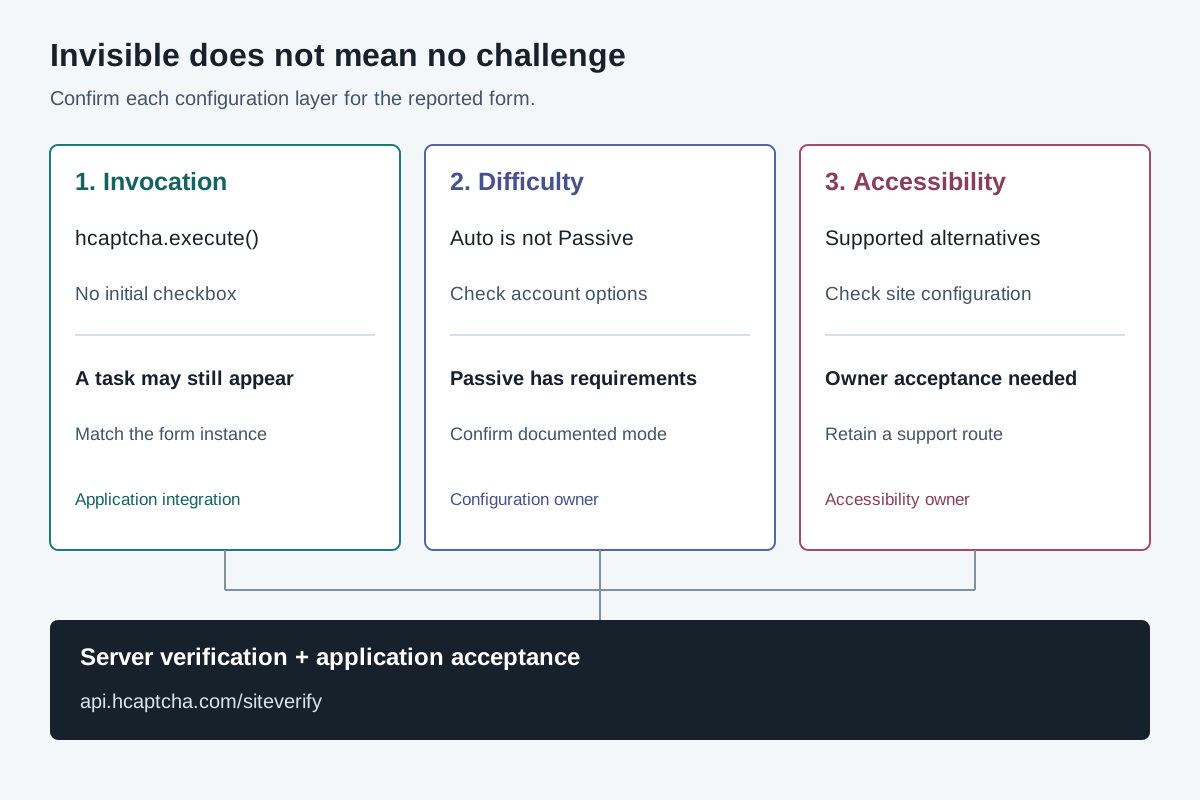
TL;DR
- An invisible invocation can legitimately lead to a visible challenge. Inspect the integration before classifying that screen as a fault.
- hCaptcha documents Passive separately from invisible, with account-specific requirements. Hiding a checkbox does not enable that capability.
- Difficulty, accessibility arrangements and form validation have different owners and evidence. Record them separately.
- A displayed task does not expose a private risk assessment; a completed task does not establish that the business operation succeeded.
- For an owned application, use the configuration diagnosis table below. For a third-party site, report the observed problem through its supported access or accommodation route.
Contents
- Start with the configuration diagnosis table
- Check how the invisible interaction is invoked
- Separate difficulty from account capabilities
- Treat accessibility as a supported user path
- Locate the failure after the visible interaction
- Work through three hypothetical configuration cases
- Practical conclusion
Start with the configuration diagnosis table
Use this table when maintaining an application whose hCaptcha integration you control. The observations are diagnostic categories, not results from a live challenge experiment. An unavailable setting stays unknown until its owner confirms it. The official invisible-mode documentation is the source for the distinction between removing the checkbox and selecting a passive experience.
| What was observed | Configuration to establish | Owner's next check | What it does not prove |
|---|---|---|---|
| No checkbox appeared, but an image task did | Actual invisible invocation and site configuration | Compare the deployed integration with its intended interaction and difficulty | That invisible mode malfunctioned |
| A checkbox appeared unexpectedly | Which widget instance and route were rendered | Identify the instance that handled this form, rather than a different widget on the page | That changing difficulty will fix the invocation |
| The integration is invisible, but no-interruption behavior was expected | Actual difficulty and account-supported capabilities | Confirm whether Passive was intended, available and configured | That invisible alone enables Passive |
| An accessibility option differs between two services | Each service's enabled accommodation path | Ask the service owner which supported route applies | That every hCaptcha deployment exposes an identical menu |
| The interaction completed, but the form failed | Server verification and the application result for that submission | Correlate the failure with the same operation using redacted records | That the challenge interaction was the failing step |
| Neither widget nor challenge appears | Script, render and form-invocation outcome | Classify that integration failure before reviewing difficulty | That the visitor was silently accepted |
The table deliberately starts with observable behavior and the configuration that could explain it. It does not assign a vendor cause from a screenshot. A page showing an image task establishes a visible interaction; identifying its private selection inputs would require evidence that the page does not supply. The CAPTCHA classification axes already separate interaction, mechanism, placement and decision. That classification is useful here precisely because a visible interface is not a complete configuration record.
Attach the observation to a specific application route and deployment revision. A product page, account form and purchase form may use different integrations even on the same domain. If the report contains only “the site uses invisible hCaptcha,” the important instance can be lost. Record which form action was attempted, whether its invocation started, which interaction appeared and whether the application eventually accepted the intended operation. Exclude credentials and challenge artifacts from shared support notes.
Check how the invisible interaction is invoked
The invisible integration reference describes triggering hCaptcha without requiring the initial checkbox. For a site owner, the first comparison is between that intended interaction and the widget instance actually attached to the form. Confirm the deployed page and application configuration rather than relying on a setting remembered from a previous release. A preview environment and a production route are separate configurations until their applicable settings are checked.
A missing checkbox is not sufficient evidence that all later behavior is passive. The reference explicitly allows a challenge to appear when its criteria are met. Consequently, a user who submits the form and then sees a task has not, from that sequence alone, demonstrated a defect in invisible invocation. Record the distinction between “the widget did not start” and “the widget started and presented a task.” Those observations send the owner to different parts of the integration.
Conversely, an unexpected checkbox is not explained merely by saying that the service selected a harder challenge. Inspect whether the reported form used the intended widget instance and rendering configuration. The main hCaptcha integration documentation describes the client and server sides of the integration. Use the applicable configuration reference to establish what the application actually deployed; do not infer one instance's settings from another widget elsewhere on the page.
Several instances on one page require a precise record. Identify the intended form and the application's own instance reference without collecting private response values. An event from an unrelated instance cannot establish that the intended form was protected or submitted correctly. Likewise, a stale page left open across a deployment may not represent the revised integration. Reproduce an owned configuration report only under the application's permitted test plan, with its revision and loading state stated.
Keep script-loading and invocation failures out of the difficulty column. If a required script did not load, a form handler never reached its invocation or the application could not render its intended component, there is not yet an observed challenge-selection result. The official integration reference supplies the implementation contract to check. Browser support questions also belong with the current FAQ, rather than an assumption that every browser-shaped environment has equivalent support.
Separate difficulty from account capabilities
hCaptcha's difficulty FAQ names Easy, Medium, Difficult and Auto for Publisher accounts in its documented Always Challenge mode. It describes additional options for Enterprise accounts. These are published account and configuration distinctions, not values that can be recovered from the appearance of one task. A support report should name the actual configured option and account-supported feature, or mark each unavailable.
The word Auto is especially easy to overread. In the FAQ's Publisher-account description, Auto varies challenge difficulty while still presenting a challenge. It does not mean the same thing as a universal no-challenge policy. If a team selected Auto expecting every visitor to proceed without interruption, its expected behavior conflicts with that documented account context. Verify the applicable account and configuration before treating the display as a browser regression.
The invisible and passive reference gives Passive a separate meaning and states its Enterprise and risk-score-consumption requirements. It also says that invisible and passive can be combined. The practical configuration question is therefore two-dimensional: how does the interaction begin, and which documented difficulty or passive option is configured? Turning off the initial checkbox answers the first question, not the second.
Do not convert that account distinction into a claim about a particular visitor's hidden assessment. A known mode can explain why a visible challenge is permitted, but it does not identify the internal reason that one person received one. Nor does selecting a documented option establish its security effectiveness for every application. hCaptcha describes tradeoffs between its active and passive options; a site owner must evaluate those tradeoffs for its own requirements without turning a vendor-wide statement into a measured result for an untested deployment.
The same reference describes a separately named 99.9% Passive option. Preserve that product label and its documented qualifications rather than rounding it into a promise that no user will ever encounter a task. No operational rate is measured here. An account option, an advertised population-level behavior and the outcome of one submission are three different statements. The official mode description is the appropriate source for the first two; the application's authorized records are needed for the third.
For a planned change, write the acceptance condition before editing production configuration. Examples include “the form begins without an initial checkbox” or “the account owner has confirmed the intended supported difficulty.” A requirement that nobody can ever encounter any interruption is stronger and cannot be established by relabeling invisible mode. If the requirement exceeds the documented contract, return it to the application owner instead of changing unrelated browser values until one trial looks different.
Treat accessibility as a supported user path
Accessibility is not a synonym for invisible invocation or for an Enterprise passive option. hCaptcha's public accessibility description describes more than one accommodation method, including an optional text-based challenge and a universal accessibility authorization arrangement. Availability and behavior have documented configuration and user-state boundaries. A service owner should state which supported path it offers rather than substituting “our CAPTCHA is invisible” for an accessibility decision.
The public description says that a text-based Accessibility Challenge can appear through the widget menu when the service enables that option. A user who does not see that menu entry cannot establish from its absence that every other service lacks it. Equally, the application's team should not promise a menu item without verifying its own configuration. Use the accessibility reference to identify the supported option, then verify the deployed user journey through the team's accessibility process.
The same page describes an accessibility signup and periodic renewal process for its authorization arrangement. It does not describe a permanent guarantee of uninterrupted access to every business operation. Account state and a service's settings can affect what the user encounters. Direct an affected user to the service's supported accommodation route and hCaptcha's published accessibility support where appropriate. Do not ask that user to disclose or share their accessibility authorization material to prove a configuration report.
For an application owner, the unresolved question is often responsibility rather than a missing browser setting. Who confirms that the intended option is available? Who handles a person unable to complete the presented interaction? Which alternative contact or supported process is provided? hCaptcha's accessibility statement assigns the online service a role in deciding how its options meet the service's needs. A supplier's description does not replace testing the particular site's complete journey.
Keep compliance claims narrower than the evidence. The FAQ recommends evaluating the particular implementation. A configuration table or one successful submission does not certify a site's accessibility, nor does the absence of an initial checkbox establish keyboard, assistive-technology or recovery-path usability. Those evaluations require their own defined users, environments and acceptance checks. No certification or accessibility-user experiment is asserted by this diagnosis.
Enterprise configuration may add accommodation choices, according to the same official references. Check what the relevant account actually supports and what the application enabled; do not use a general product page as a deployment receipt. A team's record should distinguish a capability offered by the supplier from an option selected by the service and a path verified in its accessibility testing. This prevents a contractual capability from being mistaken for a working user experience.
Locate the failure after the visible interaction
An interaction that completes is not the end of a protected form's application contract. The hCaptcha integration documentation requires server-side verification. The application then has its own validation, authorization and business rules. A registration can fail because an application field is invalid even after the challenge interaction succeeds. A purchase can fail for a business reason without establishing that hCaptcha selected a visible task incorrectly.
Correlate the observed stages for the same submission. Did the intended invocation begin? Was an interaction presented? Did the application receive the necessary completion event? Was server verification performed? What application outcome followed? These are questions for the service's permitted diagnostic records. A global event counter or an unrelated successful page does not answer them for the reported form submission. Retain only redacted correlation information in a shared report.
Do not retry a state-changing operation simply to obtain a nicer challenge screenshot. An account creation, message send or payment submission can have consequences independent of the interaction displayed. Check the operation's actual state and use the application's approved recovery behavior. The mid-run incident discussion provides the neighboring chronology and data-handling framework; it does not make a generic failure a hCaptcha mode-selection verdict.
When the owner cannot inspect the server side, that boundary should remain visible. A user can report the page, approximate time, intended action and the interaction encountered without asserting that the provider rejected the request. The service can then correlate its own records. Naming the missing evidence is more useful than changing a browser's presentation and treating a later response as proof that the original difficulty setting was wrong.
BotBrowser's automation-consistency reference documents profile-dependent browser controls and responsibilities that remain with the automation harness. That supports a reproducible browser configuration in an owned application test. It does not document changing a hCaptcha account's difficulty or supplying a user's accommodation. A browser-configuration result and a site-integration result need separate acceptance records, even when both are part of the same team's investigation.
Work through three hypothetical configuration cases
The following cases are hypothetical owner decisions, not captured provider executions. Their purpose is to show which evidence changes the diagnosis. No challenge was run, no score was measured and no account configuration was inspected. Use the official mode reference and FAQ to verify the conditions in an actual deployment before applying the corresponding action.
Case A: invisible invocation with an active difficulty. The owner confirms that the reported form starts without a checkbox and that its configured mode allows a challenge. The user encounters an image task. That observation is compatible with the documented interaction contract; invisible did not promise no task. The unresolved work is to decide whether the configured experience meets the application's requirement, not to diagnose a nonexistent promise that invisible failed to honor.
Case B: a no-interruption requirement without confirmed Passive availability. The team knows it removed the checkbox but cannot establish the account capability or applicable passive configuration. Its next action is to ask the integration owner to confirm those conditions. Until then, “Passive enabled” is unknown, not a measured property of the browser. If the requirement is not supported by the account's documented options, the owner must change the requirement or select an appropriate supported arrangement.
Case C: an accommodation problem after the intended interaction begins. A person cannot use the presented task, and the team has not verified the site's enabled alternatives. The next action is the supported accommodation and accessibility review, using the published accessibility options and the service's own process. It is not to treat the person's difficulty as evidence that invisible invocation is broken or that all users should share a different session state.
Use a small owner worksheet to turn those distinctions into an actionable change record. Each row below requires an actual owner and evidence from the relevant deployment. An unresolved row is a legitimate outcome; filling it with the visible task's appearance would hide the very gap that needs investigation.
| Decision | Evidence to obtain | Responsible function | Completion condition |
|---|---|---|---|
| Invocation | Deployed route and intended widget-instance configuration | Application integration | Intended form begins through the documented interaction |
| Difficulty | Applicable account setting and supported mode | Service configuration owner | Requirement and actual difficulty contract agree |
| Accommodation | Enabled alternatives and site's support route | Accessibility and service owner | Intended supported journey has its own acceptance evidence |
| Verification | Redacted server outcome for the same submission | Backend integration | Validation result is associated with the correct operation |
| Application result | Authorization and business-operation outcome | Application owner | A completed interaction is not mistaken for completed work |
FAQ
Can invisible hCaptcha display an image challenge?
Yes. The official invisible reference permits a challenge when its criteria are met. Removing the initial checkbox does not select a universal no-challenge policy.
Does Auto difficulty mean Passive?
No. The FAQ describes Auto in the Publisher-account Always Challenge context as varying difficulty while presenting a challenge. Passive is documented separately with its own requirements.
Is an accessibility arrangement the same as Enterprise Passive?
No. Public accommodation options and a site's selected difficulty are different parts of the integration. Verify the supported route and deployed configuration rather than treating either label as a substitute for the other.
Can a browser property explain why one user saw a task?
Not by itself. A browser observation does not reveal the private selection procedure or establish the cause for that submission. The owner needs applicable configuration and correlated evidence.
Sources
- hCaptcha: invisible and passive modes
- hCaptcha: FAQ, difficulty and accessibility
- hCaptcha: accessibility options and responsibilities
- hCaptcha: integration and server verification
- BotBrowser: automation consistency
Practical conclusion
When invisible hCaptcha displays a challenge, establish the reported form's invocation and configured difficulty before changing the browser. Confirm account-supported capabilities separately, give accommodation its own supported path and trace server verification through the application's actual outcome. The result should be an owned configuration action or an explicitly missing piece of evidence, not a claim that invisible guarantees no interruption or that a visible task reveals a hidden vendor decision.
This article is part of the guide: Proxy Configuration Overview: A Browser Network Decision Map
Related Articles
CAPTCHA Types: What a Checkbox Actually Tells You
NetworkreCAPTCHA v3 vs v2: Choose the Site Responsibilities
NetworkScraping CAPTCHA: Diagnose a Challenge Mid-Run
NetworkScraper Blocked? Diagnose DNS, TLS, HTTP and Page Errors
NetworkCloudflare and DataDome: Scraping Response Signals
NetworkScraping Rate Limits: 429, Retry-After and Concurrency
Run the same check in BotBrowser
Load a profile, keep the signals you just read about consistent inside the browser, and confirm the result on your own machine before a rollout.