reCAPTCHA v3 vs v2: Choose the Site Responsibilities
Compare reCAPTCHA v3 vs v2 checkbox and invisible integrations by user interaction, backend verification, action checks and the policy your site must own.
BotBrowser Team
Want the structured docs for Network?
This article lives in the editorial library. For step-by-step setup, reference material, and ongoing updates, jump into the docs section.
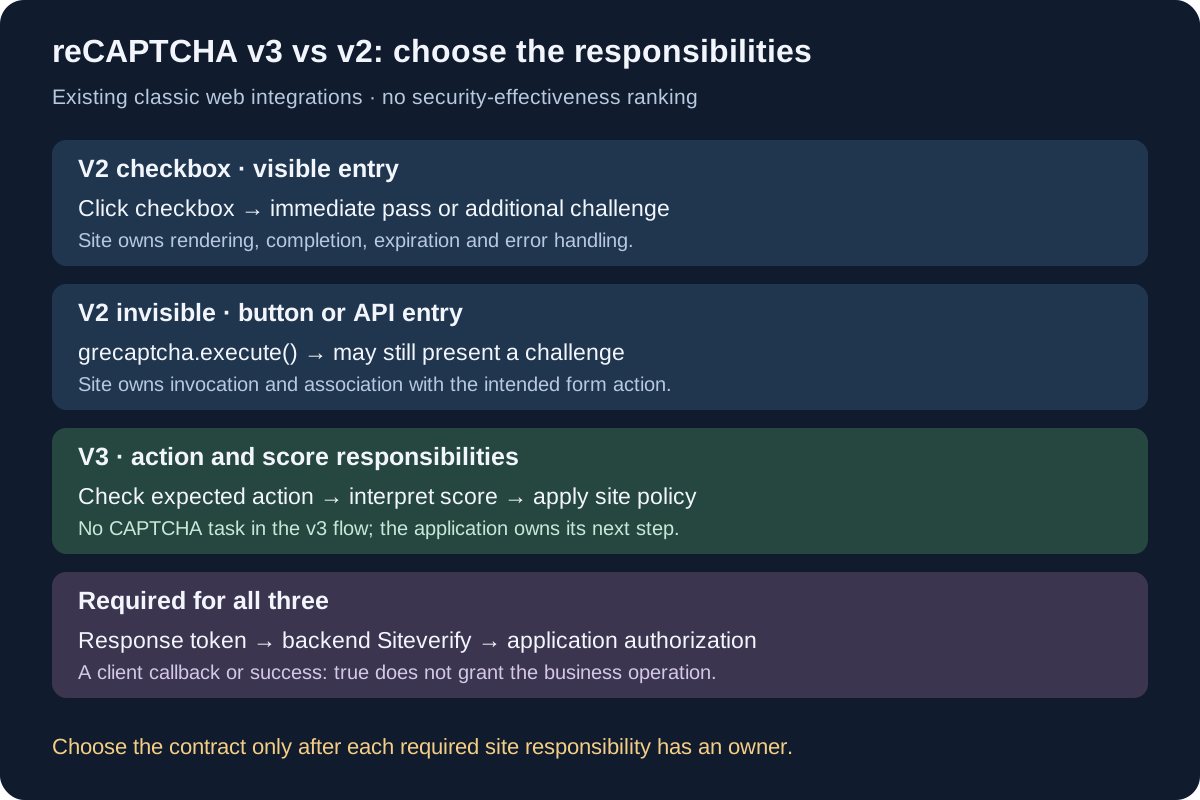
The useful reCAPTCHA v3 vs v2 choice is which interaction and server responsibilities a site can support. V2 checkbox exposes a deliberate interaction; v2 invisible can still present a challenge; v3 returns a score that the site must turn into an application decision. BotBrowser supplies profile-backed browser controls for a reproducible client environment, but it cannot choose that policy, verify a provider token on the site's behalf or reveal a private score to a visitor. An existing integration needs a named owner for both the browser flow and the backend result.
These names refer to existing classic web integrations, including supported integrations retained after account migration. Current Google Cloud key documentation maps CHECKBOX to legacy v2 Checkbox, INVISIBLE to legacy v2 Invisible and SCORE to legacy v3. Google's migration guidance confirms that existing instrumentation and backend calls can continue. The classic guide deprecation notice does not mean those deployed contracts have stopped working; new Cloud features and migration procedures require their own current documentation.
TL;DR
- Compare the actual three web integrations: v2 checkbox, v2 invisible and v3. Invisible v2 is not another name for v3.
- Every integration needs backend token verification. A successful browser callback does not authorize a form submission.
- V3 requires the site to check the expected action and decide what its returned score means for that operation. Removing a puzzle does not remove that work.
- Select an interaction that the application can explain and recover from, then assign the server checks and application outcome to specific owners.
- Google's classic guides now carry a deprecation notice. Current Cloud documentation maps their legacy names and supports existing integrations; confirm the deployed key and API instead of applying this comparison to every current product.
Contents
- The decision matrix for an existing web integration
- The browser flow changes the user experience
- Backend verification stays mandatory
- V3 adds an action and score policy
- The implementation responsibility checklist
- Three hypothetical choices and their failure paths
- Practical conclusion
The decision matrix for an existing web integration
Google's version comparison distinguishes the checkbox and invisible forms of v2 from v3. The comparison concerns their documented web integration contracts, not a measured ranking of security effectiveness. A site that already uses one of these contracts can evaluate a change by asking what its interface and backend would have to own afterward. A visitor trying to explain a refusal has a different task and normally lacks the server records needed for this decision.
The terminology has a current boundary. Google's key documentation maps SCORE to legacy v3, CHECKBOX to legacy v2 Checkbox and INVISIBLE to legacy v2 Invisible. It also describes other integration types. The old names therefore remain useful for identifying existing implementations, but do not describe the entire present product range. The matrix below applies to the named classic web flows and their documented verification model; it is not a recommendation to start a new Cloud deployment with an old API by default.
| Decision field | V2 checkbox | V2 invisible | V3 |
|---|---|---|---|
| Initial user interaction | Click the displayed checkbox | Invoke from a button or JavaScript API; no initial checkbox click | Invoke for a site action without a CAPTCHA task interrupting that flow |
| Possible challenge in the documented flow | May pass immediately or present a challenge | May present a challenge despite the invisible entry point | Returns a score; the site chooses its subsequent response |
| Browser integration responsibility | Render the right widget and handle completion, expiration and errors | Bind execution to the intended operation and handle completion, expiration and errors | Execute for the intended action and send the token promptly to the backend |
| Backend verification responsibility | Validate the response token through the documented server endpoint | Validate the response token through the documented server endpoint | Validate the response token and check the expected action |
| Application policy responsibility | Decide whether the verified operation is permitted under application rules | Decide whether the verified operation is permitted under application rules | Interpret the score in the operation's context and apply the site's policy |
| A reason to consider this contract | A deliberate checkbox step fits the existing user journey | The existing form should trigger verification from its own button while retaining a challenge path | The site can own contextual score handling and the resulting user or moderation path |
| A reason to defer the change | The interface cannot support the interaction or its recovery states | The team has not designed the possible challenge and callback states | Nobody owns action validation, score handling or the application response |
The last two rows are engineering choice rules, not Google performance claims. For example, a team that has not assigned score handling cannot make that obligation disappear by selecting a less visible client flow. Conversely, a team that keeps v2 still needs a real backend verifier. The CAPTCHA classification model separates presentation from mechanism; the additional decision here is which documented contract the application will implement and maintain.
Existing keys also need an administrative inventory. Google's current Classic migration guidance says supported existing integrations can retain their web instrumentation and backend calls, and can continue using siteverify after migration. That statement does not make account migration the same operation as changing v2 into v3. Record key ownership, the deployed client integration and the backend endpoint separately before deciding which responsibility is actually changing.
The browser flow changes the user experience
For v2 checkbox, the site renders a widget that asks the visitor to click. Google's v2 display guide supports automatic rendering or explicit rendering after the library has loaded. The choice affects how the application initializes the control, especially when a form is mounted dynamically. A rendered box alone does not establish that the application's submit handler will attach the right response token to the right operation.
The checkbox flow can accept the interaction immediately or ask for another challenge, according to the version comparison. The application must accommodate that branch rather than promise an identical number of clicks to every visitor. A support team also needs to distinguish a widget that never initialized from a visitor who reached a challenge. Those are different user states and need different explanations; neither is evidence of a numerical score visible to the visitor.
V2 invisible changes the entry point. Google's invisible guide permits automatic button binding, programmatic button binding or programmatic invocation. A normal Submit button can therefore begin the check without a preceding checkbox. However, this integration can still ask for a challenge. Calling it invisible is not a commitment that the application's whole journey will remain free of visible verification, and it does not give the site v3's documented score response contract.
The callback belongs to the form's control flow. In an invisible integration, the application may first perform its ordinary field validation, invoke verification and submit after the completion callback. The official invisible example illustrates that sequence. A real application must still prevent an unrelated callback, a repeated button activation or a stale form state from being mistaken for completion of the current operation. This is an application association requirement, not a claim that Google's client library supplies an application transaction manager.
V3 instead attaches execution to an action and returns a token for backend assessment. The v3 guide describes button binding and programmatic invocation, and advises executing when the user takes the action rather than when the page loads because tokens expire. A long-lived checkout page cannot treat its initial page load as a permanent verification event. The client owner must identify the actual protected operation and the moment its token should be obtained.
Accessibility remains part of the application's journey whichever contract it retains. The display configuration documents language and tabindex controls, while the invisible guide also describes badge placement and callback handling. These options do not certify that the surrounding form is accessible. Test the site's focus order, status messages and supported recovery path with the actual configured widget. V3's lack of a CAPTCHA task likewise does not establish that an application-selected extra step is usable; the site owns the behavior it adds.
Backend verification stays mandatory
The shared server obligation is narrower and more concrete than “the browser passed.” Google's verification guide requires the backend to send a POST to https://www.google.com/recaptcha/api/siteverify with the secret and response token. remoteip is documented as optional. Keeping the secret on the backend is part of this integration; receiving a token through a callback is only the client-to-application handoff, not a substitute for the provider request.
The same guide limits each response token to two minutes and one verification. A backend that places a token in an indefinitely delayed work queue has not preserved a valid verification simply because the original callback completed. A request that was already verified cannot use that verification token as a reusable session credential for unrelated operations. The application needs a fresh documented flow when a new response is required, while its own session and transaction controls retain their separate purposes.
The server error reference distinguishes missing or invalid secrets, missing or invalid responses, a malformed request and timeout-or-duplicate. The last error combines two possibilities: a response can be too old or already used. It does not identify which possibility occurred by itself. An owner can correlate timing and its own verification calls to investigate, but should not rewrite that documented combined error as a specific browser failure without corresponding evidence.
Verification also has a response contract. The classic web response documents success, challenge_ts, hostname and optional error-codes; the v3 response additionally documents score and action. challenge_ts describes challenge load time, not the timestamp of a completed business transaction. hostname supplies the documented site context, not proof that the application's account or checkout rule authorized anything. Keep those field meanings when designing server checks and incident messages.
The backend owner needs a declared outcome when verification cannot be completed. A network timeout to the verification endpoint, a response with success: false and a verified token followed by an application refusal are three different states. The verification protocol defines the provider exchange; the site must decide how its own endpoint reports and handles each state. An unhandled exception or an ambiguous “try again” message should not silently count as verified access.
Application authorization follows that exchange. A valid token does not establish that a password was correct, an account was eligible or an order met the site's rules. If an existing integration changes version, retain these checks rather than treating a new client callback as a replacement for them. The v3 integration guide explicitly places contextual action after the returned assessment. The relevant choice is which verified result the backend receives and what the application will do with it.
V3 adds an action and score policy
The v3 action field is an integration agreement between the client's invocation and the backend's expectation. Google says to verify that the action name is the one expected when checking a response. Its action guidance also limits action names to alphanumeric characters, slashes and underscores, and says they must not be user-specific. The site should define names for operations rather than encode an email address, account identifier or other user identity into this field.
The expected value must come from the server's understanding of the operation. Merely copying an action name supplied by the caller into an “expected” field would not establish that it matched the intended endpoint. For an existing login operation, the backend owner should know which documented action belongs to that operation before checking the returned value. This is a consequence of Google's expected-action requirement, not a new provider API or an assertion that any particular third-party site enforces it correctly.
The score is another returned field, not an application verdict. The v3 documentation describes a range from 0.0 to 1.0 and contextual responses such as additional authentication or moderation. Selecting v3 therefore creates a site policy responsibility: an owner must decide what response is appropriate for each protected action and who reviews unexpected outcomes. No universal cutoff or browser-setting recipe can replace that decision for every application.
Google also states that the service learns from real traffic, so staging scores or scores soon after implementation may differ from production. That environment qualification matters when accepting a version change. A staging form that reaches its success page proves only the declared staging integration outcome; it does not establish the distribution of production scores or the suitability of an application policy. Separate verification correctness from any later evaluation of the site's operational decisions.
The classic public description says scores are based on interactions with the site and that more context includes legitimate and abusive behavior. It does not publish a complete weighting model from which a browser client can calculate its own score. The v3 placement guidance is an integration description, not evidence that changing one browser property will change a particular result. Maintain the distinction when a version comparison is used by both application engineers and authorized automation operators.
The visible outcome belongs in a different field from the provider result. For instance, the application can require another authentication step after assessment; the absence of a puzzle does not mean the requested operation was granted immediately. Google's score interpretation examples demonstrate that kind of separation. A version decision should name the intended application response and its owner before rollout, rather than leave product behavior to an undocumented interpretation of whatever number arrives.
The implementation responsibility checklist
The checklist below turns the matrix into a handoff between the application teams. Its expected result is a named owner and a documented answer for every responsibility required by the selected contract. It is a design checklist, not a captured provider response or proof of a deployed site's behavior. Google's verification requirements and v3 action contract supply the provider obligations; application association and recovery choices belong to the site.
| Responsibility to assign | Evidence the owner should provide | Choice affected |
|---|---|---|
| Key and integration inventory | The configured product, key ownership and client/backend API names, without sharing secrets | Confirms which existing contract is being maintained |
| Browser initialization | The widget render or execution path, the intended protected operation and completion/expiration/error handling | Distinguishes checkbox, invisible invocation and v3 action execution |
| Token verification | Backend handling of the documented verification request and returned failure states | Required for every compared integration |
| Expected action | The server-owned action for each protected endpoint and the check against the returned v3 field | Required by the v3 contract |
| Score response | The application policy owner and the supported outcome for each relevant operation | Makes the v3 assessment actionable without confusing it with authorization |
| Application result | The ordinary authentication or transaction checks and an unambiguous user outcome | Remains the site's responsibility after provider verification |
| Recovery and support | A way to distinguish client initialization, expired response, backend verification and application refusal | Prevents all failures becoming one unexplained CAPTCHA error |
Client initialization deserves a specific acceptance case. The v2 display guide requires an explicit-render onload callback to exist before the API loads. That creates a real ordering requirement for applications loading components and scripts asynchronously. The client owner should verify the chosen rendering path instead of assuming that seeing api.js in a network panel proves the control was ready when the user submitted. A library-load event and a usable form state are distinct acceptance conditions.
Expiration and error callbacks also need visible handling. Google's invisible configuration describes expiration and error callbacks and makes the application responsible for informing the user to retry when it supplies an error callback. A maintenance decision should include the message and the allowed recovery action, not merely the callback name. The backend must independently handle an expired or invalid response even if the client presented an informative message.
BotBrowser's automation consistency reference can support a repeatable browser configuration when a team exercises its authorized application. That capability helps compare the same form behavior under a declared environment. It does not implement the checklist's server responsibilities, issue the site's credentials or establish a provider score from local browser observations. A form test should report the application condition actually checked, with the selected integration version recorded separately from any conclusion about access.
Three hypothetical choices and their failure paths
Consider a hypothetical existing support form using v2 checkbox. Its owner wants to remove the initial checkbox while retaining a challenge-capable flow. Comparing the documented v2 variants makes v2 invisible a relevant contract to evaluate. The concrete work is button invocation, callback association and user recovery, while backend verification remains required. Calling this change “moving to v3” would misidentify both the selected client flow and the absence of a new v3 score-policy obligation.
Now consider a hypothetical application that wants v3 for a login action. The client can invoke v3, but the team has not assigned expected-action validation or the response to an assessment that calls for another step. Google's v3 action and interpretation guidance identifies the missing responsibilities. The matrix's decision is to defer rollout until those owners and application outcomes exist, rather than infer readiness from a token appearing in a browser callback. No real provider run or measured score is represented by this example.
Finally, suppose a hypothetical maintained v3 integration receives a provider response with success: true, yet the application refuses the submission. The backend should distinguish token verification, the returned action check and its own policy result. The v3 response definition makes those different fields and responsibilities; success is not a promise of successful login. Without the relevant server record, an outside observer cannot decide whether the refusal concerned action, account state or another application rule.
These scenarios end at different owners, even when the user sees the same generic error. A broken initialization path belongs with the client integration; an invalid verification request belongs with the backend; a valid assessment followed by an intended restriction belongs with the application policy owner. If a challenge instead interrupts an authorized collection run on another site, the mid-run CAPTCHA diagnosis handles its request transition and approved recovery. The version matrix does not authorize probing the site's hidden policy or continuing extraction past its access decision.
FAQ
Is reCAPTCHA v3 always better than v2?
The documented contracts assign different work to the site. V3 removes the CAPTCHA interaction from its own flow but requires contextual score handling and expected-action validation. V2 checkbox and invisible retain their documented challenge possibilities. The version descriptions do not establish a universal effectiveness ranking for every application, deployment and abuse case.
Is invisible reCAPTCHA v2 the same integration as v3?
No. The invisible guide describes a v2 invocation flow that can still present a challenge. V3 has its own action and score contract. A button that triggers verification does not identify which integration its owner configured.
Does a successful Siteverify response permit the operation?
It establishes the documented verification result. The application still owns its action checks, applicable score policy and ordinary authorization rules. Google's v3 response fields should remain separate from the application's final result.
Can existing classic integrations still use these names?
Current key documentation maps the legacy names, and Google's migration guidance describes continued existing instrumentation and backend calls. Check the actual key and integration contract; those statements do not extend this comparison to all Cloud features or constitute a migration procedure.
Sources
- Google: choosing the type of reCAPTCHA
- Google: reCAPTCHA v2 display and configuration
- Google: invisible reCAPTCHA
- Google: reCAPTCHA v3
- Google: verifying the user's response
- Google Cloud: reCAPTCHA keys and legacy integration names
- Google Cloud: migrate from reCAPTCHA Classic
- BotBrowser: automation consistency
Practical conclusion
Choose the maintained v2 or v3 contract by the interaction the application can support and the backend responsibilities its owners can implement. Use the matrix to identify the client flow, retain mandatory verification and assign v3 action and score decisions explicitly. Complete the responsibility checklist before a version change, then validate the actual application outcome. A version label alone supplies neither an authorization policy nor evidence that an existing refusal will disappear.
This article is part of the guide: Proxy Configuration Overview: A Browser Network Decision Map
Related Articles
CAPTCHA Types: What a Checkbox Actually Tells You
NetworkCloudflare and DataDome: Scraping Response Signals
NetworkScraping CAPTCHA: Diagnose a Challenge Mid-Run
NetworkScraper Blocked? Diagnose DNS, TLS, HTTP and Page Errors
PlatformUser-Agent Reduction, Deprecation, and Client Hints Migration
NetworkScraping Rate Limits: 429, Retry-After and Concurrency
Run the same check in BotBrowser
Load a profile, keep the signals you just read about consistent inside the browser, and confirm the result on your own machine before a rollout.