Passkeys and WebAuthn: The Browser Sign-In Journey
Follow a passkey from registration to sign-in, learn what the browser and server each verify, and plan for portability, recovery, and accessible fallback.
Want the structured docs for Identity?
This article lives in the editorial library. For step-by-step setup, reference material, and ongoing updates, jump into the docs section.
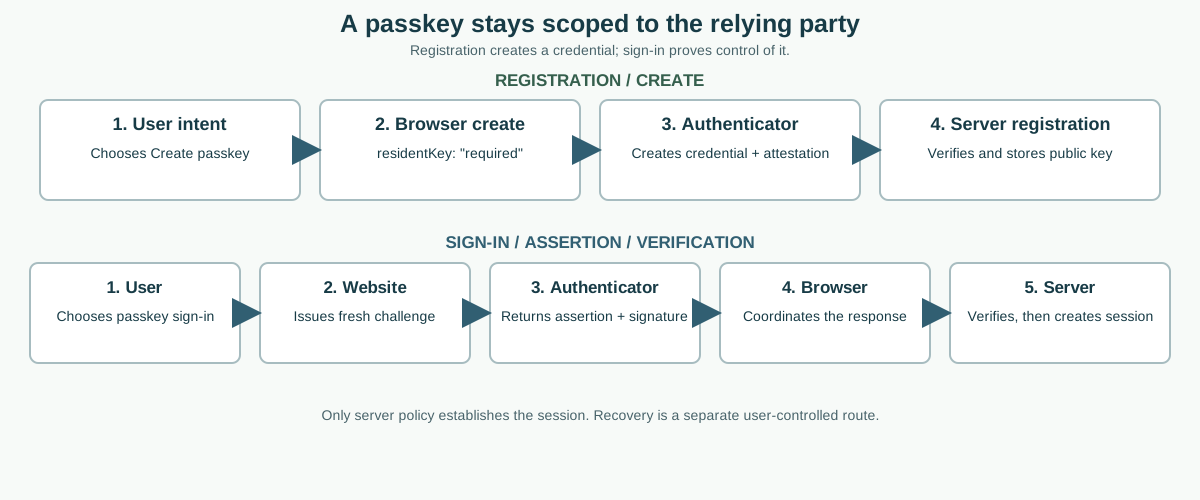
A passkey sign-in is a public-key authentication flow coordinated by a website, browser, authenticator, and server. During registration, the authenticator creates a credential scoped to the relying party and the server stores its public key. During sign-in, the server issues a fresh challenge, the browser asks an available authenticator to use the matching private key, and the server verifies the signed response before creating a session. The browser helps coordinate user choice and security boundaries; it does not decide whether the account is authorized.
The W3C Web Authentication specification defines the browser-facing credential operations and data model. MDN's Web Authentication API guide explains the JavaScript interfaces, while the FIDO Alliance passkey overview describes how passkeys are used across consumer devices and credential managers. Together they support a useful product distinction: a passkey is a way to prove control of a credential for a site, not a portable identity document or a guarantee that every device can present the same credential.
What A Passkey Means To The Browser
A passkey is a discoverable WebAuthn credential. It uses a key pair: the private key stays with an authenticator or credential manager, and the relying party stores the associated public key and a credential identifier. The browser's WebAuthn interface allows a site to request creation or use of a credential through navigator.credentials.create() and navigator.credentials.get(). The browser and authenticator handle the user-facing ceremony; the site still has to validate the result and make an account decision.
The relying party (RP) is the website or service that asks to authenticate its user. Its origin and RP ID scope the WebAuthn credential. A site cannot simply ask the browser to use the credential for an unrelated origin. WebAuthn is designed for secure contexts, with localhost treated as a development exception by browsers. Embedded or cross-origin frames have additional policy restrictions; they do not inherit unrestricted credential access just because a top-level page has it.
The word “passkey” describes a credential experience, not one universal storage arrangement. A credential may be synced by a provider among devices in an account ecosystem, kept on one device or security key, or used through a cross-device ceremony. These options have different availability and recovery paths. An API being present, a platform authenticator being available, or a browser returning a credential does not establish a person's legal identity, prove which person touched a shared device, or show that an account exists at a particular site.
It also helps to separate user presence from user verification. Presence means the authenticator observed an interaction; verification means it applied a local check such as a device PIN, passcode, or biometric. A relying party can request a verification preference and must check the returned flags against its own policy. The server never receives a biometric template as part of ordinary WebAuthn authentication. It receives protocol data used to verify the credential's signature and properties.
Sites should describe the outcome in stages. “Passkey available” is not “passkey registered”; “credential returned” is not “account authenticated”; and “signature valid” is not “user authorized for every action.” Keeping those statements separate prevents the interface from overstating what happened and makes failures easier to diagnose. For background on the privacy implications of browser capability signals, see the WebAuthn fingerprinting guide; this article focuses instead on the user's enrollment, sign-in, and recovery journey. The broader Credential Management sign-in guide covers browser-mediated passwords and federated credentials rather than WebAuthn protocol details.
Register A Credential Without Overclaiming
Enrollment starts with a clear user action, such as selecting “Create a passkey” in account security settings. The server creates a short-lived registration challenge and returns the creation options the browser needs: a challenge, an RP ID and display name, a user handle, accepted public-key algorithms, authenticator preferences, and any existing credentials to exclude. Because a passkey is discoverable, the request must require a discoverable credential, for example with authenticatorSelection.residentKey: "required"; do not silently fall back to a non-discoverable credential and call it a passkey. The server owns the challenge and the account relationship; the client should not invent or silently reuse registration state.
The page passes those options to navigator.credentials.create({ publicKey }). The browser checks whether the context, policy, and available authenticators allow the request, then presents its own user interface. The user may select a device or credential manager, verify locally, and confirm. With residentKey: "required", registration must produce discoverable credentials or fail; a platform that cannot satisfy the request is not a reason to silently weaken it. A user can cancel, switch methods, or encounter a platform restriction. All are normal outcomes the page must handle without losing the account settings task.
When the ceremony succeeds, the browser returns a credential response containing client data and an attestation object. The web application sends the response to the server together with the state that identifies the pending registration. The server verifies that the challenge matches and has not expired, that the origin is allowed, that the RP ID digest is the expected one, and that the response has the expected type and well-formed credential data. It checks that the credential can be associated with the correct account and that the registration policy required a discoverable credential; where the supported response exposes credential properties, it verifies the discoverable result before recording the enrollment as a passkey. It validates attestation only to the extent its documented policy requires.
Attestation can reveal information about authenticator provenance. A site should not request or retain more attestation data than its threat model and user notice justify. Many consumer services can use an attestation policy that accepts a broad range of authenticators instead of identifying models. A narrower policy can exclude legitimate users, create extra data responsibilities, and become stale as platforms change. If a business has a genuine assurance requirement, explain it before enrollment and test the user experience on supported devices.
After validation, the server stores the credential identifier, public key, account association, and only the metadata needed for future verification and management. It should not store a private key; WebAuthn does not return one to the site. A counter can be present, but counter behavior can vary across authenticators and synced credentials, so do not treat a simple increasing value as a universal theft detector. Use the current specification and the authenticator's documented semantics when deciding what risk checks to apply.
Only after the server confirms a discoverable credential under the registration policy should the page say that the passkey was added. If the application cannot confirm that property, do not label the result a passkey; explain that this method is unavailable and offer a clear, supported alternative. Show an understandable name such as “This device” or a user-chosen label, the date added if useful, and a way to remove or rename it. Do not label it with inferred hardware or identity details. Account security screens should explain that deleting the site's credential record may not delete a provider-managed copy from a device ecosystem; the user may need to manage that credential with its provider too.
Authenticate With A Fresh Challenge
Sign-in follows the same division of responsibility. The user chooses a passkey sign-in action, and the server creates a fresh, unpredictable challenge with a limited lifetime. It also chooses the accepted RP ID, allowed credential policy, user-verification requirement, and any account or transaction context that must be bound to the ceremony. For username-first flows, the server can limit the allowed credential identifiers to those associated with the account. For discoverable, username-less flows, the authenticator may return a credential and user handle that the server must resolve under an explicit account policy.
The page calls navigator.credentials.get({ publicKey }). A browser can present account-selection or passkey autofill UI when its platform and mediation rules permit it. The user chooses an authenticator and completes local verification; the authenticator then signs protocol data associated with the challenge and relying party. In cross-device use, the phone or other authenticator may be selected from a browser on another device through a mediated ceremony. The details vary by browser, operating system, credential provider, and available transport; an application should not promise a specific prompt or transport on every platform.
The assertion response includes client data, authenticator data, a credential identifier, and a signature. The server verifies that the challenge is the one it issued, is still fresh, and has not already been consumed. It checks the client-data type, allowed origin, RP ID digest, credential-to-account association, signature against the stored public key, and user-verification state when policy requires it. It then applies account status, authorization, rate limits, and any risk checks before creating a session. A valid signature is an input to that decision, not a session by itself.
Challenge state needs careful lifecycle handling. Generate it using a cryptographically secure source, bind it to the intended sign-in or sensitive action, expire it promptly, and reject reuse. Keep it out of URLs, analytics, and support logs. Protect the exchange with the application's normal secure transport and server-side session controls. If verification fails, do not fall back to trusting a browser-supplied username, credential label, or client-side “success” flag.
Do not mistake implementation details for a person. A credential ID is an identifier within the relying party's account system, not a global user identity. A user handle should be opaque and scoped to the service. A transport hint can help the browser choose a route, but it does not prove that an authenticator is nearby or that a device is owned by a named person. Keep account selection and authorization rooted in server records rather than in device labels or browser capabilities.
Plan For Portability And Recovery
Some passkeys are synced through a credential provider among a user's devices. Providers may use end-to-end encryption and account recovery protections, but the exact behavior, availability, and setup differ. A site should not guarantee that a credential created on one phone will immediately appear on another, that every provider interoperates with every platform, or that a sync service is always reachable. Direct users to the provider's current support material for account and sync recovery instead of trying to inspect or repair the provider's private state.
Other credentials are device-bound, for example to a security key or an authenticator whose private key is not synced. They can provide a durable second factor or a deliberate organization-controlled option, but losing or damaging the device means the relying party needs a separate recovery route. Cross-device authentication is another case: the person uses a nearby device that holds the passkey to complete a sign-in started elsewhere. A QR code or proximity exchange helps establish the ceremony, but it is not itself proof that the user passed server verification. Do not collapse syncing, backup, and cross-device use into one “works everywhere” promise.
Account recovery and credential-provider recovery are different jobs. Provider recovery restores access to a credential manager or its encrypted credential set. Relying-party recovery restores access to a service account when no registered passkey can be used. The website usually cannot repair a lost provider account or retrieve a missing private key. Its recovery policy may offer another passkey, a previously enrolled security key, recovery codes, an approved identity check, or a carefully designed support process. Each route should have an assurance level that matches the account's value and the action being recovered.
Offer recovery during enrollment, not only after a user is locked out. Encourage an appropriate second credential or recovery method and explain where it is stored. For high-value accounts, require stronger review before replacing all authenticators, changing recovery contacts, or disabling an existing method. Keep old credentials usable until the replacement has been confirmed where policy allows, and give the user a clear notification after security-sensitive changes. A support agent should not be able to waive the same account checks simply because a caller knows public profile information.
Recovery screens also need to resist account enumeration. A public sign-in or recovery response should not reveal whether a particular email or username has a passkey. Use equivalent messages and timing where practical, then perform account-specific steps only after suitable verification. Do not log passkey responses or recovery secrets in analytics, customer support tickets, screenshots, or copied error text. Keep an auditable, minimal record of the workflow stage and result instead.
Make Prompts, Cancellation, And Fallback Accessible
The browser or operating system owns much of the authenticator prompt, but the website owns the surrounding experience. Explain what a passkey is in plain language before opening the prompt. Name the account and action, say that the browser may ask the user to select a credential and complete local verification, and keep a visible alternative available. Do not trigger a credential request just because the page loaded or because an invisible timer fired. Use a clearly labelled control and wait for an intentional user action before starting the ceremony.
Treat cancellation as a user decision. If the promise rejects or resolves without a usable credential, keep the person on the sign-in page, preserve entered information that is safe to retain, and return focus to a useful control. Do not immediately reopen the prompt, repeatedly nag, or announce that the account is missing. Distinguish a user cancellation from a network failure or a server rejection only when the application can know that distinction reliably. A generic, privacy-preserving message is better than exposing internal credential or account state.
An accessible flow works with a keyboard, screen reader, zoom, and translated interface. Use a real button with an action-specific accessible name. Announce status changes without moving focus unexpectedly. Ensure dialogs and account-choice interfaces have logical focus order and a clear close action. Do not imply that passkeys require a fingerprint: a platform may use a PIN, device passcode, security key interaction, or another supported local verification method. Include instructions for a user who cannot use the device's primary biometric input.
Fallback should be a planned product path, not an improvised downgrade. Depending on the service, it may be another registered passkey, a security key, a password with multi-factor authentication, or account recovery. Apply the same server authorization rules after every method and protect fallback against brute force and phishing. Do not silently switch accounts after a passkey selection or discard unsaved work when the person changes methods. A fallback can be less convenient, but it should still be understandable, secure, and available to users with disabilities.
Operational diagnostics can name coarse stages such as options issued, browser ceremony cancelled, assertion received, server verification rejected, and session established. Do not record the challenge, credential response, signature, private data, full client data, or a raw user handle. This provides useful reliability information without turning login telemetry into a credential collection system. Review the retention period, access controls, and whether any metric can be tied back to a person before shipping it.
Keep Privacy And Server Policy In The Right Place
WebAuthn's origin and RP ID binding help prevent a credential created for one relying party from being used as if it belonged to another. They do not make every authentication system automatically secure. The server still needs sound challenge management, origin allowlists, secure session cookies, authorization checks, rate limits, recovery rules, and monitoring. A stolen active session is a different problem from theft of a passkey private key, so account security must cover both credential lifecycle and post-login session lifecycle.
Minimize signals collected around the ceremony. Do not fingerprint authenticator models, persist API availability as a device identity, infer a person's name from an account chooser, or build a cross-site profile from transport hints. Browser capability checks are useful to decide whether to show an action in the current interaction. They are not a basis for account discovery, eligibility scoring, or claims about the person holding the device. Ask only for protocol options the service needs, and explain any narrower authenticator policy before the user encounters it.
For implementation teams, test the complete path on the browser and operating-system combinations they actually support: registration, successful authentication, declined and missing credentials, expired challenge, wrong origin, server rejection, second-device use, credential removal, and recovery. Test with keyboard and screen reader use as well as touch. Compatibility notes change; consult current WebAuthn documentation and browser support data before making a guarantee. A passing demo on one device proves only that specific path, not universal behavior.
BotBrowser supports repeatable browser profiles across supported host operating systems, which can help a team review its own passkey enrollment and sign-in interface with consistent profile inputs. It does not create, store, sync, recover, or authenticate passkeys, and it does not control browser mediation, operating-system authenticators, local biometric checks, or relying-party server decisions. Use it to make an authorized application workflow easier to compare, while treating the browser, authenticator provider, and service backend as separate owners of the authentication result.
The practical contract is simple: the user chooses to begin; the browser and authenticator conduct a relying-party-scoped ceremony; the server validates the signed response and decides whether to create a session; and the service provides accessible alternatives and recovery. When each layer has a named responsibility, a passkey can make sign-in easier without making portability, identity, privacy, or recovery claims that the system cannot support.
Sources
Related Articles
Take BotBrowser from research to production
The guides cover the model first, then move into cross-platform validation, isolated contexts, and scale-ready browser deployment.