Clearing Browser Site Data Without Crossing Account Boundaries
Learn what browser site-data clearing removes, what survives, and how sign-out and account switching should protect application sessions.
Want the structured docs for Identity?
This article lives in the editorial library. For step-by-step setup, reference material, and ongoing updates, jump into the docs section.
The short answer
Clearing browser site data is a useful reset, but it is not the same thing as signing out of an account or deleting a company's records. A browser can hold cookies, localStorage, sessionStorage, IndexedDB databases, Cache Storage entries, service-worker registrations, permissions, and an HTTP cache. A site can also keep an authenticated session on its server, and a device can have backups or another browser profile. The cleanup decision is correct only when the application names the stores it uses, invalidates the server session, and gives the person a predictable path when one store is empty or cannot be cleared.
The Clear-Site-Data specification defines a response header that lets an origin request removal of categories of data. The browser decides how to apply that request. MDN's Clear-Site-Data reference documents directives and compatibility notes, while the StorageManager API exposes observations about an origin's storage. None of these APIs gives a page a universal eraser for every copy of information.
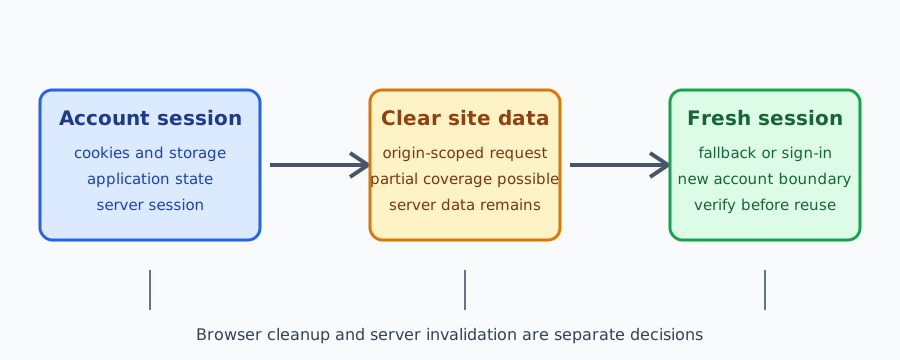
The useful mental model is three boundaries: browser state, application account state, and service-side records. A sign-out ends the application session and should make the next request unauthenticated. Browser cleanup removes selected client state so an old account is not restored by a token or cached response. Server deletion, retention, backups, and other devices remain service decisions. Keeping these boundaries separate prevents a successful local clear from being reported as complete account deletion.
What counts as site data
Cookies are small records that the browser can attach to matching HTTP requests. A cookie may carry a session identifier and can be marked HttpOnly so page scripts cannot read it. Clearing cookies can therefore remove a browser's ability to present a session, but it does not invalidate a session identifier that the server still accepts. The server needs its own expiry or revocation rule.
Web Storage has separate localStorage and sessionStorage lifetimes. localStorage generally remains until script, a user action, or browser policy removes it. sessionStorage is associated with a top-level browsing context and normally ends when that context closes. Neither store is sent automatically with requests; application code can still copy values into a request. If a token or account hint is stored there, a cleanup plan has to name it explicitly.
IndexedDB stores structured values and can support offline data, queues, and application databases. Cache Storage belongs to an origin and is often managed by service-worker code. An old cache can survive a deployment or a visible sign-out if the worker never deletes it. Service-worker registrations and permissions are related browser-managed state, but they have their own lifecycles. The browser storage model guide compares storage scope and network exposure, and the service-worker cache lifecycle guide covers versioned cache ownership.
The HTTP cache is another boundary. It can contain responses that are not represented in localStorage or IndexedDB, and its behavior depends on response headers and browser policy. A page cannot infer that the HTTP cache is empty by reading script-visible storage. Conversely, clearing cookies does not necessarily remove every cached response. A review should list each store the application relies on and state whether the browser, application, or server owns its cleanup.
Clear-Site-Data is origin-scoped
The Clear-Site-Data response header is sent by an origin. Directives such as "cache", "cookies", "storage", and "executionContexts" describe categories that the user agent may clear. The specification deliberately leaves implementation details to the browser, and support can differ by browser family and release. A response from accounts.example does not give that origin authority to erase data belonging to an unrelated origin.
The header is therefore a request, not a proof. A browser may apply one directive but not another, may scope the result to a site policy, or may keep data that is outside the directive's definition. Test the browser versions that matter to the product and record the observed result. Do not display a message saying “everything was deleted” unless the application has verified the exact promise it intends to make.
"storage" is especially easy to overread. It concerns origin storage controlled by the browser, but it does not remove server databases, email copies, exported files, backup snapshots, data on another device, or state owned by another origin. A service worker can also have application-specific caches and in-memory state that need explicit code paths. When a header is used during sign-out, pair it with application cleanup and a server-side session action.
The header also cannot make a cross-origin embedded service clean itself. A page that embeds a payment, identity, or analytics origin cannot clear that origin's cookies merely by sending its own header. Each service owns its own response and retention policy. Explain this limit to users so a local “clear site data” control is not mistaken for a command to erase every participant in a workflow.
Sign-out and account switching
Sign-out starts with the server session. Revoke or expire the session identifier according to the service's normal authentication policy, then clear account-specific browser state and reset in-memory application data. If the server action fails, show a failure state and avoid presenting the page as fully signed out. A browser-only clear can leave an active server session reachable from another tab or another device.
An account switch has the same risk even when the person never presses a sign-out button. The browser profile stays open while the account changes. Before the second account loads, remove or isolate tokens, cached responses, draft data, IndexedDB records, and worker caches belonging to the first account. Reloading a page is not a cleanup operation. A fresh page can still read the same origin storage and service-worker cache.
Multiple tabs make the order visible. One tab may sign out while another still renders an old account view from memory or Cache Storage. Broadcast the account transition to other tabs, reject stale API responses, and make every tab re-check the session before committing a write. Test with two tabs because a single-tab test can pass while the second tab continues to display data.
The user-facing control should state what will happen: for example, “Sign out on this device and remove saved site data for this account.” If the product must preserve non-sensitive preferences, say so. A clear message helps a person decide whether to continue and makes a partial result understandable. Do not promise deletion of a provider account, server history, or data held by another origin from a browser control.
Partial deletion and recovery
Cleanup can be partial. A browser may block a storage operation, evict data earlier, apply a directive differently, or keep a response in a store the application forgot to list. The application should treat missing state as a normal input and reach a safe fallback: a sign-in screen, a fresh server fetch, an empty draft, or an explicit recovery step. It should not infer identity from the presence or absence of one key.
After cleanup, make the next request prove the boundary. A server should require a valid session, and the client should rebuild account state from an approved response rather than trusting a leftover cache. If the request is rejected, discard the stale client state and offer a normal sign-in path. If a fetch fails for a network reason, distinguish that failure from an unauthenticated response so the user does not lose work unnecessarily.
Offline features need an additional decision. A queued mutation may represent an action for the old account. On account switch, pause or discard that queue according to the product's documented policy; never replay it under the next account merely because the browser still has network access. If the service keeps an encrypted queue, the key and ownership boundary need the same lifecycle as the account session.
Recovery should be observable without exposing content. Record which categories were requested, whether the server invalidation succeeded, whether the next request was authenticated, and whether the expected fallback appeared. Avoid logging cookie values, bearer tokens, account identifiers, response bodies, or database records. A short pass/fail record is enough for a release review.
Isolated contexts for authorized testing
BotBrowser provides separate BrowserContexts with isolated cookies, storage, and session state. That capability lets a team start two authorized contexts with known inputs, run sign-out and account-switch journeys, and compare the resulting application behavior without intentionally sharing one context's state with the other. The multi-account isolation documentation describes this supported boundary.
BotBrowser does not control a site's Clear-Site-Data response, its cleanup code, server-side session invalidation, browser eviction policy, or records stored outside the context. It cannot make an application-owned cache safe, erase a provider's database, or guarantee that a target site accepts a particular cookie. Those decisions remain with the browser, the application, and the service owner.
For a controlled review, create two contexts for two authorized test accounts. Record the browser release, context name, intended account boundary, and the stores the application claims to clear. Sign in and create only synthetic test state. Run the sign-out or account switch in the first context, then verify that its next request requires authentication and that the documented fallback appears. In the second context, verify that its own session and state remain available.
Close the contexts after the test and retain only the minimal result. Context isolation is a test boundary, not proof that a production service has deleted data. A site can still retain server records or send state to another origin, and a test must not inspect data that the operator is not authorized to access.
A practical cleanup checklist
Use this sequence for an application review:
- Inventory cookies, localStorage, sessionStorage, IndexedDB, Cache Storage, service workers, permissions, HTTP cache assumptions, in-memory state, and offline queues.
- Assign an owner and lifetime to each item. Mark whether it is account-specific, shared preference, public asset, or server-controlled record.
- Invalidate the server session first, then clear account-specific client state and notify other tabs or workers.
- If using
Clear-Site-Data, record the directives, browser release, origin, and observed result. Treat unsupported or partial behavior as a supported fallback case. - Make the next navigation or API request authenticate again. Show a fresh state, a sign-in screen, or a documented recovery path when state is absent.
- Repeat the check for account switching, two tabs, an offline queue, a service-worker update, and a second authorized context.
The checklist is also useful after a storage-schema change, authentication change, browser major update, or new embedded service. Keep the last accepted result until the new run passes. A failed cleanup should identify the store and owner that need correction, rather than being hidden by a generic “clear succeeded” toast.
The inventory should include state created by embedded frames when the product depends on them. An embedded origin owns its own cookies and storage rules, so the top-level page must not promise to clear it by clearing only the first-party origin.
Record whether a value is a credential, a display preference, an offline mutation, or a public asset. This classification determines whether it must be revoked, deleted, retained, or safely recreated.
An expired cookie is not the same as a revoked account session. The server should reject a stolen or replayed identifier according to its authentication policy, even if the browser has already removed its local copy.
Applications should make cleanup idempotent. Running the sign-out path twice should leave the same safe state and should not turn a missing database, cache, or worker registration into an unhandled exception.
A fresh fetch can still be unsafe if an old worker intercepts it. Check the active worker and its cache version when a release changes cleanup behavior, and offer a reload path that the user can understand.
Do not use storage presence as an account discovery signal. A browser may have been restored, evicted, copied, or used by more than one person, so the presence of a key does not establish who is signed in.
Retention messages should distinguish local removal from service retention. People can then choose whether to sign out, remove a device, request account deletion, or contact the service owner.
Support staff need a reproducible description of the boundary. A record containing the origin, browser release, requested directives, and next-request result is more useful than a screenshot of an empty storage panel.
The same rules apply to passwordless sessions, remembered-device cookies, and temporary upload state. Each item needs an owner and a documented response when it is missing or no longer valid.
If a product shares a browser profile across roles, give each role a separate context or an explicit state policy. A visual account switcher alone does not isolate storage or service-worker registrations.
Test a blocked storage operation as well as a successful one. Private browsing policies, quota pressure, managed settings, and browser changes can make a previously available store unavailable.
Keep synthetic account data out of production logs. Cleanup tests should use accounts and records that can be discarded without exposing a real person's history or credentials.
When a cleanup request is sent, the user should know whether the application will reload, return to sign-in, or preserve a non-sensitive preference. Predictable transitions reduce accidental reuse of an old session.
The browser storage partitioning guide is useful when an embedded feature behaves differently under different top-level sites. Partitioning changes which bucket is visible; it does not remove the need for explicit account cleanup.
Common questions
Does clearing cookies delete the account?
No. It removes selected browser cookies. The provider's account, server records, and sessions on other devices remain. The server must invalidate the session and apply its own retention or deletion policy.
Does Clear-Site-Data: "*" erase everything?
No universal promise follows from the wildcard. It is still scoped to the responding origin and browser implementation. Test the supported browsers, explain what the application verified, and name what remains outside the browser boundary.
Is a new browser context the same as deleting site data?
No. A fresh context is a useful isolated starting point for an authorized test. It does not delete server data, another profile's data, or records held by a different origin.
Can a service worker restore data after sign-out?
It can serve cached responses or keep in-memory state if the application does not clear them. Version caches, restrict account-specific caching, notify workers on account transitions, and verify the next request after sign-out.
What should a user see after cleanup fails?
The user should see a safe, honest fallback such as a sign-in screen or a retry action. Preserve work that is not account-sensitive, avoid claiming complete deletion, and provide a support path when the service cannot finish its own invalidation.
Sources
Related Articles
Take BotBrowser from research to production
The guides cover the model first, then move into cross-platform validation, isolated contexts, and scale-ready browser deployment.