Loading Extensions in Puppeteer and Playwright
An unpacked extension needs a persistent context and paired flags, and it can still fail to load. One measured run shows why loading has to be verified, not assumed.
BotBrowser Team
Want the structured docs for Platform?
This article lives in the editorial library. For step-by-step setup, reference material, and ongoing updates, jump into the docs section.
Loading an unpacked extension from an automation launch looks like a two-flag problem and behaves like a launch-condition problem. BotBrowser provides a declared profile that keeps the surfaces a page can read consistent with each other across launches, including launch-level settings, and it does not make a browser accept an extension that build refuses to load. This article states the conditions a loaded extension needs, then reports a measured run in which every condition appeared to be met and no extension appeared at all.
Summary
- An unpacked extension needs a persistent context, because a non-persistent context cannot hold extension state between pages.
- The two flags are meant to be passed together: one names what to allow, the other excludes everything else.
- Passing only the load flag leaves the default extension set in place, which changes what the page sees.
- An MV3 service worker is not a permanent object, so a missing worker is not proof that the extension failed to load.
- In one measured run, both flags were passed under
headless=new, the browser exited cleanly, and the profile listed zero extensions. - The same happened in old headless mode and in headed mode on the same host, so the failure was environmental rather than mode-specific.
- The useful response is to assert that the extension is present at startup, and to fail the run when it is not.
- A test that silently runs without its extension passes for the wrong reason, which is worse than a test that fails.
Contents
- The launch conditions, and what a measured failure looks like
- The service worker is not permanent, and the checklist
- The checklist as a fixture
- When headless is not the variable
- Practical conclusion
The launch conditions, and what a measured failure looks like
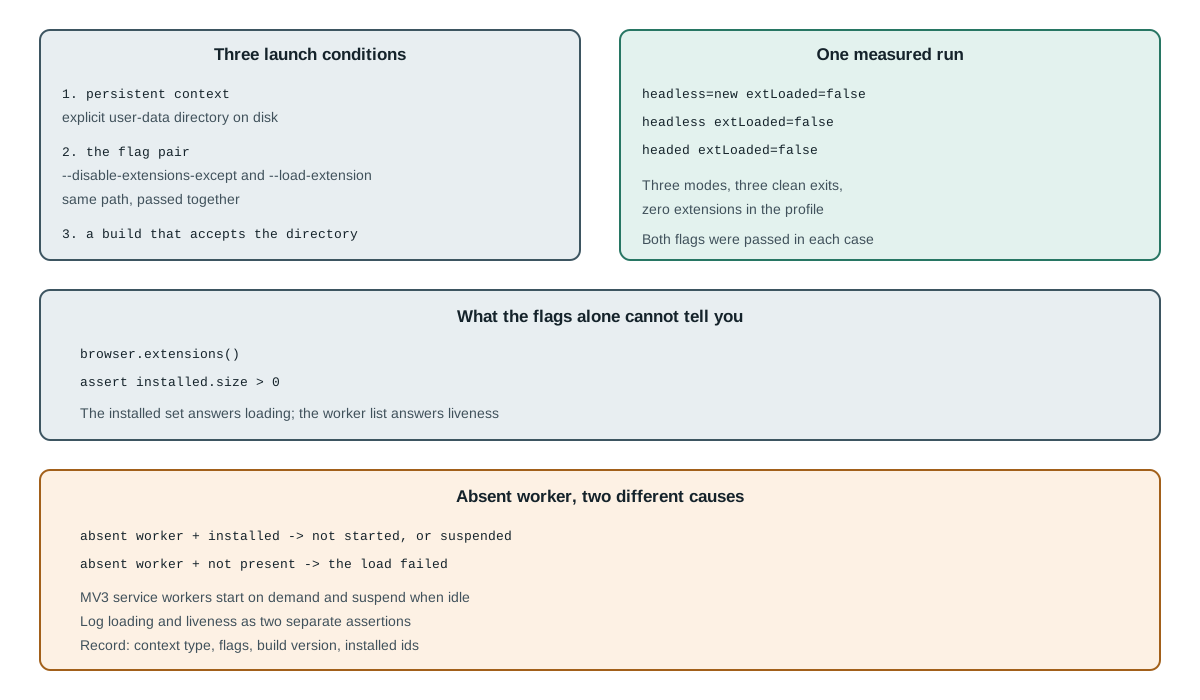
Three conditions decide whether an unpacked extension has a chance, and they are independent. The first is the context type. An extension lives in the browser profile, so a context that discards its profile at the end has nowhere to keep it. A persistent context with an explicit --user-data-dir is the only shape that holds, and each tool expresses that differently: Playwright takes the directory as the first argument of chromium.launchPersistentContext, while Puppeteer reaches the same profile through launch options and command-line arguments. The launch arguments themselves are covered in Puppeteer launch and profile pitfalls, including the viewport override that outranks a profile's display.
persistent context  -> profile on disk; extension state can persist
non-persistent      -> fresh profile per launch; nothing to hold the extension
The second is the flag pair. One flag names the extension directory to load, and the other names the only set of extensions allowed to run. Passing the load flag alone adds the extension to whatever else the profile has, which is rarely what a test wants; passing both is what makes the launched browser's extension set equal to the intended one.
--disable-extensions-except=/path/to/ext
--load-extension=/path/to/ext
The third condition is that the browser build accepts the directory at all. That is not a formality: a build with extension loading restricted, a manifest the build considers invalid, and a path the browser cannot read all produce the same observable outcome, which is no extension.
The three conditions above are easy to state and easy to believe you have satisfied. One run was recorded to check that belief, using a minimal MV3 extension with a background service worker and two flags passed together.
persistent_headless_new: headless=true persistent=true extLoaded=false sw_count=0 id=(none)
persistent_headed:       headless=false persistent=true extLoaded=false sw_count=0 id=(none)
The profile was then read after the browser exited, which is a check that does not depend on timing inside a running browser:
--headless=new: exit=0 prefs_extension_ids=0
--headless:     exit=0 prefs_extension_ids=0
(headed):       exit=0 prefs_extension_ids=0
Three modes, three clean exits, zero extensions in the profile. That result is worth reading carefully, because it says something narrower than "extensions do not work". It says that on this host, with this build and this directory, passing both documented flags did not install the extension, and the browser reported no error about it.
The practical consequence is that a test which assumes the flags worked will run without its extension and still pass. extLoaded=false is the field that records the load, and the profile read after exit reports prefs_extension_ids=0; the worker count is sw_count=0 as well, but that one alone cannot separate a failed load from a worker that never started. Every assertion inside the extension is skipped, the page under test sees the default environment, and the run reports success. That is a worse outcome than a visible failure, because nothing in the output invites a second look.
The fix is small and mechanical, but the two tools expose different evidence. Puppeteer lists what is installed, so the assertion is against that list. Playwright has no installed-set method, so the same fact is read from the profile after the browser exits, where the installed set lives in Default/Secure Preferences rather than in Default/Preferences.
puppeteer:  installed = await browser.extensions()        // Map: id -> {name, version}
playwright: JSON.parse(readFileSync(join(userDataDir, 'Default', 'Secure Preferences')))
              .extensions.settings                        // keys are extension ids
assert installed.size > 0, "no extension installed; check flags, manifest and build"
A worker check answers a different question and must not stand in for that assertion. Waiting on context.serviceWorkers() in Playwright or on browser.waitForTarget with a service_worker predicate in Puppeteer confirms that the background context has started; a bounded wait with a budget such as 30_000 ms is fine, as long as its failure message says the worker did not start rather than the extension did not load.
The service worker is not permanent, and the checklist
There is a second reason a check based on the worker list can mislead, and it is a property of the extension platform rather than of the automation tool. An MV3 background service worker is started when something needs it and stopped when it is idle. A worker that is absent may be one that has never started yet, or one that has already been suspended.
absent worker + extension installed   -> not started, or suspended
absent worker + extension not present -> load failed
The two look identical from a single poll and mean different things, which is why the load check belongs against the installed set and the worker check stays a separate liveness assertion with its own message. Reading the profile after exit, or calling browser.extensions() in Puppeteer, distinguishes the two cases; polling the worker list for a fixed number of seconds does not.
The lifecycle also changes how a test should wait on a worker. A fixed sleep long enough for a fast machine will be too short on a slow one, and a test that waits for the worker to appear and gives up after a fixed interval is measuring the machine rather than the extension. Waiting on the condition with a bounded budget such as 30_000 ms, and reporting the budget when it expires, produces a failure that names its cause.
A fourth condition deserves its own paragraph because it is the one that changes with the tool rather than with the browser. Puppeteer and Playwright both expose a launch-time argument list, and both accept the same two flags, but the context they build by default differs. Puppeteer launches a browser and creates a page in its default context; Playwright launches a browser and lets the caller create contexts. The extension lives at the browser level in both cases, which means it is visible from a persistent context and invisible from a context created through the non-persistent path.
puppeteer.launch({ args })                        -> browser-level flags; page may still be transient
chromium.launchPersistentContext(dir)             -> profile on disk; extension state survives
browser.newContext()                              -> fresh profile; extension state absent
That difference is why two teams can report opposite results from the same documented flags. One is passing them to a launch whose profile persists, and the other is passing them to a launch and then creating a context that discards the profile. Neither team is wrong about what they observed, and the flag alone does not explain the difference.
A second source of confusion is the manifest version. An MV2 extension and an MV3 extension fail differently: MV2 has a persistent background page that makes the extension obvious as soon as it loads, while MV3 starts a service worker only when something asks for it. A reader who switched from an old extension to a new one can therefore see a change in behaviour that is a manifest difference rather than a loading failure, and the check that distinguishes them has to look at the installed set rather than at the running worker.
MV2 -> persistent background page; visible immediately
MV3 -> service worker; starts on demand, suspends when idle
Both of those differences point at the same discipline, which is to verify the thing that cannot be ambiguous. The installed extension set is that thing, because it either contains the extension or it does not, and it does not depend on whether a worker happens to be running at the moment of the poll.
The checklist as a fixture
A worked checklist closes the article, because the conditions are easier to apply as an ordered list than as prose. Each step has a failure it prevents, and the order matters: the context type decides whether the rest can work at all, so it comes first.
1. launch a persistent context with an explicit user-data directory
2. pass --disable-extensions-except and --load-extension with the same path
3. validate the manifest before launch
4. read the installed extension set after launch
5. assert the set contains the extension, and fail with the four recorded fields
Step one is skipped most often, because a plain launch call looks like it should be enough and the failure is silent. A reader who adds the flags to a launch that leaves the profile directory implicit is doing the right thing at the wrong level, and the observable result is the same as passing no flags at all.
Step three is skipped because a malformed manifest.json usually produces a message that names the browser rather than the file. Validating the JSON before launch turns that into a parse error with a line number, which is a five-second fix instead of a fifteen-minute search through launch options.
Steps four and five are the ones that convert a silent pass into a loud failure. Without them, a test that depends on the extension will run its assertions against a page the extension never touched, and the report will say the assertions passed. That is the single most expensive outcome in this subject, because the work of writing the test has already been done and the result is meaningless.
The checklist is short enough to put in a fixture rather than in a document, which is the right place for it. A fixture that performs the five steps once and exposes the resulting context means every test in a suite inherits the assertion rather than repeating it, and a broken environment fails at the fixture rather than inside an unrelated test.
When headless is not the variable
One more measurement is worth recording because it removes a hypothesis a reader will otherwise form. The failure above could reasonably be blamed on the headless mode, since headless browsers are the ones most often described as not supporting extensions. The same directory and the same flags were therefore tried in headed mode on the same host.
persistent_headless_new: extLoaded=false
persistent_headed:       extLoaded=false
Headed mode failed the same way, which rules --headless out as the cause for this host and points at the build or the directory. That is a useful negative result: it saves a reader from spending an afternoon switching between headless modes when neither of them is the variable. A negative result that eliminates one of the three conditions is worth as much as a positive one that confirms another.
The reading is also a reminder about how these results should be written down. "Extensions do not work in headless" is a claim the measurement does not support, and it is a claim a reader would act on. "On this host, with this build and this directory, both headless modes and headed mode reported no extension" is the claim the measurement does support, and it points at a different next step.
The same discipline applies to the positive case. A run where the extension loads proves the three conditions were satisfied for that build on that host, and it does not prove that the flags are correct in general. Recording the four fields is what lets a later reader tell which of those two claims a run actually established.
loaded + recorded build  -> this build accepted this directory
loaded + no build        -> something worked, cause unknown
A final note on the relationship between an extension and the values a page reports, because it is the reason this topic sits next to profile consistency rather than in a separate tool guide. An extension can read and modify the document it runs in, and it does so inside the same browser the profile describes. That means an extension which alters a page surface becomes part of what the page reports, and a profile that does not account for it describes a browser that is not the one under test. The same reasoning applies to any override a page can observe, which browser automation signals and consistency treats as a question of whether the surfaces agree rather than a list of additions.
profile without extension -> describes the browser alone
profile with extension    -> describes the browser plus what the extension changed
The practical consequence is that the extension belongs in the same record as the build and the profile, for the same reason both of those do. A value that changes when an extension is added is not a defect in either; it is the expected result of putting another actor inside the document, and the record has to say so or a later reader will attribute the change to the wrong cause.
That is also why a test environment that silently loses its extension produces a result that looks clean and is not. The page reports the values of a browser without the extension, the assertions that depend on the extension never run, and the report is internally consistent about a configuration that was never used. The assertion in the checklist above exists to prevent exactly that outcome, and it is the single line of code that makes the rest of the article actionable.
Practical conclusion
Build the launch in the order the platform expects: persistent context with an explicit profile directory, both flags together, and an assertion immediately after launch that the extension is actually present. Treat the worker list as evidence only when it is non-empty, because an absent worker is ambiguous and an absent installation is not. Validate the manifest before launch rather than after, so an invalid file fails with a message about the file instead of a timeout about a worker.
When the assertion fails, record what was passed and what the browser reported, because the three conditions above are the whole search space. A run that records only "extension did not load" leaves the next reader to guess which of the three failed, and the guess is usually the flags when the cause is the build.
For what an extension can see once it does run, read browser extension content script isolation; for which build is installed and how to pin it, read Chrome for Testing version pinning.
A note on where the extension lives belongs with the conditions, because a reader who moves a test between machines is often moving the extension without noticing. An unpacked extension is loaded from a filesystem path, and that path is part of the launch rather than part of the test. A container that mounts the extension at a different location therefore needs a different flag value, and a cached launch configuration that hard-codes one path fails quietly on the other machine.
host A: --load-extension=/work/ext
host B: --load-extension=/opt/ci/ext      (same extension, different path)
The extension identifier follows from the path for an unpacked extension, so a moved directory produces a different identifier as well as a different flag value. Anything that keys on the identifier, such as a storage key or a permissions entry, then stops matching at the same moment, and the failure looks like a permissions problem rather than a path problem.
That is why the four recorded fields include the flags string rather than a boolean such as loadExtension=true. A boolean survives a machine move unchanged and hides the difference, while the string shows that the path changed and explains both the missing extension and the changed identifier in one glance.
The same reasoning applies to a packaged extension installed from a store. The identifier is stable and the path is not visible, so a packaged extension can move between machines without changing anything a reader records; the failure mode is then a version mismatch rather than a path mismatch, and the field to record is the extension version instead of the directory.
Sources
This article is part of the guide: Web Platform Surfaces: A Consistency Review Map
Related Articles
Chrome Headless New vs Old: Shell, Mode and What Differs
PlatformBrowser Extension Content Scripts and Page Isolation
PlatformWidevine in Automated Browsers: Why EME Fails and How to Check
PlatformRun a Windows Browser Identity on macOS or Linux
ComparisonBrowser Core vs JavaScript Overrides for Fingerprint Consistency
Getting StartedScraping with Puppeteer: Options and Observable Differences
Run the same check in BotBrowser
Load a profile, keep the signals you just read about consistent inside the browser, and confirm the result on your own machine before a rollout.