CreepJS Android WebView Detection: Signal Limits
Map Android WebView signals across HTTP, page JavaScript, workers, and app bridges; see what CreepJS source checks and what it cannot prove.
BotBrowser Team
Want the structured docs for Fingerprint?
This article lives in the editorial library. For step-by-step setup, reference material, and ongoing updates, jump into the docs section.
BotBrowser supports declared Android WebView identity for authorized compatibility checks; it cannot decide how a private anti-bot service classifies an embedded browser. The WebView configuration uses an explicit --user-agent template containing wv; it does not choose an app-specific X-Requested-With value. The useful question is narrower: which layer supplied each value, and which comparisons can the page actually make?
TL;DR
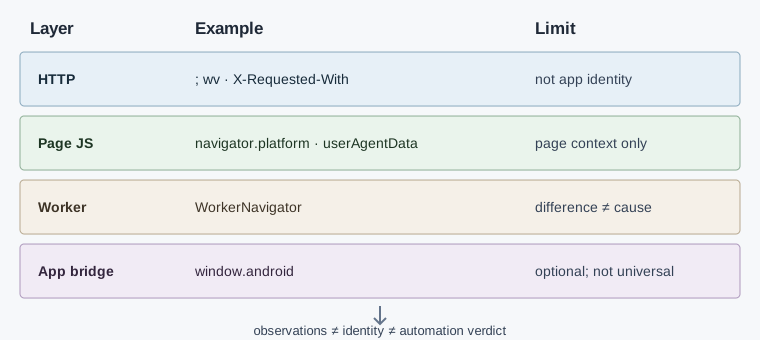
; wvin a User-Agent is a WebView-family clue, not proof of a particular app.X-Requested-Withandwindow.androiddepend on host-app behavior; neither is universal.- The pinned CreepJS navigator module compares selected page values with worker values and reads User-Agent Client Hints.
- A mismatch says that two observations differ. It does not identify the cause or establish an automation verdict.
Contents
- Watch the video
- The embedding app is not the browser surface
- Where each signal comes from
- What the pinned CreepJS source checks
- Separate WebView evidence from other conclusions
- A controlled comparison for owned apps
- Practical conclusion
Watch the video
This English-language video separates request headers, page JavaScript, worker values, and optional app bridges, then shows what a controlled browser run can and cannot establish. It does not authenticate an embedding app or reproduce an Android WebView device.
The embedding app is not the browser surface
Android WebView is a browser component hosted inside an Android application. A page can observe browser and request properties, while the host app may choose a User-Agent, add request headers, or expose a JavaScript bridge. Those are separate choices with separate scopes and should be recorded as such.
The BotBrowser Android WebView documentation covers how its declared identity settings expose a wv User-Agent form and optional app headers. The detection question is narrower: what can a detector infer from each surface, and what remains unknown? For setup and identity alignment, use the Android WebView configuration guide; for how CreepJS groups independent readings, see CreepJS signal groups and observation limits.
Where each signal comes from
| Signal | Observable layer | What it can support | What it cannot establish alone |
|---|---|---|---|
User-Agent with ; wv | HTTP request and navigator.userAgent | A WebView-style UA was presented | Which app embedded the view, or whether the value is current |
Sec-CH-UA and navigator.userAgentData | Request headers and page JavaScript, when available | Brand and platform details exposed by that context | That every Android WebView exposes the same hints |
navigator.platform | Page JavaScript | A platform-family observation | A device model or embedding application |
WorkerNavigator values | Worker JavaScript | Whether selected values agree across page and worker contexts | Whether either value matches physical hardware |
X-Requested-With | HTTP request, when the app sends it | An application may have supplied a package-like header | A universal WebView marker or a trusted app identity |
window.android or another bridge | Page JavaScript, only if injected | The host exposed a named JavaScript interface | That every app exposes it or that its methods are safe to call |
Android exposes the User-Agent through WebSettings, and the host can configure it. Android also documents addJavascriptInterface as an explicit application operation; the bridge name is selected by the app. As a result, a missing bridge does not rule out WebView, and a present bridge name should not be treated as an authenticated package identifier.
Headers and JavaScript belong in separate rows of an observation record. A server sees a request header before page code runs; page code sees JavaScript properties in its own browsing context. A redirect, service worker, app wrapper, or version change can affect one layer without changing the others.
Browser-family labels are coarse
The CreepJS helper getReportedPlatform() reduces several operating-system labels to broad families. In its User-Agent path, android, linux, and cros map to the same Linux classifier. Its navigator.platform path also maps android, arm, and linux to that family. This is useful for a consistency check, but it deliberately loses distinctions: a matching Android-family result does not identify WebView, and it cannot name the embedding app.
The navigator module performs a separate substring check that accepts android among its recognizable platform labels. That check answers whether the string looks familiar to this source revision. That is distinct from the family comparison and does not identify which app produced the string. Keep the raw field, the normalized family, and the check result as different columns. A report that stores only Android = true discards whether that value came from the UA, navigator.platform, or a request header.
This distinction is especially useful when a page is reviewed across WebView, Chrome Custom Tabs, and full Chrome. They may all run on Android while exposing different combinations of browser identity and host-app behavior. A broad family agreement is not evidence that their brands, request headers, or JavaScript bridges are identical.
Navigator checks have different triggers
The pinned module does not treat every unusual value as the same finding. When the global chrome object exists, it checks whether navigator.userAgent contains navigator.appVersion; it also looks for leading, trailing, or repeated whitespace and applies a source-defined gibberish check. Those are User-Agent quality observations. The code then compares userAgent with the worker value and marks a cross-context difference separately.
For deviceMemory, the source recognizes the values 0.25, 0.5, 1, 2, 4, 8, 16, and 32. If performance.memory.jsHeapSizeLimit is available, it converts that limit to gigabytes and checks whether it exceeds the reported device-memory value. It also compares deviceMemory with the worker. hardwareConcurrency has its own page-to-worker equality check. These are separate conditions, not one Android score.
The language path compares the first two characters of navigator.language and the first item in navigator.languages. When both page fields are truthy, the source returns the formatted language result after that comparison, whether or not the prefixes match. The worker-language comparisons occur only outside that branch. Plugin handling is different again: the source pairs navigator.plugins with navigator.mimeTypes and runs consistency checks on that pair. A useful compatibility record therefore names the exact property and trigger instead of converting a collection of unrelated checks into a single WebView label.
Client Hints is an optional branch
The CreepJS navigator module returns no User-Agent Client Hints result when navigator.userAgentData or getHighEntropyValues() is unavailable. When both exist, the source requests platform, platformVersion, architecture, bitness, model, and uaFullVersion. It then combines those returned values with the low-entropy brands and mobile fields.
The source normalizes the brand list before presenting it: brands whose names contain Not are excluded, and Chromium is removed from the displayed list when multiple brands are present. That transformation is part of the library's output format. It is not evidence that the removed brand was absent from the browser, nor that every platform returned the same high-entropy fields.
Treat three outcomes differently: the API is absent, a requested value is omitted, or the API returns a value. The cited sources establish that Client Hints are conditional but do not assign a cause to an omitted value. Record the observed state before comparing contexts; otherwise a missing hint can be misreported as an inconsistent hint.
What the pinned CreepJS source checks
The public CreepJS revision cited here is pinned to commit 10aa6724cd33a1015db1574211890518cd04f0cc. Its navigator module accepts Android among several recognizable navigator.platform substrings. It also compares the operating-system family parsed from the User-Agent with the reported platform family. That is a consistency check, not a WebView-specific classification rule.
The same module compares selected values from the page's navigator with values collected from a worker scope. The source includes platform, userAgent, deviceMemory, hardwareConcurrency, language, and languages comparisons, with the language-to-worker comparisons outside the branch where both page-language fields are truthy. Its User-Agent Client Hints path asks for fields such as platform, platformVersion, architecture, bitness, model, and uaFullVersion when the API is available. These are concrete implementation details in the pinned navigator module, not a claim that all Android WebViews provide every field.
The separate headless module reports groups of browser-visible conditions. Its group labels and inputs should not be collapsed into an Android WebView verdict. The broader CreepJS headless analysis explains why those groups answer different questions.
The code therefore supports a bounded statement: the inspected CreepJS modules can compare selected browser surfaces and report selected headless-related conditions. They do not, in these checks, authenticate the Android package that created the WebView or reveal a third party's decision rule.
Separate WebView evidence from other conclusions
Use four labels in a compatibility report instead of one binary verdict:
| Report label | Minimum evidence | Safe interpretation |
|---|---|---|
| Android-family context | A coherent set of Android platform and UA observations | The visible browser context reports an Android family |
| WebView-style context | A WebView-style UA or brand observation, with request and page values recorded separately | The context presents one or more WebView-associated properties |
| Cross-context difference | A named page/worker or header/JavaScript comparison differs | Those two observations disagree in this run |
| Automation conclusion | Independent evidence and a documented decision rule | A page-side signal alone is insufficient |
This distinction matters when reviewing browser-brand alignment. Brand, platform, and embedded-app behavior are related, but they are not interchangeable fields. A changed navigator.platform cannot explain a changed request header unless the same run links both observations and records their provenance.
A mismatch establishes only a difference
In this source, a page-to-worker mismatch is evidence that the compared values differ in the observed contexts. It does not establish whether the page value, worker value, or both are expected for a particular browser release. It also does not establish why the difference occurred. The source code documents its own comparison; it does not provide an authenticated inventory of the app, operating system, browser provider, or third-party policy.
Keep four statements separate in a report. First, record the observed value and its layer. Second, state whether a field is present and readable. Third, report the exact comparison that differs, such as navigator.platform versus the worker's platform. Fourth, state the narrow consequence for the owned compatibility test. Only an independently documented decision rule can justify a broader automation conclusion; the public CreepJS inputs alone do not disclose such a rule for another service.
When a report shows one changed field, do not silently propagate that finding to the rest of the session. A changed X-Requested-With request header says nothing by itself about navigator.userAgentData; a worker mismatch says nothing by itself about an app bridge. This keeps a useful diagnostic signal from becoming a claim about identity that the measurement did not make.
Font results are a separate surface too: the CreepJS font-table analysis shows why a detected font group cannot identify the app embedding a WebView.
The privacy consequence is also concrete. window.android may expose callable application methods, and Android warns that JavaScript bridges enlarge the security boundary. A detector review should record whether a bridge exists without invoking unrelated methods or collecting app data that the test does not need.
A controlled comparison for owned apps
For an app you own, compare three contexts on the same Android release and app build: the app's WebView, a Chrome Custom Tab if the product uses one, and full Chrome. Keep the page origin and test action constant. The table below is a capture plan, not a report of a run:
| Capture point | Record | Keep separate |
|---|---|---|
| Request | User-Agent, Client Hint headers, X-Requested-With if present | Initial navigation versus later requests |
| Page | navigator.userAgent, navigator.platform, available userAgentData fields | Missing, denied, and empty are different states |
| Worker | The corresponding WorkerNavigator fields | The worker's creation timing and origin |
| Host app | Whether a bridge is intentionally registered and its documented name | Do not call bridge methods just to identify the container |
Version the Android OS, WebView provider, app build, and test page together. A comparison across different provider versions can make a legitimate update look like an identity inconsistency. For each changed cell, record the source layer and whether the field was absent, unavailable, or different; do not convert those states into a single score.
Preserve context and minimize collection
Run the same page-owned action from the same origin and keep navigation timing comparable. Record Android release, WebView provider version, app build, browser version, locale, permission state, and whether the context is WebView, a Chrome-powered tab, or full Chrome. These fields explain what was compared; they are not themselves a verdict. If a browser update changes a value, retain both version labels rather than describing the new value as a lie.
The host app's package-like X-Requested-With header can identify an app package, so store it only when the compatibility question requires it and access is authorized. Prefer a presence flag or a redacted value in a shared report. A JavaScript bridge can expose callable methods; record whether the app intentionally registers it and its documented name, but do not invoke unrelated methods or serialize returned app data. The Android warning about addJavascriptInterface makes this a security boundary as well as a fingerprinting surface.
Keep each comparison tied to its source: request capture for headers, page capture for navigator, and worker capture for worker values. A compact record can retain the field name, observed state, browser/app versions, and comparison partner without storing unrelated user content. That is enough to reproduce an owned compatibility review while reducing accidental collection of package identifiers and application data.
Keep request timing comparable
Capture the top-level navigation separately from later subresource requests. An app can attach a header only to selected requests, so a header on one image fetch should not be compared with JavaScript values from the final document as if they came from one observation. Keep each request tied to its navigation, origin, app build, browser version, and permission state. If redirects occur, record the request at each hop instead of treating the first and final URL as the same transaction. A comparison describes the context and point in time that supplied it; it does not generalize to every device with the same Android major version.
FAQ
Does ; wv prove that a request came from Android WebView?
No. It is a recognizable string in a User-Agent, which an application can configure. It is useful evidence about the presented value, not proof of the embedding package or the request's origin.
Does CreepJS identify the Android app hosting the page?
The cited navigator checks compare browser-visible values and worker values. They do not authenticate the host application's package. An app-injected bridge or request header is conditional application behavior, not a universal CreepJS identity signal.
Does a page/worker mismatch mean the browser is automated?
No. It means the captured values differ. Browser version changes, API support, context timing, or application configuration can also explain a difference. Preserve the exact fields and environment before drawing a broader conclusion.
Sources
- CreepJS navigator module at a pinned revision
- CreepJS headless module at a pinned revision
- Android
WebSettings.getUserAgentString - Android WebView JavaScript interfaces
- MDN:
Navigator.userAgentData - BotBrowser Android WebView documentation
Practical conclusion
Treat WebView identification as a provenance question, not a single-token test. Record request headers, page properties, worker comparisons, and optional app bridges as separate observations. For owned-app QA, compare equivalent contexts and preserve missing values; a mismatch is a useful compatibility finding, but it does not establish a device identity or a third-party automation decision.
This article is part of the guide: What Is a Browser Fingerprint?
Related Articles
How to Read Browser Fingerprint Signals
FingerprintCreepJS Font Tables: 51 Names and 14 Possible Returns
FingerprintClient Hints Fingerprinting: HTTP Headers as Identity
FingerprintCreepJS Math Signals: Read the Source Fields
FingerprintCreepJS WebGL Report: Contexts and Capability Signals
Fingerprintua-parser-js: Client Hints, Bots and a 500-Char Cap
Take BotBrowser from research to production
The guides cover the model first, then move into cross-platform validation, isolated contexts, and scale-ready browser deployment.