CORS Browser Boundaries: Headers, Preflights, Credentials, and Cache
A practical guide to diagnosing cross-origin fetches without confusing CORS with network reachability, authorization, CSP, or Permissions Policy.
BotBrowser Team
Want the structured docs for Platform?
This article lives in the editorial library. For step-by-step setup, reference material, and ongoing updates, jump into the docs section.
let pageOrigin = '';
let apiOrigin = '';
const observations = [];
const listen = server => new Promise(resolve => server.listen(0, '127.0.0.1', resolve));
const close = server => new Promise(resolve => server.close(resolve));
const api = http.createServer((request, response) => {
const name = request.url.slice(1);
if (name === 'control') response.setHeader('Access-Control-Allow-Origin', pageOrigin);
observations.push({ name, status: 200, allowOrigin: response.getHeader('Access-Control-Allow-Origin') || null });
response.writeHead(200, { 'Content-Type': 'application/json' });
response.end('{"fixture":true}');
});
const pageServer = http.createServer((request, response) => {
const name = request.url.slice(1);
response.end(<button>Run CORS check</button><output data-testid="cors-status"></output><script> document.querySelector('button').onclick = async () => { try { await fetch('${apiOrigin}/${name}'); document.querySelector('output').textContent = 'CORS_ALLOWED'; } catch { document.querySelector('output').textContent = 'FETCH_UNCLASSIFIED'; } };</script>);
});
await listen(api); await listen(pageServer);
const apiPort = api.address().port; const pagePort = pageServer.address().port;
pageOrigin = http://127.0.0.1:${pagePort};
apiOrigin = http://127.0.0.1:${apiPort};
const browser = await chromium.launch();
const context = await browser.newContext();
context.setDefaultNavigationTimeout(8_000);
async function runCase(name) {
const page = await context.newPage();
try {
await page.goto(${pageOrigin}/${name});
await page.getByRole('button', { name: 'Run CORS check' }).click();
await page.locator('[data-testid="cors-status"]').waitFor({ state: 'visible', timeout: 5_000 });
return await page.locator('[data-testid="cors-status"]').textContent();
} catch { return 'UNKNOWN'; }
finally { await page.close(); }
}
try {
const control = await runCase('control');
const candidate = await runCase('candidate');
assert.equal(control, 'CORS_ALLOWED');
assert.equal(candidate, 'FETCH_UNCLASSIFIED');
assert.deepEqual(observations.map(({ name, allowOrigin }) => ({ name, allowOrigin })), [
{ name: 'control', allowOrigin: pageOrigin }, { name: 'candidate', allowOrigin: null }
]);
} finally { await context.close(); await browser.close(); await close(pageServer); await close(api); }
The control must report `CORS_ALLOWED`; candidate reports `FETCH_UNCLASSIFIED` after Fetch rejects. The code does not treat that rejection as a CORS conclusion. It asserts the server's real observations too: both paths reached the owned API, both returned 200 and the same body, and only candidate omitted the exact page origin in `Access-Control-Allow-Origin`. Together, those observations establish the fixture's `CORS_BLOCKED` result. Navigation, status, server-start, or assertion failures remain `UNKNOWN` and must not be relabeled as CORS or network failures. The eight-second navigation limit, five-second visible-status limit, and `finally` cleanup keep the fixture bounded.

The fixture keeps navigation, status, server evidence, and cleanup boundaries explicit.
## Decision table for incident triage
| Observation                             | First owner       | Next check                                                | Safe conclusion                                              |
| --------------------------------------- | ----------------- | --------------------------------------------------------- | ------------------------------------------------------------ |
| DNS or connection failure               | Network/platform  | Resolve, TLS, proxy, route, and server health             | The page did not reach a CORS response                       |
| Preflight is absent                     | Client/request    | Method, content type, custom headers, service worker      | Request may be simple or intercepted; inspect actual traffic |
| Preflight returns 4xx/5xx               | API/platform      | `OPTIONS` routing, auth middleware, allowed method/header | Preflight exchange failed; actual request may not have run   |
| 200 response, script cannot read it     | API/browser       | Allow-Origin, credential mode, exposed headers, console   | CORS sharing failed or response was opaque                   |
| Cookie missing                          | API/auth/browser  | credentials mode, SameSite, Secure, scope                 | CORS alone cannot make a cookie eligible                     |
| Works for one origin, fails for another | API/cache         | allow-list and `Vary: Origin` at every cache              | Origin-specific policy or cache behavior differs             |
| CSP violation                           | Web security      | `connect-src` and policy reports                          | CSP owns the block; do not label it CORS                     |
| Feature denied in an iframe             | Embedder/platform | Permissions Policy and `allow` delegation                 | Feature policy/permission is separate from API sharing       |
What BotBrowser can and cannot establish
BotBrowser controlled browser contexts can run authorized, owned control and candidate CORS fixtures, isolate synthetic cookies and storage, and compare visible Fetch outcomes on a declared browser build. That is useful for regression evidence: the same reachable route can be exercised with a known response-header difference, and the resulting page status can be captured repeatedly without sharing state between workers. The [multi-account isolation documentation](https://botbrowser.io/docs/identity/multi-account-isolation/) describes the context boundary. For CORS validation, BotBrowser can execute the owned control/candidate comparison, but it cannot configure the API response or circumvent the browser sharing rule.
BotBrowser does not author or deploy CORS headers, grant server authorization, repair a third-party API, change a page's origin, circumvent browser CORS enforcement, or prove that a remote business operation completed. It also cannot turn an opaque response into a readable one. Server configuration, CDN behavior, credentials, CSP, Permissions Policy, and application commit state remain responsibilities of the systems that own them. Treat the browser observation as one bounded signal in a larger authorization and delivery test.
A repeatable operating checklist
1. Declare the page origin, API origin, method, request headers, credential mode, and expected application result.
2. Check DNS, TLS, proxy, and route reachability before interpreting browser policy errors.
3. Capture the request origin, preflight (when present), status, CORS headers, `Vary`, and cache layer.
4. Separate CORS from CSP, Permissions Policy, user permission, server authorization, and business completion.
5. Use a fresh owned fixture with bounded eight-second navigation and five-second status waits; close the context in cleanup.
6. Keep network errors, navigation failures, status timeouts, preflight failures, and CORS blocks as distinct result types.
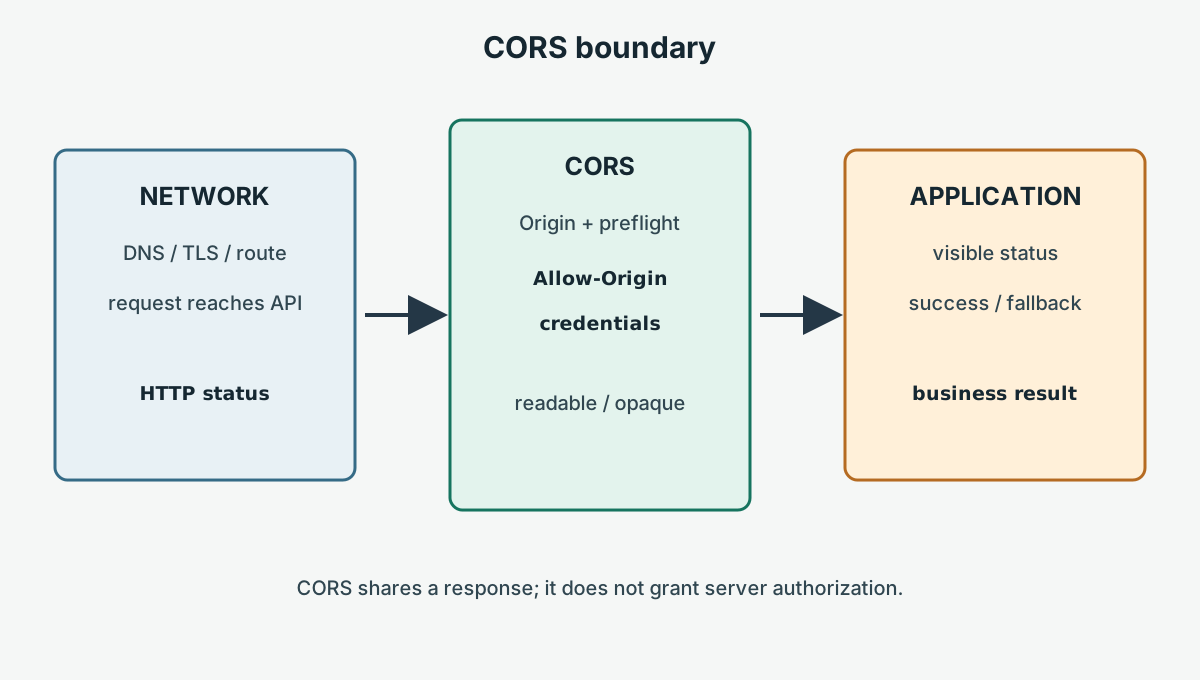
The standards remain the source of truth: consult the [Fetch CORS protocol](https://fetch.spec.whatwg.org/#http-cors-protocol), [MDN CORS](https://developer.mozilla.org/en-US/docs/Web/HTTP/CORS), [MDN CSP](https://developer.mozilla.org/en-US/docs/Web/HTTP/CSP), and [MDN Permissions Policy](https://developer.mozilla.org/en-US/docs/Web/HTTP/Permissions_Policy) when browser support or deployment details change. CORS is precise when its evidence is kept precise: reachability first, response sharing second, and application meaning last. Teams should also document which component owns each header. The API owner owns Allow-Origin and preflight behavior; the platform owner owns TLS, routing, proxy, and cache configuration; the web application owner owns Fetch mode, credential mode, error presentation, and retry behavior. A browser test should name these owners in its result rather than assigning every failure to the frontend. When a deployment changes an origin, CDN, authentication gateway, or service worker, rerun the control and candidate cases with a fresh context and preserve the captured request and response headers. Compare the preflight and actual request separately, because a successful preflight does not prove that the actual response was authorized or readable. For credentialed flows, use synthetic identities and a short-lived test cookie, and remove the fixture data after the run. Keep production observability focused on aggregate policy failures instead of collecting response bodies or private account details. This evidence model gives incident responders a bounded next action: repair the network, response policy, cache, embedding policy, or application branch that owns the observed result.


When an incident spans several teams, keep the evidence packet small and explicit. Include the page origin, API origin, request method, requested headers, credential mode, preflight response, actual response, cache headers, and visible application state. This lets an API owner reproduce the header decision while a frontend owner reproduces the browser branch. It also prevents a successful network trace from being reported as proof that a user was authorized. A CORS test should never scrape private response data to infer whether another account exists. Use synthetic records, short-lived cookies, and an owned endpoint that can be reset after every attempt. The browser can report that a response was exposed or withheld; only the application can report that a business operation was accepted. Keeping those statements separate makes alerts actionable and keeps a rollback focused on the policy that actually changed.
**Author:** BotBrowser Team
Read the [cross-origin isolation guide](/en/blog/cross-origin-isolation-and-shared-memory-requirements/) and [Permissions Policy guide](/en/blog/permissions-policy-for-embedded-browser-features/) for adjacent browser boundaries.

## Sources

- Fixture URL (example only): https://api.example.test/cors-fixture`
- Fixture URL (example only): https://app.example.test/candidate`
- Fixture URL (example only): https://app.example.test/control`
- Fixture URL (example only): https://app.example.test`


- [Fetch CORS protocol](https://fetch.spec.whatwg.org/#http-cors-protocol)
- [MDN CORS](https://developer.mozilla.org/en-US/docs/Web/HTTP/CORS)
- [MDN CSP](https://developer.mozilla.org/en-US/docs/Web/HTTP/CSP)
- [MDN Permissions Policy](https://developer.mozilla.org/en-US/docs/Web/HTTP/Permissions_Policy)
Related Articles
Take BotBrowser from research to production
The guides cover the model first, then move into cross-platform validation, isolated contexts, and scale-ready browser deployment.