Scraping Rate Limits: 429, Retry-After and Concurrency
Diagnose a scraping rate limit from HTTP 429 and Retry-After, separate rate from concurrency, and stop an authorized workload before retries amplify it.
BotBrowser Team
Want the structured docs for Network?
This article lives in the editorial library. For step-by-step setup, reference material, and ongoing updates, jump into the docs section.
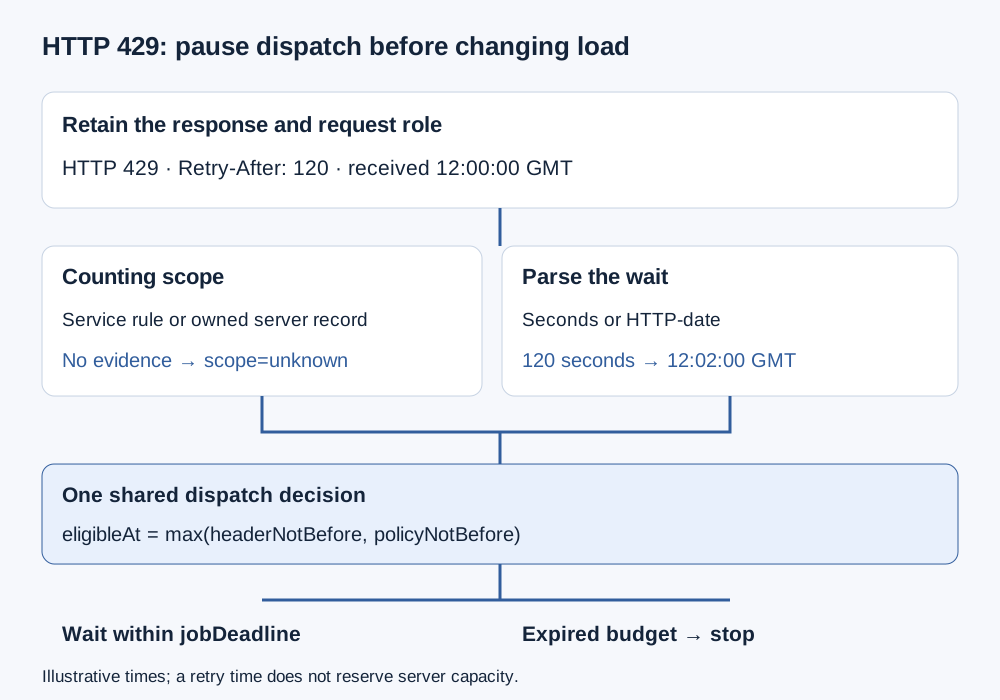
A scraping rate limit is a server decision, not a browser capacity setting. An HTTP 429 response reports too many requests over a period; it does not identify the counting key or authorize a different route. BotBrowser documents browser-level and per-context proxy configuration, but it does not raise a service quota or guarantee access. Diagnosis starts with the response, the permitted workload and its dispatch record, then separates request frequency, in-flight work and retry traffic.
When usable data changes into a challenge during the same job, diagnosing a CAPTCHA appearing during scraping connects the last usable response and the first challenge without treating their sequence as a cause.
TL;DR
- Preserve HTTP 429, the received time and any
Retry-Aftervalue before changing configuration. - Treat the limiter's counting key as unknown unless the service documentation or an owned server's records establish it.
- Concurrency counts unfinished work; request rate counts dispatches over time. A browser navigation can cause several requests.
- On an owned fixture, stop increasing load at the first 429. Do not probe a third-party service for its operating limit.
- Honor the time boundary and retry budget together. A deferred request can expire instead of being retried.
Contents
- What a 429 response establishes
- Find the counting scope in server evidence
- Measure rate and concurrency separately
- Read the two Retry-After forms
- Keep a shared queue and a finite budget
- Retain an incident record that explains the stop
- BotBrowser configuration and server policy
- Practical conclusion
What a 429 response establishes
RFC 6585, section 4 defines 429 as a rate-limiting response. The response may include Retry-After; its absence does not mean unlimited traffic is permitted. A body may explain the condition, but the status alone does not establish an account ban, an IP reputation verdict or a browser-fingerprint finding. Keep the observed status separate from those possible explanations until there is evidence for one. For failures before any 429 response, the layered blocked-scraper diagnosis separates DNS, TLS, HTTP and page-data evidence.
Capture which request received the response. The top-level document, a same-origin data endpoint and a resource request are different request records. A successful document navigation does not prove that the data request succeeded, and an application may display a stale shell after its data request was limited. Correlate the response with the field or record that failed rather than classifying the whole page from its appearance. The SERP workload requirements distinguish completed navigation from accepted data, a useful separation for this diagnosis too.
Retain the final response URL without unnecessary query secrets, its status, receipt time, selected response headers and the request's role. If redirects occurred, keep their statuses separately instead of assigning the final 429 to every hop. A timeout with no response is not an observed 429. A challenge page delivered with another status also needs its own outcome category; silently relabeling both as rate limits makes later comparisons unreliable.
The source establishes an HTTP meaning, not a recovery promise. Reaching a suggested retry time does not reserve capacity or guarantee that a subsequent request will succeed. A scheduler still needs permission to resume, a remaining workload budget and an acceptable operation to repeat. Keep the original response record even when a later request works, so the incident is not erased by a final success counter.
Find the counting scope in server evidence
RFC 6585 deliberately leaves user identification and request counting to the server. A limiter might apply to a resource, a wider service or an authenticated account. Therefore, one 429 cannot distinguish a per-IP rule from a per-account or per-session rule. The MDN 429 reference is a status reference, not a description of the policy used by the particular server that answered.
For a service you operate, inspect the limiter configuration and correlate its decision record with the request ID. Record the rule identifier, resource group, measurement window and the documented key category. Store a redacted key reference rather than raw cookies, credentials or an account identifier. If a gateway and application both limit traffic, identify which component produced the response before attributing its policy to the other layer.
For a third-party integration, use its published quota rules or an authorized support response. If neither identifies the counting scope, write scope=unknown. Changing an IP, cookie or account until the response changes would change several inputs and would not establish the original counting rule. It can also conflict with the service's policy. Unknown scope is a valid incident result; a guessed identity category is not an improvement.
Separate configuration intent from observation. A deployment may intend to isolate jobs by browser context, while the server counts all traffic against one shared account quota. A proxy route may be distinct while an application session remains shared. Keep those as different facts in the record. Browser storage boundaries and network paths cannot, by themselves, certify a server's quota partition or permission model.
Measure rate and concurrency separately
Request rate is a count of dispatches per interval, such as requests per second. Concurrency is the number of operations still in flight. Neither is the number of open tabs. Count the layer relevant to the policy: browser jobs, document navigations and HTTP requests can have different totals. A page may request scripts, images and data in addition to its document, so a jobs-per-minute counter is not a complete request-rate record.
For illustration, 2 dispatches per second with a mean duration of 3 seconds can sustain approximately 6 unfinished requests in a steady workload. This arithmetic is a planning approximation, not a measured browser result or a quota recommendation. Bursts, variable durations and fan-out can invalidate the simple picture. Preserve the real dispatch timestamps and in-flight counts when evaluating an owned fixture rather than inferring them from a configured worker count.
inflight ≈ dispatches_per_second * mean_request_seconds
Set separate controls for dispatch frequency and the in-flight ceiling. A concurrency limit of 4 does not impose a specific request rate: fast completions can permit many dispatches in a short interval. Conversely, a low dispatch rate can still accumulate unfinished operations when responses become slow. Retain queue age, response duration, active work, retry dispatches and accepted records so a growing queue is distinguishable from useful throughput.
A bounded ladder on an owned fixture
Before a load check, agree the permitted rate, maximum concurrency, window duration, resource ceilings and stop conditions with the fixture owner. Start at the declared low-load baseline and increase only through preapproved levels. At the first HTTP 429, stop new dispatches, cancel work that has not started and record the response. Do not advance to the next level to find how much more traffic the limiter tolerates. In-flight operations need an explicit cancellation or completion policy because they may already have reached the server.
The last level without a 429 is only an observation for that sample. It is not a stable service limit or permission to operate indefinitely at that rate. The limiter may use a longer window than the sample or share a quota with other authorized clients. Repeat only within the agreed test plan, and use server-side records to interpret the result. The browser-selection scorecard treats sustainable concurrency as workload-bounded evidence rather than a brand-wide capacity number.
Read the two Retry-After forms
HTTP Semantics, section 10.2.3 defines Retry-After as either an HTTP date or a non-negative integer number of seconds. The MDN Retry-After reference illustrates both forms. Parse the header before scheduling, and retain its original text alongside the interpretation. This prevents an interval from being mistaken for milliseconds or a date from being treated as a duration.
For Retry-After: 120, the proposed scheduling boundary is 120 seconds after receipt of that response. With a recorded receipt time of 12:00:00 GMT, the arithmetic boundary is 12:02:00 GMT. These are illustrative inputs, not a captured exchange. Measure the interval from response receipt, not job creation, browser launch or the time a waiting worker finally inspects the record. A delayed log consumer should not restart an already elapsed interval without saying so.
For Retry-After: Mon, 09 Nov 2026 12:02:00 GMT, the value names a date rather than a duration. Clock accuracy matters when comparing it with local time. Keep the received timestamp and the server's Date header, if present, as diagnostic inputs; the presence of Date alone does not prove either clock is accurate. A date already in the past creates no future wait from that value, but it also does not create permission for an immediate retry loop.
Use one time unit throughout the scheduling calculation. The following fields are proposed incident fields, not a browser API or a mandated header-processing algorithm. headerNotBefore is the parsed time boundary; policyNotBefore is a stricter delay imposed by the documented integration policy. The job deadline limits whether waiting remains useful:
eligibleAt = max(headerNotBefore, policyNotBefore)
if eligibleAt > jobDeadline: stop
If the header is absent, malformed or beyond the supported numeric/date range, retain that state rather than silently turning it into zero. Apply an established integration policy if one exists; otherwise stop for a policy decision. Retry-After: 0 is different from a missing or invalid value, yet none of those cases justifies unbounded immediate attempts. A conservative parser should also report unsupported forms rather than accepting an arbitrary date-like string through a permissive date parser.
Keep a shared queue and a finite budget
Each worker sleeping independently can produce a synchronized restart when the delay ends. Use a dispatcher that owns the not-before state for the known quota scope, instead of letting every browser decide to resume at once. When scope is unknown, pause the affected integration's dispatch rather than inventing separate per-context quotas. This is a proposed operational policy for containing load, not a statement that the server uses the same internal grouping.
Retain at least three independent budgets: the job deadline, the maximum attempts and the amount of authorized work remaining. A request can become eligible by time while still being ineligible because its deadline expired or attempts are exhausted. The queue should then produce a terminal outcome, not put the request back at its head. Keep attemptsUsed, eligibleAt and jobDeadline in the same proposed job record so the decision can be inspected.
Backoff and jitter are different controls. A documented policy may increase the delay after repeated failures, while non-negative jitter can spread allowed resumptions later in time. Neither should reduce a valid server-indicated wait. Do not truncate a 120-second wait to 10 seconds merely because a worker timeout is shorter; stop or defer the job outside that worker instead. The workload budget is a reason not to retry, not a reason to retry early.
Retry safety also depends on the operation. A data read and a purchase submission do not have the same consequences when repeated. HTTP 429 alone does not determine whether a prior business operation changed state. Keep state-changing operations out of a generic scraping retry queue and follow the integration's documented duplicate-protection rules. Avoid nesting retries in both the job scheduler and automation library without a combined attempt budget; otherwise one visible job can generate several uncounted requests.
Retain an incident record that explains the stop
An incident record should connect the HTTP response to a scheduling decision. Use an opaque run ID, a fixture or integration revision, browser/package versions and a redacted route reference. Record the response time, status, request role, original Retry-After, parse state, dispatch rate, in-flight count and queue age. These are proposed fields for a bounded diagnostic record, not claims that every browser exposes them automatically.
| Observation | Retained value | Decision supported |
|---|---|---|
| Response | Status, request ID and receipt time | A particular request received 429 |
| Header | Original value and parse state | A wait was parsed or remains unknown |
| Scope | Documented rule or unknown | Which queue is paused and why |
| Load | Dispatches, in-flight work and retries | Rate differs from worker count |
| Budget | Attempts, deadline and eligibleAt | Wait, expire or stop |
| Outcome | Accepted record or terminal reason | Navigation is not data acceptance |
Separate observations from policy. A field such as pauseReason=429 records an event; resumePolicy=documented-window records a chosen rule. A comment that says “probably IP blocked” belongs in an unconfirmed hypothesis field, if retained at all, not in the server-fact column. The distinction lets a later operator revise the diagnosis without rewriting what the response actually contained.
Keep a request ledger for the bounded observation window. Include failed attempts in dispatch totals even if they produced no accepted record. Count cancellation before dispatch separately from cancellation after a request started. For pages with several resource requests, retain the request role so a rate change in images is not mistaken for a change in data extraction. Limit retained response content to what is needed, redact secrets and follow the relevant retention policy.
After the incident, compare the effective configuration with the recorded one before resuming authorized work. Check whether another process shares the same documented quota, whether a retry layer was enabled twice, and whether the observed wait exceeded the job's remaining time. Those are concrete configuration questions. A new browser, route or context should not be credited as a fix merely because a later response happened to be different.
BotBrowser configuration and server policy
BotBrowser's proxy configuration documentation describes --proxy-server and supported routing configuration. Its dynamic proxy documentation describes changing a BrowserContext's proxy through a browser-level CDP session. These are configuration capabilities. Neither documentation establishes the counting key, reset window or allowed request rate of an external service.
Keep the declared route stable during a rate-limit diagnosis so unrelated changes do not obscure the response sequence. Record a redacted context and route reference when the integration needs that distinction. BotBrowser does not guarantee that a separate context has a separate server quota, that a changed route will remove a 429, or that a completed browser configuration grants authorization. A server-imposed boundary remains a boundary for the workload.
FAQ
Do fewer workers always mean fewer requests?
No. Fast completions, resource fan-out and nested retries can increase dispatches even with fewer workers. Measure the request count and interval relevant to the documented policy.
Does every 429 include Retry-After?
No. RFC 6585 makes it optional. Missing guidance should be recorded as missing, then handled through the integration's established policy or a stop decision.
Can changing a proxy prove an IP-based limit?
No. A changed result does not identify the original counting rule. Use service documentation or an owned server's decision records, and do not change routes to circumvent a quota.
Is a passed retry time a guarantee of success?
No. It is a time boundary, not reserved capacity or a promise of access. Permission, operation safety and the remaining job budget still apply.
Sources
- RFC 6585, section 4: 429 Too Many Requests
- RFC 9110, section 10.2.3: Retry-After
- MDN: 429 Too Many Requests
- MDN: Retry-After
- BotBrowser: Proxy configuration
- BotBrowser: Dynamic proxy switching
- SERP scraping browser requirements
- Browser selection criteria
Practical conclusion
Start a scraping rate-limit diagnosis with the specific 429 response and dispatch record. Establish scope from server evidence, keep concurrency separate from request rate, and let a parsed time boundary and finite job budget govern any authorized resumption. Preserve unknowns instead of replacing them with identity guesses. The immediate action is to pause new dispatches and retain the response before changing the workload.
This article is part of the guide: Proxy Configuration Overview: A Browser Network Decision Map
Related Articles
Scraping CAPTCHA: Diagnose a Challenge Mid-Run
NetworkScraper Blocked? Diagnose DNS, TLS, HTTP and Page Errors
NetworkProxy Rotation for Web Scraping: Session Boundaries
NetworkCloudflare and DataDome: Scraping Response Signals
NetworkProxy Failover and User-Visible Continuity
DeploymentBrowser Automation Performance: Optimizing for Scale
Run the same check in BotBrowser
Load a profile, keep the signals you just read about consistent inside the browser, and confirm the result on your own machine before a rollout.