How to Evaluate Cross-Platform Browser Consistency Before Deployment
A practical deployment evaluation for validating browser profiles, hosts, runtime cost, and rollout ownership across platforms.
BotBrowser Team
Want the structured docs for Platform?
This article lives in the editorial library. For step-by-step setup, reference material, and ongoing updates, jump into the docs section.
Start With the Deployment Decision
Cross-platform browser consistency is a deployment question, not just a feature comparison. Before selecting a plan or moving a workflow to production, write down the target platform, the host operating systems, the browser mode, and the workload that must remain stable.
The supported combinations are broad. The Cross-Platform Profiles documentation lists Windows, macOS, and Linux hosts for Windows, macOS, and Android target profiles. Linux hosts require ENT Tier 1. The same page also recommends checking the BotBrowser version, profile file, and launch settings when output differs between hosts.
That matrix gives you a starting point. It does not replace a test of your own authorized workflow.
Check the Host and Target Matrix
Make the support matrix explicit before comparing vendors or plans. Record each target profile and each host that will run it. Include the production host class, not only the workstation used by the evaluation team.
For example, a team might need a Windows target profile on macOS for development, the same profile on Linux for a server deployment, and an Android target profile on Windows for a validation workflow. Each pairing should have an owner and a test result.
Linux deserves a separate readiness check. The Headless Server Setup documentation specifies Ubuntu 20.04 or later, x86_64 or arm64, the BotBrowser Ubuntu binary, a matching production profile package, and root or sudo access for system packages. Ubuntu and Linux binaries require ENT Tier 1 or higher.
The server also needs the documented system libraries and a virtual display. The public setup uses Xvfb and DISPLAY=:10.0, including for headless operation. Treat these as release prerequisites. A host that cannot reproduce the display and system-library baseline is not ready for a consistency decision.
Validate the Headless Baseline
Server evaluation should happen on a host that resembles production. The headless setup documentation calls out shared libraries for rendering, audio, networking, and accessibility, along with fonts and GPU rendering considerations. Missing packages or an incomplete display setup can affect startup, screenshots, character rendering, or media behavior. The Headless Server Setup guide walks through the same prerequisites in more detail.
Use the documented server configuration as the baseline, then test the representative workflow. Check the selected profile package as well. The public guidance states that identity properties such as screen resolution, fonts, and GPU information come from the profile rather than server hardware. That is behavior a team should verify in its own environment.
Keep the operational details under ownership. Someone should be responsible for the profile package, someone for the host image and system dependencies, and someone for the workflow acceptance record. This division makes a later inconsistency easier to investigate without changing several variables at once.
Run One Representative Workflow
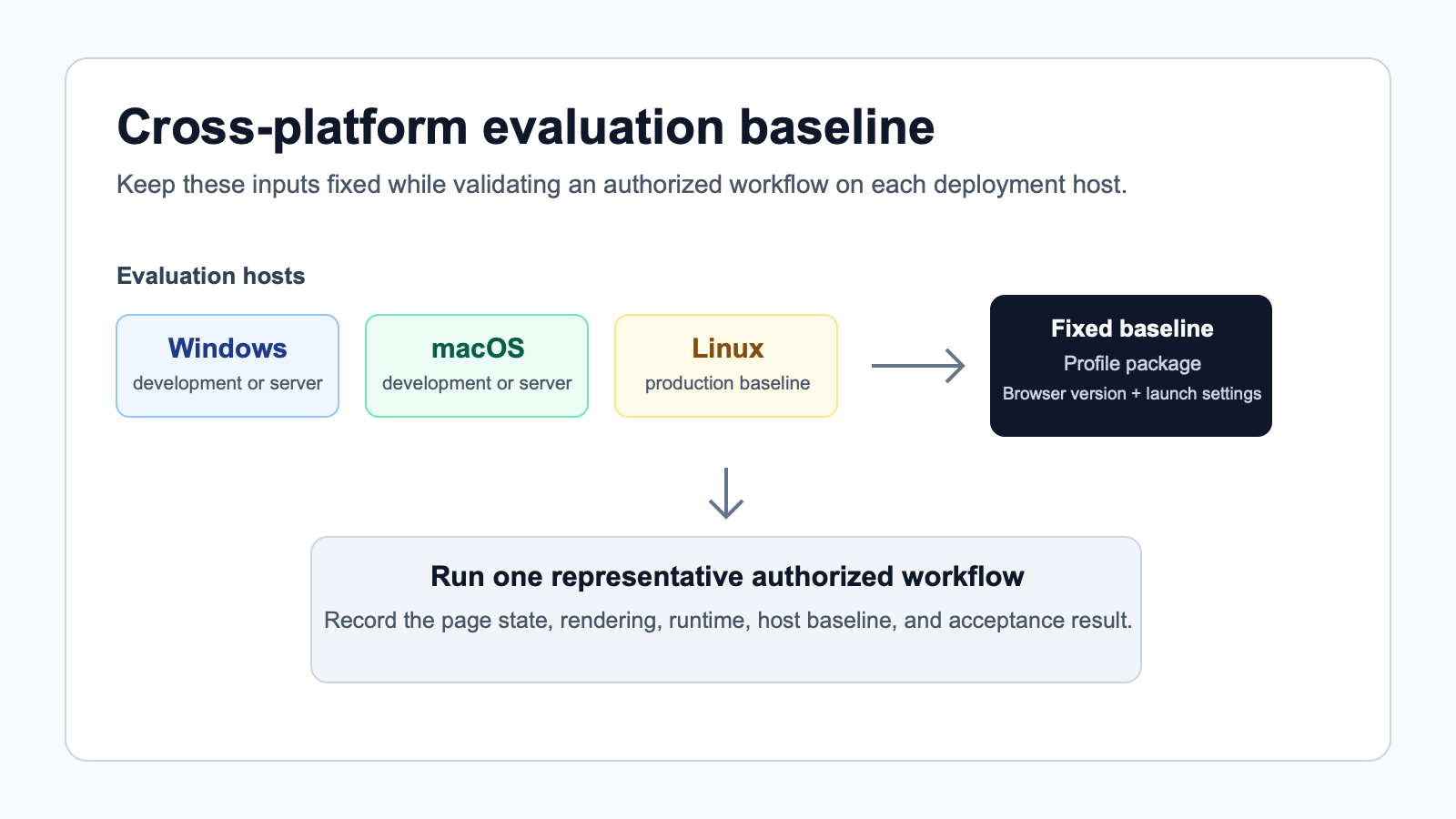
A useful evaluation has a clear subject. Choose one authorized workflow that represents the production path, then run it on every important host and target combination.
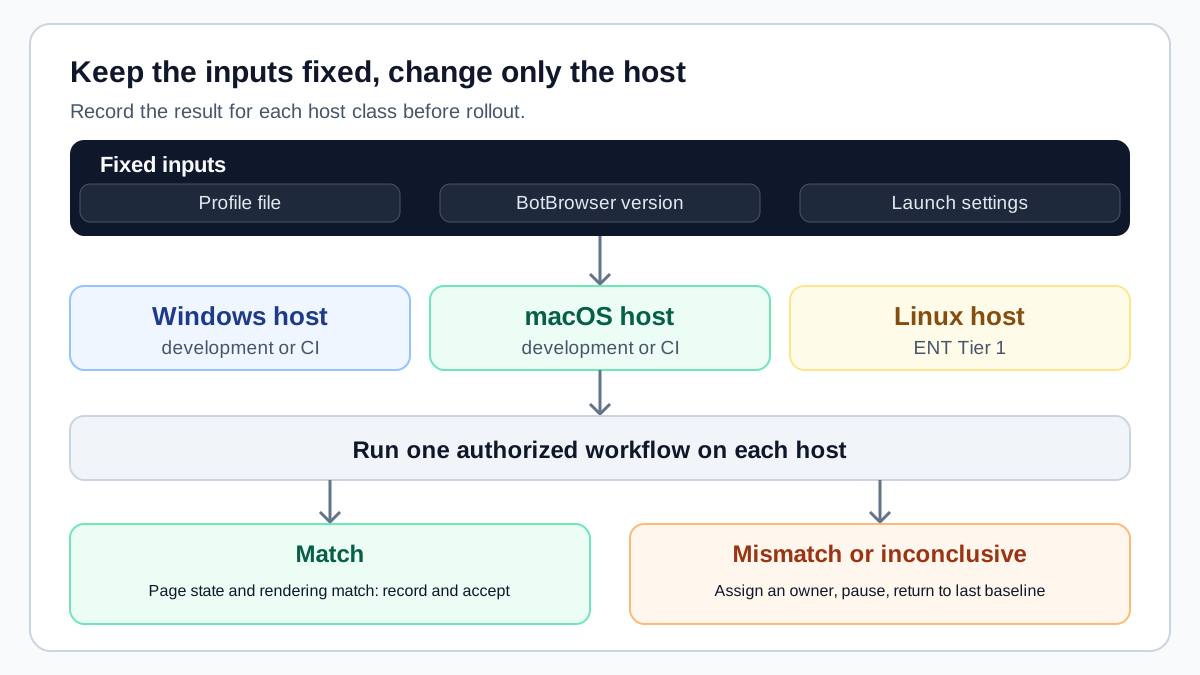
Keep the profile artifact, BotBrowser version, launch settings, browser mode, and workflow steps fixed while changing the host. The cross-platform documentation describes the profile as the source of identity and recommends running the same profile across Windows, macOS, and Linux runners for comparison.
Record observable results at each step. Confirm that the workflow reaches its expected page state, that screenshots and rendering behave as expected, and that the broad browser signal families remain coherent for the selected target. Do not use a single property as the acceptance test. A successful launch alone is also not enough.
Run the test more than once when the workflow is sensitive to startup or rendering conditions. Keep the evidence with the release record so a later host or version change can be compared with the original result.
Define an Acceptance Record Before Testing
The evaluation record is what turns a successful demonstration into an operating decision. Write it before the first run, while the team can still agree on what matters. The record should identify the workflow, its owner, the intended target profile, and the host class under review. It should also state the expected page state in plain language. For one team that might be reaching an authenticated workspace; for another it might be completing a supported internal transaction or rendering a required report.
Keep the acceptance language observable. "The workflow completed and the expected page state was reached" is useful. "It looked normal" is not. Capture the page or state that confirms the outcome, the conditions under which the run happened, and any known dependencies such as a test account, an approved proxy route, or an internal service. The purpose is repeatability, not a collection of one-off screenshots.
Separate required outcomes from useful observations. A required outcome is a condition that must hold before the workflow can move forward. A useful observation may help an operator understand a result, but it should not silently become a new approval condition. This distinction prevents a test from expanding each time someone notices another variable. It also makes the result explainable to an engineering, operations, or procurement reviewer who did not run the test.
Use the same record across host environments. Only the host-specific fields should change between runs. This makes it easier to identify a meaningful difference: a version mismatch, a missing dependency, a changed display baseline, or a workflow condition that was not held constant. If a result changes, resist the urge to change several settings at once. Record the difference, restore the known baseline, and isolate one variable at a time.
The record should also name the evidence location. Store screenshots, relevant application output, and the approval decision together. A shared location matters when the person who ran the evaluation is unavailable later. It gives the next operator a defensible starting point instead of asking them to recreate an undocumented environment from memory.
Separate Host Readiness From Profile Readiness
Profile readiness and host readiness answer different questions. A profile package determines the selected browser identity. Host readiness determines whether the environment can launch and render the authorized workflow consistently. Treating them as the same task creates confusing investigations, because a host issue may be mistaken for a profile issue, or the reverse.
Start with host readiness. Confirm the operating system family, architecture, required runtime dependencies, display configuration, storage location, and network policy. For a Linux deployment, use the documented headless baseline as the source of truth rather than adapting a local workstation recipe. For a desktop host, document the same essentials so an evaluation can be repeated when the machine is replaced or reconfigured.
Then establish profile readiness. Confirm that the profile package, BotBrowser release, and target platform belong together for the intended workflow. Do not infer this from a filename alone. Record the package identifier and the browser version used for the test. When the workflow has a persistent state requirement, record how that state is owned and isolated as well. A successful check should not depend on an accidental cache, an unknown data directory, or a prior session that cannot be reproduced.
Finally, assess the connection between the two. Run the same approved profile under the same launch settings on each host class that matters to deployment. A difference at this point is actionable because the inputs are clear. The team can determine whether to correct the host baseline, use a different supported host, or change the rollout sequence. It is much less costly to make that decision during evaluation than after a broader deployment has started.
Plan the Evaluation as a Controlled Rollout
Cross-platform evaluation benefits from a deliberate sequence. Begin with the smallest environment that represents the intended operation. Confirm the workflow and the baseline there before adding another host, another target profile, or another browser mode. The goal is not to maximize coverage on the first day. The goal is to establish one trustworthy reference point that can be compared with later results.
Expand by meaningful operational boundary. A new host operating system, a new deployment image, a headless runner, or a new target profile are useful boundaries because each can change the practical conditions around the workflow. Add one boundary, rerun the acceptance record, and preserve the result. This creates a clear history of what has been validated and what remains an assumption.
Define a pause condition before starting. A pause condition can be an unexpected page state, a rendering result that prevents work, an inability to reproduce the approved record, or an environment that lacks a documented prerequisite. When it occurs, stop the expansion of the evaluation and return to the last accepted baseline. This is a normal operating control, not a failure of the product or the team.
The same approach helps when a result is inconclusive. Mark it as inconclusive instead of treating it as a pass or attempting to explain it with unverified claims. Record what was observed, retain the environment details, and assign an owner for the next check. Clear uncertainty is more useful than false certainty when a subscription decision or production rollout depends on the answer.
Connect the Plan to the Operating Model
The right plan is determined by the workflow that has been validated, not by a generic feature list. Start with the target platforms, the host classes, the operating mode, and the number of independently managed browser identities required by the team. Then confirm which BotBrowser capability supports that operating model and whether the relevant entitlement is included in the selected plan.
For a small validation effort, the important outcome may be a repeatable profile and an approved desktop or server baseline. For a broader operation, the question may shift to how teams maintain profile packages, document changes, and keep multiple environments aligned. Per-Context capabilities are relevant when the workflow is designed to manage separate profile identities within a shared browser operation, but the public benchmark should be treated as reference evidence rather than a sizing promise.
Keep the commercial decision close to the evidence. The pricing page describes the available plans, while the deployment record explains why a team needs a particular capability. This connection makes the sales conversation more useful: the team can discuss a real workflow, its accepted platform scope, and the operational responsibility that comes with it. It also prevents a plan from being selected based only on a hypothetical future workload.
When the expected operation changes, revisit the decision. A new host family, a different target platform, or a shift from an interactive workflow to a server workflow may require a fresh evaluation. Reusing the original record gives the team a head start, but it does not make the new condition automatically accepted.
Compare Runtime Cost With Published Evidence
Performance should be measured against the workload and scale you plan to operate. The BotBrowser Performance Benchmark reports results for defined headed and headless comparisons. It also covers selected Canvas, WebGL, Navigator, Screen, and Font API groups across macOS, Linux, and Windows test environments.
Those results are useful reference points, not a promise about every host. The benchmark methodology uses defined hardware, browser versions, modes, and repeated runs. Your evaluation should record the same kinds of variables and compare like with like.
If the deployment uses many profiles at once, compare the operating model as well as single-session speed. The published scale comparison contrasts Per-Context operation with separate browser instances under a defined workload. Per-Context Fingerprint is an ENT Tier option. Confirm that the entitlement and workflow fit your plan before using benchmark evidence in a capacity estimate. The capacity planning article explains how to turn measurements into host budgets.
Translate measurements into a cost model. Record host count, memory headroom, process density, startup time, and the number of concurrent profiles required by the workflow. Then price the required capability against the current BotBrowser plans. A lower benchmark number is only useful when it reduces the resources your rollout actually needs.
Keep a Versioned Baseline
Cross-platform consistency depends on more than a profile name. Save the BotBrowser version, profile version or package identifier, target platform, host operating system and architecture, headless or headed mode, display configuration, and the workflow revision used for acceptance.
The cross-platform documentation specifically calls out matching the BotBrowser version, profile file, and launch settings when outputs differ. Make those fields mandatory in the evaluation record. Include the date, the measured runtime, and links to the evidence.
This record creates a useful rollback point. When a host image, profile package, or browser version changes, rerun the same workflow and compare it with the approved baseline. Keep the old record available until the new result is accepted.
Review Changes Without Losing the Baseline
Changes are expected in a browser deployment. Hosts receive updates, profile packages evolve, browser releases move forward, and workflows gain new pages or dependencies. The operational question is not whether change will happen. It is whether the team can recognize which change occurred and decide whether the approved result still applies.
Define the changes that require a new evaluation record. A profile package replacement, a browser-version change, a new host image, a different display configuration, or a material workflow revision are common examples. Keep the trigger focused on an operational condition, not on every minor observation. The resulting rule should be easy for an operator to follow during a routine rollout.
When a change is made, preserve the prior record and create a new comparison entry. Explain what changed, who approved the new run, and whether the previous baseline remains supported for an existing deployment. This keeps rollback practical. It also avoids a common source of support friction: several teams each believing they are using the same configuration while their host images or profile packages have already diverged. The browser release validation article covers a related routine for browser version changes.
Use a short review note for each acceptance decision. It should say what was tested, what evidence was reviewed, what remains outside the tested scope, and who owns the next action. That note is valuable when a subscription is being evaluated by more than one stakeholder. It turns a broad claim about platform support into a bounded result that operations can actually use.
Assign Rollout Ownership
A deployment evaluation is complete when the operating decision is clear. Name the person or team that approves profile changes, the team that maintains server dependencies, and the owner of the workflow test. Define who can pause a rollout when a host produces inconsistent results.
Start with a limited deployment that covers the representative combinations. Expand only after the same profile, version, host baseline, and workflow result are recorded for each new environment. This keeps a platform change from becoming an untracked production variable.
Cross-platform support can reduce the need to rebuild a workflow for every host, but the purchasing decision still needs evidence. Check the matrix, reproduce the authorized workflow, compare runtime cost with the published benchmark, preserve the baseline, and assign ownership before deployment.
BotBrowser supports this evaluation by applying the selected profile's identity surfaces, including the user agent, screen, fonts, GPU, and language stack, so the same profile file can run on Windows, macOS, and Linux hosts. With the same BotBrowser version and launch settings, your team can compare outputs across hosts instead of rebuilding the workflow for each one. BotBrowser cannot guarantee identical results on every host or site, and it does not replace validating your own authorized workflow on representative hosts. It also does not control host dependencies, display setup, or how a website interprets browser signals, and Linux hosts require ENT Tier 1.
The result is a deployment decision that can be reviewed, repeated, and improved as the environment changes. It gives technical and commercial stakeholders the same practical reference: an authorized workflow, a defined host scope, and evidence that belongs to the operation rather than an assumption.
Public Sources
Related Articles
Take BotBrowser from research to production
The guides cover the model first, then move into cross-platform validation, isolated contexts, and scale-ready browser deployment.