WebGL Software Rendering, Capability Fallbacks, and Privacy
Plan WebGL software-rendering fallbacks that preserve an accessible experience while keeping capability checks separate from device profiling.
BotBrowser Team
Want the structured docs for Fingerprint?
This article lives in the editorial library. For step-by-step setup, reference material, and ongoing updates, jump into the docs section.
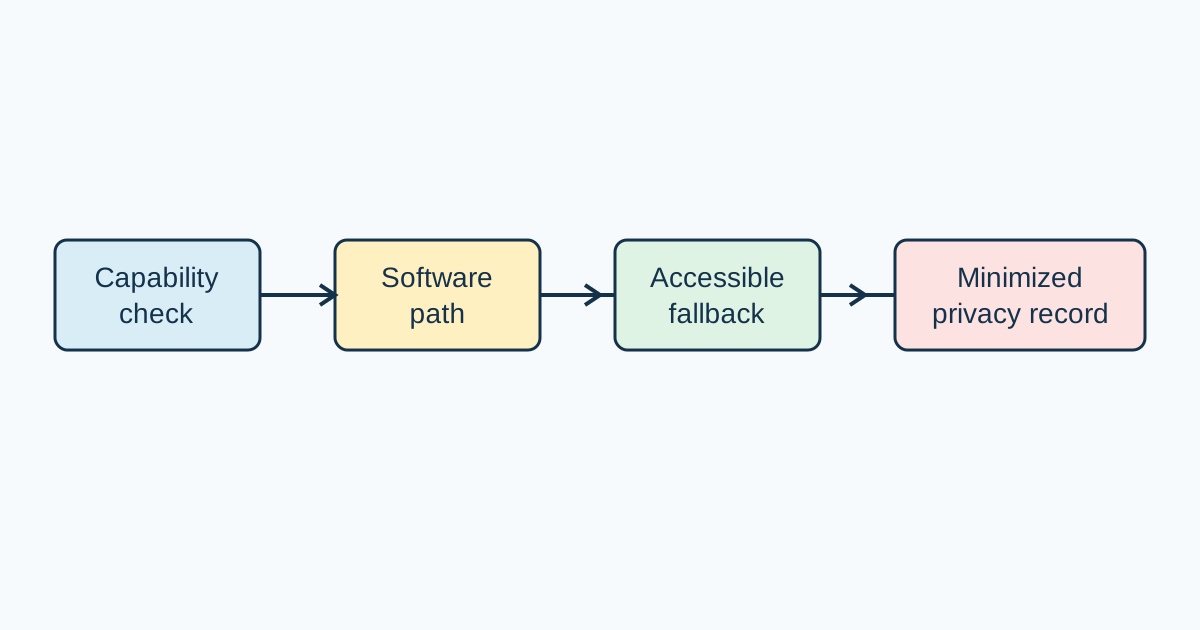
WebGL does not require an application to know which physical GPU is present. A page can ask whether the context it needs is available, attempt a supported operation, and provide a usable alternative when the operation cannot run. This is particularly important when a browser uses a software renderer: the page may remain functional while throughput, memory pressure, or supported limits differ. BotBrowser can repeat this authorized capability journey in a declared profile and rendering mode, but it cannot guarantee identical capabilities on every host or prove a privacy property.
Capability is a product question
WebGL supports interactive maps, product previews, diagrams, and data visualizations, but it should not define whether the underlying task is possible. A person looking for a location needs searchable results and descriptions even if a map cannot start. Someone comparing a product needs dimensions, options, and controls when a three-dimensional view is unavailable. A report reader needs values and labels when an animated chart cannot run. The fallback should expose the same decision-making information in ordinary document structure. This is progressive enhancement: the richer view adds a way to explore content without replacing it. Start by listing the task's essential inputs and outcomes, then identify which controls depend on graphics. Keep those controls in HTML when possible so they remain available before context creation completes, after a failure, and to assistive technology. A canvas alone has no built-in semantics for its drawn shapes; provide names, instructions, and a sensible focus order outside it.
The Khronos WebGL specification and MDN WebGL API reference describe browser-facing behavior, but neither promises identical host performance or limits. Context creation can fail, an option may not fit, or an optional extension may be absent while the core workflow still works. Treat these as separate capability decisions. A successful getContext call does not show that required work will finish; attempt a small representative operation and use its application result. Failure can come from policy, an invalid shader, resource pressure, or an unavailable feature. None requires renderer names or broad host inventories. Context attributes need a product reason because options affect memory and compatibility. Keep headings, labels, navigation, and controls available while the enhanced view initializes. Context attributes are requests that influence creation, not a promise that a particular backing store or performance level will be supplied. Request only options the feature needs, such as alpha or antialiasing behavior, and verify the resulting user-visible outcome rather than assuming the request was honored identically everywhere. A missing optional extension should select another supported feature path; it should not make unrelated page content disappear. This distinction keeps capability handling resilient to browser policy and resource constraints.
Software rendering is a supported path, not a privacy verdict
A software renderer can keep an application usable when hardware acceleration is unavailable or unsuitable. It may also change startup time, memory pressure, or the practical size of a scene. Those observations describe a rendering path, not a person. “The chart is readable and its controls work” is a capability outcome; “the first useful frame takes longer” is an operational observation. Keeping the two separate makes it easier to decide whether to adjust the feature, alter capacity, or show a simpler view without turning performance into an identity claim. The same application can cross a practical limit at different points depending on whether it is drawing a small diagram, decoding large textures, or updating a dense scene. A fallback decision therefore belongs to the feature's required work, not to a fixed label attached to the browser. If a map's text list and search remain usable, slower map motion may be acceptable; if rotation is necessary to inspect an object, that interaction needs a tested alternative.
Comparisons only help when their scope is stable. Hold the browser release, declared profile, viewport, route, page shape, and required operation constant when comparing hardware and software rendering. Describe the host class and mode, then state what the user could do. A result from one browser, host, and page does not establish behavior for every operating system image, driver, GPU, or application. It is also not a ranking: a slower path can still meet the product need, and a fast path can still fail a visual, accessibility, or data-correctness requirement. Record the scenario before comparing results: initial load or later update, amount of visible content, interaction sequence, and the success condition. Without that boundary, one path may be measured during warm-up and another after resources are cached. Keep the reporting language plain, such as “the preview loaded, but rotation was not responsive enough for this task,” and make clear which configuration was exercised. That account helps product teams decide without implying that one result generalizes to unrelated pages or hosts. Measure stages that map to the experience. Useful observations can include when the basic page becomes usable, when the first meaningful graphic appears, whether interaction stays responsive, and whether resources are released after leaving the view. A chart should be evaluated on a representative update, not on a large scene unrelated to its use. A three-dimensional preview should include the interaction people need, such as changing a selected item or rotating the model. Measuring elaborate effects that customers do not rely on adds cost without improving the release decision. Separate page readiness from graphic readiness so a renderer delay does not obscure whether navigation, text, and primary actions are already usable. Use the same start and end events for each comparison, and avoid comparing a single frame with an entire interaction sequence. When a view uses workers or asynchronous asset loading, include the point at which the result can actually be interpreted, not just when a draw call was submitted. Describe variation as observed in the sample instead of turning a few runs into a rule for all systems.
“Software rendering” describes a broad implementation category, not one speed or quality level. Paths can use different algorithms, CPU features, memory layouts, and optimizations. Performance also depends on scene complexity, texture dimensions, shader work, synchronization, and copying pixels back to the CPU. A small interface icon and a dense interactive model are not comparable workloads. State which operation is measured; do not treat one slow sample as a property of every software renderer. Visual correctness also needs a task-based definition. For a chart, preserve values, labels, ordering, and distinguishable series; for a preview, preserve the dimensions and boundaries people use to compare options. Small rasterization differences may be harmless, while a missing boundary or unreadable label changes meaning. Check representative states at the display sizes people use and pair image review with DOM and keyboard checks. That approach catches meaningful regressions without demanding byte-identical pixels from varied rendering implementations.
Operational planning should distinguish latency from capacity. A software path may be acceptable for one session but consume more CPU when many pages render concurrently. Capacity can often improve by lowering decorative texture dimensions, limiting work outside the visible area, reducing unnecessary pixel readback, and choosing a lower-detail mode. Preserve the information the task requires. If detail is decorative, reducing it is usually better than delaying essential controls while a large scene loads. An application can explain the tradeoff plainly: a simpler view is available now, while richer graphics load when supported. Do not hide a long wait behind a blank canvas: show the primary information immediately and make loading or fallback state perceivable without relying on color alone. Release textures, buffers, and listeners when a view is no longer needed so repeated navigation does not retain work unnecessarily. For simultaneous sessions, test a realistic amount of concurrent activity and plan capacity from the application's own service objectives. A single machine's observation can inform that test, but it cannot define a safe limit for every deployment.
Avoid promising equal pixels across GPUs, drivers, operating systems, display scales, and software paths. Color management, antialiasing, rounding, and implementation choices can cause small differences even with identical assets. Decide which properties affect meaning: readable labels, distinguishable data series, visible boundaries, or correct values. Verify those properties with interface-appropriate tolerances. Exact pixel comparison is useful only where exact output is itself a requirement; it is usually not the right measure for an interactive page used across varied hosts. A release check can combine a few stable visual landmarks with a functional assertion and a review of the accessible alternative. Keep test data fixed, state the viewport and scale, and inspect both the graphics and the surrounding HTML. If a change affects chart values, selection state, or interaction reachability, it is not a cosmetic variance and should be corrected even when the overall image looks similar. Conversely, a small antialiasing difference should not be described as a capability failure if the information and task remain intact.
Handle context loss without losing user work
Context loss is a lifecycle change that can occur during editing, movement, asset loading, or navigation. Preserve the task state outside GPU resources: selection, search text, document position, and unsaved input should not exist only in buffers or textures. When webglcontextlost fires, stop issuing draw calls and update the visible state. When webglcontextrestored fires, rebuild the resources needed for the current application state and redraw. Do not assume objects created before loss remain ready for use, and keep reconstruction safe to repeat. The two events mark a resource lifecycle, not an explanation of why a context became unavailable. Keep the application model independent of WebGL objects, then derive buffers, textures, and programs from that model when a context is ready. This avoids treating the renderer's current resources as the only copy of user work. A simple recovery state machine can distinguish ready, unavailable, rebuilding, and fallback states, each with a user-visible outcome and a clear point at which interaction resumes.
The event handler should reflect the recovery decision. An application planning to restore the context can prevent the default loss behavior; one that does not intend to restore should not imply a recovery it will not perform. After restoration, verify the required operation rather than assuming that the event alone means the view is ready. If restoration fails or takes too long, use the same accessible alternative available when the context was absent initially. Avoid automatic retry loops that continually allocate resources, consume memory, or announce confusing status updates. Reconstruction should be idempotent: running the recovery path again must not duplicate event listeners, leak old resources, or reset the selected item. Treat each asynchronous load as belonging to the current view state so a late asset response does not overwrite a newer selection. If the page is leaving, cancel work that is no longer useful. These details turn context restoration into a controlled application transition instead of an unbounded attempt to recover graphics at any cost. Recovery should preserve both user work and accessibility. Keep focus meaningful as the interface changes, announce a short status once, retain keyboard controls, and honor reduced-motion and forced-colors preferences in the HTML alternative. A readable DOM, Canvas 2D representation, static preview, or text explanation can all be appropriate depending on the information. A reload should not be the only path for a workflow with unsaved values. The person needs a clear next action, not private host diagnostics or instructions to identify a driver. For a visualization, a concise table or downloadable data view may be more useful than reproducing every visual effect. For a product preview, a set of labeled dimensions and selectable options can preserve the comparison task. The fallback should be available through the same navigation and not require a pointer gesture that cannot be performed by keyboard. Status text should explain what remains possible and avoid repeating every retry or low-level graphics event. Test loss at meaningful moments: before the initial frame, while a selection changes, during asset loading, and while leaving the view. Verify that navigation and document state survive, that the fallback explains graphics-only information, and that status text does not repeat indefinitely. Also test the page shape used by customers. A top-level document, same-origin frame, and cross-origin embed can face different policies and resource conditions; success in one form does not establish success in another. Include repeated transitions between graphic and fallback views, then check that focus is not lost and that stale rendering work cannot replace current application state. Test with keyboard-only input and with the preferred assistive technology for the product. A cross-origin frame may receive a different embedding policy than a top-level page, and cross-origin image readback can remain restricted even when drawing succeeds. Keep those platform boundaries intact; choose an alternate representation when an operation is intentionally unavailable rather than weakening origin protections.
Minimize privacy data
Graphics data can become identifying when many small observations are combined. A page may be able to observe context availability, optional extensions, limits, and the behavior of particular operations. Each field can have an engineering use, but collecting all of them by default creates a record broader than a fallback decision needs. Start from the product decision and work backward: which fact changes the interface, support action, or capacity plan? Keep only that fact, at the least detailed level that still answers the question. Separate data needed to render a feature from data sent to analytics or support systems. A capability result can often remain in memory long enough to select the path and then disappear; it need not become part of an account profile. If performance monitoring is needed, define the time window, aggregation, access, and removal point before collecting it. Minimize both the number of fields and their persistence, because combining routine operational values can reveal more than any single field suggests.
A document viewer might need to know whether thumbnails loaded, keyboard navigation remained available, and a text alternative appeared. It does not need to retain a renderer label, every extension, and a complete limits table to make that decision. A map may need only a result that its alternate list view is available. A dashboard may record that a required chart operation completed, while keeping actual report values within the application's data controls. This practical minimization still supports reliability work while reducing unnecessary collection. These outcomes can be represented in application terms, such as “preview ready” or “text view selected,” instead of retaining low-level details that do not affect a support decision. If an error report is needed, include only the action and feature state needed to reproduce the issue, with a short retention period and restricted access. Avoid attaching report contents, search text, or personal selections merely because they happened to be present when rendering failed. A small, purpose-built event is easier to explain and govern than a general graphics snapshot. Purpose and retention should match. A short-lived aggregate of failed previews may help determine whether to simplify a feature. A persistent per-user graphics description is different and should not arise merely because a browser exposes values. For routine analytics, aggregate outcomes and avoid attaching a durable graphics profile. Where individual support details are needed, explain the purpose and scope, restrict access, and remove them when the support or deployment decision is over. Temporary diagnostic inspection during development does not mean production needs to transmit the same information. Review who can see operational records and whether the same decision can be made from a coarser aggregate. A field that once helped investigate a release can outlive its usefulness when copied into long-lived telemetry. Set an expiry and a named owner for the collection, and revisit it when the feature, browser support, or support process changes. Privacy review is part of feature maintenance because the minimum useful evidence can change as the application changes. Capability checks do not prove anonymity, security, or absence of tracking. A page owner controls its own collection, and a single controlled result says nothing universal about every origin or browser setup. Privacy depends on the feature's purpose, data minimization, retention, and the surrounding application behavior. If the interface only needs to choose between a WebGL view and text, a bounded outcome and its expiry may be enough. For broader context, see WebGL API capabilities and privacy. Explain the distinction to users when it matters: choosing a fallback locally is different from transmitting graphics details to a service. Apply the same access controls and deletion rules to support attachments as to analytics. A capability check should not quietly change into an identifier simply because a value is easy to read. The least-data design is the one that still supports the defined task, not the one that records the most convenient browser fields.
Where BotBrowser fits
BotBrowser can repeat an authorized WebGL journey with a declared profile, browser release, host, and rendering mode. Its WebGL configuration supports comparison of a software path with an accepted baseline, within the declared conditions. A useful result names the user-visible operation, page shape, and accessible outcome, then states what was and was not covered. It does not guarantee identical capabilities or pixels on every GPU, driver, operating system image, application, or embedding policy, and it does not prove privacy or anonymity. The BotBrowser WebGL documentation describes supported configuration. That makes it useful for a bounded compatibility question: did this declared setup complete the operation, and did the non-graphics path remain usable? Keep the answer attached to the browser/profile, host class, and page shape actually exercised. Do not extend it to an untested customer environment or infer a graphics cause from a different result. The browser's configuration can support controlled repetition, while the application owner remains responsible for defining a useful fallback and evaluating its own privacy collection.
For a rollout, explain which content remains available, what the person can do, and what alternative appears if the required operation cannot run. Keep the status tied to observed application behavior rather than guessing about the host. Review the path after a browser release, profile refresh, host image, or graphics library changes. A compact record can include the browser/profile pair, host class, rendering mode, operation, accessible result, timing, owner, and review date. It can also note whether focus, form state, search state, and document position survived a loss event. Set an expiry for operational observations and leave out fields that cannot change support or release decisions. Keep the test fixture close to the product interaction: a chart should update representative data, and a preview should perform a realistic selection or rotation. Record the start condition and completion criterion so another reviewer can repeat the same question. If the accessible path is not part of the configured browser check, assess it through the application's own rendered route and assistive-technology testing. A browser execution result alone cannot establish that the complete user experience is accessible. This makes a repeatable browser journey useful without treating it as a detector or identity tool. It answers a bounded question about a defined page and operation. It cannot certify every environment, replace accessibility review, or establish what a third-party origin collects. Keep customer-facing claims proportional to the evidence: the supported path was exercised under stated conditions, the alternative remained available, and other hosts may behave differently. That boundary helps application owners make a practical decision while preserving uncertainty instead of hiding it. A sound release note identifies the operation and setup, reports whether the required content and controls remained available, and says which environments were not tested. It should not turn one profile comparison into a guarantee about all visitors or a privacy certification. Re-run the check when the page's rendering logic or fallback changes, not just when a browser version changes; the application itself is part of the tested system. Pair execution evidence with review of source behavior, data collection, and the route people actually use. Design the fallback before the renderer: specify information and controls that remain available, user state that survives path changes, and a visible next action for each state. A real check should exercise the smallest required operation, not run a benchmark or request a renderer label. Evaluate support, visual and interaction quality, and performance separately. If software rendering misses a timing budget, consider capacity planning, smaller decorative textures, paused off-screen animation, reduced readback, or a simpler visual mode, while preserving required information. Test top-level and embedded page shapes because policy and origin boundaries can change availability. A canvas may draw a cross-origin image while readback or export remains restricted; describe those limits accurately instead of weakening policy to force a graphics check through. State the task, path, visible result, and remaining unknowns. Browsers can expose graphics signals even when an application uses only a boolean capability decision, so privacy still depends on purpose limitation, minimization, and retention controls.
Sources
Related Articles
Take BotBrowser from research to production
The guides cover the model first, then move into cross-platform validation, isolated contexts, and scale-ready browser deployment.