WebGPU Adapter Information and User Privacy
Understand what a WebGPU adapter represents, when it may be unavailable, and how to choose graphics fallbacks without collecting a device profile.
Want the structured docs for Fingerprint?
This article lives in the editorial library. For step-by-step setup, reference material, and ongoing updates, jump into the docs section.
WebGPU lets an application request a graphics adapter that can run a WebGPU device. The adapter is a capability boundary for the requested task, not a user identity. Availability depends on the browser, operating system, graphics stack, policy, and current resources. A privacy-aware application asks only enough to select a usable experience, then provides a clear fallback when the request cannot succeed.
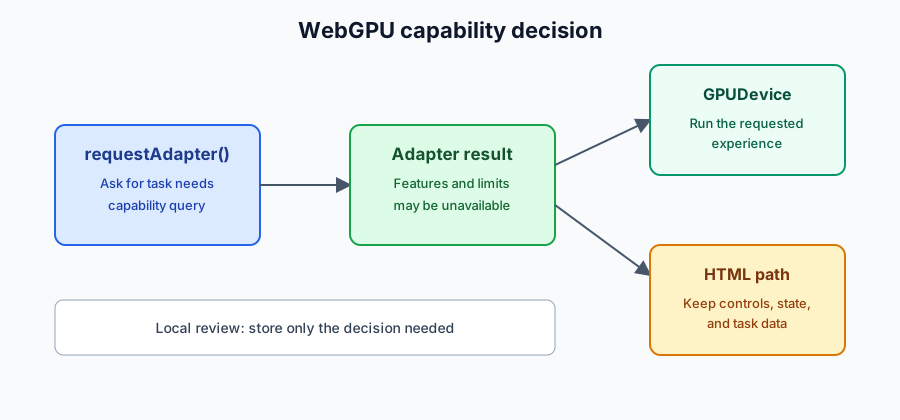
What an adapter represents
The W3C WebGPU specification describes an adapter as an object representing a physical or software graphics implementation that can be used to create a device. An application may request an adapter and then request a device with the limits and features it needs. The browser can return no adapter, and an adapter request can expose only the information permitted by the implementation. It is not a promise that every adapter has the same features or that a device will be created successfully.
An adapter is therefore different from a renderer inventory. The application should start with a visible goal such as an interactive scene, a compute task, or a reduced visual mode. The WebGPU API reference on MDN describes the public API surface; it does not establish universal support across browsers. For the broader distinction between capability checks and tracking, see the WebGL capabilities and privacy guide.
Availability and permission boundaries
WebGPU is exposed through navigator.gpu only where the browser implements the API and allows it in the current context. Requesting an adapter can fail or return no result. A later device request can also fail when required features, limits, or resources are unavailable. Treat these outcomes as normal compatibility branches, not as evidence about a person or a unique machine.
The W3C specification defines the API contract, while browser documentation explains release-specific availability and restrictions. Do not describe WebGPU as universally available, and do not promise that an adapter request will produce a prompt or a stable set of fields. A product should document the browser range it has tested and keep the unsupported path useful.
Privacy-aware application choices
Use the smallest decision that selects the experience. If the application needs a basic device, record that the request succeeded and whether the required feature set was accepted. Do not retain a complete adapter description, combine graphics details with account or network data, or turn capability differences into a persistent identifier. A session-local decision is often sufficient; a remembered quality preference should be an explicit user choice rather than an inferred profile.
Diagnostics need a separate purpose. When support needs more information, explain what will be collected, restrict access, and set a retention period. Do not ask users to submit an adapter inventory by default. The cross-surface browser privacy guide explains why combining individually ordinary signals can create a broader privacy impact.
Fallbacks and accessible recovery
Render essential page content and controls outside the graphics surface. If adapter or device creation fails, offer a reduced scene, a static image, a data table, or another representation that serves the same task. Preserve filters and user input across the transition. Tell the user what changed and what action remains available; do not leave a blank canvas or retry indefinitely.
Test the success path, missing adapter, rejected device request, resource failure, and a later context loss. The expected result is a usable state, not a detailed explanation of the user's hardware. Keep names, status messages, keyboard controls, and equivalent information in ordinary HTML so the fallback remains accessible. The WebGPU fingerprinting overview covers the separate tracking risk; this guide stays focused on normal application capability decisions.
Plan the request around a user-visible outcome
An adapter request should have a clear owner in the product flow. Before calling it, define what the person is trying to do, which visual or compute result is essential, and which parts are optional. A product viewer may require rotation and selection while making shadows optional. A scientific tool may require a chart and labels while treating animation as an enhancement. A video effect may require a particular texture path but still provide a still image when that path cannot start. These decisions let the application stop after it has enough information to choose a supported mode.
Do not initialize WebGPU merely because the page loaded. Delay expensive work until the user reaches the feature, and keep navigation, account actions, purchase controls, consent choices, and help links as ordinary HTML. A graphics surface should support the workflow, not become the only route through it. This design also makes it easier to preserve state if the browser reclaims resources or if the user switches to a fallback.
The request can be treated as a short compatibility transaction. Prepare the surrounding interface, ask for an adapter, check only features and limits tied to the planned mode, request a device, and report one of a small number of outcomes. Those outcomes might be standard mode, reduced mode, static alternative, or unavailable with support guidance. A short list of owned outcomes is easier to explain and test than a matrix of device-specific branches.
If the adapter is present but a required feature is not, do not keep probing unrelated fields. Explain which user-visible function is unavailable and select the documented lower mode. Keep that failure separate from a missing network asset or a server timeout. These causes have different remedies and should not trigger the same diagnostic collection.
Keep capability data local and temporary
Capability data should have a defined lifecycle. A page can hold the result in memory for the current visit, use it to choose a scene, and discard it when the session ends. If a person asks to remember a quality preference, store the preference they selected, such as “reduced effects,” rather than the collection of adapter facts that led to it. This preserves agency and allows the person to change the choice later.
Avoid copying adapter objects or detailed feature lists into analytics labels, account records, URLs, screenshots, or support tickets. A support event can usually say “standard WebGPU scene failed to initialize” and include a redacted flow stage and application version. That small record is more useful for an operational question than an unexplained hardware inventory. If a case genuinely requires additional diagnostics, request them in that case, state the reason, limit access, and delete them on a documented schedule.
Graphics capability is not a reliable basis for sensitive inference. It does not establish identity, location, income, disability, intent, or ownership of a device. Do not combine it with account, network, font, storage, or timing signals to create a profile. The fact that an adapter exposes a limit or feature says what the current graphics path can do; it does not say who is using the browser.
Third-party engines and observability libraries deserve the same review. Check whether a library sends adapter details to a remote endpoint, whether that transfer is required for rendering, and how long the service retains it. A dependency loaded for convenience does not remove the application's responsibility for its data flow. Keep the core graphics path available when optional telemetry is disabled.
Test failure paths as product behavior
A useful test plan covers more than the successful scene. Run with WebGPU unavailable, with the adapter request returning no result, with a required feature missing, with device creation rejected, with a resource or validation error, and with a later loss of the graphics context. Also test slow asset delivery and an optional texture that fails after the device has started. Each case should reach a known state with a message, a next action, and preserved application data.
Accessibility belongs in each state. Give the visual an accessible name that describes its purpose, not merely “WebGPU canvas.” Keep instructions, prices, legal text, status, and important values in page content so they can be read, translated, enlarged, and copied. Make reset, pause, view selection, and fallback actions ordinary controls with keyboard focus. A user should be able to leave the scene without a pointer gesture or a timed animation.
Respect reduced-motion preferences before starting nonessential movement. Provide a stable view when animation is disabled, and do not hide an important state transition inside a visual effect. If the fallback is a table, image gallery, or summary, make sure it reflects the same filters and selected data as the graphics view. Two representations that disagree create a correctness problem even when both render successfully.
Recovery should be bounded. A single retry may make sense after a transient resource loss, but repeated requests can leave the user waiting and produce noisy logs. When the bounded attempt is exhausted, explain that the simpler view is being used and keep the rest of the page active. If unsaved work exists only inside the graphics device, say that honestly; otherwise keep application state in ordinary page data so it survives a presentation change.
Finally, document the support contract. Record the tested browser range, the required WebGPU generation, the feature set for each mode, the fallback for an unavailable adapter, and the owner for reviewing changes. Revisit the contract when the user-facing requirement changes or new evidence shows a support difference. A browser release alone is not a reason to promise identical graphics behavior everywhere.
The same discipline applies to compute workloads. Define the result the user should receive, the acceptable waiting time, and the non-GPU representation before requesting an adapter. A report can expose calculated values as a downloadable table. A media tool can keep trimming and metadata controls available while an optional preview is unavailable. A simulation can provide a paused state and summary values while a richer view loads. This keeps the API request connected to a product commitment rather than to an open-ended inventory of the environment.
Feature and limit checks should have named owners. The rendering team can own scene requirements, the accessibility team can own equivalent content, and the privacy team can own retention and disclosure. When a requirement changes, update the mode contract and its fallback together. Avoid adding a new check simply because a value is easy to read; every value should answer a documented product question.
Browser updates can change availability without changing the user's task. Treat a new result as a compatibility observation, record the tested release and visible outcome, and decide whether the owned mode still works. Do not silently convert a temporary observation into a long-lived profile field. A release note that says “reduced scene selected” is usually more useful than one that includes a list of adapter limits.
A clear error message should use ordinary product language. Say that the enhanced graphics view is unavailable and that a simpler view remains available. Explain how to retry only when retrying is meaningful. Avoid naming a driver, vendor, or model when the user does not need that information to continue. This reduces confusion and prevents a technical diagnostic from becoming an accidental disclosure.
Data minimization also applies to caches. If a service worker or local store remembers a graphics choice, give the entry a purpose and an expiration policy. Remove it when the feature is retired. If a person clears site data, the application should be able to make the capability decision again without treating the new session as suspicious or unusual.
Applications that operate in managed environments should respect administrator policy. A policy may disable WebGPU, limit resource use, or make a feature unavailable in a particular context. The product should present the same useful fallback and should not ask the user to weaken a security or privacy control. Support documentation can identify a policy-controlled failure without requesting a complete environment report.
The network boundary is separate from the adapter boundary. Loading a shader, model, texture, or data set may require a remote request even when the adapter is local. Explain which part failed, apply the service's normal access rules, and do not attribute every network error to graphics support. Keeping these boundaries separate makes both troubleshooting and privacy notices clearer.
Retain only operational events that have a current owner. A small event might include the mode selected, the stage that failed, a coarse application version, and a timestamp subject to the normal retention policy. It should not include raw adapter objects, full feature arrays, account identifiers, or unrelated browser signals. Review event schemas when the support question changes and delete fields that no longer answer one.
The fallback should be part of design review, not a last-minute error page. Give it the same content hierarchy, labels, and essential actions as the preferred mode. If the visual carries a result, repeat that result in text or structured data. If the visual carries an action, provide a named control. This makes the simpler path useful for people who cannot or do not want to use graphics.
When a graphics task is optional, the least invasive path can be the default. Let a person open the enhanced view deliberately, and make it easy to return to the standard page. A user choice is clearer than inferring interest from capability values. It also reduces unnecessary initialization and makes resource use easier to explain. Record which path was tested and who owns the fallback so future updates can remove stale assumptions safely while keeping the support message aligned with the actual browser behavior.
Review the article's public claims against the current W3C specification and MDN documentation before publishing a compatibility change. The standards describe the API contract; they do not guarantee a result on every browser, operating system, or policy configuration. Keep product guarantees narrower than the evidence and label tested behavior as tested behavior. A compatibility record should name the fallback owner, the date of the observation, and the exact user-visible outcome. This makes later changes auditable without preserving a detailed device profile. Teams can remove obsolete checks when the product no longer depends on them, reducing maintenance cost and the amount of technical data processed. A support note can link to the tested browser range and describe the visible fallback without exposing implementation details. Keep that notice current when the task changes, and remove claims that no longer have an owner or a reproducible check. This gives readers a stable expectation while preventing a temporary browser result from becoming an unqualified promise. A documented lifecycle also makes deletion practical: when a feature retires, remove its adapter checks, cached decisions, analytics fields, and support instructions together. The same record should state whether the observation came from a normal, reduced, or fallback path, because those outcomes have different user implications. Keep examples tied to the public behavior that readers can verify, and avoid turning a single browser result into a claim about every implementation. This preserves useful guidance while acknowledging that WebGPU support evolves.
Sources
Related Articles
Take BotBrowser from research to production
The guides cover the model first, then move into cross-platform validation, isolated contexts, and scale-ready browser deployment.