Back-Forward Cache: Lifecycle, Privacy, and State Consistency
Understand how the browser back-forward cache restores pages, which lifecycle events matter, and how to protect private state without breaking navigation.
BotBrowser Team
Want the structured docs for Platform?
This article lives in the editorial library. For step-by-step setup, reference material, and ongoing updates, jump into the docs section.
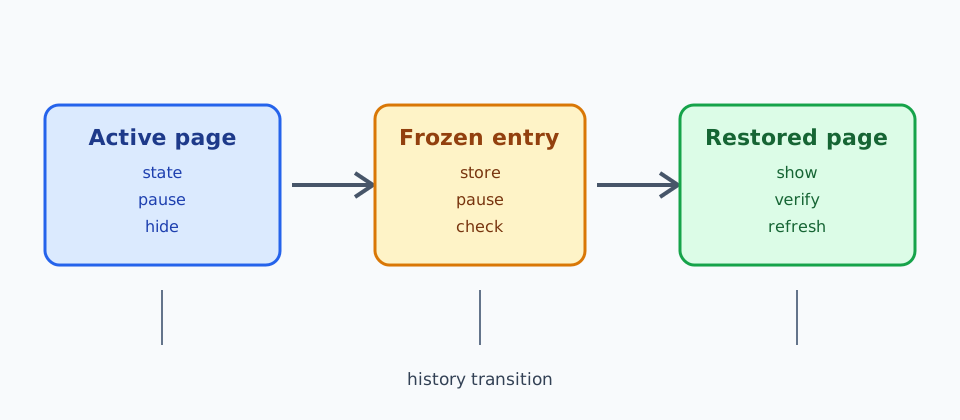
The back-forward cache (BFCache) lets a browser restore a previously visited page almost instantly when a person goes back or forward. The restored document may include its DOM, JavaScript heap, form values, and in-memory application state; it is not a normal reload. This improves navigation, but it also means code must treat a page as paused and later resumed. The WHATWG HTML specification defines the history traversal model, while MDN's BFCache guide documents practical eligibility and the pageshow and pagehide events. The W3C Page Visibility specification defines the visibility signal used alongside BFCache; visibility is related lifecycle evidence, not proof that a document was cached. BotBrowser can run authorized lifecycle tests in isolated BrowserContexts; it cannot force a site to enter BFCache, change a browser's eviction decision, or decide what an application should retain.
TL;DR
- BFCache restores a prior document without a normal reload;
pageshowandpagehideare key evidence points. - Visibility, restoration, authentication, and server freshness are separate checks.
- BotBrowser repeats an authorized fixture but cannot force eligibility or guarantee restoration.
Contents
- The lifecycle to design for
- Privacy is a state boundary
- Consistency after restoration
- BotBrowser's bounded role
- Conclusion
The lifecycle to design for
When a document is put into the cache, pagehide can report event.persisted === true. When it returns, pageshow reports the same flag. These events are the portable observation points; a load handler does not run again, and a framework component may still hold its old memory. visibilitychange is useful for saving user work, but it does not prove that a page entered BFCache. The Page Visibility API and Page Lifecycle API guidance describe complementary signals.
Pause timers, polling, media, and expensive observers when a page is hidden or cached. Resume them from pageshow, and re-check data that may have changed while the document was away. Abort or ignore stale requests so a response from the first visit cannot overwrite a newer account state after restoration. Keep cleanup idempotent: a page can be evicted instead of restored, and a user can close it without a BFCache transition.
Privacy is a state boundary
BFCache is process-local browser state, not a server session. A restored page can still show a private dashboard, draft, or form value that was visible before navigation. Do not put secrets in DOM attributes, URLs, or long-lived JavaScript objects merely because the page is short lived. On pageshow, verify the current authentication and account boundary before rendering sensitive data. If the session is no longer valid, replace the view with a sign-in state and clear account-specific memory.
Logout should revoke the server session first and then clear client state. A Cache-Control: no-store response can prevent a document from being cached, but it is a policy trade-off and is not a universal privacy eraser. Test the browser versions that matter to the product rather than assuming one header gives the same result everywhere. A different origin embedded in the page owns its own storage and session.
Consistency after restoration
The most common bug is treating a restored document as current without checking its data. On pageshow, compare a version, account identifier, or freshness token with the server. Revalidate only what can have changed; avoid a blanket reload that defeats the fast history path. Reconnect a WebSocket or event stream only once, and dispose of the previous connection when pagehide says the document is being cached. Service workers and shared workers have independent lifecycles, so coordinate their messages rather than assuming page memory is authoritative.
Use a small matrix for testing: same-tab back/forward, a cross-origin navigation, an account switch in another tab, a revoked session, a changed record, and a page that is ineligible for BFCache. Assert both the visual result and the network behavior. A restored page should not resend a form, repeat a purchase, or expose data from the previous account.
BotBrowser's bounded role
BotBrowser provides isolated BrowserContexts and repeatable browser profiles for authorized lifecycle and privacy tests. Teams can open two contexts, navigate away and back, revoke a synthetic session, and inspect pageshow/pagehide outcomes without sharing cookies or storage. BotBrowser does not bypass origin policies, guarantee BFCache eligibility, solve interactive challenges, invalidate a site's server session, or remove records outside the context. Browser version, operating system, proxy, and site policy can change the result, so record those inputs with each test.
Practical checklist
- Observe
pagehideandpageshow; usepersistedas a signal, not a promise. - Pause and resume timers, media, sockets, and observers without duplicating them.
- Re-check authentication, account identity, and data freshness before showing private state.
- Test revoked sessions, account switches, changed records, and non-BFCache navigations.
- Report browser restoration separately from server logout and data deletion.
BFCache is a performance feature with lifecycle consequences. Treat restoration as a new verification point, and fast history navigation can remain both responsive and privacy-aware.
Related reading
- Navigation API history and privacy
- Service worker cache lifecycle and privacy
- Browser site data clearing and account boundaries
Conclusion
Treat a restored document as a fresh verification point: pause work safely, re-check authorization and freshness, and keep browser observations separate from server-side decisions.
Sources
Related Articles
Take BotBrowser from research to production
The guides cover the model first, then move into cross-platform validation, isolated contexts, and scale-ready browser deployment.