CreepJS CSS Computed Style Collector: What It Reads
Trace CreepJS CSSStyleDeclaration key collection, alias handling, and separate system color and font probes without confusing support with a measured value.
BotBrowser Team
Want the structured docs for Fingerprint?
This article lives in the editorial library. For step-by-step setup, reference material, and ongoing updates, jump into the docs section.
CreepJS has a CSS computed-style collector separate from its media-query collector. The pinned
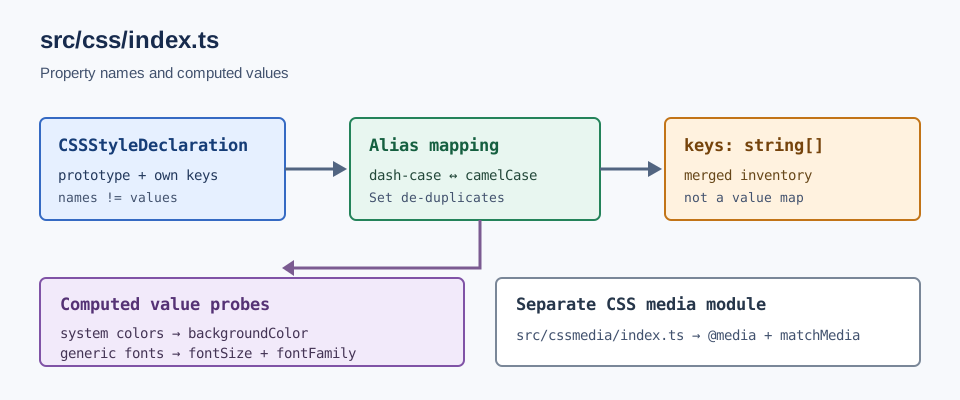
src/css/index.tsbuilds a property-name inventory, normalizes aliases, and then reads system colors and generic fonts as separate computed values. BotBrowser documents profile-driven CSS settings, but does not claim to implement this third-party collector or predict its output. A list of supported names is not a list of observed style values and is not a device identity.
TL;DR
- The pinned collector reads the names available on a
CSSStyleDeclaration; it does not compute every named property's value. - It combines prototype names, enumerable own keys, and recognized dash/camel-case aliases, then de-duplicates the names with a
Set. - System colors and generic system-font keywords form separate value probes through
getComputedStyle(). - CreepJS keeps this module separate from the
@mediaplusmatchMedia()checks covered in the CSS media-channel analysis.
Contents
- The collector's input
- How its key inventory is assembled
- Inspect an owned page without inventing a baseline
- Alias normalization has limits
- System colors and fonts are separate probes
- What a key list cannot tell you
- Practical conclusion
The collector's input
The source calls getComputedStyle(document.body) and passes the resulting CSSStyleDeclaration into computeStyle(). That object is the source for a list of available property names, but the collector does not loop over that list and save every computed value. The distinction matters: color appearing in keys establishes that the interface exposes that property name in this environment; it does not state which color value a page element computed.
The collector also reads the declaration object's prototype with Object.getPrototypeOf() and Object.getOwnPropertyNames(). It records the prototype's own names as one input to the inventory. The CSS-based fingerprinting guide covers media-query and resource-loading collection, rather than this declaration object's property inventory.
This is not the CreepJS CSS media collector. That other module asks preference questions through an @media custom-property channel and matchMedia(); its fourteen paired preference keys answer a different question from the computed-style property inventory described here.
How its key inventory is assembled
The source first iterates Object.keys(cssStyleDeclaration). Numeric keys are treated as indexed entries: their values are property names, so the collector adds the value rather than the numeric index. Non-numeric keys are added unless they are custom-property names beginning with --. A value that itself resembles a custom-property token is also excluded from the indexed-name branch.
CSS exposes many properties in both dash-case and camel-case forms. For example, a property can have a spelling such as background-color and an alias such as backgroundColor. The collector checks whether the counterpart exists with the in operator and marks it so the final inventory does not need to keep both spellings as unrelated observations. It also handles a leading vendor prefix when reducing a name for counterpart lookup.
The final list is constructed from the prototype names, own enumerable names, and names inferred through counterpart checks. A Set removes duplicates. That means counts in the rendered report describe the collector's combined key inventory for the running environment. They are not a stable cross-version property count, and they do not imply that every name contributed a unique computed value.
| Input | What the source takes | What the resulting entry means |
|---|---|---|
| Prototype | Object.getOwnPropertyNames(proto) | A name declared directly on the declaration object's prototype |
| Own keys | Object.keys(cssStyleDeclaration) | An enumerable own key, with indexed entries converted to their property-name values |
| Alias counterpart | in checks across dash/camel forms | A spelling relationship used to avoid counting aliases as separate properties |
| Final inventory | new Set([...]) | A de-duplicated name list, not a value map |
The pinned CSS collector source is the authority for these steps. The standard CSSStyleDeclaration API provides context for the object being inspected; it does not say that every browser reports an identical enumeration.
There is a practical consequence for comparing two report versions. If the keys array changes, the first question is whether the set of exposed names changed, not whether the page's rendered color changed. A new alias may alter a raw array before de-duplication; a change in prototype placement may affect the input list; and the final Set can hide duplicate spellings while preserving a changed unique name. Conversely, the inventory can stay identical while a computed system color changes, because that value is stored in the separate system.colors result.
When inspecting a saved report, keep its hierarchy intact. The top-level CSS object includes the computed-style result and the system-style result; the UI adds a short hash and a count for display. A rendered count is convenient for scanning, but it is a lossy summary: it does not preserve which property names were present, whether their spelling was normalized, or what the system color and font probes returned. A useful comparison retains the underlying arrays and objects instead of transcribing only the displayed count.
The collector can be reviewed as a small pipeline. The first stage chooses getComputedStyle(document.body) and the CSSStyleDeclaration prototype. The second stage builds names from prototype and own-key sources, including aliases. The third stage independently asks the browser to resolve selected system colors and generic fonts. Those stages have different inputs and produce different output shapes, so a comparison should not flatten them into a single “CSS fingerprint” field.
| Stage | Source operation | Output shape | A useful question |
|---|---|---|---|
| Select declaration | getComputedStyle(document.body) | A declaration object for the body | Which element and document produced this object? |
| Enumerate names | prototype names plus Object.keys() | A de-duplicated keys array | Did the available or enumerable names change? |
| Resolve system colors | set a color keyword, read backgroundColor | One result per keyword in system.colors | Did a resolved system color change? |
| Resolve generic fonts | set a generic font keyword, read size and family | A size/family string in system.fonts | Did the browser resolve the system-font shorthand differently? |
This staging matters when the report changes after a browser update. A changed name inventory belongs to the enumeration stage. A changed backgroundColor string belongs to the system-color stage. A missing system object may instead indicate a caught exception or a blocked result. The stages may be related by the environment, but the source does not collapse them into one value or provide a causal explanation for every difference.
Inspect an owned page without inventing a baseline
For a page that you own, a small console capture can preserve the categories the collector keeps separate. This is a reading aid, not a reproduction of every CreepJS helper or a claim that another service uses these exact values:
const declaration = getComputedStyle(document.body);
const prototype = Object.getPrototypeOf(declaration);
const ownNames = Object.keys(declaration).map(key => {
  const numeric = !Number.isNaN(Number(key));
  return numeric ? declaration[key] : key;
});
const prototypeNames = Object.getOwnPropertyNames(prototype);
const inventory = [...new Set([...prototypeNames, ...ownNames])];
const selectedValues = Object.fromEntries(
  ['color', 'background-color', 'font-family', 'font-size'].map(name => [name, declaration.getPropertyValue(name)])
);
console.log({ inventory, selectedValues });
The example deliberately labels the value sample as selectedValues; it does not claim to recreate CreepJS's full alias logic. It also does not substitute this selected-property sample for CreepJS's system color and font probes. In the pinned source, those probes create or reuse an element, set a keyword in its inline style, call getComputedStyle(), and read a specific resolved field. A page author should record which element was inspected and whether the test changed it before interpreting a captured value.
To compare captures responsibly, store the browser build identifier, page origin, element choice, capture time, and exact object in separate metadata from the CSS result. Then diff the name list independently from selected values. Do not sort or normalize the saved raw object before retention, because doing so can erase evidence about the representation that the collector actually returned. A normalized view may be derived for analysis, provided the original is kept alongside it.
An absent value deserves its own state. A property may be unsupported, a lookup may return an empty string, or the collector may fail before producing the expected object. These are not equivalent outcomes. The CSSOM API defines property access and computed-style behavior, but the page's evidence should still record whether the field was missing, empty, or populated. That discipline prevents a missing observation from being rewritten as a measured negative.
Alias normalization has limits
The source's counterpart checks are a de-duplication rule, not proof that every CSS spelling is interchangeable in every context. It derives a counterpart for names containing a dash, accounts for a leading prefix marker, and also derives a dash form from capital letters. If the counterpart exists on the declaration object, the code marks it in propertiesInPrototypeChain. The final key list then includes those marked names before Set removes exact duplicates.
For a reader comparing output, there are two separate questions: whether two strings are recognized as aliases by this collector, and whether reading the two CSSOM spellings on an element gives the same result. The source addresses the first question while constructing a name inventory. It does not store a value comparison for every alias pair. Do not infer a value-equivalence test from the fact that both spellings were normalized during enumeration.
Custom properties are also handled differently from ordinary names. Names matching --... are not added through the ordinary branch, and numeric entries whose value resembles a custom-property token are excluded from that indexed-name path. That is a source-specific filtering decision. It does not establish that a custom property is invisible to CSS or unavailable through getPropertyValue(); the collector's keys field is simply not a complete dump of all declarations or stylesheet contents.
| Observed change | First source area to inspect | Avoid concluding |
|---|---|---|
keys count changes but common names remain | Alias counterpart set and prototype enumeration | That a style value changed by the same amount |
| A new dash/camel spelling appears | The name transformation and in check | That both spellings were value-tested |
system.colors changes | Keyword assignment and computed backgroundColor | That the system theme alone caused it |
system.fonts changes | Generic font assignment and computed size/family | That an installed application font was enumerated |
| CSS report is absent or partial | Error capture and the render path | That the browser returned an empty inventory |
The table is a triage map derived from the pinned implementation. It identifies where the collector obtains each output class; it does not diagnose the cause of a specific report difference without the corresponding raw objects and environment metadata.
System colors and fonts are separate probes
The getSystemStyles() function makes two distinct groups of calls. For colors such as Canvas, CanvasText, ButtonFace, and Highlight, it assigns a background-color style to a temporary element and reads getComputedStyle(el).backgroundColor. For generic system-font keywords such as caption, icon, menu, message-box, small-caption, and status-bar, it sets the font shorthand and records the resulting computed fontSize and fontFamily.
Those are value observations, unlike the keys inventory. They are also separate from the CSS color parser: the collector asks the browser to resolve system color keywords, then stores the returned computed color string. The CSS system-color reference documents the keyword category, while getComputedStyle() describes the browser API used to read resolved style.
If no element is passed, this source creates a div, appends it to document.body, obtains the values and removes the element. When an element is passed, it uses that element instead. The function catches failures and returns no system-style result after reporting the error through CreepJS's collector error path. A missing result is therefore not the same as a measured empty list.
The fixed input lists are useful for interpreting what the collector does not attempt. The color list includes names such as Canvas, CanvasText, Field, FieldText, Highlight, and WindowText; the font list includes generic system-font keywords, not a catalogue of all installed families. The output therefore answers “how did these keywords resolve on the selected element?” rather than “which fonts are installed?” or “what color scheme preference did matchMedia() report?” The latter is a separate media feature question and belongs to the other collector.
The source writes each color keyword as background-color: <keyword> !important before reading the resolved background. It writes each font keyword through the font shorthand and then combines the resolved fontSize and fontFamily into one string. These choices define the measurement surface. If a downstream consumer compares the values, the record should retain the keyword and field name as well as the returned string; otherwise a row such as CanvasText → rgb(...) can be mistaken for a direct reading of an arbitrary page's text color.
Temporary DOM state also matters. With no supplied element, the helper appends its own div to the body, reads styles, and removes it. That is different from reading an existing application element whose classes, inherited styles, or inline declarations may affect the result. The collector's default path makes its chosen fixture explicit in source; a reproduction should not silently switch to a styled element and then call the difference a browser-level discrepancy.
What a key list cannot tell you
A property inventory cannot establish that a page used a property, that a particular value was returned, or that a remote detector consumed the report. The source can reveal which API names it records and which system-style values it requests. It cannot, by itself, identify hardware, an operating system, or a person. A name's presence is an interface observation; interpretation needs the surrounding browser version, document context, and the actual values being compared.
BotBrowser documents CSS-related settings in its CSS signal consistency reference. That page concerns profile configuration. It does not claim to reproduce this third-party collector or predict how another service will interpret its output. Keep product capability statements separate from claims about CreepJS source behavior.
FAQ
Does keys contain every computed CSS value?
No. It contains names assembled from declaration-object keys and aliases. The code shown here separately requests only the system color and generic-font values in getSystemStyles().
Why does the collector inspect both the object and its prototype?
The source treats own enumerable keys and prototype property names as distinct inputs, then merges them. That exposes the collector's normalization strategy; it does not mean each source represents a separate browser measurement.
Is this the same signal as matchMedia()?
No. src/css/index.ts reads CSS declaration names and system styles. src/cssmedia/index.ts asks media-query preference questions through CSS rules and matchMedia(). The shared CSS label does not make them one collector.
Can this list identify a device?
No. Property names describe an API surface, and system-style results are browser-resolved values. Neither alone establishes a physical device or a unique identity.
Sources
- Pinned CreepJS CSS collector (
src/css/index.ts) - MDN:
Window.getComputedStyle() - MDN:
CSSStyleDeclaration - MDN: CSS system colors
- BotBrowser: CSS signal consistency
Practical conclusion
Read the CreepJS CSS report as two kinds of data: a merged property-name inventory and a separate set of computed system color and font values. When comparing reports, keep those categories apart, pin the source revision, and record the actual value object rather than inferring it from the key count. The neighboring media-query collector article covers the independent preference channels; the CreepJS font-table analysis covers a different report field, not computed system CSS fonts.
This article is part of the guide: What Is a Browser Fingerprint?
Related Articles
CreepJS CSS Media Queries: Two Channels, One Preference
FingerprintCSS Fingerprinting: How Stylesheets Track You
FingerprintCreepJS Font Tables: 51 Names and 14 Possible Returns
FingerprintCreepJS WebRTC Report: Trace the Fields
FingerprintCreepJS WebGL Report: Contexts and Capability Signals
FingerprintCreepJS Math Signals: Read the Source Fields
Run the same check in BotBrowser
Load a profile, keep the signals you just read about consistent inside the browser, and confirm the result on your own machine before a rollout.