Network Information API Fingerprinting: A Policy Review
How navigator.connection values add to a browser fingerprint, why a proxy exit can disagree with them, and how to review a network information policy.
BotBrowser Team
Want the structured docs for Fingerprint?
This article lives in the editorial library. For step-by-step setup, reference material, and ongoing updates, jump into the docs section.
The Network Information API gives a page a few connection estimates through navigator.connection. It was designed so that a site can choose lighter resources on a slow link, but the same values can be read by any script on the page, so they can also add to a browser fingerprint. The sections below cover what each property reports, why a proxy exit can disagree with the values a browser measures, how to choose between native, profile-based, and field-level policies, and how to review the result without guessing. BotBrowser can keep the network information values of one profile consistent in a controlled context; it cannot change the actual connection or how a site uses those values.
TL;DR
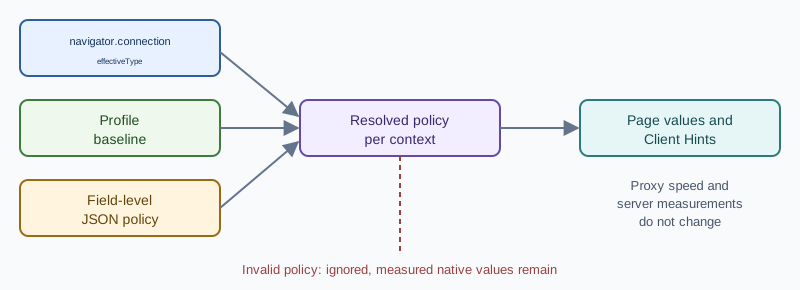
navigator.connectionexposeseffectiveType,rttin milliseconds,downlinkin megabits per second,type, andsaveDatawithout a permission prompt, so every script on the page reads the same five fields.--bot-network-info-override=falsekeeps the host's measured values, the bare flag orprofileapplies every value the loaded profile defines, and a JSON policy sets only the fields it names.- Malformed JSON, an unknown field, an invalid value, or a
profileselector for a field the profile lacks discards the entire policy, and the measured native values remain in place. - One resolved policy belongs to one browser context and also feeds the
RTT,Downlink,ECT, andSave-Datarequest headers, so compare the page with the headers your own server receives. - Run the native and override comparisons back to back on the same host and route, because a proxy moves the path and not the values the page reads.
Contents
- What navigator.connection exposes
- How connection values add to a fingerprint
- Choosing a network information policy
- Mismatches a reviewer can catch
- Reviewing a native run against an override run
- Where BotBrowser fits
- Practical conclusion
What navigator.connection exposes
The NetworkInformation object reports coarse hints about the connection the browser is using at the moment. Pages use it to decide whether to defer an optional video, pick a smaller image candidate, or postpone a prefetch. It needs no permission prompt, so any script that runs in the page can read it, and a change event fires when the browser's estimate moves.
effectiveTypeclassifies observed conditions asslow-2g,2g,3g, or4g. It labels the quality the browser has seen, not the radio technology.rttis an estimated round-trip time in milliseconds. The browser rounds it, so it moves in steps.downlinkis an estimated downstream bandwidth in megabits per second, also rounded.typenames the connection technology, such aswifi,cellular,ethernet, orunknown, where the browser implements it.saveDatais a boolean that reports whether the user asked for reduced data use.
These values are estimates produced by the browser, not measurements a page can trust to the last digit. The specification lets the browser round and bucket them, and two readings taken a few seconds apart can differ. Support also varies by browser family. Chromium-based browsers expose the object, Firefox exposes a limited surface, and Safari does not provide it, so a review has to start from the browser brand the deployment targets. A missing object on a brand that normally exposes it is an unusual observation of its own. The specification also describes downlinkMax, an upper bound for the underlying connection technology, which only some browsers implement, so do not assume that a property you can set in a policy exists on every target. For the application side of the same API, including how to handle missing or changing hints, see Network Information API for adaptive content.
How connection values add to a fingerprint
No single property identifies a person. effectiveType has only a handful of possible values, type is often unknown or absent, and saveData is off for most visitors. The contribution is statistical. A particular effectiveType, a rounded rtt, a rounded downlink, and a saveData setting together narrow the set of browsers that could have produced a visit, and that narrowing adds to whatever other signals the page collects. A claim that these values alone identify a user, or that they reach a fixed identification rate, goes beyond what the public specification and documentation support.
The values also carry context about where the browser sits. A fiber desktop, a cellular phone, and a shared office link tend to report different combinations. saveData is a user preference, so a visitor who enables it stands out more than one who leaves it off. Because the object is readable without a prompt, a script can record the values at load time and compare them with later readings in the same visit.
Rounding is the browser's own privacy measure, and it limits how much any one reading reveals. The signal that remains is mostly about stability and plausibility. A context that reports one connection class all session, together with an IP address, timezone, and language that fit it, looks like an ordinary visit. A context whose network values change in ways the rest of the visit does not explain, or contradict its other signals, gives a script something to compare. This is why a reviewer looks at the whole set of values together instead of tuning one number in isolation.
The most practical problem appears with a proxy. A browser that sends traffic through an exit in one region still measures the path it actually uses, so rtt and downlink describe that real path and not a connection typical of the exit region. When the IP address, timezone, and language all point to one place and the connection estimates describe a different kind of link, the combination is unusual. Neither the proxy nor a profile fixes this by itself, because a proxy changes the route and not the values the page reads. The proxy configuration guide covers the routing side, and a network information policy covers the values the page can see.
A second place where values can disagree is the request itself. The same estimates can reach servers that opt in through Client Hints, using the RTT, Downlink, ECT, and Save-Data request headers. If JavaScript reports one connection class and the headers report another, the inconsistency is easier to notice than either value alone. A sound policy treats the JavaScript API and the network-related Client Hints as one decision. The Client Hints fingerprinting guide explains the wider family of hints.
Choosing a network information policy
The --bot-network-info-override flag takes one policy, and there are three useful choices. Pick the smallest one that answers the question in front of you.
- No override, written as
false: the page sees the browser's native estimates with their normal rounding. This is the right baseline for any comparison. - Profile baseline, written as the bare flag,
true, orprofile: every network value the loaded profile defines is used. It suits a deployment where the profile already describes the intended connection class. - Field-level JSON: only the named fields are set, and omitted fields stay native. A policy that names
rttalone leaves every other field at its measured value.
Use the native policy when you want to measure what the host connection reports, for example while debugging or when a deployment has no reason to present anything else. Use the profile baseline when the profile was chosen to describe the device and connection you want a page to see, because one flag then brings every available network value along and keeps them consistent with each other. Use field-level JSON when a scenario needs one or two specific values, such as a different rtt for a distant exit, and the rest of the fields should stay as they are.
# Native values
--bot-network-info-override=false

# Every available value from the loaded profile
--bot-network-info-override=profile

# Selected fields only; omitted fields stay native
--bot-network-info-override='{"effectiveType":"3g","rtt":180,"downlink":1.8,"saveData":false}'

# Mix sources field by field
--bot-network-info-override='{"type":"profile","rtt":"host","downlink":2.5,"saveData":"profile"}'
A JSON policy accepts type, effectiveType, rtt, downlink, downlinkMax, and saveData. Each field takes either a supported value or a source selector, profile or host. The selector profile takes the field from the loaded profile, and host keeps the measured value on purpose. Supported values follow the platform: type is one of wifi, cellular, ethernet, bluetooth, wimax, other, none, or unknown; effectiveType is one of slow-2g, 2g, 3g, or 4g; rtt is a non-negative integer in the supported range; downlink and downlinkMax are non-negative numbers in the supported range; saveData is true or false. A custom or host policy can run without a profile, while a profile selector needs the profile to define that field.
Treat every value as a baseline, not a constant. The browser still applies its limits, rounding, and per-host variation, so two origins can receive slightly different numbers from the same baseline, and two browser launches need not return the same exact rtt. No policy promises one fixed number across origins, and a constant unrounded value on every site would itself look unusual.
Invalid input is not fatal and it is not partial. Malformed JSON, an unknown field, an invalid value, or a profile selector that points at a field the profile lacks causes the whole policy to be ignored, and measured native values remain. Other profile settings keep working. The consequence for a reviewer is simple: native-looking numbers are not evidence of a custom override. Check the policy text first, then read the values again.
The resolved policy belongs to a browser context. Pages, workers, navigations, and the supported Client Hints requests inside that context use the same result, and another context can use a different policy. Set the policy before the first page in the context is created. A policy passed on the command line takes priority over the profile's networkInfoOverride setting, so check both when the result is not what the profile suggests.
Mismatches a reviewer can catch
Most problems with network values are inconsistencies between fields or between a field and the rest of the scenario, not a single wrong number. These cases are worth checking before a deployment goes live.
A device class that does not fit the connection type. A profile that describes a desktop browser normally reports ethernet, wifi, or unknown, while a phone profile is more likely to report cellular. If you set type by hand, make sure it still fits the device the profile describes.
Fields that do not fit each other. The specification defines effectiveType in terms of round-trip time and downlink, so a hand-written 4g next to a round-trip estimate measured in seconds describes a link that rarely exists. When you name several fields, choose values that describe one plausible connection, or let the profile supply the whole set.
A data-saving flag that nobody intended. Most visitors leave saveData off, so setting it to true makes the browser rarer. Enable it only when the scenario really represents a user who asked for reduced data, and otherwise let the profile or the native value decide.
A host selector in a proxied scenario. The host selector keeps the measured value, which means the reading again reflects the real path, including the hop to the proxy. That is the right choice when you want measured behavior, and the wrong one when you expected the page to look like a connection typical of the exit region.
A worker that reports something different. The resolved policy is meant to apply to pages and workers in the context alike. If a dedicated worker or a shared worker used by the application reports different values from the page, treat it as a finding and record which policy and context produced it.
A native baseline taken on a different connection. Native values depend on the connection of the host at the moment of the run, so two native runs on different networks, or hours apart, are not directly comparable. Take the native and override runs back to back on the same host and route.
A context that was changed too late. Because the resolved policy is fixed for the context, a value read from a page that existed before the policy was applied can differ from a value read in a fresh context. When two readings disagree, compare them in separate contexts that were each created with the same policy.
Reviewing a native run against an override run
A review is a comparison, not a single reading. Run the page once with the native policy and once with the policy under test. Keep the browser release, profile, proxy route, viewport, and application state the same, and change only the policy value. Use a fresh context for each run so that the new policy is not mixed with a page that was already established.
- Record the exact policy text for each run, including the field names.
- Open a small diagnostic page that displays
effectiveType,rtt,downlink,type, andsaveData, and nothing else. - Read the values from the console as shown below, in the page and in a worker if the application uses one.
- Compare the network-related Client Hints that reach a server you operate, if that server requests them.
- Repeat the reading after a navigation to confirm that the context keeps one result.
const c = navigator.connection;
console.log(c.effectiveType, c.rtt, c.downlink, c.type, c.saveData);
Consider a deployment that uses a proxy exit in another region together with a profile for a broadband desktop. The native run shows the measured values of the host. The profile run should show the profile's connection class instead, with rounded values that stay stable inside the context. A field-level run that names only rtt should change that one value and leave effectiveType, downlink, and the other fields as the native run reported them. If the field-level run changes more than the fields it names, or changes nothing, the policy text is the first thing to read again.
A good result looks like this. The fields named in the policy change together, in the page and in the request headers, while fields left out keep their native values. Values may be rounded or vary slightly between origins, which is expected and not a failure. Just as important is what does not change. Proxy throughput, routing, and any latency a server measures on its own requests stay what they were, so a comparison that expects the server to observe a different speed is testing the wrong thing.
When a value looks wrong, check in this order: the profile that was loaded, the JSON syntax, the field names, whether the policy was set before the first page of the context, which of the command-line and profile settings won, and the proxy route. A policy that was ignored because it was invalid returns measured values, so a page that looks unchanged does not mean the browser stopped working. A separate context is the cleanest way to test a corrected policy.
Keep the review record to configuration and visible outcomes: the release, the profile name, the policy text, a label for the route, and the values read. Leave out page content, credentials, and private request data. That is enough for someone else to repeat the comparison, and it keeps the record safe to share with the team.
Repeat the comparison whenever the browser release, the profile, or the proxy provider changes, because rounding rules, supported properties, and the route itself can all move. A saved comparison from the previous release is a useful reference. If the named fields still change together and the unnamed fields still stay native, the policy still does what the deployment expects. If the numbers differ but the relationships hold, the cause is usually ordinary rounding and per-host variation rather than a broken policy.
Where BotBrowser fits
BotBrowser supports one --bot-network-info-override policy, either the profile baseline, native values, or field-level JSON, that sets the navigator.connection properties and the corresponding Client Hints for each browser context, so you can keep the network values a page sees aligned with the profile and proxy scenario you selected. It does not change a proxy's real speed or latency, server-side measurements, or what a site infers from other network signals, and an invalid policy is ignored, which leaves the measured native values in place.
Network values are one input among many, so keep them consistent with the timezone, locale, and language chosen for the same route, as described in timezone and locale configuration. Browser support and specification details change, so check the sources below when a property or hint behaves differently on a new browser release.
Public sources
Practical conclusion
A network information review ends with three artifacts: the exact --bot-network-info-override text, the five values read in the page and in a worker, and the RTT, Downlink, ECT, and Save-Data headers received by a server you control. When a run looks native, read the policy text before the numbers, because a rejected JSON object silently falls back to measured values. Repeat the pair of runs after any browser release, profile swap, or proxy provider change, and compare the two records field by field rather than looking at one number.
This article is part of the guide: What Is a Browser Fingerprint?
Related Articles
Network Information API: A Fallback-First Guide
PlatformNetwork Information API: Hints, Privacy Limits, and Fallbacks
FingerprintNavigator Properties Fingerprinting: Browser Leaks
Fingerprintnavigator.hardwareConcurrency: Real CPU Core Count
FingerprintWebGPU Fingerprinting: The Next Generation of GPU Tracking
Fingerprintwebgl_debug_renderer_info: What Your GPU Reveals to Pages
Take BotBrowser from research to production
The guides cover the model first, then move into cross-platform validation, isolated contexts, and scale-ready browser deployment.