Screen and Window Fingerprinting: Display Tracking
Distinguish screen, available area, window, layout viewport, visual viewport, zoom, and pixel density without treating display observations as proof of identity.
BotBrowser Team
Prefer the maintained product doc?
This article has a matching page in the docs center. Use the docs for the canonical setup flow, current flags, and long-term reference.
Screen and window values are privacy-relevant because a page can observe parts of a display configuration without a permission prompt. They can help a site adapt layout, and they can also contribute to a broader browser fingerprint. A reported resolution, window size, or pixel ratio describes what this browser context exposes at that moment. It does not prove a particular person, operating system, monitor, or physical location. Location itself is governed by a separate permission, described in Browser Geolocation Permissions and Location Accuracy. The useful question is which surface produced a value, under which conditions, and what the value cannot establish.
TL;DR
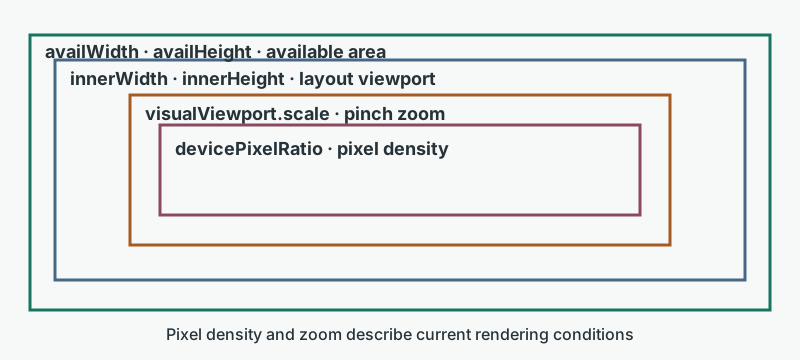
screen.widthreports the display the browser exposes, whilewindow.innerWidthreports the layout area a document can occupy, so neither value alone describes a monitor or a window.availWidthandavailHeightshrink when persistent system UI, a dock, or a remote session reserves space, and the size of that difference does not name the system that reserves it.devicePixelRatiofollows display scaling and page zoom, whilevisualViewport.scalefollows pinch zoom, so both can change during one session with no hardware change.- In a headful desktop session
--bot-screenand--bot-windowdefault toreal; set both toprofileto apply the loaded profile, or pass explicitWxHor JSON values.
Contents
- Watch the video
- Screen and available area
- Window dimensions and CSS viewports
- Why these observations matter for privacy
- Protection boundaries and validation
- BotBrowser capability and limits
- Practical conclusion
Watch the video
This English-language video explains which display surface each number a page reads comes from, runs a controlled local test where a resized frame stands in for the window, and shows what those declared values do and do not prove. The test uses one browser build on one host with no BotBrowser profile and no zoom, so it shows how the surfaces relate, not what any real display, host, or person is. The audio is in English.
Screen and available area
The Screen object exposes
values such as width, height, availWidth, availHeight, colorDepth, and pixelDepth. width and height
describe the screen containing the window in CSS pixels as reported to the document. The available area describes the
portion available to windows under the platform's current display arrangement. Persistent system UI can reduce
availHeight or availWidth. These fields are observations of browser-visible state, not a hardware inventory. CSS
media queries expose related constraints such as viewport width, resolution, color scheme, and color gamut. A media
query result is another view of current rendering conditions, and CSS Fingerprinting: How Stylesheets Track You covers how such styling features are used for tracking. It should be interpreted with writing mode, scrollbars,
browser UI, and responsive layout in mind. A CSS pixel is not a promise about one physical pixel. Device pixel ratio
describes a rendering relationship, not a serial number for a monitor. Multiple displays, display scaling, rotation,
docking, remote sessions, accessibility settings, and a browser window moving between displays can change the values
visible to a page. A snapshot can therefore change during an ordinary session. A difference between screen and available
area may reflect current window-management state; it does not identify a specific operating system or user.
Window dimensions and CSS viewports
window.innerWidth and window.innerHeight describe the layout viewport used by page
layout, including the vertical scrollbar when present. window.outerWidth and window.outerHeight describe the browser
window boundary as exposed by the browser. The relationship between inner and outer dimensions depends on browser
chrome, scrollbars, window state, and platform behavior. screenX and screenY describe a window position when
exposed, but a page should not treat them as stable location identity. The layout viewport is the coordinate space used
to lay out most document content. The visual viewport represents the part currently visible to the user and can change
during mobile browser UI movement, on-screen keyboard use, or pinch zoom. window.visualViewport provides that visual
view when supported, with dimensions in CSS pixels affected by the pinch scale. A page can use both viewports for
accessibility and interaction without treating either as a permanent device attribute. Page zoom and pinch zoom are
different. Page zoom changes the CSS layout scale used by the browser and can affect device pixel ratio. Pinch zoom
changes the visual viewport and how a user inspects content, especially on touch devices. Device pixel ratio can also
vary with display scaling and moving a window between screens. These values should be read as current conditions, not
combined into an identity claim.
Why these observations matter for privacy
Screen and window signals can add context
to other browser observations. A single width is usually shared by many users, while a changing combination of screen,
available area, viewport, zoom, and pixel ratio may be more distinctive in a particular population. A script reads each
of those properties synchronously from screen, window, and visualViewport, so collection adds no request the user
can block or deny. The combination
still does not prove who is behind a browser or which host system supplied every value. A site should collect only what
its layout or support task needs, explain that purpose, and avoid retaining raw display inventories as account identity.
Do not infer a person's operating system from a window margin, taskbar-like difference, or one media-query result.
Browser UI, remote desktops, accessibility tools, custom window managers, and multi-display state can produce
overlapping observations. Do not infer physical monitor dimensions from CSS pixels, and do not call a value a hardware
identifier. Headless and headed modes can expose different window conditions even when a profile is the same; a
controlled headless result is not a guarantee of identical behavior in every headed environment.
Protection boundaries and validation
Changing a display setting on the host changes the host, not the meaning of every browser
signal. A browser-level reported value can be consistent for a selected context, but it cannot change physical monitor
hardware, operating-system display settings, or information collected outside the browser process. A privacy review
should compare equivalent journeys and record the viewport, zoom, display arrangement, and browser mode used for each
observation. Validate the relationship between screen values, window dimensions, CSS media queries,
visualViewport, and devicePixelRatio in the supported workflow. Test a resize, a display change, a rotation or
docking change where relevant, page zoom, pinch zoom, and a mobile browser UI transition. Treat unsupported APIs and
unavailable values as conditions to handle, not as evidence of a hidden identity. Keep a user-facing layout usable when
a value changes or is unavailable.
BotBrowser capability and limits
BotBrowser documents profile-based controls for
screen and window information reported to web pages. --bot-screen=profile and --bot-window=profile apply the
profile's dimensions instead of the host display, and a headful desktop session uses real for either value unless
both flags are set explicitly. In profile mode, this can support display consistency for
authorized privacy and compatibility testing. The control applies to browser-visible APIs and does not modify physical
display hardware, host operating-system display settings, or OS-level screen enumeration outside the browser process. A
real-window mode can reflect actual resize and multi-monitor conditions. Headless display settings can be
profile-controlled, but they are not an unconditional promise of parity with every headed browser. Verify the selected
profile and runtime rather than assuming that a reported value describes the host. For related context, read device
pixel ratio and browser rendering, cross-surface browser
privacy, and browser permission
fingerprinting. These topics also separate browser-visible signals from
claims about a person or a machine.
Start with the user outcome. Record which surface is needed: Screen, window dimensions, CSS media queries, layout viewport, visual viewport, or pixel ratio. Record whether
the browser is headed or headless, whether the window moved between displays, and whether page or pinch zoom was active.
Compare only equivalent conditions. When a value changes, ask whether resize, browser UI, display scaling, rotation,
docking, or zoom explains it before assigning privacy meaning. The review should state what was observed, what remains
unknown, and what action follows. A responsive layout may need to recalculate. A support workflow may need a new
screenshot. A privacy workflow may need to discard a raw value after the decision. None of these actions turns display
observations into a permanent identity. For CSS pixels, images, and responsive choices, CSS pixels are the unit used by
web layout. They let a page describe a usable interface without assuming that every display has the same physical pixel
density. A button with a CSS width occupies the intended layout width whether the underlying display has a denser or
less dense pixel grid. The browser maps that layout to the current rendering environment. devicePixelRatio describes
part of that mapping, but it does not reveal the physical size of a display or establish that two sessions use the same
hardware.
Images need the same distinction. A bitmap resource has a finite number of image pixels, while its displayed CSS size is chosen by layout. A page may select an appropriately detailed resource for the current rendering density, but the choice should serve legibility and bandwidth rather than identity collection. A higher-density asset can make text or graphics clearer on a dense display. It does not prove the display is a particular model, and a page should keep a usable fallback when an image candidate, media query, or rendering feature is unavailable.
Responsive layouts normally
respond to the layout viewport, not to a full reported screen. A navigation bar, form, article column, or dialog needs
the space available to the document, which can be much smaller than screen.width when a window is not maximized. Using
screen dimensions to choose a desktop-only interface can make an ordinary split window, side-by-side application, or
small browser window unusable. Use the relevant layout constraints, preserve reflow and zoom support, and let the person
change the window size without losing content or controls.
The visual viewport answers a different interaction question. It helps position a temporary affordance near content the user can currently see, such as an anchored control or focused field. It is not a replacement for the layout viewport. A mobile on-screen keyboard can reduce the visible region while the document's layout still has a different width or height. Pinch zoom can alter the visible area and scale while retaining the broader layout. A page that tracks a visual-viewport change should update its accessible position and avoid assuming that the change identifies a device.
Resize, keyboard, and display transitions make window values
time-dependent. A user can resize a window, restore it from full screen, move it to another display, rotate a device,
connect a dock, or begin a remote session. Browser UI can expand or collapse on mobile. An on-screen keyboard can
obscure a focused input. Each condition may affect the layout viewport, visual viewport, outer window dimensions, screen
selection, or pixel ratio differently. Correct application behavior starts by handling the change rather than treating
it as an anomaly. When a window crosses displays with different scaling, the rendering relationship can change and
devicePixelRatio may change with it. A page that draws a canvas, chooses image detail, or positions an overlay should
respond to the current value and to resize-related events through its normal layout path. It should not cache an earlier
ratio as a durable display identity. The user may move the same browser window back again, change scaling, or use a
display arrangement that differs between sessions.
Available area has similarly bounded meaning. A reduced availHeight
can be consistent with persistent operating-system UI, but it does not tell a page which system owns that UI. Different
platforms, shells, accessibility configurations, remote desktops, and display arrangements can overlap. A page should
not label a visitor's system from an available-area difference. For product work, the useful response is to ensure that
important controls remain reachable when the available area is constrained.
Color values also need careful scope.
colorDepth and pixelDepth describe values exposed through Screen; they are not a measurement of high dynamic
range, a complete color-gamut report, calibration state, panel quality, or visual accessibility. Color-gamut and
contrast decisions belong to their own browser features and to visible testing. A page can offer a legible fallback and
respect user preferences without claiming that a screen field identifies a color-capable monitor. Authorized
compatibility examples apply the same distinctions to concrete user journeys. An authorized compatibility check can
start with a concrete user task. Consider a person increasing page zoom to read a support form. The layout should reflow
so that labels, controls, error text, and the submit action remain available. The result demonstrates that the
application handles a changed layout scale. It does not demonstrate the person's identity, their eyesight, their
operating system, or the physical display used for the test. Consider a person using pinch zoom on a touch device to
inspect a long help page. The visual viewport becomes smaller than the layout viewport, and a floating action must avoid
covering the focused content or keyboard. The expected result is usable interaction at the current visible scale. The
result does not identify a handset, establish an account relationship, or prove that every browser will expose identical
visual-viewport timing. Consider a user dragging a browser window from one display to another. The page may need to
redraw a canvas at a newly reported pixel ratio, move a popup into the available visible area, or recompute a responsive
breakpoint. Record the display arrangement and browser mode for the test so a later comparison uses equivalent
conditions. Passing that test proves the declared application behavior for that journey. It does not prove a permanent
multi-monitor configuration or a host operating system. These examples apply the same data-minimization rule. Keep only
the observation needed to resolve the visible issue, such as a temporary viewport class or a support screenshot approved
by the user. Do not turn a sequence of zoom levels, resize events, or display transitions into an authentication factor.
When diagnostics are necessary, explain why they are collected, retain them for the shortest useful period, and separate
a layout observation from a claim about identity. Practical interface boundaries keep those journeys usable. An
interface should remain understandable when reported display fields disagree with an earlier snapshot. Do not lock a
dialog width to an initial screen value, and do not position critical content from an outer-window estimate alone. Use
normal document flow for essential text and controls. When an overlay must follow a visible control, measure the current
layout and leave room for zoom, a keyboard, and safe scrolling. If an API is missing, keep the ordinary document path
available instead of replacing the page with a display-specific error. Text sizing is another useful boundary. Readers
may use page zoom, browser text preferences, system scaling, reader modes, or assistive technology. These choices can
change how much content fits without changing the purpose of the page. A valid layout test checks whether headings
remain associated with their content, form labels remain visible, focus remains discoverable, and controls can be
reached with keyboard and touch. It does not classify users by their settings. Avoid using a display observation as a
silent policy decision. A narrow layout can offer a compact navigation pattern, but it should not remove account
recovery, privacy controls, or support information. A dense display can receive a sharper bitmap resource, but it should
not receive more personal-data collection. A changed visual viewport can reposition an element, but it should not
initiate a new permission request. These boundaries keep responsive behavior useful while limiting the privacy meaning
assigned to routine display changes. The same rule applies to error handling. If a requested rendering feature is
unavailable, explain the visible limitation in the interface and preserve the task's alternative path. Do not expose raw
display fields as an error message when a plain action is enough. A reader who cannot use an enhanced view should still
be able to read content, submit a form, contact support, and change privacy choices. This is a compatibility result, not
evidence about the reader's device. For a comparison to remain useful, record the application version, browser mode, and
visible task rather than an unbounded set of display fields. Repeat the same task after an intentional resize or zoom
change and describe whether the content reflowed, stayed reachable, and preserved the selected state. This gives support
and engineering a bounded result they can act on. It does not turn ordinary display variation into a profile of the
person using the page.
Practical conclusion
Review order decides whether a display observation means anything. Name the surface the task depends on first
(Screen, the layout viewport, the visual viewport, or devicePixelRatio), then record the browser mode, the window
state, and the zoom level that produced the value. A comparison between two sessions is valid only when those
conditions match.
For interface work, make layout decisions from window.innerWidth and position temporary controls with
visualViewport, keeping the document readable when that API is absent. Treat availWidth and availHeight as
constraints on the space a window receives, not as a description of the platform.
For an authorized BotBrowser check, load the intended profile, set --bot-screen=profile and --bot-window=profile
together in a headful session, and confirm the reported values on the pages the journey uses. A reported display value
explains what the browser context exposed at that moment; it does not identify the host, the monitor, or the person.
Sources
This article is part of the guide: What Is a Browser Fingerprint?
Related Articles
Screen and Viewport Properties for Responsive Design
FingerprintDevice Pixel Ratio Policy with --bot-dpr
FingerprintBrowser Geolocation Permissions and Location Accuracy
PlatformWindow Management API: Multi-Screen Boundaries
FingerprintText Measurement Fingerprinting: Sub-Pixel Tracking
FingerprintBrowser Permission Fingerprinting: Privacy and Consistency
Take BotBrowser from research to production
The guides cover the model first, then move into cross-platform validation, isolated contexts, and scale-ready browser deployment.