DNS over TLS: Resolver Privacy, Deployment, and Failure Boundaries
Understand how DNS over TLS changes resolver transport, how deployment differs from DNS over HTTPS, and what resolvers and proxies can still see.
Want the structured docs for Network?
This article lives in the editorial library. For step-by-step setup, reference material, and ongoing updates, jump into the docs section.
DNS over TLS (DoT) sends DNS messages over a TLS-protected TCP connection, commonly to a resolver that accepts service on port 853. It can protect a query from a local network that would otherwise read or alter plaintext DNS, but it does not make browsing anonymous. The browser, operating system, proxy, resolver, destination, and account can each see different parts of a request. A useful privacy policy names the resolver and control owner, then states which traffic is and is not covered.
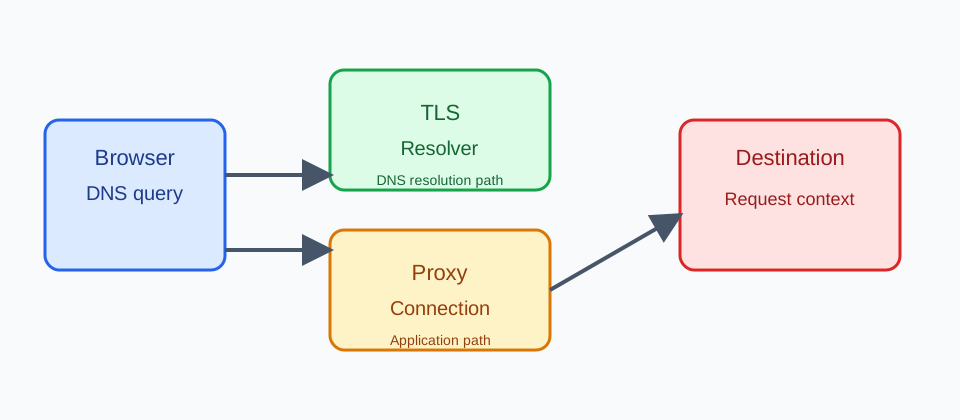
What DoT changes
Traditional DNS often uses UDP or TCP without encryption to a resolver configured by the operating system or network. DoT carries the DNS exchange inside a TLS session over TCP. RFC 7858 describes the protocol and its authenticated server connection; the MDN DNS guide explains DNS as the name-resolution step. DoT changes transport and resolver relationship, not the destination site's policy.
DoT is a transport profile, not a universal browser feature. A device, operating system, router, enterprise agent, or dedicated resolver client may establish the TLS session; many browsers expose DoH controls instead of a direct DoT switch. DoT does not require every lookup to use one endpoint, and a policy may use a local resolver, a proxy-provided resolver, or a system path for fallback. Document the tested browser, operating-system, and network settings rather than promising a universal mode.
DoT and DoH are different deployment choices
DoT and DoH can protect DNS messages with TLS, but they sit at different protocol layers. DoT normally uses a long-lived TCP connection to a resolver service, conventionally port 853. DoH maps DNS messages into HTTPS requests and responses, so it can use the same HTTP infrastructure, ports, proxy settings, and connection pooling as other web traffic. Neither choice alone determines which organization operates the resolver or what it retains.
Port and protocol placement affects deployment. A network that permits ordinary web HTTPS may still block or intercept a dedicated DoT port. A managed network may deliberately terminate, restrict, or route DoT at a gateway. DoH may traverse an HTTP proxy where DoT cannot, while a policy may prefer DoT for a controlled device-to-resolver link. These are operational differences, not evidence that one protocol makes a person anonymous or defeats network controls.
The resolver still receives the DNS question in either design. TLS hides message contents from observers that cannot terminate the session, but the resolver must decrypt the request to answer it. A provider can therefore observe names, timing, source information available at its edge, and account or policy metadata. Compare the complete route and retention policy rather than treating an encrypted transport as a complete privacy product.
Browser controls and user choice
DoT is usually a device, operating-system, router, or resolver-client policy decision, not a page-level permission. An enterprise policy may control the endpoint and certificate checks; a network may block port 853; and a browser may have no DoT setting at all. A web page cannot reliably detect or override that choice. Explain the effect of a setting in ordinary language and provide a supported fallback when name resolution fails.
Browser vendor controls commonly document DoH rather than direct DoT. Their options and defaults can change, and a device-level DoT client can operate below the browser. Do not treat a provider label as proof that all DNS, connections, or telemetry use the same route, and do not ask a person to weaken an administrator's policy to complete an unrelated task.
Proxy, resolver, and destination boundaries
A proxy and a DoT resolver solve different routing problems. A proxy carries application requests after a name has been resolved, while a resolver answers a name query. Depending on configuration, the browser may resolve through DoT before connecting to a proxy, ask the proxy to resolve a name, or use a system path for a fallback. The exact order is implementation- and policy-dependent.
The resolver can usually see the queried name and request metadata needed to answer it. The proxy can see the connection it carries and its own logs. The destination can see the request that reaches it, including application headers and account context. HTTPS protects the connection between the browser and the DoT endpoint; it does not hide the destination from the destination or erase records kept by a service. State these separate observers in a data-flow review instead of claiming that DoT removes tracking.
For a managed browser, assign ownership for the browser setting, proxy route, resolver account, and retention policy. Keep a per-context proxy decision separate from the resolver choice, and record only the operational outcome needed to diagnose a failure. A DNS answer is not proof of a user's location, identity, or intent.
Privacy limits and failure handling
DoT can reduce exposure to a local DNS observer, but it does not prevent a resolver from learning queries, a proxy from learning connections, or a site from learning the request it receives. Resolver selection also does not remove cookies, account identifiers, browser storage, or application telemetry. Avoid combining DNS events with unrelated browser signals to create a profile.
Name resolution can fail because of endpoint availability, policy, certificate validation, captive portals, incompatible networks, or an unreachable destination. Keep the task usable when a secure-DNS mode is unavailable, and show a clear retry or documented alternative. Do not silently switch to an unapproved resolver, loop on retries, or call a failure an attack signal. A bounded diagnostic event such as resolver-unavailable is usually safer than storing the queried name.
A practical review checklist
Before changing a DoT setting, document the intended resolver, who controls it, what metadata it retains, and which browser versions were tested. Verify the proxy and resolver arrangement with controlled endpoints that your team owns. Test policy-managed, custom-provider, unavailable, and fallback states without collecting real users' query histories.
Keep user-facing controls explicit: explain whether a change applies to this browser, profile, or managed device; make an administrator-owned setting read-only; and provide an ordinary recovery path. Recheck the BotBrowser proxy configuration guide when a workflow also uses a proxy. The durable promise is narrower than “private DNS”: the application can explain its route, minimize records, and remain useful when a resolver or policy changes.
Related guidance: DNS leak prevention and proxy, DNS, and WebRTC consistency cover adjacent route ownership questions.
Choosing a resolver responsibly
Resolver choice is a governance decision as well as a network decision. Compare the provider's published operating policy, jurisdiction, retention explanation, incident process, and support model. A provider that offers encrypted transport may still receive the query name, the request time, and network information needed to serve the request. Encryption in transit does not make the provider unable to observe its own service.
Use a resolver that matches the purpose of the browser profile. A personal profile may follow the person's documented preference. A managed profile may require an organization-approved endpoint and a policy notice. A test profile should use a controlled domain and a resolver arrangement that the test owner can explain. Do not select a provider solely because its public claims use the word "private," and do not claim that a custom endpoint is safer without checking who operates it and how failures are handled.
Keep the provider choice separate from application identity. A web page should not require a particular resolver to sign in, access an account, or disclose content unless that dependency is an explicit, reviewed product requirement. Resolver availability varies by network, and a person may have no authority to change a managed setting. A useful application can report that a name could not be resolved without turning the event into a risk score.
How fallback paths affect the promise
Secure-DNS settings can have more than one path. A browser may try a configured DoT endpoint, use a system resolver when the endpoint is unavailable, or honor an administrator's disablement. Some networks intercept the first connection to help with captive-portal access; some environments block unknown endpoints; and some operating systems centralize DNS policy below the browser. These behaviors are reasons to state the tested contract carefully, not reasons to assume that every lookup is encrypted.
Define the acceptable fallback before shipping. For a public information page, a temporary resolution failure may be handled with a retry and a readable offline state. For a security-sensitive workflow, the product may require a known resolver and stop before sending an application request. The decision belongs to the service owner and should be documented in user-facing language. Never silently fall back to an endpoint that a person or administrator did not approve.
A fallback is also a lifecycle event. If a browser update changes the default, a certificate expires, or a policy is refreshed, the page may experience a different route without any code change. Avoid caching a previous assumption in an account profile. At most, retain a short-lived operational state such as "name resolution unavailable," with an owner and deletion policy. Recompute the route when the browser or profile is restarted and when the relevant policy changes.
What a web application can and cannot know.
The web platform generally does not expose a portable, authoritative API saying which resolver answered a particular lookup or whether DoT protected it. A page can observe an application request succeeding or failing, but that outcome does not identify the transport used underneath. Timing differences are not reliable evidence of a resolver, and a page should not build a fingerprint from them.
Support staff may need a reproducible description of the environment. Ask for the browser name and version, profile or managed-policy status, approximate time, visible error, and a controlled hostname that the organization owns. Do not ask a person to paste their complete browsing history or a list of every hostname they looked up. A support record can use a redacted stage such as dns-resolution-failed and a correlation identifier that has a short lifetime.
When an application uses a proxy, keep its own observability explicit. A failed proxy connection can occur after successful resolution; a proxy can also resolve a hostname on behalf of the browser. Separate those stages in logs and user messages. "The secure connection to the service failed" is not interchangeable with "the resolver could not answer." A clear stage improves recovery while avoiding unnecessary query collection.
Privacy controls beyond DoT.
DoT is one control in a broader browser privacy design. Cookies, storage partitioning, permissions, referrers, account sign-in, application logs, and third-party resources can reveal context even when DNS transport is encrypted. Review these surfaces according to purpose and minimize what leaves the browser. A resolver policy cannot substitute for access control, retention limits, or an explanation of optional telemetry.
Consider embedded content separately. The top-level page may use one connection path while an iframe or a third-party script makes another request. The third party's own service can observe the request it receives, and the browser's policy may apply different storage or permission rules. Do not describe a page as "using private DNS" when the statement actually means only that one browser setting is enabled.
Privacy is also affected by error handling. An error reporter that includes the full failing URL can reveal a hostname even if the DNS event itself was not stored. A screenshot, referrer, copied support link, or analytics label can carry the same information. Use an allowlist for diagnostic fields, redact query names unless a controlled test requires one, and expire troubleshooting data after the incident. The least revealing useful event is usually a stage and a result, not a network transcript.
Testing without collecting browsing history.
Build a small matrix around outcomes rather than provider claims. Include a normal configured endpoint, an endpoint that is unavailable, a managed policy that disables changes, a proxy that performs its own resolution, and a destination that deliberately fails. For each case, assert that the visible message is accurate, that entered data is preserved, and that the next action is clear. Run the matrix in a browser version and operating system that the product actually supports.
Use domains and endpoints owned by the test team. A controlled endpoint can return an expected answer, delay the response, or close a connection so that fallback behavior is observable without recording a person's real queries. Keep the fixture names out of production analytics and delete test records after the run. A test should not depend on a specific provider IP, resolver latency, or browser-internal label that can change in a release.
Review both positive and negative assertions. It is useful to verify that an approved endpoint is reached in a managed test environment when that evidence is available to the owner. It is not useful to assert that a public page can identify every resolver or that a timeout proves a particular network actor. Do not set a latency cutoff as a privacy or trust boundary. Network conditions are variable, and a number that works in one lab can misclassify a normal user.
Frequently asked questions.
Operating a documented control.
Write the DoT decision down where people can find it. A short policy should name the selected mode, the responsible team, the approved endpoint or provider class, and the conditions that permit a fallback. It should also say whether the policy applies to every browser, one managed profile, or a particular test environment. A setting that exists only in a deployment script is difficult for support and users to understand.
Review the policy when browsers, operating systems, proxy software, or network providers change. A new default can alter the resolver path, while a new proxy can alter who answers a name. Record the date of a compatibility review and the browser versions tested, but do not promise that a future version will preserve the same behavior. The public statement should describe the intent and the user-visible control, without relying on hidden mechanics.
When the browser exposes a setting, give it a clear label and a short explanation. “Use secure DNS when available” communicates a different behavior from “Use this provider only.” If a managed policy owns the choice, show that the control is managed and point to the ordinary support channel. Do not create a page control that appears to change a setting the browser will ignore. A disabled control with an explanation is more honest than a successful-looking toggle with no effect.
Keep recovery proportional to the problem. A single retry can help when a resolver endpoint is temporarily unreachable. Repeated retries can delay the actual page and produce noisy logs. Preserve form data before trying again, and make an offline or manual path available when the task permits it. If the service must stop because its approved resolver is unavailable, say what failed and how an authorized operator can restore the path. Do not ask an end user for private network details that are unrelated to that recovery.
The same discipline applies to documentation and training. Support examples should use organization-owned hostnames and redacted event stages. Tutorials should explain that DoT protects a transport segment, not every browser signal or every connection. Product pages should avoid a blanket “anonymous” or “untraceable” promise. Precise wording helps readers choose a control that fits their needs and prevents a resolver setting from being mistaken for a complete privacy solution.
Does DoT hide my IP address?
No. DoT encrypts the DNS exchange to the selected resolver. It does not hide the IP address used for the subsequent connection from the destination or from a proxy carrying that connection. Other browser and account data can also identify a session.
Does a browser page know whether DoT is enabled?
Not reliably through a portable web API. A page can know whether its own request succeeded, but that does not establish which resolver or transport answered the name. Treat browser and operating-system settings as policy inputs owned outside the page.
Is a proxy the same as a DoT resolver?
No. A resolver answers names; a proxy carries application connections and may or may not resolve names on behalf of the client. Their ordering and ownership depend on browser, operating-system, and policy configuration.
Should an app require a specific resolver?
Only when a documented, reviewed requirement makes that dependency necessary. Most applications should remain useful across supported resolver policies and explain a failure rather than asking a person to override an administrator's control.
What should support collect when DNS fails?
Collect the visible stage, browser and operating-system version, policy state when the person is authorized to share it, and the time of a controlled reproduction. Avoid full query histories and redact hostnames unless a test owner has explicitly approved the controlled value.
Sources
Related Articles
Take BotBrowser from research to production
The guides cover the model first, then move into cross-platform validation, isolated contexts, and scale-ready browser deployment.