MIME and Codec Fingerprinting: Media Support Signals
How canPlayType, isTypeSupported, and MediaCapabilities report media support, why results vary by host, and how to check them against one profile.
BotBrowser Team
Prefer the maintained product doc?
This article has a matching page in the docs center. Use the docs for the canonical setup flow, current flags, and long-term reference.
Watch the video
This English-language video investigates one symptom: the same MIME string can get different answers on two machines. It checks four suspects in order: the three answering APIs (canPlayType(), MediaSource.isTypeSupported() and MediaCapabilities.decodingInfo()), the MIME string itself, the host underneath, and the context that asks. A local lab page declares one fixed list of media types and asks each API in the main page, a dedicated Worker and a same-origin iframe; the answers are read in the DevTools Console of a browser on an Ubuntu runner and on a Windows runner. It then quotes the article and the BotBrowser documentation for the --bot-media-types flag and its three modes (expand, profile, real). No BotBrowser profile is loaded in the recordings, so the modes are quoted, not run. The audio is English.
Media type queries expose which containers and codecs a browser accepts, and the answers come from the build, operating system and graphics hardware of the host. BotBrowser can report the loaded profile's media types for canPlayType(), isTypeSupported() and decodingInfo(), but a reported type is not evidence that the host can decode it.
TL;DR
Run one fixed list of MIME strings with explicit codecs parameters through all three APIs on the main page, in a Worker and in an iframe, then compare line by line. Use --bot-media-types=profile for a consistency check, real to learn what the host decodes, and expand when host playback matters more.
Contents
- Watch the video
- What the three media APIs report
- Why answers differ between machines
- Reading the answers side by side
- Checking one profile across contexts
- Privacy limits of media queries
- Choosing a media types mode
What the three media APIs report
HTMLMediaElement.canPlayType(type) takes a MIME type string, optionally with a codecs parameter, and returns an empty string, maybe, or probably (MDN canPlayType). An empty string means the browser cannot play that type. probably means it is confident, and maybe means it cannot tell without trying. The three-value answer is deliberately coarse, so it says little about quality or performance.
MediaSource.isTypeSupported(type) is a static method that returns a boolean for a MIME type with an optional codecs list (MDN isTypeSupported). It tells a player whether the browser is likely to accept that type for streaming through Media Source Extensions. A true result is a prediction about support, not proof that a particular stream will play.
MediaCapabilities.decodingInfo(configuration) is the most detailed of the three (MDN decodingInfo). The configuration describes a stream, including a content type and, for video, the dimensions, bitrate, and frame rate. The returned promise resolves with supported, smooth, and powerEfficient flags. The last two describe how well decoding is expected to go, so they depend more on the hardware and on the browser's own history than the plain support answers do.
All three start from a MIME type string. A bare container type such as video/mp4 says little, because one container can carry many codecs. The optional codecs parameter names the actual codecs, for example avc1.42E01E for H.264 video, mp4a.40.2 for AAC audio, vp09.00.10.08 for VP9 video, or opus for Opus audio. Codec strings are compact on purpose and encode a profile and level, so two strings for the same codec family can receive different answers.
The type field of a decodingInfo() configuration matters as well. file describes plain playback of a resource, while media-source describes streaming through Media Source Extensions, and the two paths do not have to agree. Asking with the type that matches how your player really works keeps the answer relevant to the job, and it keeps the question the same each time you ask it.
The calls below show the three shapes side by side.
const type = 'video/mp4; codecs="avc1.42E01E, mp4a.40.2"';
document.createElement('video').canPlayType(type);
MediaSource.isTypeSupported(type);
await navigator.mediaCapabilities.decodingInfo({
  type: 'media-source',
  video: { contentType: 'video/mp4; codecs="avc1.42E01E"', width: 1280, height: 720, bitrate: 2500000, framerate: 30 },
});
The same code can print different answers on two computers, or on one computer after a browser update. The MIME string is only a question. The answer comes from the decoders and policies available to the browser that receives it.
Encrypted media adds another layer. decodingInfo() can also be asked about a key system, which belongs to DRM rather than plain codec support. DRM fingerprinting covers that boundary, and WebCodecs capabilities covers the lower-level codec interface, which has its own support queries.
Why answers differ between machines
Answers can differ because the browser build, operating-system decoders, graphics hardware, and managed-device policy vary independently. H.264/AAC are common on desktop browsers; HEVC often depends on an OS or GPU decoder, while AV1 may use browser software or newer hardware. A virtual machine or remote desktop often lacks hardware decoding, so powerEfficient can differ from a physical host. Recheck after browser, driver, or policy updates.
Treat those causes as separate columns in a review record. Put the exact browser build in one column, the operating-system release in another, and note whether the display is attached to a physical GPU or provided by a virtual desktop. A codec answer that changes after moving from a local desktop to a virtual machine is not evidence that the MIME string changed. It is evidence that the decoder path changed. Keeping the columns separate prevents an operator from changing a profile setting to compensate for a missing system decoder.
The input string deserves the same care as the host. video/mp4; codecs="avc1.42E01E, mp4a.40.2" is not interchangeable with an MP4 string that names a different H.264 profile or level. For VP9, AV1, and HEVC, the profile, tier, level, and bit-depth fields can select a different decoder path. Store the strings in a version-controlled list, and do not silently add a new codec when comparing two releases. Otherwise the report records a change in the question rather than a change in the browser.
A useful troubleshooting order is deterministic. First call canPlayType() and MediaSource.isTypeSupported() with the fixed list. Then await decodingInfo() for the same list and record supported, smooth, and powerEfficient separately. If only the last two fields change, inspect the graphics path and the resolution or bitrate in the media description. If supported changes, inspect the browser build, operating-system media service, and the selected --bot-media-types mode. This order keeps playback quality problems separate from codec availability problems.
Do not infer hardware decoding from a single true value. A browser may report support while choosing software decoding for a 4K stream, and a profile may report a type that the host cannot play in real mode. A short playback check belongs beside the capability record, with the sample resolution, bitrate, and frame rate written down. The capability answer tells you what the browser advertises; the playback result tells you what the host delivered. Those are complementary records, not competing answers.
When a result looks impossible, compare contexts before changing the profile. A Worker can expose the same navigator.mediaCapabilities object while a media element in an iframe follows a different lifecycle. A page that asks before its media service is ready can also record a transient rejection. Repeat the call after the document is idle, keep the promise result, and compare it with the same call after a reload. If the result changes only with timing, the report describes initialization order rather than a stable platform property.
For an incident report, preserve the exact MIME strings, API method names, returned values, profile mode, and browser build. A reviewer can then reproduce the question and identify whether the changed field came from a decoder, a context, or a policy setting.
That record also makes a rollback safer: restore the previous list and mode, then compare one changed field at a time instead of guessing from a screenshot.
For example, keep video/mp4; codecs="avc1.42E01E, mp4a.40.2" and an AV1 string as two named rows, then attach the three API answers and one playback note to each row. This small table is more useful than a single sentence saying that the browser supports video.
Reading the answers side by side
The three interfaces are related but not interchangeable, and a useful review compares them using the same codec strings. Each one has a different job.
canPlayType()answers for plain playback in a media element and returns a three-state string.isTypeSupported()answers for streaming through Media Source Extensions and returns a boolean.decodingInfo()answers for a described stream and addssmoothandpowerEfficient.
Two consistency expectations follow. First, the answers should agree in direction: if decodingInfo() reports supported as false for a codec at a modest resolution, isTypeSupported() returning true for the same type needs an explanation. Second, a codec family should look coherent for the platform. A report that lists very recent hardware-only codecs next to a missing baseline codec such as H.264 is unusual for a mainstream desktop browser, and unusual is itself informative.
Spelling and ordering matter too. The codecs parameter can be written several ways, for example with different profile and level codes for the same codec family, and a browser can answer differently for each one. Compare strings exactly as a page would send them, and keep the list you test fixed between runs, so that a change in the answer reflects a change in the browser and not a change in the question.
smooth and powerEfficient deserve extra care. They describe expected decoding quality and power use, so they can vary with the hardware and with the browser's playback history. Treat them as softer evidence than supported, and do not expect two runs on two different hosts to match them.
Sequence matters in practice. canPlayType() and isTypeSupported() answer immediately, while decodingInfo() returns a promise, so a script has to wait for each result before it records anything. Run every call from one code path, collect the answers in a fixed order, and compare against a baseline you produced yourself on the same host. A list copied from a web page or from another machine describes a different environment, and it will mislead a review more often than it helps.
Here is a typical reading. Suppose canPlayType() returns probably for H.264 and AAC in MP4, isTypeSupported() returns true for the same type, and decodingInfo() reports supported and smooth for a 720p stream. Those three agree, and the host plainly handles baseline web video. If decodingInfo() for a high-resolution AV1 stream reports supported but not powerEfficient, that can point to software decoding rather than a contradiction.
Checking one profile across contexts
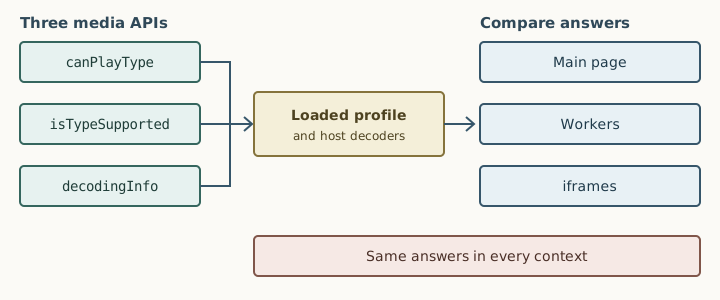
navigator.mediaCapabilities is available in Workers, and media elements can run in iframes. Compare the same fixed MIME list on the main page, a dedicated Worker, and the same-origin frame; include the actual cross-origin player frame when the workflow embeds one. A mismatch can expose a context-specific configuration change, so line up results before comparing them with the loaded profile.
- Fix a list of type strings that matches the media your workflow actually uses, with explicit
codecsparameters. - Run the three APIs against the list on the main page and record each answer.
- Repeat from a dedicated Worker and from a same-origin iframe, where the API is available there.
- Compare line by line, then compare the result with what the loaded profile is meant to describe.
- Play a short sample of each important type to see what the host really decodes.
A mismatch is a finding to explain, not noise to ignore. Common causes are a setup that was changed in one context only, a list that mixes strings with different profile and level codes, and an answer that reflects the host's real decoders instead of the profile. Fix the cause, then rerun the whole list, because a partial rerun can hide a new difference. For a broader method of comparing a browser across platforms, see evaluating cross-platform browser consistency.
Record the loaded profile, browser version, host OS and graphics hardware, MIME list, and answers by context. Note separately whether a sample actually played: API support describes what the browser reports, while playback shows what the host can decode.
Privacy limits of media queries
MediaCapabilities queries need no permission prompt and can expose a coarse software-and-hardware pattern shared by many users. Ask only about formats the page needs, and avoid storing a full codec inventory beside account or device identifiers. For support reports, retain the failing MIME type and browser version rather than every answer.
Choosing a media types mode
When a profile is loaded, the --bot-media-types flag decides how the profile's media types relate to the host's own decoders. It accepts three documented values (MIME and codec documentation).
expandis the default. It prioritizes local decoders and extends the list with the types the profile defines, so the result mixes the host's real capability with the profile's.profileuses only the media types the profile defines. It does not mix in host decoders, so it fits a consistency check that compares answers with the loaded profile.realuses the actual system media types. It fits checking what the host can really decode, but it may not match a profile that describes different hardware.
Pick the mode from the question you are asking. For a consistency review, start with profile and compare the three APIs across contexts. Move to expand when playback on the host matters more than a strict match, and use real to learn what the host itself reports. Change one setting at a time and keep the list of types fixed between runs.
Consider a profile that describes a desktop system and a host that lacks a decoder for one codec the profile lists. In profile mode the APIs report the profile's list, which is what a consistency check wants to see, while real playback of that codec on this host would still fail. In real mode the answers follow the host and would reveal the missing decoder. Neither mode is wrong. They answer different questions, and the review record should say which question was asked.
Mode behavior can change between releases, so reread the documentation before relying on a detail from this page, and rerun your fixed list after updating either the browser or the profile. Compare the new record with the previous one. A difference that appears right after an update is much easier to explain than one discovered months later.
BotBrowser reports MIME type and codec support through the loaded profile and provides --bot-media-types with the modes expand (the default), profile, and real, so canPlayType(), isTypeSupported(), and MediaCapabilities results can be checked for consistency across the main page, Workers, Service Workers, and iframes. That gives you a documented way to confirm that the media answers agree with one profile. BotBrowser cannot add decoders the host lacks, cannot guarantee that a given site treats the reported media capabilities as acceptable, and does not replace checking real playback on the target workflow.
For related background, see Widevine in Automated Browsers: Why EME Fails and How to Check.
Beyond the reference page
The reference page lists the media modes. For a comparison, send the same MIME string to canPlayType(), isTypeSupported(), and decodingInfo() in each context; investigate disagreements against the context and host decoders rather than treating one API as authoritative.
Practical conclusion
Choose the media types mode from the question: profile to compare answers with the loaded profile, real for the host's own decoders, expand for the default mix. Treat a disagreement between the three APIs, or between contexts, as a finding to explain, and rerun the whole fixed list after any browser or profile update. A short real-playback sample of each important type shows what the host actually decodes.
Sources
This article is part of the guide: What Is a Browser Fingerprint?
Related Articles
Device Pixel Ratio Policy with --bot-dpr
FingerprintDRM Fingerprinting: What EME and Widevine Queries Reveal
FingerprintWebRTC Codec Fingerprinting: Media Capabilities Leak
FingerprintCSS Fingerprinting: How Stylesheets Track You
FingerprintWebCodecs Browser Capabilities and Privacy
FingerprintAudio Fingerprinting Explained: How AudioContext Tracks You
Take BotBrowser from research to production
The guides cover the model first, then move into cross-platform validation, isolated contexts, and scale-ready browser deployment.