Headless Chrome in Docker: What Changes
Compare the same headless Chrome build on a host and in Docker: shared memory, devices, fonts, timezone, screen and renderer evidence.
BotBrowser Team
Part of the Headless Deployment collection
Want the structured docs for Deployment?
This article lives in the editorial library. For step-by-step setup, reference material, and ongoing updates, jump into the docs section.
Moving headless Chrome into a Docker container can leave the browser executable and version unchanged while changing the machine-facing inputs around it. A container may receive a smaller /dev/shm, no GPU or audio device, a different font package set, another timezone and a new virtual display. Those are deployment changes, not proof that a Chrome launch flag changed. BotBrowser can declare documented browser/profile inputs, but it cannot create hardware, fonts or shared memory that the container never exposes.
TL;DR
- Docker changes the resources and namespaces around Chrome. It does not turn the same Chrome build into a different rendering engine.
- Start with launch and process evidence:
/dev/shm, sandbox and capability policy, GPU/audio device exposure, fonts and the display path. - Record host timezone and locale separately from page overrides; the browser can expose one value while the profile policy declares another.
- Keep a failed container launch as the result. Do not replace it with a successful host field record.
Contents
- Container resources before page signals
- Devices, fonts and rendering path
- Timezone, locale and display geometry
- One recorder for host and container
- What BotBrowser can and cannot restore
- Method, failures and limits
- Practical conclusion
Container resources before page signals
Start with resources that can prevent Chrome from reaching the page at all. A Docker runtime grants a container its own view of shared memory, devices, capabilities and filesystem. Those inputs are real even when they never appear in JavaScript.
The shared-memory boundary is the clearest example. Chrome uses shared memory for inter-process communication, and a container can expose much less /dev/shm than the host. A page may crash, a renderer may disappear or a browser process may exit while the host has ample RAM. The Docker command or Compose setting that changes the shared-memory allocation belongs in the run record; the Chrome version alone does not describe it.
The official Playwright container guidance treats root execution, sandbox availability and a seccomp profile as deployment choices. The Puppeteer Docker guide describes an image intended to run with a browser sandbox and the additional capability that arrangement requires. Those documents answer different operational questions. Do not infer that two images have the same sandbox, user, device or memory policy because both contain a browser.
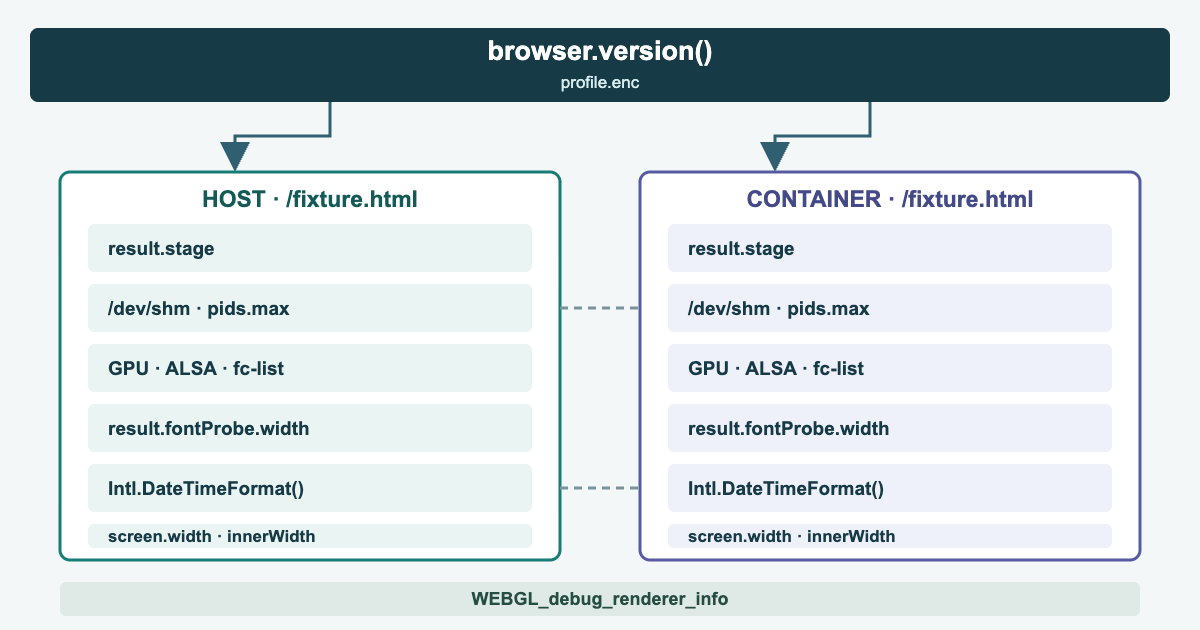
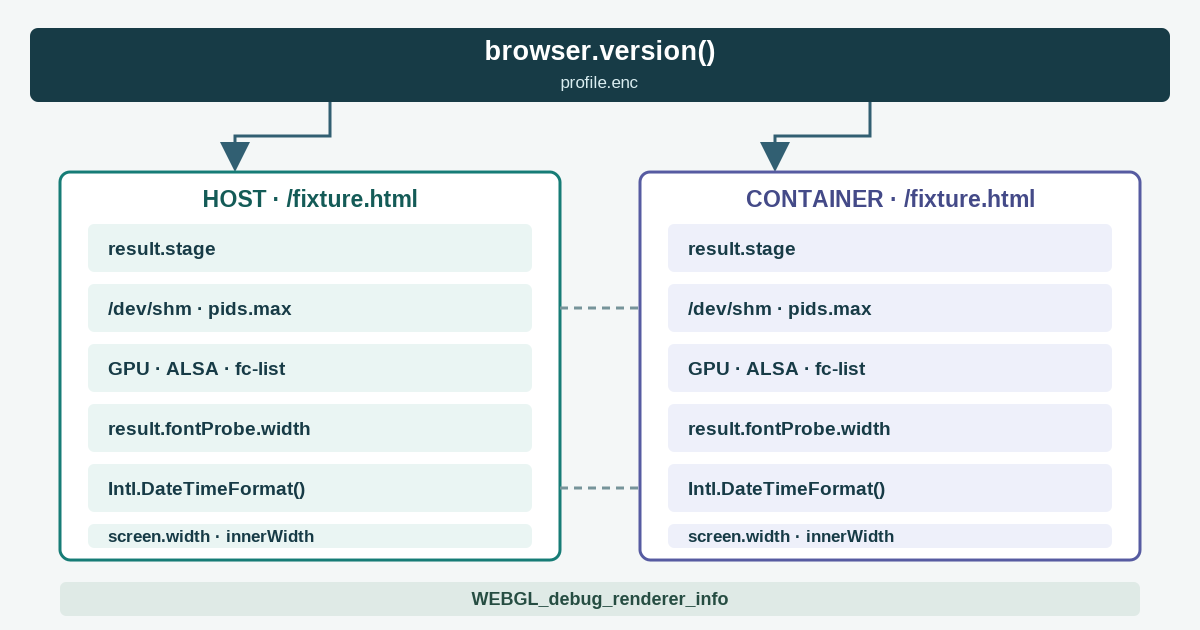
Capture launch status, resource limits and the device/font inventory before collecting page fields:
printf 'container=%s\n' "${CONTAINER_NAME:-host}"
df -h /dev/shm
cat /sys/fs/cgroup/pids.max
ulimit -u
id
grep '^Cap' /proc/self/status
ls -l /dev/dri /dev/snd
fc-list | wc -l
Run the same commands in the approved host lane and the intended container lane. A container report with no /dev/shm capacity, no process limit or no user identity cannot support a field comparison. If Chrome fails to start, preserve that exit status and stderr; a later host run does not erase the container failure.
The host's kernel, cgroup policy and container runtime remain part of the result. A browser that works in one image may fail after a resource limit, device policy or shared-memory change. Record the image digest, runtime version, launch options and the resource values beside the browser version.
Use a fixed evidence order so a later symptom does not hide an earlier deployment failure. First record whether the container was created, whether the browser process started and whether the owned page navigated. Then collect /dev/shm, user, capability, device and font-package evidence. Only after those stages pass should the recorder read timezone, locale, screen, viewport and renderer fields. A missing shared-memory allocation can explain a renderer crash, while a missing font can change text geometry without stopping the browser; both outcomes are easier to attribute when the order is stable. The same order should be used after every image, runtime or host-policy change.
Devices, fonts and rendering path
The next layer is what the container makes available to Chrome. A GPU and an audio device are host resources exposed through device nodes and libraries. A container can run Chrome successfully without either while still producing different rendering or media results.
Do not assume that a page-visible renderer string is the physical GPU. Chrome can report an ANGLE renderer, a software rasterizer or a vendor string selected by the launch configuration. The useful record is the actual WebGL vendor and renderer values returned by the owned fixture, plus the launch flags and the host's approved backend. If a container has no hardware GPU and falls back to software rendering, that is a deployment path to document, not evidence that Chrome changed its engine.
Audio deserves a separate row. A container that exposes no audio device can still run a page that never requests audio. A fixture that enumerates devices or measures an audio context may see fewer devices or fail at a different stage. Record the fixture stage and the error before comparing later values.
Fonts are a similarly concrete input. A minimal image may contain fewer font families than the host, so the same string can wrap differently, a text probe can report a different width and a screenshot can show missing glyphs. Keep the font package list and probe output in the run record. A font family that appears in a profile is not the same claim as a font file installed in the container.
Use a deterministic local font probe rather than a generic screenshot:
const fontProbe = await page.evaluate(() => {
  const sample = 'Waltz, bad nymph, for quick jigs vex.';
  const canvas = document.createElement('canvas');
  const context = canvas.getContext('2d');
  context.font = '32px "Liberation Sans"';
  const measured = context.measureText(sample);
  return {
    sample,
    width: measured.width,
    actualBoundingBoxAscent: measured.actualBoundingBoxAscent,
    fontSet: [...document.fonts].map(font => font.family).sort(),
  };
});
The probe does not prove that every installed font matches. It gives one repeatable text measurement and a visible font set for the owned page. Compare only the same sample, font size and browser build. A different width is evidence of a different rendering input; it is not a detector verdict.
The Chrome headless implementation remains a separate axis. Unified headless Chrome uses the regular Chrome implementation, while a separate headless-shell executable is a different binary. This topic keeps that implementation fixed and changes the container boundary around it. For launch-mode differences, use the headless scraping mode comparison instead of folding shell selection into the container result.
Timezone, locale and display geometry
The host environment can supply a default timezone and locale that page code reads through Intl and locale APIs. A container image can start with UTC and a minimal locale set even when the host is configured for another region. That can change date formatting, number formatting and the value returned by a timezone probe before any page code applies an explicit override.
Record the timezone and locale as inputs, not as a hidden identity. A page can observe a resolved timezone through Intl.DateTimeFormat().resolvedOptions().timeZone and a locale through navigator.language. A profile can declare browser-facing values, but the host environment and the profile policy must be recorded separately. If the profile intentionally overrides the container default, say so; do not call the profile value a host observation.
Screen geometry and viewport are another pair of values with different owners. A virtual display can expose dimensions that are not the container's physical screen, while a launch viewport can be fixed independently. Record both screen.width and window.innerWidth, then check whether the profile or automation client supplied a value that differs from the container's display.
const environmentProbe = await page.evaluate(() => ({
  timezone: Intl.DateTimeFormat().resolvedOptions().timeZone,
  locale: Intl.DateTimeFormat().resolvedOptions().locale,
  language: navigator.language,
  screen: { width: screen.width, height: screen.height },
  viewport: { width: innerWidth, height: innerHeight },
  devicePixelRatio,
}));
Do not combine a timezone change, a locale change and a viewport change in one run. Change one declared input at a time, then use the same owned fixture and browser build. A page that renders a different date string can be explained by the timezone, while a different text width points toward fonts or device scale. Keeping the fields separate makes the next test possible.
The display path is part of the same record. A virtual X server can provide a display even when the container has no physical monitor. A different screen depth or backend can alter screenshots and graphics behavior without changing the browser version. Record the display service, its geometry and the renderer string; do not infer them from the container image name.
One recorder for host and container
Use one owned fixture and one recorder in both lanes. The host lane is the approved baseline; the container lane is the candidate deployment. Both must use the same Chrome binary, fixture revision, viewport, profile policy and recorder code. The only intended variable is the environment around Chrome.
The recorder below is a fixture contract, not captured output. It writes a compact JSON record and preserves the first failed stage. A launch error is a result, not a reason to continue with a partial field set.
const result = {
  lane: process.env.LANE_NAME,
  fixtureRevision: process.env.FIXTURE_REVISION,
  browserVersion: null,
  stage: 'launch',
  launchArgs: [],
  error: null,
  fields: null,
};

try {
  const launchArgs = (process.env.CHROME_ARGS ?? '').split(/\s+/).filter(Boolean);
  result.launchArgs = launchArgs;
  const browser = await chromium.launch({
    executablePath: process.env.CHROME_PATH,
    headless: true,
    args: launchArgs,
  });
  result.browserVersion = await browser.version();
  result.stage = 'page';
  const context = await browser.newContext({
    viewport: { width: 1365, height: 768 },
    locale: 'en-US',
    timezoneId: 'UTC',
  });
  const page = await context.newPage();
  await page.goto('http://127.0.0.1:4173/fixture.html');
  result.fields = await page.evaluate(() => ({
    timezone: Intl.DateTimeFormat().resolvedOptions().timeZone,
    locale: Intl.DateTimeFormat().resolvedOptions().locale,
    language: navigator.language,
    fontProbe: (() => {
      const sample = 'Waltz, bad nymph, for quick jigs vex.';
      const canvas = document.createElement('canvas');
      const context = canvas.getContext('2d');
      context.font = '32px "Liberation Sans"';
      return { sample, width: context.measureText(sample).width };
    })(),
    screen: { width: screen.width, height: screen.height },
    viewport: { width: innerWidth, height: innerHeight },
    devicePixelRatio,
    webgl: (() => {
      const gl = document.createElement('canvas').getContext('webgl');
      if (!gl) return null;
      const ext = gl.getExtension('WEBGL_debug_renderer_info');
      return {
        vendor: ext ? gl.getParameter(ext.UNMASKED_VENDOR_WEBGL) : null,
        renderer: ext ? gl.getParameter(ext.UNMASKED_RENDERER_WEBGL) : null,
      };
    })(),
  }));
  result.stage = 'cleanup';
  await browser.close();
  result.stage = 'complete';
} catch (error) {
  result.error = String(error);
}
console.log(JSON.stringify(result, null, 2));
The script intentionally sets locale and timezone to the same declared values in both lanes. That answers one question: what remains different after those page-level inputs are aligned? Run a second pair with the host's own locale and timezone when you need to measure inheritance instead. The two questions are not interchangeable.
The expected result is a comparison, not a winner:
| Evidence | Host lane | Container lane | What it establishes |
|---|---|---|---|
| Launch status | complete or preserved failure | complete or preserved failure | Whether Chrome reached the fixture |
/dev/shm capacity | Host value | Container value | Shared-memory deployment input |
| GPU and audio devices | Host device list | Container device list | Resource exposure before page code |
| Font probe | Same sample and font size | Same sample and font size | Whether text geometry changed |
| Timezone and locale | Declared or inherited values | Declared or inherited values | Which environment supplied the value |
| Screen and viewport | Same fixture, recorded separately | Same fixture, recorded separately | Display versus page-viewport boundary |
| WebGL renderer | Approved backend string | Container backend string | Which graphics path produced pixels |
| Cleanup | Browser closed | Browser closed | Whether the comparison completed |
For each lane, also record the image digest, runtime version, Chrome version, fixture revision, launch arguments and profile digest. A passing JSON object without those inputs is not reproducible. A failed container launch must keep its stderr and resource evidence next to the host's successful record.
Use the Docker deployment guide when the image, shared memory, display or user data setup still needs to be built. This page starts after the image and launch policy exist and asks what the browser can observe in that environment.
What BotBrowser can and cannot restore
BotBrowser can make the browser executable, profile file and documented profile-backed values explicit for an authorized deployment. That matters when a team needs a declared browser input rather than an accidental host default. The profile is an input layer; it is not a device emulator for hardware the container never exposed.
The boundary is concrete:
| Input | BotBrowser can declare or help record | Container must still provide |
|---|---|---|
| Browser executable/profile | Explicit launch inputs | A readable mounted profile and compatible binary |
| Shared memory | No substitute for the mount | /dev/shm or the documented alternative |
| GPU/audio device exposure | No substitute for device nodes | Runtime/device policy and a tested graphics path |
| Installed font files | Profile-backed page values may differ | The image's font packages and rendering libraries |
| Timezone/locale defaults | Profile policy may override | The host/image default the team intends to inherit |
| Virtual display | No physical display creation | X server or the documented headless path |
The BotBrowser deployment documentation and Linux GPU backend guide are the sources for deployment inputs and backend selection. Neither makes a container's missing device appear, installs fonts or guarantees that a profile will reproduce every host value. If the profile and container disagree, record both layers and treat the difference as a deployment decision.
Method, failures and limits
This comparison was prepared from public documentation and source-reading review. The Docker CLI reported version 29.9.2, but its daemon was unavailable; no container or Chrome process was launched. The expected values in the recorder are a constructed fixture contract, not captured output.
The evidence boundary follows from that method. A launch failure belongs to the container, runtime or image before any page signal can be interpreted. A completed launch followed by a missing page field belongs to the fixture or page stage. A different font width belongs to the font/rendering inputs. A different timezone or locale belongs to the declared or inherited environment. A different renderer string belongs to the graphics backend and launch configuration. A profile value does not erase the container evidence that produced the page.
When the host and container differ, preserve the first failure and stop. Fix the container launch path or the declared input, then rerun both lanes with the same fixture revision. Do not average results across host classes or call a single successful navigation a complete compatibility result.
FAQ
Is headless Chrome in Docker a different browser?
Not solely because it is in a container. The same Chrome build can run in either environment. The container may change shared memory, devices, fonts, timezone, display geometry and graphics libraries around it. Record those inputs separately from the browser version.
Does Docker make headless Chrome invisible to a site?
No. A container changes the deployment environment; it does not establish a site's access decision or make a browser universally indistinguishable. The owned fixture records observable inputs, not a third-party verdict.
Why does the same font look different in a container?
The image may contain a different font set, and the graphics path may differ. A text probe with a fixed sample and font size shows whether the rendered geometry changed. A profile value and an installed font file are separate inputs.
Can BotBrowser restore a missing GPU or audio device?
No. BotBrowser can make documented browser/profile inputs explicit, but it cannot create a device node, install a font package or add shared memory to a container. The deployment owner must provide those resources and validate the resulting configuration.
What should be compared first after a container launch?
Compare launch status and /dev/shm first, then device and font availability, then timezone, locale, screen, viewport and renderer values. Keep the same fixture revision and stop at the first failed stage before drawing a conclusion from later fields.
Sources
- Playwright: Docker
- Puppeteer: Docker
- Chrome Headless documentation
- BotBrowser: Linux deployment
- BotBrowser: Headless server setup
- BotBrowser: Linux GPU backend
Practical conclusion
Run the same headless Chrome build, owned fixture and profile policy on the approved host and in the intended container. Record launch status, shared memory, device exposure, fonts, timezone, locale, screen, viewport and renderer values before interpreting any page difference. BotBrowser can make browser/profile inputs explicit, but the container must still supply the resources and the team must keep host and image classes separate until each difference has a reproducible owner.
This article is part of the guide: Browser Deployment and Release: Operations Map
Related Articles
Docker Browser Automation: Deployment and Scaling Guide
DeploymentBrowser Container Resource Limits: A Practical Planning Method
DeploymentReliable Screenshot Capture in Headless Browsers
DeploymentHeadless Browser Setup on Ubuntu Servers
DeploymentHeadless vs Headed Browser: What Actually Differs
Getting StartedHeadless Browser Scraping: What Actually Changes
Headless Deployment: Docker, Servers and Signal Consistency
Guides on headless browser deployment: Docker images, server setup, headless mode differences, signal consistency and release operations.
Run the same check in BotBrowser
Load a profile, keep the signals you just read about consistent inside the browser, and confirm the result on your own machine before a rollout.