EFF Cover Your Tracks Results: How to Read Them
Separate Cover Your Tracks tracker simulation from fingerprint uniqueness results, then read Canvas, WebGL, fonts and timezone fields within their limits.
BotBrowser Team
Want the structured docs for Fingerprint?
This article lives in the editorial library. For step-by-step setup, reference material, and ongoing updates, jump into the docs section.
An EFF Cover Your Tracks report contains two questions that should not be collapsed into one score: what happened to requests in a tracker simulation, and how distinctive the browser configuration looked in the comparison data. A blocked request does not make the fingerprint result anonymous, and a distinctive configuration does not prove that a tracker identified a person. BotBrowser supports validation of declared browser-surface settings, but it cannot reproduce EFF's comparison population or predict a third party's decision.
TL;DR
- Read tracker simulation outcomes separately from the browser-uniqueness comparison; the report template renders separate rows for these result families.
- In the tracker section, distinguish a request that did not load from a cookie that was set after a request. Those are different observations.
- Treat a uniqueness estimate as a comparison against EFF's observed configurations and time window, not a person identifier or a stable cross-site label.
- Canvas, WebGL, fonts and timezone are examples of reported field categories; a source template listing a category does not prove it is collected on every current run.
- Save the tool revision, date, outcome category and only the fields needed for the question. Do not retain raw browser identifiers by default.
Contents
- Two report tracks answer different questions
- Read tracker outcomes as request and cookie observations
- Read uniqueness as a bounded comparison
- What the field list can and cannot establish
- A repeatable interpretation worksheet
- Privacy and product boundaries
- Practical conclusion
Two report tracks answer different questions
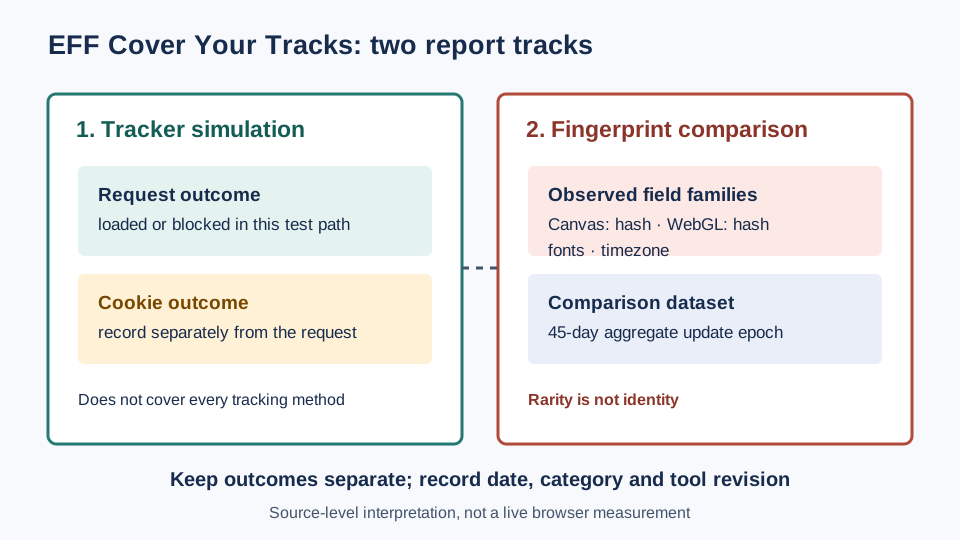
Cover Your Tracks combines tracker-blocking simulation with browser-fingerprint research. The visible report places both topics near each other, but proximity on a page does not make them one measurement. The tracker track concerns behavior in a controlled set of page requests and the cookies associated with those requests. The fingerprint track concerns how a browser's observable configuration compares with other configurations in the site's dataset. Neither track is a general verdict about every site a person visits.
The pinned EFF result template makes this separation concrete. It renders rows for tracking ads, invisible trackers, fingerprinting, acceptable ads and Do Not Track. A separate explanatory area compares simulated request loads and cookie counts. That structure matters when a summary label appears alarming: a reader must first identify which row and which underlying observation generated it. A label under one row cannot be transferred to another row without evidence that the report itself makes that connection.
The template also says that the tool does not measure all forms of tracking and protection. This is a boundary on both positive and negative interpretations. A favorable result means the test path produced the displayed result under its tested conditions; it does not certify every tracker, page script, storage mechanism or browser protection. An unfavorable result identifies a report condition to investigate; it does not establish that a named company linked the browser to a person.
This distinction is useful when comparing reports from different dates. A report can change because the browser configuration changed, because the tool's source or test set changed, or because the comparison dataset changed. A tracker row and a uniqueness row can therefore move independently. A one-number summary that erases which track changed is not an adequate incident record. The pinned template keeps ad_status, tracker_status and fp_status as separate rows.
The broader browser fingerprinting overview defines the general idea of combining observable browser characteristics. The EFF result page adds a narrower task: interpret its own report sections without treating the tracker simulation and the configuration comparison as interchangeable evidence.
The distinction also applies across separate browser applications: cross-browser fingerprint linkability requires a defined browser pair and comparison design, not just a distinctive report.
Read tracker outcomes as request and cookie observations
The tracker simulation section should be read as a small observation table, not as a universal inventory of every request made by the browser. The pinned result template distinguishes simulated third-party request loading from cookie counts. Its partial-protection state is not the same as a state in which a request was blocked before reaching the simulated tracker. A cookie can be restricted even when a request occurred; conversely, the absence of a cookie is not by itself proof that no request occurred.
Use the following decision table to record what the report actually says:
| Report evidence | What it supports | What it does not support |
|---|---|---|
| Simulated tracker request is shown as blocked | The tested request did not complete along the displayed path | All tracker domains or all tracking mechanisms are blocked |
| Request is shown as loaded and a cookie count is shown | A request and the displayed cookie outcome were observed in this simulation | The cookie necessarily identifies a person or is used across unrelated sites |
| Request is shown as loaded but cookie outcome is restricted | Request handling and cookie handling differ in this case | The browser prevented every form of state or linkability |
| A summary says protection is partial | At least one part of the report's tested condition differs from complete blocking | Which untested feature would change the result |
The table intentionally avoids translating every interface label into a named browser API. The result template is evidence about the report's categories and its displayed request/cookie comparison. It is not a trace of every network event in a user's ordinary browsing session. A claim about a specific request header, storage API or script execution would require a trace from that page and test run, not inference from a summary row.
A practical review can preserve one row per tested category. Record the exact visible category, whether the simulated request is shown as loaded or blocked, and the separate cookie outcome if the report exposes one. If the page offers a detailed explanation, copy its wording or link to the official explanation rather than replacing it with a stronger paraphrase. This makes a later comparison auditable without storing a raw fingerprint.
For example, compare two dates by keeping the tracker result in a tracker column and the uniqueness result in a separate column. If only the cookie result changes, investigate the cookie-related test context before attributing the difference to fingerprinting. If only the uniqueness description changes, keep tracker behavior out of that explanation unless the report explicitly connects the two. This rule prevents category drift in support tickets and privacy reviews.
Read uniqueness as a bounded comparison
The fingerprint section compares observable browser characteristics with configurations represented in EFF's data. In ordinary language, a result about how many configurations look similar or different describes the comparison set and method used by that report. It is not a census of all browsers, and it does not expose the identity of a matching visitor. “Uncommon in this dataset” and “identifies a person” are different claims with different evidence requirements.
The EFF repository README.md describes a 45-day epoch for updating characteristic totals. That time window is a property of the dataset's aggregate update process. It is not a claim that an individual browser fingerprint remains unchanged for 45 days, that the same browser appears in every update, or that a report can follow one person across websites for that period. A timestamp attached to a report should be read as the time the report was viewed or produced, not as a retention guarantee. The 45-day epoch applies to aggregate totals, not individual identifier persistence.
The comparison is also conditional on the fields the tool can observe and the way its current implementation groups them. A result can change when a field changes, when the test implementation changes, or when the population represented by the dataset changes. The public report does not let a reader infer which single characteristic caused a particular uniqueness estimate unless it exposes that breakdown and the evidence supports the attribution.
Do not compare an EFF result number directly with a score from another service as though both use the same population, collection, field normalization or update schedule. The term “unique” can be used for distinct statistical questions. One service may describe the rarity of a combination in its own sample; another may describe similarity or uniqueness in another dataset. A numeric match does not prove methodological equivalence.
For a useful longitudinal record, save the report date, the public tool revision if known, the result category and the exact visible wording. Add the browser family and major version only if they are necessary for the declared comparison and available from a legitimate test record. Do not add a raw Canvas digest, full font list or other high-entropy value to an incident report merely because the page discusses that category. A minimum-data record is more useful when it preserves what the analyst needs and avoids collecting unrelated identifiers.
If the wording says that a configuration is rare, phrase the conclusion narrowly: “The report placed this observed configuration in its stated comparison category on this date.” Do not expand that into “the person is trackable,” “the browser is detectable as automated,” or “the user was identified.” Those conclusions are not entailed by a uniqueness comparison alone.
What the field list can and cannot establish
The Canvas fingerprinting analysis explains the rendering surface behind a Canvas result; that mechanism alone does not establish the rarity of a configuration in EFF's dataset.
EFF's pinned field template lists categories such as HTTP Accept, screen characteristics, timezone, fonts, Canvas and WebGL digests, Do Not Track, platform, language and touch support. It also retains plugin-era wording. A list in a repository template documents the source's field vocabulary; by itself it does not establish that every field is currently collected in every production run. The present report, consent context and current implementation must be checked before making a claim about collection behavior.
The metric explanations provide narrower interpretations. The Canvas text describes an image digest and notes that other reported context can affect interpretation. The WebGL text describes a related digest and says Canvas and WebGL results are closely linked. The font text describes measurement through rendered text and warns that an unusual font can contribute distinguishing information. The timezone text presents a timezone as a broad clue, not a precise location. These explanations support discussing categories and limitations; they do not prove a person's identity, location or intent.
| Field family | What the public explanation supports | Safe comparison question |
|---|---|---|
| Canvas | A rendered image can be summarized as a digest; context can matter | Did the tool revision and browser configuration remain the same? |
| WebGL | A graphics-related result is reported and can relate to Canvas output | Are these two correlated outputs being counted as independent evidence? |
| Fonts | Rendered text can expose differences associated with available fonts | Is the observed font set a product requirement or a privacy exposure? |
| Timezone | A browser-visible timezone value can provide a broad clue | Is the value a configured timezone label rather than location evidence? |
| Language and screen | Browser or platform characteristics appear in the documented field vocabulary | Are the values necessary to answer the current question? |
The Canvas API and WebGL API references describe browser interfaces, not EFF's entire collection pipeline. They can clarify what a web page may request from a browser, but they cannot substitute for the report's implementation or privacy notice. The distinction between a platform capability and a particular site's actual collection is essential: an API existing does not prove that a site called it in a specific session.
Legacy categories deserve explicit caution. The pinned template includes references to extensions or plugins and older plugin technologies. That is historical source evidence, not proof that a modern browser exposes those technologies or that the live report collects them on every visit. When a field looks obsolete, verify it against the current report and current source revision before including it in a present-tense privacy statement.
A repeatable interpretation worksheet
The following worksheet turns a result page into a bounded review. It uses only information a reader can see or cite and avoids guessing at hidden server-side decisions.
| Step | Record | Decision rule |
|---|---|---|
| 1. Identify the report | Tool name, page URL, observation date and source revision if available | If the revision is unknown, mark it unknown rather than assuming the latest repository commit is deployed |
| 2. Separate sections | Tracker simulation rows and fingerprint comparison rows | Never merge them into one “privacy score” unless the tool explicitly defines that score |
| 3. Capture tracker evidence | Displayed request outcome and separate cookie result | State only what the tested simulation displayed |
| 4. Capture fingerprint evidence | Exact uniqueness wording and any field detail shown | Keep rarity within the report's comparison dataset and method |
| 5. Check field provenance | Whether the field is in a pinned source template, current report or current privacy notice | A source vocabulary list is not proof of live collection on every run |
| 6. Compare dates | Same test path, tool revision, browser context and visible categories where known | If one of these is unknown, treat the comparison as incomplete |
| 7. Minimize retention | Keep only the date, category, relevant version and necessary explanation | Do not retain raw identifiers unless a documented purpose requires them |
This record is designed for an analyst who needs to explain why two displayed reports differ. It is not a reproduction protocol for EFF's backend and cannot recreate the dataset from a screenshot. Where the report exposes no field-level cause, leave the cause blank. An honest unknown is more informative than assigning a change to Canvas, WebGL or a cookie without evidence.
Three comparison cases show how the worksheet prevents overreach:
| Case | Observed change | Supported next step |
|---|---|---|
| A | Tracker row unchanged; uniqueness description changed | Check report revision, date and comparison context before investigating tracker behavior |
| B | Request outcome unchanged; cookie result changed | Review the cookie result and test context without claiming the fingerprint changed |
| C | A field label is absent in one report | Check whether the current report or implementation changed; absence does not prove the browser lacks the capability |
The automation consistency reference explains why declared browser settings should be evaluated as a coherent configuration rather than as a single isolated field. That product documentation is about configuration validation; it does not claim to compute EFF's uniqueness score or to predict EFF's tracker simulation.
Privacy and product boundaries
EFF's privacy page describes information gathered and how it is used. Read that notice before submitting a browser to an online test, especially on a work device or a profile containing personal accounts. A reader should not assume that a public test page receives only the summary shown in the browser. The site owner's current privacy notice is the right source for collection and retention questions; a metric explanation is not a privacy policy.
For an internal assessment, define the question before collecting data. If the question is whether a configuration changed between two approved test runs, retain only the comparison fields required to answer that question. Avoid combining the report with account identifiers, network logs or unrelated browsing history. Restrict access, set a deletion date, and document whether the comparison is about the browser profile, an application build or a controlled test environment.
BotBrowser's public documentation covers browser-surface configuration and automation consistency. It can help teams validate declared settings and reason about whether related surfaces agree. It does not establish the coverage of EFF's dataset, make an EFF test result reproducible from configuration alone, or tell a team how an unrelated service will classify a browser. A product comparison should therefore use a declared test scope and direct evidence from each tool rather than treating one tool's output as an oracle for another.
No report category should be used to infer an individual person's behavior or to make a consequential decision without an appropriate, validated process. A browser configuration is not a person. A report is one tool's output under one path and one point in time. Those limits matter even when the page presents a confident visual label.
FAQ
Does a blocked tracker result mean the browser cannot be tracked?
No. The result template says the tool does not measure every form of tracking or protection. A blocked simulated request is evidence about that tested path, not a complete inventory of trackers, storage, link decoration or server-side correlation.
Does a rare fingerprint identify the visitor?
No. A rarity or uniqueness estimate describes a comparison within the tool's observed data and method. It does not name a person, prove a stable identity, or establish that another site has the same data.
Why can two reports from the same browser differ?
The browser fields, report implementation, observed comparison data and test context can change independently. Preserve dates and revisions when known, then compare like categories. Without field-level evidence, the displayed difference does not reveal a single cause.
Should raw Canvas or font values be stored for troubleshooting?
Only when a documented purpose specifically requires them and access and deletion are controlled. Most interpretation tasks can retain the result category, date, relevant browser version and source revision without preserving a raw high-entropy value.
Sources
- EFF Cover Your Tracks: About: describes tracker-blocking simulation and browser-uniqueness research.
- EFF Cover Your Tracks: Learn: distinguishes storage identifiers from observable configuration characteristics.
- EFF Cover Your Tracks: Privacy: current source for information-use and retention questions.
- EFF result template at pinned revision: separate result rows, request/cookie comparison and measurement limitation.
- EFF fingerprint field template at pinned revision: documented field vocabulary and its legacy terms.
- EFF Canvas explanation, WebGL explanation, font explanation and timezone explanation: metric-specific interpretations.
- EFF repository README at pinned revision: documents the 45-day epoch for characteristic totals.
- MDN Canvas API and MDN WebGL API: browser API context, not evidence of a particular site's collection.
- BotBrowser automation consistency documentation and browser fingerprint overview: product scope and configuration context.
Practical conclusion
Treat the EFF page as two related but separate reports: one about a defined tracker simulation, another about browser-configuration comparisons. Preserve the displayed categories and test date, verify the current privacy notice before submitting a profile, and keep only the data needed for the review. A result can guide a focused follow-up; it cannot identify a person, certify every protection mechanism or predict an unrelated service's decision.
This article is part of the guide: What Is a Browser Fingerprint?
Related Articles
Cross-Browser Fingerprinting: What Linkability Shows
FingerprintBrowserLeaks Canvas Report: Signals and Limits
FingerprintWhat Is a Browser Fingerprint?
FingerprintBrowser Tracking Protection Settings Explained
FingerprintHow to Read Browser Fingerprint Signals
FingerprintBrowserLeaks WebGL Report: Collection and Missing States
Take BotBrowser from research to production
The guides cover the model first, then move into cross-platform validation, isolated contexts, and scale-ready browser deployment.