How to Read Browser Fingerprint Signals
Compare browser signal groups, trace behavior checks, and route fingerprint differences without overclaiming.
BotBrowser Team
Want the structured docs for Fingerprint?
This article lives in the editorial library. For step-by-step setup, reference material, and ongoing updates, jump into the docs section.
BotBrowser can repeat an authorized page-owned check under declared browser and profile inputs and capture bounded browser-visible fields. It cannot explain every cause of a difference, identify a person, or predict a private service decision. A useful fingerprint review separates signal groups first, then checks the execution context before assigning an owner.
TL;DR
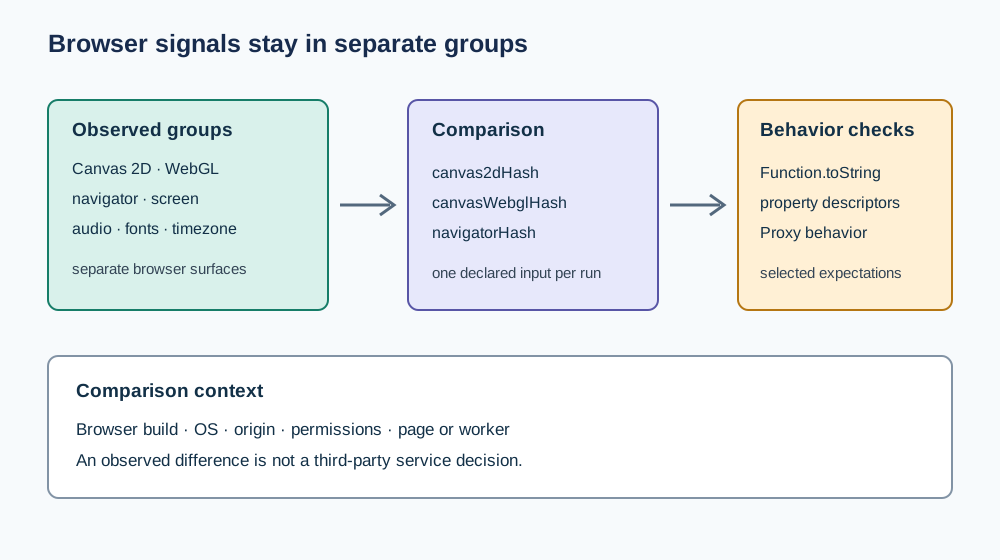
- Treat Canvas, WebGL, navigator, screen, audio, fonts, timezone, and function-behavior checks as separate observations.
- A changed group summary narrows what changed; it does not identify the cause or a person.
- Preserve browser build, OS, origin, permissions, page or worker context, and check name with each comparison.
- A source implementation is evidence about its own checks, not a browser standard or a third-party verdict.
Contents
- Start with signal groups
- Read behavior checks narrowly
- Preserve comparison context
- Set the decision boundary
- Practical conclusion
Start with signal groups
A browser fingerprint review becomes easier to debug when each observation stays attached to the API or behavior that produced it. Canvas rendering, WebGL parameters, navigator properties, screen metrics, audio output, fonts, timezone, and function behavior have different inputs and failure modes. Combining them into a single label hides which surface changed.
One public implementation illustrates the grouping choice: its pinned source assembles distinct summaries for Canvas, WebGL, screen, timezone, audio, fonts, navigator, and selected function checks. This example is evidence about that implementation's collector set. It is not a complete inventory of browser fingerprinting, and a summary change does not establish a unique cause.
The BotBrowser fingerprinting documentation covers product controls and profile consistency. This article adds a way to classify a difference across signal groups, keep the comparison context, and route the next investigation without treating one checker as an authority over a site.
For the basic vocabulary, see what browser fingerprinting means. For a repeatable evidence workflow, use how to verify a browser fingerprint; both pages provide the surrounding reader context for this signal-group method.
If a Canvas summary changes while navigator fields remain stable, preserve both facts rather than reporting “the fingerprint changed.” The first statement tells the next investigator where to start; the second throws away the useful boundary. Related background is available in browser API integrity across realms and privacy-preserving browser validation.
Read behavior checks narrowly
Some checkers inspect how JavaScript functions present themselves. Public examples include comparing Function.prototype.toString() output, enumerating own-property descriptors, and checking whether calls or Proxy-wrapped functions produce expected errors. These tests encode the selected implementation's expectations; they are not a full conformance suite for every browser realm.
A failed case supports a limited statement: one checked behavior differed from the checker's expectation in one context. It does not explain whether the difference came from a browser update, an extension, instrumentation, a wrapper, or a test fixture. A passing case likewise covers only the checked path. Keep the check name and API beside the result so a reader can reproduce the same question.
Do not report a single “lie” flag as proof that a browser is deceptive. State the exact behavior, the context in which it was checked, and whether the comparison used a window or worker. For an API overview, see the MDN reference for Function.prototype.toString() and the MDN reference for property descriptors.
Preserve comparison context
Before comparing values, record the conditions that can alter them. At minimum, keep the browser build, operating system, page origin, permission state, profile lifecycle, and execution context. If a check runs in both a page and worker, label the two records separately. A context mismatch can look like a browser regression even when the browser binary did not change.
Change one declared input per comparison. If the browser build and profile both change in the same run, the result cannot assign the difference to either one. For repeatable product checks, use the same owned page and fixture, capture the first changed field, and preserve the source revision of any checker that defines an expected result.
Privacy minimization applies to diagnostics as well. Keep only the fields needed to route the issue; do not join them with account identifiers, unrelated browsing history, or cross-site data. The W3C privacy principles provide a broader basis for minimizing collection. A browser-visible value can be sensitive even when it is not a direct identity claim.
Route a difference to the next owner
Use the first changed observation to select a review path rather than assigning a universal severity:
| First changed observation | First review | What to compare next |
|---|---|---|
| Canvas or WebGL summary | Rendering owner | Browser build, graphics backend, OS, and the exact drawing or parameter input |
navigator or screen field | Browser-context owner | Permission, emulation, profile configuration, and page versus worker context |
| Function string or descriptor check | JavaScript integration owner | Wrapper, instrumentation order, own-property keys, and the exact checked function |
| Audio, font, or timezone field | Environment owner | Installed fonts, audio path, OS locale, timezone, and profile lifecycle |
| Several groups changed together | Test owner | Origin, fixture version, browser build, profile, and run timing before changing code |
The table is a triage aid, not a diagnosis. It assigns the next question to the team most likely to verify the input. A browser-level result can be reproduced in BotBrowser's authorized controlled context, but the reproduction still does not reveal a third party's private scoring policy.
Build a bounded observation record
Use a small record that keeps the observation and its limits together. This is a schema example, not captured runtime output:
{
  "fixture": "owned-signal-review-v1",
  "browserBuild": "declared build",
  "os": "declared OS",
  "origin": "https://app.example.test",
  "context": "page",
  "profileLifecycle": "fresh",
  "checkSourceRevision": "pinned source commit",
  "changedGroup": "webgl",
  "checkName": "parameter summary",
  "outcome": "changed",
  "interpretation": "review rendering inputs before changing profile settings"
}
Use a synthetic owned origin in examples and replace it only in a private test record. Do not store raw canvas output, full audio samples, account data, or unrelated signals when a changed-group label is enough. If the checker does not expose its source revision or execution context, mark that field unknown instead of guessing.
An authorized BotBrowser run can repeat the declared page and retain these bounded fields for a release comparison. It cannot certify that a signal is harmless, infer a person from a browser value, or guarantee acceptance by an external service. Keep that boundary adjacent to the record wherever the result is handed off.
Set the decision boundary
Browser-surface checks answer questions about the path they execute. They do not disclose a website's complete risk model, which can include network reputation, account history, request timing, server-side state, and application-specific rules. A consistency result therefore should not be described as a prediction about a WAF or an assurance of anonymity.
For privacy analysis, the W3C privacy principles emphasize purpose and data minimization. For engineering, the practical boundary is equally direct: compare a declared fixture, report the observed field, and state what remains unknown. If the claim depends on a service decision, obtain evidence from an authorized integration test rather than extrapolating from a browser checker.
The minimum handoff header should include browserBuild, os, origin, context, changedGroup, and testedOn: 2026-10-29. Keep the record tied to the same W3C privacy principles reference and to the exact page fixture; these concrete fields make a later comparison auditable without retaining raw signal values.
Run a controlled comparison.
Start by writing down the question in a form that names one field and one context. “Did the WebGL parameter summary change after the browser update in the same profile?” is testable. “Is this browser fingerprint consistent?” combines many surfaces and leaves the comparison boundary undefined. A narrow question also makes it possible to stop when the relevant field is explained.
Use this sequence for a browser-owned test page:
- Record the page origin, browser build, operating system, profile lifecycle, permission state, and whether the code runs in a window or worker.
- Run the unchanged page twice in the declared baseline context. If the selected field changes between these runs, investigate fixture stability before comparing browser builds.
- Change only the variable named in the question, such as the browser build. Keep the origin, profile lifecycle, permissions, and page bundle fixed.
- Compare the first changed field and its source path. Preserve the exact property name or check name instead of copying a whole fingerprint report.
- Repeat the baseline after the comparison. A return to the original value helps distinguish a changed input from an unrelated context drift, but it still does not establish the cause by itself.
An authorized BotBrowser context can repeat a page-owned fixture under declared profile inputs and keep a bounded record. The fixture owner remains responsible for choosing the page, defining which fields are safe to retain, and interpreting whether the observed difference matters to the application. Browser automation supplies a repeatable execution context; it does not supply the product's risk policy.
Diagnose common mismatches.
When a result differs, first decide whether the test ran under the same conditions. A missing or changed navigator property can follow a different permission state, an emulated setting, a page-to-worker move, or a changed profile. A Canvas or WebGL difference can follow a rendering input or backend change. A function behavior check can be affected by instrumentation order or a wrapper installed before the check. These are hypotheses to test, not causes to infer from the output alone.
If the field is missing.
Check whether the code path asked for the field, whether its prerequisite was available, and whether the page had permission to use the relevant capability. Then inspect the presentation path: some diagnostic pages omit values they consider unavailable, low-confidence, or outside the current view. “Not present in the report” and “unsupported by the browser” are different outcomes.
If a page and worker disagree.
Confirm that both contexts received the same page bundle and that the worker was created successfully. Record the context next to each value. Do not combine a page result from one profile with a worker result from another. If the test intentionally reads the same property in both contexts, report two rows and compare their inputs before treating the difference as a browser defect.
If only a function check changes.
Inspect how the function was loaded and whether an application wrapper or test instrumentation replaced it before the check ran. The public Function.prototype.toString() reference describes the standard API surface, while a checker may encode additional assumptions about how a particular native function should appear. Compare the exact function and own-property keys; a generic “lie” label is not enough to locate an integration change.
If multiple groups change at once.
Return to the run headers before changing code. Check whether the browser build, OS image, locale, profile lifecycle, permission state, or origin changed together. Restore the baseline and vary one input. If the groups still move together under a controlled run, retain the relationship as an observation, not as proof that one group caused the others.
Keep a useful incident handoff.
A support handoff should let the next owner reproduce the first divergence without receiving an entire browsing history. Include the fixture identifier, run timestamp, browser build, OS, profile label, origin class, context, changed group, exact check name, and the first differing field. Include a source revision when the expected behavior comes from a checker implementation. Exclude cookies, account identifiers, unrelated URLs, raw canvas output, and full audio samples unless a separately authorized investigation requires them.
The next action should be specific to the evidence. A rendering owner can compare the same drawing input across builds. A context owner can repeat a permission or worker check with fixed settings. A JavaScript integration owner can compare the function before and after application instrumentation. A test owner can verify that the fixture and origin did not drift. “Investigate the fingerprint” is not an actionable handoff because it does not name the first changed field or a controlled next comparison.
If the record is shared outside the application team, remove internal hostnames and any value that can be joined to a user or account. Retain enough context to interpret the result, but do not turn a diagnostic bundle into a reusable profile identifier. Data minimization is a property of the record design, not a claim that a particular field is harmless.
Avoid misleading comparisons.
Several comparison shortcuts produce a number without a defensible conclusion:
- Comparing two runs from different origins can change permissions, storage, feature policy, and application code at the same time.
- Comparing a persistent profile with a fresh profile can change permission grants, cached assets, service workers, and application state.
- Comparing a page result with a worker result without labeling the context merges distinct execution environments.
- Comparing raw canvas or audio output can retain more identifying detail than the question requires.
- Treating a changed digest as an identity change confuses a summary function with a person-level property.
- Treating a passing behavior check as complete consistency extends a small test beyond the paths it actually covers.
Use these examples to review the design of the comparison, not to infer that any one condition caused a result. If a test cannot hold a variable constant, state that limitation next to the observation and avoid assigning a single cause.
Separate compatibility and privacy questions.
Compatibility asks whether the owned application can use a declared browser capability under specified conditions. Privacy asks whether collecting or retaining an observation is necessary and proportionate. A field can be useful for debugging and still be inappropriate for routine analytics. Keep those decisions separate: define the compatibility check first, then decide whether its output must be stored, for how long, and by whom.
For a release check, a short-lived record may be enough to confirm that a required field is present and that a fallback works. For aggregate product monitoring, retain counts or coarse outcome categories rather than raw values. For a user-facing privacy statement, describe the data your application actually collects; a browser checker cannot substitute for reviewing server logs, analytics configuration, or account joins.
The W3C privacy principles provide a framework for purpose limitation and minimizing data. They do not certify a specific test design. The application owner must still verify what the fixture emits, where the record goes, and whether unrelated identifiers are attached.
Review a source-based checker.
An open-source checker can clarify why a particular result exists, provided the review is pinned to a revision. The cited implementation groups Canvas, WebGL, screen, timezone, audio, fonts, navigator, and selected function checks into separate outputs. Its function-check code contains cases for stringification, property descriptors, expected errors, and Proxy behavior. Those details explain the checker's design; they do not establish that every browser exposes the same behavior or that a service uses the same checks.
To review a source claim, inspect the collector entry point and the specific check file at the same commit. Record which output field is assembled, which condition can omit it, and what a failing case actually compares. If the page changes later, use the fixed commit links in this article until the claim is re-reviewed. A moving default branch can change its checks without changing the meaning of an earlier observation.
Do not quote a source file as though it were a runtime measurement. Source review can establish that a test is implemented; it cannot establish that a given browser run passed or failed it. For runtime evidence, use a dated record with the actual command or page, output, browser build, operating system, and profile context. This article does not claim that such a run occurred.
Decide when evidence is sufficient.
An observation is ready for a bounded engineering decision when the test question is explicit, the comparison context is recorded, the first changed field is reproducible, and the next action addresses that field. It is not ready when the only evidence is a score, an unlabeled screenshot, or a large report with no baseline. In that case, narrow the question and rerun a controlled comparison before changing browser settings or product code.
The decision may also be “no change.” If a difference comes from an expected OS rendering input and the owned application works correctly, record the compatibility condition and avoid changing unrelated profile fields to make a checker output look uniform. If a difference blocks an application requirement, preserve a minimal reproduction and route it to the owner of the browser surface or integration layer.
Do not equate stability with privacy or variability with a defect. Some APIs are designed to vary, some are policy-controlled, and some are stable only within a declared environment. The right conclusion depends on the application requirement and the exact observable path, not on a generic preference for identical output.
Sources
- W3C Privacy Principles
- MDN:
Function.prototype.toString() - MDN:
Object.getOwnPropertyDescriptor() - Reference implementation source, pinned
creep.tsrevision - Public function-behavior checks, pinned
lies/index.tsrevision - BotBrowser fingerprinting documentation
Next reading
Use browser API integrity across realms when the same property is read from multiple execution contexts. Use privacy-preserving browser validation when a diagnostic needs a narrower retention footprint.
Cloudflare’s public Bot Score evidence guide shows why a service score must stay separate from browser-visible signal groups: neither one is a person-level verdict.
Practical conclusion
Start with the first changed signal group, preserve the browser and execution context, and compare one declared input at a time. A bounded observation can route a useful investigation; it cannot establish a person's identity or predict a private third-party decision.
This article is part of the guide: What Is a Browser Fingerprint?
Related Articles
What Is a Browser Fingerprint?
PlatformWeb Platform Surfaces: A Consistency Review Map
DeploymentHeadless vs Headed Browser Signals: A Comparison Method
FingerprintV8Log Forensics: Runtime Evidence for Privacy Validation
FingerprintCrypto Randomness Observability and Browser Fingerprints
FingerprintAudio Fingerprinting Explained: How AudioContext Tracks You
Take BotBrowser from research to production
The guides cover the model first, then move into cross-platform validation, isolated contexts, and scale-ready browser deployment.