BrowserLeaks WebGL Report: Collection and Missing States
Trace BrowserLeaks WebGL fields from context discovery to parameter, extension, precision, and pixel reads. Diagnose missing output without guessing.
BotBrowser Team
Want the structured docs for Fingerprint?
This article lives in the editorial library. For step-by-step setup, reference material, and ongoing updates, jump into the docs section.
When a BrowserLeaks WebGL report has a blank renderer or image hash, the blank alone does not identify the cause. The public page combines context discovery, ordinary parameter reads, optional renderer metadata, precision checks, and a rendered-pixel digest. BotBrowser documents profile controls that configure a declared WebGL surface for authorized review, and it cannot explain a third-party report's missing value, control that page's script, or predict another service's decision. The CreepJS WebGL source analysis follows a different collector and its own cross-context comparisons.
TL;DR
- BrowserLeaks tries a fixed sequence of WebGL context names before collecting the selected context's report rows.
- Ordinary
getParameterrows, optionalWEBGL_debug_renderer_info, shader precision, and a laterreadPixelsdigest are separate paths. - An absent unmasked renderer value is not proof of a blocked extension, a GPU model, a privacy tool, or automation.
- Record the page revision and the stage that produced a missing value; repeat that stage under the same browser build and origin before comparing.
- BotBrowser documents profile controls for WebGL validation, not a guarantee that BrowserLeaks or another site will show a particular value.
Contents
- Watch the video
- Start with the collection stages
- Ordinary parameters and optional renderer data
- Precision and pixel output are separate
- Classify a missing field before interpreting it
- Use a controlled report record
- Practical conclusion
Watch the video
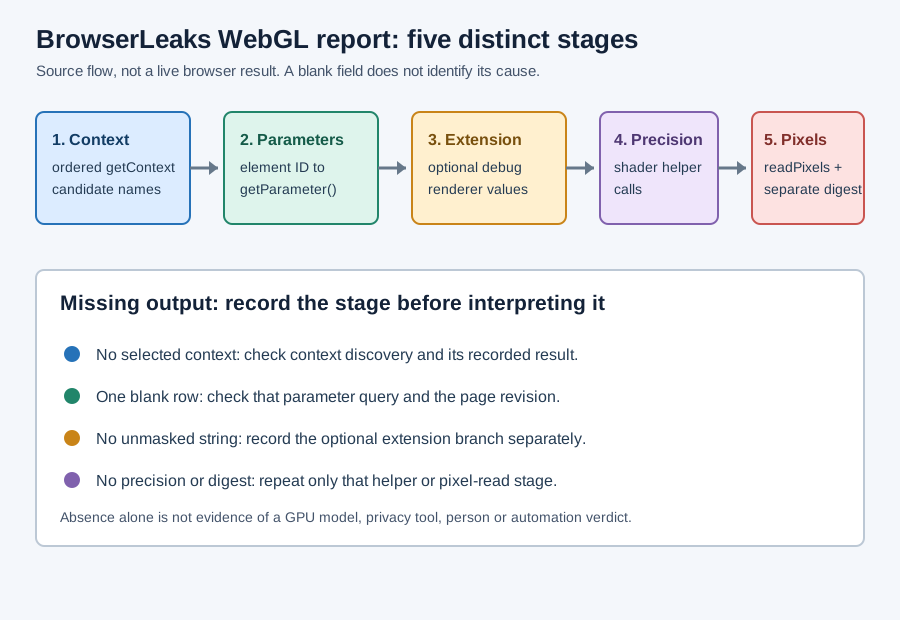
This English-language video maps the five collection stages and then runs a controlled five-stage fixture in real Chrome: the native getContext('webgl2') result, the renderer string the debug extension returns, a shader precision integer, and a real readPixels buffer. The audio is English. The fixture is a controlled replay of the published stage order; it does not measure a particular person's device.
Start with the collection stages
BrowserLeaks' public WebGL page is a report template with separate sections for support detection, a WebGL fingerprint, a report hash, an image hash, and a rendered image. The page source and its script reveal the collection order, but downloading those files does not run the report in a browser. The findings here are therefore a source-level map, not a claim about what a live profile returned.
The script tries context names in this order: webgl2, webgl, moz-webgl, webkit-3d, and webgl2-compute. For each candidate it creates a canvas and calls getContext; it keeps the first usable context and continues with that one. A report that reaches a later fallback is not equivalent to one whose first candidate succeeded, even if both pages eventually show some rows.
Two details of that attempt loop matter when a report looks wrong. First, the canvas is created at a fixed 256 by 128 size and is reused for the drawing stage, so the drawing buffer dimensions in a saved report describe that canvas rather than the browser window. Second, each attempt passes failIfMajorPerformanceCaveat: false and rejects a context whose isContextLost() already returns true. A context that fails either test is skipped silently, and the loop moves on, which is why a report can be complete for a fallback name while the first name produces nothing at all.
The collector also stores every context it managed to obtain, not just the selected one. The page's context selector is built from that list, so the number of names offered in the selector is a record of how many attempts succeeded. A report whose selector shows only webgl tells you that webgl2 was attempted and rejected; it does not tell you why, and it does not mean the browser lacks WebGL2 in general.
| Stage | What the public script does | What a missing output narrows |
|---|---|---|
| Context discovery | Tries candidate names against a newly created canvas | Whether a candidate context was obtained; not why every later field might be absent |
| Parameter rows | Maps each report element ID to a context enum, then passes that enum to getParameter | Which ordinary row did not produce a displayable result |
| Debug renderer | Requests WEBGL_debug_renderer_info, then reads its unmasked constants only when an extension object is returned | Whether this optional branch returned a value; not the GPU identity by itself |
| Precision | Calls shader precision helpers separately from ordinary parameter rows | Whether the precision helper produced a usable summary |
| Image hash | Draws a separate scene, reads a pixel buffer, serializes it and calculates a digest | Whether this render/readback path completed; not whether the parameter collector succeeded |
| Report hash | Serializes the collected object and hashes that serialization | Whether the serialized object was stable between captures; not whether any single row was correct |
The table is a reading aid, not an exhaustive list of browser failure causes. The same visible blank can result from different stages, and the page's rendered output alone may not expose which one failed. The general WebGL fingerprinting guide covers the broader signal surface and documented profile controls; this page is specifically about interpreting BrowserLeaks' report pipeline.
Ordinary parameters and optional renderer data
For ordinary rows, BrowserLeaks iterates .pname elements, reads each element's ID, resolves that name on the selected WebGL context, and passes the resulting enum constant to getParameter. That design makes the report table a useful inventory of requested values, but it also means a row is evidence about one query in one context. It is not a complete GPU description, and a row that is empty in the page does not reveal whether the query was skipped, returned a value the UI did not render, or encountered an earlier failure.
One consequence of using element IDs as property names is that the row names come from the page, while the queried enum constants come from the selected WebGL context. In the published script, n is that selected context and each listed ID is queried as getParameter(n[id]). A specification constant omitted from the markup cannot appear as a row, and adding an ID that maps to a context property changes the collected object without changing the browser.
The collector also merges three non-parameter sources into the same object after the loop: the context attributes returned by getContextAttributes(), the drawingBufferColorSpace and unpackColorSpace properties, and the supported extension list. Context attributes are the values the context was created with rather than values the browser reports about its hardware, and the two color-space properties are strings that follow the canvas color-space settings. Reading them from one flat table is convenient, but they answer different questions than a getParameter row does.
The unmasked vendor and renderer fields use a separate branch. The script first calls getExtension('WEBGL_debug_renderer_info'); only when it gets an extension object does it read UNMASKED_RENDERER_WEBGL and UNMASKED_VENDOR_WEBGL. MDN documents that getExtension() returns an object for a supported extension and null when it is unavailable. That API contract explains the branch condition, but it does not identify why a particular report has no unmasked string. The separate privacy-boundary analysis for WEBGL_debug_renderer_info distinguishes that API state from identity claims.
Two further parameters are read through their own extensions rather than through the ordinary list: MAX_DRAW_BUFFERS_WEBGL from WEBGL_draw_buffers, and MAX_TEXTURE_MAX_ANISOTROPY_EXT from whichever of EXT_texture_filter_anisotropic, WEBKIT_EXT_texture_filter_anisotropic or MOZ_EXT_texture_filter_anisotropic resolves first. Both are guarded by an extension lookup, so both can be empty for the same reason the unmasked renderer can be empty. In the page's markup these rows sit alongside ordinary parameters, which makes the difference easy to miss when you scan the table.
Keep these cases separate in a report note:
| Observation | Safe statement | Unsupported leap |
|---|---|---|
| Ordinary renderer row exists, unmasked row is blank | The ordinary renderer row was displayed; the optional unmasked value was not | “The browser is hiding a specific GPU” |
| Extension lookup returns no object | The optional extension branch had no object to read | “A privacy tool blocked it” |
| Context discovery has no selected context | This collector did not proceed with a selected context | “The browser has no GPU” |
| Field is absent from a saved report | The saved artifact lacks that field | “The original API call failed” |
Each unsupported leap invents an unobserved cause. A second capture can test whether the same stage is repeatable, but it still cannot establish a cause without recording the conditions that changed.
Precision and pixel output are separate
Shader precision is produced through calls to getShaderPrecisionFormat, rather than being inferred from the debug renderer string. A precision summary and a renderer label can therefore disagree without either one being a corrupted copy of the other. Preserve the shader stage, precision class, returned range and precision, and any exception or absent result separately if the report consumer exposes them.
The report presents two different precision summaries. One compares the high-float result against the medium-float result for the same shader stage and falls back to the medium result when the high result reports zero precision. The other collapses two separate queries, HIGH_FLOAT and HIGH_INT, into a short highp/mediump and highp/lowp label. A single label in the table therefore stands for up to three helper calls, and a value that looks coarse can come from the fallback rather than from the browser's actual precision support.
The image hash is another path. BrowserLeaks creates a small WebGL drawing, reads its pixel values into a Uint8Array with readPixels, serializes the array and hashes that serialization. This digest describes that drawing under the selected context and execution conditions. It is not the same as an API parameter, and it is not evidence that a person or device has been identified.
The drawing is a fixed fan of line segments produced by a loop of 128 steps between 45 and 315 degrees, drawn with a LINE_STRIP and a hard-coded projection matrix. Because the geometry comes from constants in the script, a changed image hash points at the rendering path, the canvas size, the color space or the readback, not at a changed GPU model by itself. The report hash covers a different input: it is a digest of the serialized collection object, so it changes when any collected row changes, including rows unrelated to rendering.
For a controlled comparison, keep the report revision, browser build, operating system, origin, selected context name, viewport, and collection time alongside each result. Compare parameter rows with parameter rows, extension output with extension output, precision output with the same precision query, and image hashes only when the drawing and readback procedure are unchanged. If only the hash changes, check the draw inputs and readback stage before attributing the difference to a renderer or a profile.
The evidence should not be collapsed into one “WebGL fingerprint” field. That label hides which call produced a value and what can be repeated. A compact record with separate stage outcomes is more useful to an engineer diagnosing a report export or a page-level compatibility issue.
Classify a missing field before interpreting it
Use the first matching row below. The follow-up is designed to distinguish a collection-stage issue from a report-rendering issue; it does not assume a particular browser defect.
Two classifications are worth separating before you consult the table. A value that the page renders as empty came back from getParameter as null or an empty string, which is a returned value rather than a missing call. A value the page renders as undefined means the collected object had no key for that row at all, which points at the collection step rather than at the query. These two labels look similar in a screenshot and lead to different follow-ups.
| What is missing | First check | Repeatable follow-up |
|---|---|---|
| All WebGL report sections | Whether the page's support check and context discovery ran | Reload once with the same origin and browser build; capture the selected context or the exact failure stage |
| One ordinary parameter | Whether the corresponding row ID exists in the downloaded page revision | Repeat that parameter query in an owned diagnostic page and keep the returned type/value or exception |
| Unmasked vendor or renderer only | Whether the optional extension branch returned an object | Record extension availability separately from the ordinary renderer row; do not infer a blocker from absence |
| Precision summary | Which shader stage and precision class the helper queried | Repeat the same helper call and preserve its result or thrown error |
| Image hash only | Whether the separate drawing, readPixels, serialization and digest steps completed | Preserve the drawing revision and pixel-read outcome; do not compare hashes from different scenes |
| Report hash only | Whether any collected row changed between captures | Compare the row-level values first; a changed report hash without a changed row means the serialization order changed |
If two captures differ, write down what was held constant and what changed. A page revision change, context fallback, origin difference, display configuration, or a changed scene can alter the route or result without showing that a browser identity changed. Conversely, matching values on one report do not prove equivalence across unrelated applications.
The page keeps a raw-key toggle that rewrites the left column of the table. Switching it changes the label a reader sees without changing the collected object, so two screenshots of the same capture can look different in their first column. Compare key names, not labels, when you are checking whether two reports collected the same rows.
Use a controlled report record
The following is a record schema, not sample output. Fill it from the report and your own capture; do not copy an expected value into an observation field.
{
  "toolUrl": "https://browserleaks.com/webgl",
  "capturedAt": "YYYY-MM-DDTHH:mm:ssZ",
  "pageRevision": "save the script URL or content hash",
  "browserBuild": "record the actual build",
  "origin": "record the report origin",
  "selectedContext": "record the actual context name or null",
  "ordinaryParameterRows": "present, missing, or error per row",
  "debugRendererExtension": "object, null, or not reached",
  "precisionChecks": "record each queried class and result",
  "pixelRead": "completed, missing, or error",
  "imageDigest": "record only if actually present"
}
This schema keeps source revision and collection state next to values so a later comparison can reproduce the same branch. It deliberately contains no verdict field: deciding whether an application accepts an environment requires evidence from that application's documented and authorized test context.
A record filled from one capture answers a narrower question than a record filled from several. One capture establishes that a branch produced a value under the conditions you wrote down. Several captures under a changed condition can show whether that branch is sensitive to the change, but only if every other field in the record stayed the same. The schema records the conditions; it carries no score for the page.
FAQ
Does a blank unmasked renderer mean the extension was blocked?
No. It means the saved report does not show that value. Record whether the extension branch was reached and what getExtension() returned before making a narrower statement.
Is the image hash another GPU identifier?
It is a digest of the script's rendered pixel buffer. It can be useful for comparing the same drawing procedure, but it does not independently identify a GPU, device or person.
Does BotBrowser guarantee these fields will match BrowserLeaks?
No. BotBrowser documents profile controls for authorized browser-surface validation. The report depends on its own script, page revision and browser execution conditions, so no product setting guarantees a third-party output or classification.
Sources
- BrowserLeaks WebGL report and its published collector, read as source on 2026-11-04.
- MDN:
WebGLRenderingContext.getExtension()andgetParameter(). - BotBrowser: WebGL fingerprint controls and automation consistency practices.
- CreepJS WebGL report collection and capability signals, for the distinct CreepJS collector.
Practical conclusion
Treat a BrowserLeaks WebGL report as several collection paths, not a single pass/fail result. Preserve the context, parameter, optional extension, precision and pixel-read stages independently; rerun only the stage that is missing under recorded conditions. A comparison built from those recorded stages stays defensible, and a rendering difference stays a rendering difference.
This article is part of the guide: What Is a Browser Fingerprint?
Related Articles
CreepJS WebGL Report: Contexts and Capability Signals
FingerprintWEBGL_debug_renderer_info: Privacy and Renderer Boundaries
FingerprintWebGL Renderer Missing: Privacy or Context State?
Fingerprintwebgl_debug_renderer_info: What Your GPU Reveals to Pages
FingerprintBrowserLeaks Canvas Report: Signals and Limits
FingerprintWebGL Software Rendering, Capability Fallbacks, and Privacy
Take BotBrowser from research to production
The guides cover the model first, then move into cross-platform validation, isolated contexts, and scale-ready browser deployment.