Cross-Browser Fingerprinting: What Linkability Shows
Separate fingerprint uniqueness, browser stability, and cross-browser linkability with sample limits, confounders, and a practical evidence worksheet.
BotBrowser Team
Want the structured docs for Fingerprint?
This article lives in the editorial library. For step-by-step setup, reference material, and ongoing updates, jump into the docs section.
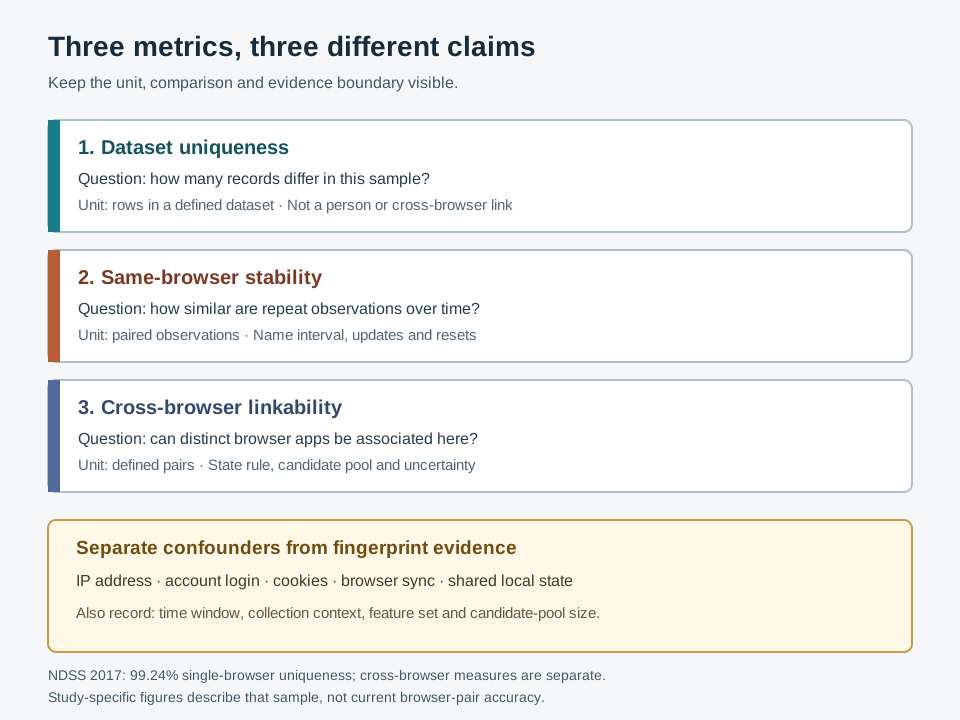
Two browser profiles can look unusual in a dataset without proving that they belong to the same device. Cross-browser fingerprinting is often used as a loose label for three different questions: how many records are unique in a sample, how consistently one browser appears over time, and whether observations from separate browser applications can be associated. The last question needs its own method and controls; the first two do not answer it by themselves.
BotBrowser documents profile portability across supported host operating systems and surface separation between browser contexts. Those are configuration scopes, not a claim that unrelated browser products can be linked to one physical device. A useful privacy assessment keeps those boundaries visible, records non-fingerprint signals separately, and reports an association only at the level its evidence supports.
TL;DR
- Uniqueness describes a defined dataset and candidate population. A rare or unique record is not automatically a named person or a cross-browser match.
- Temporal stability asks whether repeated observations of one browser remain similar over a stated interval. It does not show that another browser on the device is the same entity.
- Cross-browser linkability asks whether observations from distinct browser applications can be associated under specific collection conditions. The answer depends on the features, browser pairs, time window, sample, and confounders.
- A 2017 NDSS study reported separate single-browser uniqueness, cross-browser uniqueness, and cross-browser stability measures for its own dataset and method. These are historical study results, not current browser-pair accuracy.
- Shared IP, account, cookies, browser sync, shared local state, and candidate-pool size must be recorded separately. They can explain an association without fingerprint-only linkage.
Contents
- Three metrics answer three different questions
- What the 2017 study measured
- A cross-browser claim needs a comparison design
- Shared signals and fingerprint evidence
- Evidence levels for an association
- Where standards and product documentation stop
- Practical conclusion
Three metrics answer three different questions
The word “fingerprint” often covers a collection of observable browser properties. A study might combine screen dimensions, language, installed-font behavior, graphics output, or other values into a record. Different papers and products use different features, normalization, and matching rules. A result cannot be compared meaningfully until the operation and denominator are named.
| Measure | Question | Denominator or comparison | What it does not establish |
|---|---|---|---|
| Dataset uniqueness | How many records differ from the other records in this sample? | Records in a defined collection, under a stated normalization rule | A person's identity, persistence, or a link between browsers |
| Temporal stability | How similar are repeat observations of one browser over time? | Paired observations for the same browser across a stated interval | That another browser application belongs to that browser's user |
| Cross-browser linkability | Can observations from different browser applications be associated under this study's rules? | Cross-browser pairs or known same-user pairs in the study design | Universal accuracy, physical-device identity, or a real-world service verdict |
Uniqueness is a property of a dataset and a chosen representation. If every row differs after a particular normalization, every row is unique in that collection. Add a new population, remove a field, round a value, or change how missing values are represented and the result may change. Uniqueness does not say who produced the row, whether the same browser will produce it next week, or whether a second browser can be connected to it.
Temporal stability has a different unit: repeated observations associated with the same browser across time. A stable value can help distinguish one record from another in that experiment, but persistence may be short or conditional. Browser updates, privacy settings, display changes, profile resets, network conditions, and site collection changes can all affect the observed record. Stability should therefore include an interval and a description of what was held constant.
Cross-browser linkability needs observations from different browser applications and a rule for deciding which pairs count as a match. A study might have labels from consenting participants, use a predeclared similarity cutoff, or estimate candidate associations. Each design has a different meaning. A pair that shares a coarse language value is not equivalent to a pair linked by a wider set of features, and a research match is not proof that an unrelated service uses the same method.
The browser fingerprinting overview explains how a browser record can combine several surfaces. It does not make the three denominators interchangeable. A report should name the metric before attaching words such as “unique,” “stable,” or “linked.”
What the 2017 study measured
The NDSS paper Cross-Browser Fingerprinting via OS and Hardware Level Features is useful because it reports single-browser and cross-browser measures separately. Its abstract describes a collection of 3615 fingerprints from 1903 crowdsourcing users over three months. The authors compare their method with earlier work and report results within that collected population. The sample and the study period are part of the finding, not incidental metadata.
The paper's Table II labels its columns “Single-browser” and “Cross-browser.” For the authors' approach it reports 99.24% single-browser uniqueness, 83.24% cross-browser uniqueness, and 91.44% cross-browser stability. Those percentages are not three versions of one accuracy score. The first describes unique fingerprints in the single-browser comparison. The cross-browser uniqueness figure describes the study's ability to distinguish users across browsers under its method. Stability is a separate percentage for fingerprints that remain stable across browsers according to the study's definition.
The table itself gives an important guardrail: the authors say they do not list the single-browser number for one comparison method and the cross-browser number for another because those numbers were very low and the methods were not designed for that purpose. The values depend on feature selection, pair definitions, a particular browser set, and the collected participants. They should not be carried forward as the expected performance of a present-day browser pair.
The sample was gathered from crowdsourcing tasks. The paper notes that cookie-enabled participation mattered because workers needed cookies to log in to the crowdsourcing service. That condition affects who can enter the sample and what observations are available. It also means the research context included account and cookie state around data collection. The paper's fingerprint metrics should not be re-described as evidence that fingerprints alone supplied every association in every real-world environment.
Browser behavior and the surrounding ecosystem have changed since the study. Browser versions, operating systems, graphics stacks, font availability, privacy protections, and site collection practices evolve. A historical result remains useful for understanding a method and its evaluation design; it does not update itself when those conditions change. The Google research on web-fingerprinting risk published in 2024 studies entropy and risk in Chrome observations, but it is not a cross-product validation of the 2017 browser-pair figures.
When citing a historical percentage, keep four pieces next to it: publication year, collection population, metric definition, and comparison scope. If any of those are missing from a secondary summary, the percentage should not be restated as an operational expectation. A careful paraphrase says “the authors reported this result in this sample,” not “cross-browser fingerprinting identifies users with this accuracy.”
A cross-browser claim needs a comparison design
A defensible assessment begins with a question that can be falsified. For example: “Under the stated collection conditions, does this feature set associate repeat observations from Browser A and Browser B above the predeclared baseline?” That wording is narrower than “Do these browsers fingerprint the same device?” It names the pair, collection, and comparison, and it leaves room for a negative or inconclusive result.
The collection unit should be explicit. Record whether each observation is one page load, one session, or a time-bounded group; whether the browser application and version are known; and whether the participant or test owner supplied labels. A row without a reliable pairing label cannot establish cross-browser linkage simply because two values look alike. Likewise, observations collected in different contexts may have changed for reasons unrelated to the browser's underlying hardware.
Before looking at results, define what constitutes a candidate match and what the comparison baseline is. If one browser record is compared with two possible candidates, a match has a different chance interpretation than when it is compared with 20000. A nearest-neighbor result can always identify the closest candidate in a pool even when all candidates are poor matches. Report the size and construction of the candidate pool, the predeclared similarity cutoff or decision rule, and the treatment of ties or missing values.
| Design item | Record before interpretation | Why it changes the result |
|---|---|---|
| Browser pair | Product family, version range, profile condition, and observation order | A result from one pair does not generalize to every pair |
| Observation interval | Elapsed time and whether updates or resets occurred | Similarity across minutes is not the same question as similarity across months |
| Feature set | Which surfaces were available, omitted, rounded, or normalized | A change in collection changes both the match rule and missingness |
| Candidate pool | Size, source, inclusion rules, and known labels | The chance of a coincidental nearest candidate depends on the pool |
| Decision rule | Similarity measure, predeclared cutoff, tie handling, and baseline | A cutoff chosen after seeing results can exaggerate apparent success |
| Confounder record | IP, account, cookies, sync, shared local state, and collection context | A shared signal can create an association that is not fingerprint-only |
Separate development choices from evaluation. If a cutoff is tuned on the same pairs used to report success, the reported figure may reflect that tuning rather than generalization to new observations. A sound design holds out participants, devices, or collection periods as appropriate to its question. The paper or report should state which unit was held out; “cross-validation” without the split unit is incomplete for assessing leakage between observations from one participant.
Do not collapse unknown states into a mismatch or a match. Missing values can mean an API was unavailable, a field was not collected, a policy blocked access, or an error occurred. A normalizer that turns every missing value into the same token can make unrelated records appear similar. A useful report preserves at least “present,” “not collected,” “unavailable,” and “error” when those states can be distinguished by the collection method.
For a privacy review, an evidence worksheet can use one row per comparison and keep the inference narrow:
| Field | Example of a bounded entry |
|---|---|
| Comparison | Browser A and Browser B; versions and observation window recorded |
| Collection | Same declared task and page set; no claim about other sites |
| Pairing basis | Participant-provided study label or explicitly unknown |
| Candidate set | Number of eligible records and how they were selected |
| Inputs | Feature names and missing-value states, not unnecessary raw values |
| Confounders | Shared network, login, cookie jar, sync, or local state marked separately |
| Result | Similar, dissimilar, or inconclusive under the predeclared rule |
| Limit | Association under these conditions; no person identity or universal accuracy |
This worksheet is a reporting template, not an experiment. It separates the evidence available from evidence still needed. If the pairing label is unknown, the correct output may be “unresolved,” even when the record looks distinctive.
Shared signals and fingerprint evidence
Keep ipShared, accountShared, cookieState, syncState, and localStateShared in separate ledger fields. The EFF Cover Your Tracks results guide explains the limits of its report labels, while the screen and window fingerprinting guide bounds one browser surface before a cross-app comparison.
Cross-browser observations can share many things besides browser-exposed properties. A public IP address can be common to a household, office, mobile carrier, or VPN exit. Two sessions may use the same account because a person signed in. Cookies may be synchronized by a browser account, shared through a profile, or set by a service. Operating-system services can also share state across applications. These signals may be relevant to a system's overall association decision, but they are not fingerprint-only evidence.
The distinction matters in both privacy audits and incident response. Suppose two browser applications access the same service from one network and one authenticated account. A service can associate those visits through its account or network context without relying on browser fingerprinting. Calling that outcome “cross-browser fingerprinting” obscures the actual mechanism and can overstate what the fingerprint contributed.
Record each channel separately. A useful analysis labels a match as “same account,” “same cookie or sync state,” “shared network,” “shared local state,” “browser-surface similarity,” or “unknown,” when the evidence supports that label. Do not combine every channel into one score and then attribute the total to a browser fingerprint. If raw network or account data is not needed for the authorized assessment, avoid collecting it; a coarse confounder flag may be enough to prevent a false causal claim.
Browser sync deserves particular care. Sync may transfer settings or browsing-related state between browsers associated with one account, but products differ in what they sync and when. A shared value observed after sync cannot automatically be attributed to a passive fingerprint. The source and route of the value must be established first. Similarly, “same device” is often an assumption in a dataset label rather than a directly measured physical fact.
The cross-platform profile guide is about carrying a declared BotBrowser profile across supported host operating systems. That controlled profile relationship is not evidence that unrelated consumer browsers share a device identity. Keeping the term “profile portability” separate from “cross-browser linkability” prevents a product configuration example from being mistaken for a tracking result.
Evidence levels for an association
An audit record can keep pairingLabel, candidatePoolSize, and matchRule separate, then state whether a pair met that rule. For historical context, the NDSS 2017 study used 3615 fingerprints from 1903 participants over three months; that sample does not establish current accuracy.
An association result is conditional on the data, candidate pool, and rule used. It can support a statement such as “these records were closer than the declared cutoff in this sample.” It cannot by itself support “these records are the same person,” “the hardware is identical,” or “a website will reject the browser.” Each of those stronger statements requires different evidence and, for a service outcome, direct observation of that service under controlled and authorized conditions.
The vocabulary should preserve that ladder of inference. “Similar records” describes values. “Associated under this method” describes an analysis output. “Same participant” is a label established by the study's pairing process. “Same device” is a stronger physical claim that may require independent validation. “Same person” is stronger still and should not be inferred from browser properties. Report the strongest rung supported, not the strongest rung that sounds useful.
A privacy reviewer should also ask whether linkage is necessary to answer the stated question. Feature-rich records can be sensitive even if nobody assigns a name. Retain the minimum fields, limit access, define a deletion schedule, and prefer aggregate outcomes where possible. A source-level description of a fingerprinting technique does not authorize deploying it against people. The W3C's fingerprinting guidance treats linkability as a privacy consideration and discusses threat models; it does not provide a universal measurement result for every browser pair.
When a result is inconclusive, keep that outcome visible. A non-match may reflect missing fields or a changed browser rather than proof of two devices. A match may reflect a common configuration or a shared non-fingerprint signal. “Inconclusive under the stated conditions” is a useful technical result because it constrains what the team may claim and what a later assessment should measure.
Where standards and product documentation stop
The W3C guidance describes fingerprinting and the privacy risks that can arise when observations are correlated across contexts. It notes a threat-model possibility involving transient event correlation between different browser applications, while stating that this is typically not a concern. That passage does not say that ordinary websites routinely link unrelated browsers, nor does it measure a success rate. It is a boundary for risk analysis, not a result to generalize beyond its stated conditions.
The two relevant BotBrowser documentation pages cover different scopes. Cross-platform profiles describes moving a declared profile across supported host operating systems and preserving documented browser-surface consistency. Per-context fingerprinting describes surface separation among contexts within one browser instance. Neither page establishes whether Firefox, Safari, Chrome, or another unrelated application on the same physical device can be linked by a third party.
These distinctions also define what BotBrowser can and cannot establish for an authorized test. Its documented controls can help configure a declared profile and inspect behavior inside supported contexts. They do not prove that an external service uses a particular matching rule, that two products share a device-level identifier, or that a person can be identified from a browser record. No live cross-browser runtime comparison is claimed here.
FAQ
Does a unique fingerprint identify a person?
No. Uniqueness says that a record differs from other records under a particular sample and normalization. Identity requires a separate, justified link between that record and a person; the percentage alone does not supply it.
Does a stable fingerprint in one browser link another browser?
No. Stability concerns repeated observations of one browser. Cross-browser linkability requires a comparison across distinct browser applications, with an explicit pair definition, matching rule, candidate pool, and confounder analysis.
Is 99.24% a current cross-browser accuracy number?
No. In the cited NDSS 2017 paper, 99.24% is the authors' single-browser uniqueness result for their collected dataset. The paper separately reports 83.24% cross-browser uniqueness and 91.44% cross-browser stability for its method and sample.
Can a shared IP prove a fingerprint match?
No. A shared IP is a network-context signal and may be shared by many devices. It must be documented separately from browser-surface evidence; it does not prove same-device or same-person linkage.
Do BotBrowser's profile controls test unrelated browsers on one device?
The cited documentation covers BotBrowser profile portability across supported host operating systems and per-context separation inside a browser instance. It does not claim a cross-product physical-device linkage test.
Sources
- W3C: Mitigating Browser Fingerprinting in Web Specifications
- Cao et al., NDSS 2017: Cross-Browser Fingerprinting via OS and Hardware Level Features
- FingerprintJS discussion 687: cross-browser matching scope
- Google Research: Assessing Web Fingerprinting Risk (2024)
- BotBrowser: Cross-platform profiles
- BotBrowser: Per-context fingerprint
Practical conclusion
Name the metric before interpreting a browser record. Keep sample uniqueness, same-browser stability, and cross-browser association separate; attach historical figures only to the study that produced them; and log account, network, cookie, sync, and shared-state signals outside the fingerprint evidence. The next safe action is to define the comparison population and decision rule before collection, then report only the bounded result those conditions support.
This article is part of the guide: What Is a Browser Fingerprint?
Related Articles
EFF Cover Your Tracks Results: How to Read Them
FingerprintScreen and Window Fingerprinting: Display Tracking
FingerprintMemory and Storage Signals in Browser Profiles
FingerprintBrowserLeaks Canvas Report: Signals and Limits
FingerprintCreepJS Emoji Metrics: What Sets and Sums Reveal
FingerprintText Measurement Fingerprinting: Sub-Pixel Tracking
Take BotBrowser from research to production
The guides cover the model first, then move into cross-platform validation, isolated contexts, and scale-ready browser deployment.