Date String Parsing: Local and UTC Boundaries
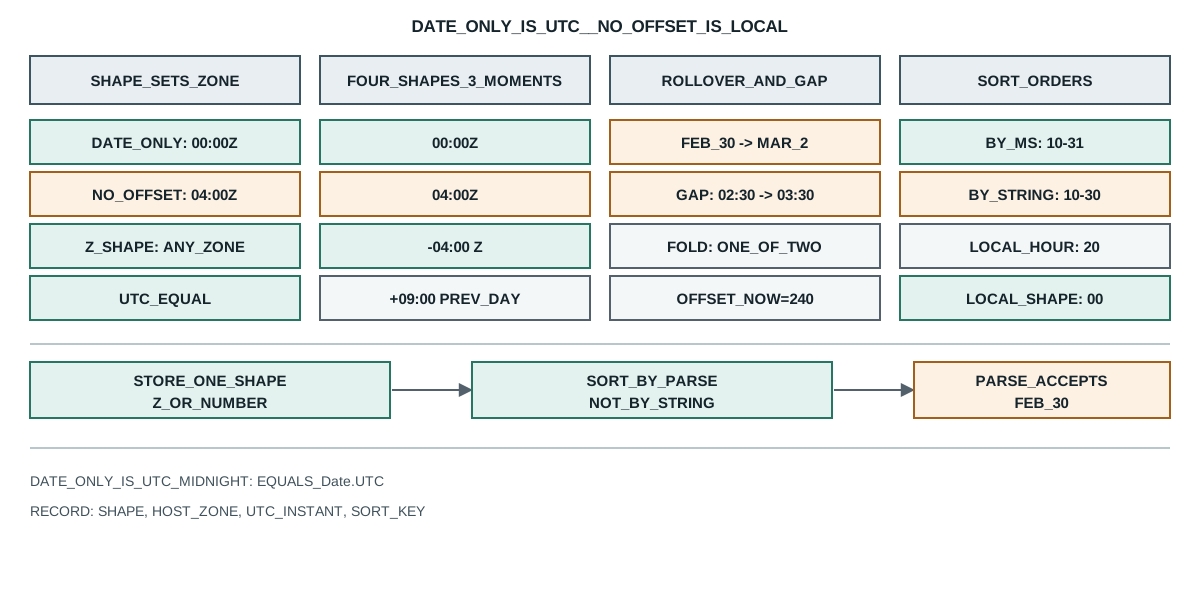
One probe on date strings: a date-only value is read as UTC midnight while a date-time with no offset is read as local, and an out-of-range day rolls over.
BotBrowser Team
Want the structured docs for Fingerprint?
This article lives in the editorial library. For step-by-step setup, reference material, and ongoing updates, jump into the docs section.
BotBrowser supports replaying an authorized same-origin fixture under a declared profile and keeping a bounded record of the exact timestamp a page produced, but it cannot make a date-only string and a date-time string name the same instant, cannot keep an out-of-range day from rolling over, and cannot make a stored string sort the way its instant sorts. This review runs one probe over ten fixed cases on a host set to America/Toronto and records which string shapes Date.parse reads as UTC and which as local time, how four shapes that spell the same calendar day become three different instants, what an out-of-range day and a daylight-saving gap do, why a sort by stored string and a sort by instant disagree, and the local hour each shape lands on.
TL;DR
- A date-only string is read as UTC midnight, so the probe prints
"2026-10-31" -> 2026-10-31T00:00:00.000Zandutc-equal -> Date.UTC=1793404800000 parse=1793404800000. - A date-time with no offset is read as local time, so
"2026-10-31T00:00:00"becomes2026-10-31T04:00:00.000Zon a host at UTC-4. - Four shapes that spell the same day produce
distinct -> 3 instants from 4 shapes, because the date-only shape is UTC and the offset shapes move the instant. - An out-of-range day rolls over: the probe requests Feb 30 and gets
2026-03-02T05:00:00.000Z, and"2026-02-30"parses to March 2, not an error. - A local wall time inside a daylight-saving gap moves forward, so
02:30becomes03:30local, while a fold keeps one of the two01:30occurrences. - A sort by stored string and a sort by instant disagree: the probe prints
sort-by-ms -> 2026-10-31 , 2026-10-30T23:00:00 , ...againstsort-by-string -> 2026-10-30T23:00:00 , 2026-10-31 , .... - A second comparison the probe exposes is that two strings can name the same instant and still sort differently, which is the same mismatch array sort and comparators covers for a comparator that is not a consistent total order. The
Zshape reads the same in every zone, while the date-time shape shifts by the host offset and the date-only shape is stable but lands at a different local hour.
Contents
- Which shapes read as UTC and which as local
- Why four spellings of one day are three instants
- What rolls over and what fails
- Why a string sort and an instant sort disagree
- Record a date-parsing reading
Which shapes read as UTC and which as local
The same calendar fields can name several different instants, and which one a shape picks depends on the shape rather than on the date. The probe parses four strings and prints the ISO instant and the numeric time each one produced:
"2026-10-31" -> 2026-10-31T00:00:00.000Z ms=1793404800000
"2026-10-31T00:00:00" -> 2026-10-31T04:00:00.000Z ms=1793419200000
"2026-10-31T00:00:00Z" -> 2026-10-31T00:00:00.000Z ms=1793404800000
"2026-10-31 00:00:00" -> 2026-10-31T04:00:00.000Z ms=1793419200000
distinct -> 3 instants from 4 shapes
shape:2026-10-31 -> 2026-10-31T00:00:00.000Z
shape:2026-10-31T00:00:00 -> 2026-10-31T04:00:00.000Z
shape:2026-10-31T00:00:00-04:00 -> 2026-10-31T04:00:00.000Z
shape:2026-10-31T00:00:00+09:00 -> 2026-10-30T15:00:00.000Z
utc-equal -> Date.UTC=1793404800000 parse=1793404800000
The first line sets the rule for a bare date. "2026-10-31" parses to 2026-10-31T00:00:00.000Z, and the last line confirms it: utc-equal shows the parsed value equals Date.UTC(2026, 9, 31) exactly. A date-only string therefore has no local reading at all; it is UTC midnight by definition, and a page that formats it back with a local formatter on a host at UTC-4 will show October 30, 20:00, which is the previous day for a reader who expected the 31st.
The second line sets the rule for a date-time without an offset. "2026-10-31T00:00:00" parses to 04:00Z on this host, because the missing offset is filled in from the host's zone, which is UTC-4 on that date. The value is therefore not the same instant as the date-only string, and a page that mixes the two forms in one dataset has two different start points for what looks like one day.
The third line is the shape that is unambiguous. "2026-10-31T00:00:00Z" parses to 00:00Z, and it will do so on any host, because the trailing Z names UTC explicitly. An explicit numeric offset does the same job: the -04:00 shape in the shape: lines prints 04:00Z, and the +09:00 shape prints the previous day at 15:00Z, both of which are the same instant regardless of where the code runs.
The fourth line is the risky one. "2026-10-31 00:00:00" uses a space instead of a T, and the probe shows it parses to 04:00Z, the same local reading the T form got. That makes the space form work the same way on this host, but the space form is implementation-defined rather than required, so a runtime is free to read it differently or reject it. The only shapes an application should store are the date-only form, which is UTC, and a date-time form with a Z or an explicit offset. How a stored instant becomes a visible date is a separate step, and date-time formatting and time-zone portability records what a formatter does with the zone it is given.
Why four spellings of one day are three instants
The distinct -> 3 instants from 4 shapes line is the summary of the problem. Four strings that a reader would call "October 31" become three distinct instants, and the reason is that two of the four name the same instant by two different routes.
The date-only shape is 00:00Z. The no-offset shape is 04:00Z on this host, which is four hours later. The -04:00 shape is also 04:00Z, so it agrees with the no-offset shape by a coincidence of this host's zone rather than by a rule. The +09:00 shape is 15:00Z on the previous day, five hours earlier than the 04:00Z pair. So the four strings span a range from the previous day to the requested day, and a page that treats all four as interchangeable will order two of them wrong and place two others on the previous day.
The agreement between the no-offset shape and the -04:00 shape is the trap. On a host at UTC-4 they print the same instant, so a test that runs only on that host passes, and the same code on a host at UTC+9 prints two different instants for the two shapes. A test that wants to prove the code is zone-independent has to run the comparison in at least two zones, or it has to assert against Z and offset shapes that do not depend on the host at all.
The instant that a stored string names is therefore a property of the string's shape and, for the unmarked shapes, the reader's zone. That is why a record has to store the instant as a number or a Z string rather than as a local wall time, and why a display that shows a date must format from the instant with a named zone rather than read back the wall time the string implied.
The offset-now -> 240 line in the same probe makes the same point from the other side. The date 2026-10-31 is in daylight saving on this host, so its offset is -4. A host that formatted it with a fixed -05:00 standard offset would be an hour off for that date and correct in the winter, which is the bug that a fixed offset written into a fixture usually hides until the date crosses a transition.
The two remaining shapes in the probe are the ones a dashboard filter usually produces. "2026" parses to 2026-01-01T00:00:00.000Z and "2026-10" parses to 2026-10-01T00:00:00.000Z, both as UTC because a partial ISO date has no time and no offset. A filter that sends a month as 2026-10 therefore names the first instant of that month in UTC, which is the previous month for a reader west of Greenwich at a negative offset: on this host the local reading is 2026-09-30T20:00, a full month label that shows the wrong month. A dashboard that wants "October" for a Toronto user has to send an explicit start such as 2026-10-01T00:00:00-04:00 rather than a bare month, or it has to send the month as a string and format it without turning it into an instant at all.
The "10/31/2026" and "Oct 31 2026" shapes behave the other way, and they show why a locale-formatted string should never be the storage format. Both parse to 2026-10-31T04:00:00.000Z here, a local reading, so they follow the host zone like the unmarked date-time shape. But their acceptance is implementation-defined, so a runtime that follows a different date order is free to read 10/31/2026 as the tenth of the thirty-first month, or to reject it. A page that stores a date in the format its locale prints and later parses it on a server in another locale has a shape that is accepted in one place and read differently in another, and the failure appears as a wrong month rather than as an error.
The round-trip line is the one that answers whether a local wall time survives a store and a read. The probe parses 2026-10-31T09:30:00, prints the instant 2026-10-31T13:30:00.000Z, reads back localHours=9, and confirms the stored number returns the same instant. That is a correct round trip of a wall clock on one host, and it is exactly the shape that breaks on another host: the same string read in a zone at UTC+1 lands at 08:30Z, so the stored instant moves by five hours and the displayed wall time is still 09:30 only because the display uses the same zone that parsed it. A page that stores the wall time and formats it back in the same zone sees no error, and the error appears only when the two ends run in different zones.
What rolls over and what fails
Not every invalid-looking date fails, and the probe separates the shapes that roll over from the ones that throw. It constructs three impossible or borderline dates:
rollover -> 2026-03-02T05:00:00.000Z (Feb 30 requested)
rollover-leap -> 2026-03-01T05:00:00.000Z (Feb 29 in a common year)
parse-invalid -> "2026-02-30" -> 2026-03-02T00:00:00.000Z
The Date constructor rolls an out-of-range day into the next month. new Date(2026, 1, 30) asks for February 30, which does not exist in a common year, and the result is March 2, because the constructor adds the extra days to the last valid day of February. The same applies to February 29 in a non-leap year: new Date(2026, 1, 29) becomes March 1. So a page that builds a date from three parsed numbers gets a rollover silently, and the getMonth() of the result is not the month that was passed in.
The parse of the string form does the same. new Date('2026-02-30') returns 2026-03-02T00:00:00.000Z rather than Invalid, because the string is read as a date-only value and the day rolls over. That is the opposite of what many validators assume, and it means a check written as if (isNaN(Date.parse(value))) passes a string that no calendar contains. A validation that must reject February 30 has to compare the parsed fields back to the input fields rather than trust the parser's acceptance.
The daylight-saving cases show the same silent adjustment for wall times. The gap line requests 02:30 on the US spring-forward day, an hour that does not exist, and the probe prints 2026-03-08T07:30:00.000Z with the local time reading 03:30. The runtime moved the nonexistent wall time forward by the gap, so the constructed date is an hour later than requested and the getHours() of the result is 3, not 2. The fold line requests 01:30 on the fall-back day, an hour that occurs twice, and the probe prints 2026-11-01T05:30:00.000Z with the local reading 01:30, which is one of the two occurrences and not necessarily the one a reader meant.
A page that schedules a job at a local wall time therefore inherits both edges. In the spring it can start an hour late because the requested hour did not exist, and in the fall it can start on the first of two occurrences, which for a job that runs once is fine and for a job that counts occurrences is not. The record for such a job has to store the instant that was chosen, not the wall time it asked for, because the wall time does not uniquely identify the run.
Why a string sort and an instant sort disagree
The two sorts of the same list are the clearest consequence of the parsing rules, because they disagree on the order of the same four strings. The probe sorts one list by Date.parse and once by plain string comparison:
sort-by-ms -> 2026-10-31 , 2026-10-30T23:00:00 , 2026-10-31T00:00:00 , 2026-11-01
sort-by-string -> 2026-10-30T23:00:00 , 2026-10-31 , 2026-10-31T00:00:00 , 2026-11-01
Sorting by instant puts 2026-10-31 first, because it is UTC midnight of that day, and it puts 2026-10-30T23:00:00 second, because that is the local wall time of the previous day read as 03:00Z on the next day. Sorting by string puts 2026-10-30T23:00:00 first, because the characters 2026-10-30 sort before 2026-10-31. The two sorts therefore disagree on the first two items, and the disagreement comes entirely from the shapes rather than from the values.
A comparator that is not a consistent total order gives a wrong but silent order, the same failure array sort and comparators documents. The default array sort is the string sort, because it compares the code units of the elements. A list of dates sorted with the default sort() is therefore sorted by its text, which matches the chronological order only when every element uses the same shape. Mix a date-only value with a date-time value and the text order and the chronological order diverge, and nothing warns that they did.
The zone a serialized string names is also the zone a time-zone and locale guide has to resolve before it can label a date. The fix is to sort by the parsed number and to store one shape. The probe's sort-by-ms line is that fix, and it orders the same four strings by the instant they name. A page that stores every timestamp as a Z string or a number and sorts on that value gets the same order from both a string sort and a numeric sort, because the shape is uniform; a page that mixes shapes gets two different orders and cannot tell which one a reader will see.
The local-hour lines show the same problem from the display side. local-hour:2026-10-31 -> 20 reads the date-only value's UTC midnight in the host zone and reports 20:00 of the previous day, while local-hour:2026-10-31T00:00:00 -> 0 reads the local shape and reports 00:00, and local-hour:2026-10-31T00:00:00Z -> 20 reads the Z shape and reports the same 20:00 as the date-only value. So two of the three shapes display as the previous evening, and only the local shape displays as the requested midnight. A record that stores the displayed hour without the shape cannot explain why two pages that say October 31 show different hours.
The compare and diff-hours lines close the loop. The probe prints compare -> '2026-10-31' == new Date('2026-10-31') is true, which only says the parsed string equals itself, and then prints diff-hours -> dateOnlyUtcHour=0 dateTimeUtcHour=4, which shows the two shapes land four hours apart in UTC on this host. A comparison between a date-only value and a date-time value is therefore not a comparison of the same day; it is a comparison of an instant at 00:00Z against an instant at 04:00Z on this host, which differ even though both strings begin with the same calendar date.
Record a date-parsing reading
A date-parsing reading supports a narrow claim: this runtime, this zone, these shapes, produced these instants. Four fields keep it checkable:
- The shape, because a date-only value is UTC and a date-time without an offset is local, and the shape is not visible in the instant.
- The host zone, because the unmarked date-time shape depends on it while the
Zand offset shapes do not, and a reading without the zone cannot be reproduced. - The instant in UTC, because the wall time a reader sees is a second step that can differ per zone.
- The sort key and the stored shape, because a string sort and an instant sort of a mixed list disagree, and a record must say which one produced the order.
Public sources
- MDN: Date
- MDN: Date.parse()
- MDN: Date.UTC()
- ECMAScript: Date Time String Format
- MDN: Intl.DateTimeFormat
- IANA: tz database
- BotBrowser: automation consistency reference
Practical conclusion
Store one shape and store it as an instant: a Z string or a number, never a local wall time, because a date-only value and an unmarked date-time value name different instants and the second depends on the reader's zone. Do not trust Date.parse to reject an impossible day, since February 30 rolls to March 2 instead of returning Invalid; check the parsed fields against the input. Sort on the parsed number rather than the default string comparison when a list may hold more than one shape, and remember that a wall time inside a daylight-saving gap moves forward while one inside a fold is one of two occurrences. For the display half of the same problem, read date-time formatting and time-zone portability; for the locale data that names a zone, read time zones and locale language.
This article is part of the guide: What Is a Browser Fingerprint?
Related Articles
Date-Time Formatting and Time-Zone Portability in Web Applications
FingerprintICU Timezone Aliases and the TZ You Actually Report
FingerprintArray Sort and Comparators: A Function You Can Get Wrong
FingerprintUnicode Normalization: Four Text Identities a Page Reads
FingerprintURL Parsing and Search Params: What Round Trips Change
FingerprintIntl.Collator: Locale Order Is Not Code-Unit Order
Take BotBrowser from research to production
The guides cover the model first, then move into cross-platform validation, isolated contexts, and scale-ready browser deployment.