CreepJS CSS Media Queries: Two Channels, One Preference
Read the pinned CreepJS CSS media collector: one preference answered through an @media custom property and through matchMedia, its fourteen keys, and the screen range scan.
BotBrowser Team
Want the structured docs for Fingerprint?
This article lives in the editorial library. For step-by-step setup, reference material, and ongoing updates, jump into the docs section.
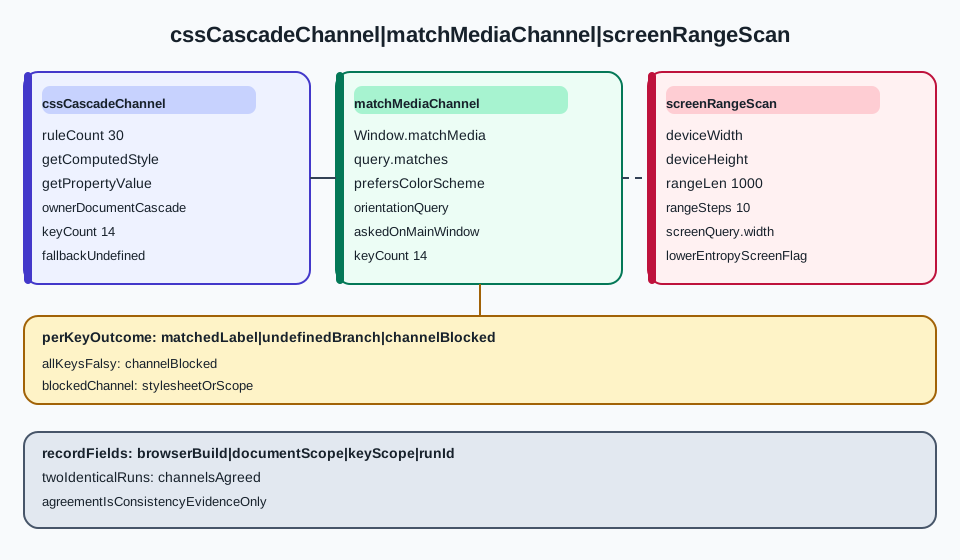
Display preferences are one of the few surfaces a page reads without a permission prompt, and a collector can read each one twice: once by letting the engine apply a media query and reading the resulting custom property, once by asking matchMedia whether the query matches. Those two answers come from the same engine but not from the same code path, so a collector that stores both has two independent observations of one preference. This page traces that split in a pinned open-source collector, names the fourteen keys it reports through each channel, explains the branch that prints a blocked note instead of an empty object, and walks the range scan that recovers device dimensions from media queries rather than from screen. BotBrowser applies the profile display configuration inside the browser core, which keeps the media-query answer and the reported screen values on one configuration; it does not control what a third-party collector does with a disagreement between its channels, and nothing here is a score, a rating, or a statement about how any site classifies a session.
TL;DR
- The collector writes thirty
@mediarules into a style element, then reads fourteen custom properties back withgetComputedStyle, so each value arrives through the cascade rather than through an API call. - It then asks
matchMediathe same questions and stores a second object with the same fourteen keys, so every preference has two stored answers. - Two keys deliberately query the top-level window's
matchMediarather than the frame's, because a frame can inherit a different colour scheme than the window that contains it. - A channel whose fourteen keys all come back falsy renders a blocked note; an individual key that does not match is stored as
undefined, which is a different statement. - Device width and height are recovered by probing
device-widthanddevice-heightin one candidate plus ten ranges of 1000 pixels, so the reported screen size is a measurement, not a read ofscreen.width.
Contents
- What the two channels read
- What a stored answer can and cannot establish
- The screen range scan
- A paired record for one run
- Practical conclusion
What the two channels read
Both channels answer the same fourteen questions. The difference is where the answer is computed.
The custom-property channel
The first channel does not call a matching function at all. It assigns a style element containing thirty media rules to the document body, where each rule sets one custom property under one condition, then reads the body's computed style and pulls fourteen properties out of it:
body.innerHTML = `<style>@media (prefers-color-scheme: light) {body {--prefers-color-scheme: light}}</style>`;
const style = getComputedStyle(body);
style.getPropertyValue('--prefers-color-scheme').trim() || undefined;
Two properties of this approach matter for anyone reading the output. The value is produced by the style engine applying a conditional rule, so a key that does not match leaves the property unset and the expression yields undefined rather than an empty string or false. And because the rules sit in the document, the answer is whatever the engine decided for this document's conditions, not a value a script computed from other readings.
The separate CreepJS computed-style collector enumerates CSSStyleDeclaration names and reads system colors and fonts; it does not use this preference-channel path.
The rules also encode a pairing: (monochrome) sets --monochrome: monochrome and (monochrome: 0) sets --monochrome: non-monochrome, so the stored value is a label chosen between two branches rather than a boolean.
The matchMedia channel
The second channel asks the engine the same questions through Window.matchMedia, and each key walks a ternary chain from the most specific answer to the least:
pointer: win.matchMedia('(pointer: fine)').matches
  ? 'fine'
  : win.matchMedia('(pointer: coarse)').matches
    ? 'coarse'
    : win.matchMedia('(pointer: none)').matches
      ? 'none'
      : undefined;
pointer and any-pointer each try three branches, color-gamut tries rec2020, then p3, then srgb, and display-mode tries fullscreen, standalone, minimal-ui, then browser. A key whose branches all fail is undefined, the same sentinel the first channel uses, which is why the two objects are directly comparable key by key.
Which window each channel queries
Fourteen keys do not mean fourteen identical scopes. Most queries go through win.matchMedia, where win is the collector's own window reference. Two do not: prefers-color-scheme and orientation call the bare matchMedia identifier, with a comment in the source saying the main window is preferred.
That choice is deliberate and observable. A frame can sit inside a document whose colour scheme or orientation the frame's own context reports differently, and a collector that wants the containing window's answer has to ask the window rather than the frame. When you compare two runs, record which scope each key used, because a difference in prefers-color-scheme between runs can come from the scope as easily as from the configuration.
The same asymmetry appears in the @media channel for a structural reason: cascade rules apply to the document that owns the style element, so a frame reading its own body cannot see a rule written into the parent's body. The two channels therefore have different scopes for the same key, and a disagreement between them is not automatically an inconsistency.
| Key | @media value source | matchMedia value source |
|---|---|---|
prefers-reduced-motion | no-preference or reduce | no-preference or reduce |
prefers-color-scheme | light or dark | light or dark, asked on the main window |
monochrome | monochrome or non-monochrome | same two labels |
inverted-colors | inverted or none | same two labels |
forced-colors | none or active | same two labels |
any-hover | hover or none | same two labels |
hover | hover or none | same two labels |
any-pointer | fine, coarse or none | same three labels |
pointer | fine, coarse or none | same three labels |
device-aspect-ratio | the reduced ratio string | the same ratio string |
device-screen | width x height | the same pair |
display-mode | fullscreen, standalone, minimal-ui or browser | same four labels |
color-gamut | srgb, p3 or rec2020 | same three labels |
orientation | landscape or portrait | the same two, asked on the main window |
The table is the part of the report a reader can check without running anything: if a stored object has a key with a value that is not in its column, the value did not come from that channel.
What a stored answer can and cannot establish
An object with fourteen keys looks like a measurement. It is a set of labels, and the useful questions are about which labels are absent and what an absence means.
undefined is a branch result
Every key ends in undefined when no branch matched, and the collector stores that value as-is. So a report can distinguish three states for one key: a matched label, an absent key because nothing matched, and a whole object that never rendered because every key failed. Only the third is a blocking condition.
When you record a run, keep the two objects separate rather than merging them. A merged object cannot tell you whether pointer: fine came from the cascade or from matchMedia, and that provenance is the only thing the second channel adds.
The blocked branch
The rendering function checks both objects before drawing anything. For each channel it counts the keys whose value is truthy, and when that count is zero it prints a blocked note instead of an empty list:
!Object.keys(mediaCSS).filter((key) => !!mediaCSS[key]).length ? HTMLNote.BLOCKED : modal(...)
The distinction matters because the two readings have different causes. An empty @media object means the cascade did not apply any of the thirty rules, which points at the style element, the document, or a stylesheet restriction. An empty matchMedia object means no branch matched for any of the fourteen queries, which is almost impossible on a normal desktop session and therefore describes a heavily restricted context rather than a missing preference.
A report that shows blocked for one channel and labels for the other is describing a scope or stylesheet problem, not a privacy setting. Treat it as a configuration finding first.
What a disagreement means
Because both channels answer the same questions, a per-key comparison is available without any extra instrumentation. Three outcomes are worth naming:
- Both channels return the same label. The engine agreed with itself across two code paths, which is consistency evidence for that key and nothing more.
- One channel returns a label and the other returns
undefined. Check the scope first:prefers-color-schemeandorientationare asked on the main window, so a frame whose own context differs can produce exactly this shape. - Both channels return labels that contradict each other. This is the interesting case, and it is a statement about the document's stylesheet and media state, not about a physical device.
None of those outcomes names a person, a model, or a verdict. The signal groups used by a detector classify output like this into families, and the difference between a family label and a channel comparison is that the family label is assigned after a decision while a channel comparison is available before one.
The touch-device line
The rendered panel adds one derived line, touch device, which reads a single stored value: when any-pointer is coarse it prints true, and otherwise it prints an unknown note rather than false. A coarse primary pointer is common on phones and tablets, and it also appears on some desktop touch panels, so the line is a hint about pointer capability and not a statement about the hardware class.
The screen range scan
The third part of the collector does not read screen.width and screen.height and stop. It verifies them against media queries.
The single-candidate probe
The first attempt asks two queries for exactly the values the screen object reported: (device-width: W px) and (device-height: H px). If both answer, the pair is returned unchanged and the scan ends.
Only when one of them fails does the scan begin. That ordering keeps the common case cheap and makes the expensive path a diagnostic rather than the default.
The ten-range walk
The fallback builds a thousand rules per step and walks ten steps, covering zero to ten thousand pixels, filling in whichever dimension has not answered yet. Both dimensions are searched independently inside the same walk, so a width that answers in the first range does not stop the height from continuing. Range walks like this are not unique to media queries: the same collector approach shows up wherever a value has to be verified rather than trusted, and the CSS fingerprinting surface lists the queries that make such verification possible in the first place.
The result is a pair of numbers recovered from the engine's own device queries, not from the screen object. That is what makes the reading useful: a configuration that reports one resolution through screen and answers a different one through device-width produces two different numbers in the same report, and the disagreement is visible without extra work.
The aspect ratio and the no-taskbar test
Two derived values come out of the same block. The ratio is computed by reducing width and height with a greatest-common-divisor helper and formatting the result as W/H, which is then both queried through matchMedia and written into an @media rule.
The second is a heuristic about available area. The collector computes whether reported width and height equal available width and height, and treats a large display with no difference between the two as a lower-entropy condition:
const noTaskbar = !(width - availWidth || height - availHeight);
if (screen.width !== width || (width > 800 && noTaskbar)) {
  LowerEntropy.IFRAME_SCREEN = true;
}
The flag is interesting for two reasons. A desktop session normally reserves some area for a taskbar or dock, so an exact match on a large display is the shape of a synthetic surface. And the flag is written onto a shared record that declares only six keys, none of them this one, so the marker is an ad-hoc annotation rather than a documented field. If you read that record from other scripts, do not treat a key's presence as proof that it was designed to be there.
| Field | Where it comes from | What it establishes |
|---|---|---|
screenQuery.width | first candidate probe, then ten ranges of 1000 px | what the engine answers for device-width |
screenQuery.height | the same walk, independently | what the engine answers for device-height |
device-aspect-ratio | width and height reduced by their greatest common divisor | a ratio string, not a panel type |
device-screen | W x H queried through matchMedia | whether the pair matches as one condition |
LowerEntropy.IFRAME_SCREEN | reported screen versus available area | a low-entropy display hint, not a verdict |
The touch line and the range walk both describe the display, while screen and window geometry are a separate surface with its own distinctions between reported resolution, available area and layout viewport; screen and window fingerprinting covers those values, while this collector only verifies two of them against media queries.
A paired record for one run
The collector's two objects make a record cheap to build, provided the record keeps both.
Fields worth storing
Store the two objects under separate keys, the screen pair recovered by the scan, the browser build identifier, and the document URL. Add one field that the collector does not produce: the scope each sensitive key was asked on. That field is what turns a disagreement into an explanation instead of an alarm.
Keep the raw labels rather than a hash. The collector renders a short hash beside each modal, which is convenient for comparing two reports at a glance and useless for diagnosing one, because a hash of fourteen labels cannot tell you which label changed.
Repeat and diff
Two runs with the same configuration should produce the same labels for every key. A key that moves between runs is a configuration or timing finding: the stylesheet may not have applied in one run, the frame may have been at a different scope, or the document may have loaded in a different environment.
Diff by key rather than by object, and record the direction of the change. A pointer that moves from fine to undefined is a different finding from one that moves from fine to coarse, and only the second describes a pointer capability that changed.
What the record cannot settle
The record describes what the document's engine answered. It does not describe the display hardware, the operating system, or the model any site builds from these labels. A clean comparison across both channels says the two code paths agreed on this build for this document, which is a statement about consistency and not about identity.
BotBrowser applies profile display settings inside the browser core, so the value a media query resolves to and the value screen reports come from the one loaded configuration; the CSS signal reference documents which settings are available. It does not change what a third-party collector concludes from a disagreement, and it cannot make a low-entropy display behave like a specific physical panel.
FAQ
Do the two channels always agree?
Not necessarily, and the reasons are structural rather than random. The cascade channel only applies to the document that owns the style element, while two matchMedia keys are asked on the main window, so a frame in a different context can legitimately produce different answers for the same key.
What does a blocked note mean?
A blocked note means every key in that channel came back falsy. For the cascade channel that points at the stylesheet not applying; for the matchMedia channel it points at a restricted context, because a normal desktop session matches at least one branch for most of the fourteen keys.
Why probe media queries instead of reading screen values?
Because the probe is an independent answer to the same question. A configuration can report one resolution through screen and answer a different one through device-width, and the scan makes that difference visible in the report rather than leaving it to a separate test.
Practical conclusion
Start from the two objects rather than from the rendered panel. One channel comes from the cascade and one from a matching function, they answer the same fourteen questions, and each key can be absent, labelled, or part of a channel that never rendered. Then read the screen values as a measurement: the scan verifies the reported pair against device-width and device-height, and the no-taskbar test is a hint about available area rather than a verdict.
The next action is one paired record on a document you control. Store both objects, the recovered screen pair and the scope each sensitive key used, then repeat the run and diff by key. If a key moves, the stylesheet or the scope is the thing to investigate; if every key holds, the two channels agreed on that build.
Sources
This article is part of the guide: What Is a Browser Fingerprint?
Related Articles
CSS Fingerprinting: How Stylesheets Track You
PlatformMedia Query Preferences: Respect User Choices in Web Interfaces
FingerprintCreepJS CSS Computed Style Collector: What It Reads
FingerprintScreen and Window Fingerprinting: Display Tracking
FingerprintCreepJS Signal Groups and How It Combines Them
FingerprintCreepJS Math Signals: Read the Source Fields
Run the same check in BotBrowser
Load a profile, keep the signals you just read about consistent inside the browser, and confirm the result on your own machine before a rollout.