IndexedDB Lifecycle: Versions, Quota, and Data Cleanup
Open and version IndexedDB safely, run upgrades without blocking other tabs, plan for quota and eviction, and clear application data on sign-out.
Want the structured docs for Identity?
This article lives in the editorial library. For step-by-step setup, reference material, and ongoing updates, jump into the docs section.
Open a database with an explicit version
An IndexedDB database has a lifecycle with four stages that application code has to handle on purpose: opening with a version, upgrading the schema, living within browser-managed quota, and being deleted when the data should no longer exist. Each stage has an event or an API that reports what happened, and each has a failure outcome that a user can see. A dependable application opens the database with an explicit version, changes the schema only inside the upgrade step, closes its connection when another tab asks for a newer version, records what happens when space runs out, and removes the previous account's databases on sign-out with a bounded result when removal is blocked.
Everything below concerns data that your own application stores. Reading or inspecting another site's stored data is a different task, and the database and store names in the examples are invented rather than taken from a real site. For where IndexedDB sits next to cookies and Web Storage, see Cookies, localStorage, and IndexedDB: Where State Belongs.
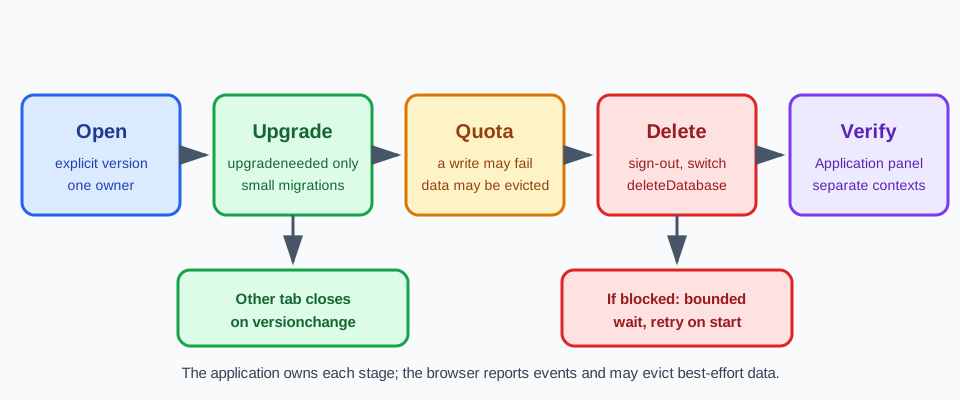
The entry point is indexedDB.open(name, version). It returns an open request rather than a database. The connection arrives in the request's success event, and any creation or change of the schema happens in the upgradeneeded event, which fires first when the requested version is higher than the stored one. If the database does not exist yet, it is created at the requested version and upgradeneeded runs once to build the initial object stores. The W3C Indexed Database API defines this sequence, and MDN's guide to using IndexedDB walks through it with examples.
Pass the version explicitly and keep it as a named constant in the code that owns the schema. When the version argument is omitted, the browser opens the existing database at its current version, or creates a new one at the first version, so the code cannot request an upgrade on purpose. An integer that the team raises with each schema change makes the history reviewable: each number maps to a known set of object stores and indexes, and a pull request that changes the schema also changes the constant.
A version lower than the stored one is a defined outcome as well. The open request fails with a VersionError. This happens when a user keeps an old tab open while a newer tab has already upgraded the database, or when an older cached copy of the application code runs after a newer release. Treat the error as an application state with a message and a reload action, and do not retry in a loop with a guessed version number.
Handle the request outcomes in one place. The success event hands over the connection, error reports a failure such as a VersionError or a storage problem the browser cannot recover from, and blocked reports that other connections still hold the database open while an upgrade is waiting. Wrap the open call in a small function that returns a promise, attach the versionchange handler to the connection before returning it, and make the rest of the application ask that function for the database instead of opening its own. One owner for opening and closing keeps the connection lifecycle easy to reason about.
Name databases and object stores for what they own. Use a stable database name chosen by the application, and when one origin serves several accounts, put an opaque local account key in the name instead of an email address or other personal data. The name is visible in developer tools and tends to appear in support reports, and it is also the handle that a sign-out flow needs later to find and delete the data of one account.
Upgrade the schema without blocking other tabs
Schema changes are allowed only inside the upgradeneeded handler. During that event the connection holds a special version-change transaction, and only inside it can code call createObjectStore, deleteObjectStore, createIndex, or deleteIndex. Outside it, those calls throw an error. The W3C specification gives the event oldVersion and newVersion values, which let one handler move a database forward from any earlier release.
Write the handler as a sequence of steps keyed by the old version: if the old version is below the first target, create the initial stores; if it is below the second, add the new index; and so on. A user can arrive from any earlier release, so each step must run correctly in order and on its own. Keep the handler limited to IndexedDB work. The upgrade transaction finishes when it has no pending requests, so waiting on a network call or an unrelated promise inside the handler can end the transaction before the next step runs. Fetch remote data after the open request succeeds, not during the upgrade.
Moving existing records to a new shape is the risky part. Run the conversion inside the same upgrade transaction by walking the old store with a cursor, so that the step either commits as a whole or does not commit. If the handler throws, or calls abort() on the transaction, the version stays unchanged and the open request fails with an AbortError, which leaves the previous schema intact. Keep each migration small, and test it against a database seeded at each older version the application still supports, not only the latest one.
The second tab is where upgrades usually go wrong. IndexedDB lets a database change version only when no older connection is open. When one tab requests a higher version, the browser fires versionchange on the connections that other tabs still hold. MDN's guide to using IndexedDB says the handler should close the connection so the other page can upgrade. If it does not, the new open request fires blocked and stays pending, the upgrade does not run, and the user sees the new tab wait on a loading state.
A good handler does two things. It calls db.close() immediately, and then it tells the user what happened, for example by showing that the application was updated in another tab and offering a reload. Closing releases the database to the tab that is upgrading, and the message explains why this tab stopped working. Do not keep using a connection after closing it, because new transactions on it throw an error. The same event fires when a tab calls deleteDatabase, so one handler covers both upgrades and deletions.
The tab that requested the upgrade should handle blocked too. Show a short notice that another window is still open on an older version, keep the open request pending, and let the upgrade complete once the other connection closes. If the application also runs a service worker or a shared worker that opens the database, include it in the review. A worker is another connection that can keep an upgrade waiting, and it needs the same versionchange handling.
Plan for quota and eviction
Browsers share a limited amount of disk space between origins, and IndexedDB data lives inside that budget. The Storage Standard describes origin storage as best-effort by default: the browser may remove it under storage pressure without asking. MDN's page on quotas and eviction criteria explains that limits and eviction order vary by browser. Capacity figures differ between browsers, devices, and versions, so the application should not depend on a number that it cannot verify.
Two outcomes need a defined application response. The first is a write that does not fit. When a transaction cannot commit because space ran out, the failure is reported as a QuotaExceededError and the transaction aborts. Listen for abort and error on the transaction, not only on individual requests, and decide in advance what the user sees. Reasonable responses include dropping the least valuable cached records, pausing synchronization, or asking the user to free space, depending on the kind of data.
The second outcome is data that is simply gone. A best-effort origin can be evicted, and browsers that evict commonly remove the data of an origin as a unit rather than a few records at a time. The next visit finds an empty database, and the application opens it at the first version again. Design for that case. Keep a marker record or a metadata store so that startup code can tell a fresh install from an evicted one, and rebuild from the server where the data has a server copy.
The call navigator.storage.estimate() returns approximate usage and quota values that help decide when to trim a cache, and navigator.storage.persist() asks the browser to treat the origin's data as persistent. Both are estimates and requests as described by the Storage Standard. The browser may refuse persistence, may ask the user, or may decide without a prompt. Record the result of the request in the review instead of assuming it was granted, and keep the same recovery path for the case where it was not.
Record the decisions for each object store in a small table that lives next to the schema code. For each store, write down its owner, its retention rule, and what the application does when quota is exceeded or the data has been evicted. A store of drafts that the user has not synchronized needs a warning and an export path. A store of cached server responses needs only a rebuild. A store of settings may need a default value. Retention rules belong in the same table: a cache of recent items can be pruned at startup by walking an index on a timestamp field with a cursor and deleting records older than the stated age, in small batches so that each transaction stays short.
Delete application data on sign-out and account switches
Sign-out is a data decision, not only a session decision. When one person signs out of a shared computer, or one account replaces another in the same browser profile, the previous account's IndexedDB data stays on disk under the same origin until the application removes it. A cleanup flow needs a clear list of what to remove, a way to find it, and a defined outcome when removal cannot finish.
Keep a registry of the database names that the application creates, such as a short list in code or a metadata record, instead of relying on discovery. Where it is available, indexedDB.databases() can list the databases of the origin and is useful for a verification step, but browser support has differed over time, so check the compatibility notes before using it as the only source. With a registry, sign-out becomes a loop: close this tab's own connections, then call indexedDB.deleteDatabase(name) for each name that belongs to the account that is leaving.
The method returns a request, as open does. Its reference page says that deletion fires versionchange on open connections and, if any remain open, fires blocked on the request, and that the deletion waits until they close. That is why the versionchange handler from the upgrade section matters here too, and why a sign-out flow that does not close its own connection first will block itself. Give the flow a bounded outcome: wait for success, and if blocked arrives and does not resolve within a short wait that the application chooses, record that the purge is pending, tell the user, and retry at the next startup before any data of the previous account is read. Avoid an open-ended spinner on the sign-out screen.
A server can also ask the browser to clear data with the Clear-Site-Data response header. The "storage" directive covers IndexedDB along with other origin storage such as localStorage and service worker registrations, which means it clears more than IndexedDB and suits a full sign-out better than the removal of one account among several. The header reference notes that it is honored only on secure responses and that support differs between browsers. Open connections can delay or limit what is cleared, so keep the application-side deletion above as the dependable path and treat the header as an additional step.
Neither tool proves that no copy of the user's data remains. Server records, backups, other devices, and anything the browser keeps outside the origin's storage are separate matters with their own retention rules. What the application can show is narrower: the previous account's databases no longer appear in the browser's storage view, and the next account starts from an empty state. Say that plainly in internal runbooks and in any privacy text shown to users.
Account switching adds one rule: finish the deletion, or scope the data, before the next account reads anything. Opening a database named for the new account is safe by construction, while reusing one shared database for several accounts means that a purge by account key has to finish first. Prefer separate databases per account when the accounts are separate in the user's mind, because deleting one database is simpler to verify than filtering records by key. For the service worker side of the same cleanup, see Service Worker Cache Lifecycle and Privacy.
Review the lifecycle across browser contexts
A lifecycle is easier to trust when you can start from a known empty state and watch each stage happen. Two browser contexts that do not share storage give you that: one plays the signed-in account, the other plays the next user or a second account, and neither can see the other's IndexedDB. The guide to multi-account browser isolation covers the account-separation side of this setup.
BotBrowser documents that each BrowserContext created with browser.newContext() has its own storage, cookies, and session state, so a reviewer can start each account journey from a separate IndexedDB state and verify per-context cleanup behavior. BotBrowser does not manage, migrate, or purge a web application's IndexedDB schema or records, and it cannot make an application's upgrade, quota, or sign-out logic correct; those remain application code. The multi-account isolation documentation describes the context boundary that this review relies on.
Use the browser's developer tools as the shared instrument. In Chromium-based browsers, the Application panel lists IndexedDB databases, their object stores, and their records, and other browsers offer a similar storage view. Refreshing that view after each step turns a statement such as "sign-out removed the data" into something that a second person can observe.
Keep the review about your own application. Use test accounts and synthetic records that you created, and do not point these steps at data that another site stored.
Run the lifecycle checks
Run these checks against a build of the application and record pass or fail for each one.
- Open and upgrade: the database opens with an explicit version, and
createObjectStoreandcreateIndexcalls appear only insideupgradeneeded. Raise the version and reload. Pass if the new store appears underApplication > IndexedDBand existing records are still readable. Fail if a schema call exists outside the upgrade handler, or if the new store is missing or existing records are unreadable after the reload. - Second tab: open the application in two tabs, then raise the version in the second one. Pass if the first tab closes its connection on
versionchange, shows a reload message, and the second tab finishes the upgrade. Fail if the second tab stays on a loading state or reportsblockedwith no notice. - Store review: for each object store, the review records an owner, a retention rule, and the response to exceeded quota and to eviction. Clear the origin's data in developer tools and reopen the application. Pass if each store has all three entries and the application detects the empty state and recovers or shows its documented message. Fail if an entry is blank or the application keeps running on an empty database without noticing.
- Sign-out cleanup: sign out, then refresh
Application > IndexedDB. Pass if no database of the previous account remains and the next account starts empty. Fail if a database of the previous account is still listed. - Blocked deletion: keep a second tab open on the old account and sign out. Pass if the flow ends in a defined state, such as a purge-pending notice and a retry at the next startup, within the wait that the application chose. Fail if the sign-out screen waits without end or the previous data is readable at the next startup.
- Separate contexts: start two browser contexts. Confirm that
Application > IndexedDBis empty in both contexts. Write a marker record in the first, then open the same address in the second. Pass if the marker is absent in the second context's IndexedDB. Fail if it appears.
Repeat the checks after a schema change, a release that touches storage code, or a browser major update, and keep the last passing record until the new run passes.
Sources
Related Articles
Take BotBrowser from research to production
The guides cover the model first, then move into cross-platform validation, isolated contexts, and scale-ready browser deployment.