Credential Management API: Design A Safer Browser Sign-In Flow
Learn how the Credential Management API mediates sign-in, how to preserve user choice and recovery, and where server validation remains essential.
Want the structured docs for Identity?
This article lives in the editorial library. For step-by-step setup, reference material, and ongoing updates, jump into the docs section.
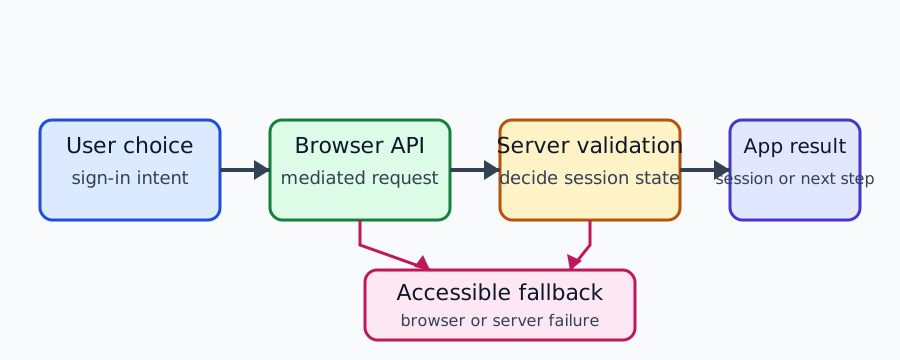
The Credential Management API gives a site a browser-mediated way to request, store, and retrieve credential objects. It does not turn a browser into an identity provider, and it does not create a session by itself. A dependable sign-in experience treats the API as one step in a larger contract: the user asks to sign in, the browser may mediate a credential operation, the server verifies the result, and the application explains what happened. When any step is unavailable or declined, a deliberate fallback keeps the user in control.
The W3C Credential Management Level 1 specification defines the credential container and mediation concepts. MDN's Credential Management API reference describes the browser-facing interfaces and their limits. Those sources support a practical distinction between an API capability, a user-mediated operation, and an authenticated application session.
Start With The Sign-In Contract
Before calling navigator.credentials, describe the user-visible job. Is the person signing in to continue a saved task, creating an account, or confirming a sensitive action? The answer controls which credential types are appropriate, what consent text is needed, and what the application must preserve if the operation is cancelled. A vague “continue” button makes it difficult to explain the browser prompt and difficult to decide whether a returned credential should create, link, or switch an account.
Treat the credential container as a browser boundary, not as an account database. The API can expose a credential object to the relying application when the browser and user permit the request. The application still owns account policy, session lifetime, authorization, and recovery. Do not assume that a successful JavaScript promise means a server session exists. The returned object must travel through the application’s normal, protected exchange and be accepted only after server-side checks.
Use a state model that names the stages separately: sign-in idle, user intent recorded, browser mediation requested, user cancelled, credential returned, server verification pending, session established, and recovery available. This vocabulary prevents a UI from announcing “signed in” when the browser only returned an object or when a network request is still pending. It also gives support staff a useful stage to investigate without collecting the credential itself.
An explicit choice is important for privacy and accessibility. Offer a labelled sign-in control, state which account relationship will be attempted, and explain that the browser may show its own prompt. Do not open a credential operation merely because a page loaded. People using assistive technology, shared devices, or password managers need to understand why focus moved and how to choose another route.
Account linking requires an even narrower contract. If a person is already signed in, a credential result must not silently replace the current session or merge records. Ask whether the operation should sign in to the current account, link another credential, or switch accounts. Preserve unsaved work while the choice is made. A browser credential is an input to that decision, not permission to change ownership of application data.
Understand Browser Mediation
The API separates credential types from mediation behavior. A site may work with password credentials, federated credentials, or other types that a browser implements. The exact availability and prompt behavior depends on the browser, credential provider, policy, and current context. MDN documents these interfaces as browser APIs, not as a portable guarantee that every credential type is present or that a prompt will appear in the same way everywhere.
Mediation describes how much user interaction the browser requires. A silent or conditional path can be useful for a returning user when the browser permits it, while a required path makes the user action explicit. The application should branch on the observable result and keep a visible alternative. It should not interpret “no credential returned” as proof that a person has no account, no saved credential, or no interest in the service.
A call can fail before a provider is contacted. The context may be insecure, the interface may be missing, a policy may block the operation, or the user may not have granted the required browser permission. These outcomes have different owners. A compatibility branch can select a password form or a first-party provider page; it cannot manufacture a credential or relax a browser security boundary.
The browser prompt is part of the user journey. Explain the action before invoking it, keep focus predictable, and provide a cancellation path. Do not loop on rejection. A declined prompt is a valid decision, not a technical defect. Return the user to the sign-in choices with the current task intact and say whether another method can continue without repeating the same prompt.
Credential objects can contain sensitive material or references. Avoid putting them in URLs, analytics labels, screenshots, exception strings, or support tickets. Send only the fields required by the documented server exchange over the application's normal secure channel. Logs should record a redacted stage and outcome, not the object, token, password, or provider assertion.
The WebAuthn privacy guide covers a related boundary: a browser capability or availability result is not proof of a credential or an identity. The same reasoning applies here. The presence, absence, or shape of a credential API result should guide a current interaction, not become a long-lived browser profile.
Keep Server Validation In Charge
The server is the authority for account and session state. It should validate the credential exchange according to the credential type and provider contract, bind the request to the intended relying party and action, reject expired or replayed values, and apply account authorization rules. A browser callback cannot establish these facts. The client should wait for a clear server response before changing navigation, cookies, or visible account state.
Bind every request to an application-controlled state value. The state should identify the pending action and expire after a bounded period. On return, the server checks the binding, provider or credential type, and audience where applicable. It checks a nonce or signature only when the integration's protocol requires one. Keep these checks in one service boundary so that a password fallback and a browser credential path receive the same session policy.
Session creation and credential storage are separate decisions. A successful exchange may create a short-lived application session, register a credential, link an account, or simply return a verified profile. Explain the result to the user and expose sign-out that ends the relying-party session. Do not claim that signing out of the application also signs out of an upstream provider or deletes a browser-saved credential unless those actions actually occur.
Error responses should be useful without revealing account existence. Use a consistent message for an invalid, expired, or unrecognized credential when account enumeration would be harmful. Internally, retain only the redacted details needed to distinguish a browser-unavailable branch, a user cancellation, a provider failure, a server validation failure, and a timeout. Rate-limit repeated failures according to the product's account-security policy.
Recovery remains an application responsibility. Offer password reset, support verification, a first-party provider route, or another method only when the product already authorizes it. Do not ask the user to upload browsing history, copy a complete profile, or disable privacy controls. A recovery reference should be short-lived, bound to the intended account action, and invalidated after use. Preserve a form or draft where policy allows.
The browser storage partitioning guide explains why a credential or session may appear different in an embedded or new top-level context. Treat that as a storage and context result, not as evidence about a person's identity. The application should provide a clear first-party handoff when an embedded flow cannot access the state it needs.
Design Fallbacks And Accessible Feedback
A resilient flow has a primary browser-mediated option and at least one understandable alternative. The fallback may be a password form, a provider's first-party page, an email-link flow, or approved support recovery. It must not be presented as a way around a browser policy. It is the normal user path for unsupported browsers, declined prompts, unavailable providers, expired requests, and account conflicts.
Keep the user's work across branches. If the browser prompt closes, return to the known sign-in screen with the original intent and non-sensitive form fields preserved. If the server times out, explain that completion is unknown and offer a bounded retry that cannot reuse an expired state value. If validation fails, do not show a success page or silently create a partial session.
Accessible status is part of correctness. Announce when a browser prompt is about to open, when the user cancelled, and when another action is required. Move keyboard focus to the message that explains the next step. Give disabled controls a reason and keep a reachable alternative nearby. Test zoom, high contrast, screen readers, and long localized account names; credential UI often combines browser chrome with application content.
Localization should preserve the security meaning of each branch. Translate the provider name, account purpose, cancellation result, expiry, and recovery action without changing whether a session was created. Avoid translating a neutral “not available” result into a claim that the user has no credential. Keep technical API names and code identifiers in their official spelling while translating surrounding instructions.
Use a small acceptance table for product testing. Start with a clean profile and a synthetic account, then test a returning profile separately. Cover approval, decline, cancellation, missing API, provider unavailability, expired state, invalid server response, account conflict, sign-out, and recovery. For each case record the visible message, server session result, preserved work, and redacted stage. The expected result is a product contract, not a claim about every browser release.
Do not build account discovery from the API. A missing credential, an unavailable method, or a declined prompt may all look like “no result,” but they do not have the same meaning. Keep public content available when authentication is optional. When authentication is required, explain the requirement and provide the approved recovery route rather than repeatedly reopening a chooser.
Review Privacy And Product Boundaries
Credential data deserves data minimization. Collect only what the server needs to complete the documented operation, limit retention, restrict support access, and remove temporary fixtures after testing. A diagnostic event can contain a flow stage, application revision, browser family, provider category, and visible outcome without retaining the credential object. Document why each field exists and who owns deletion.
Do not use credential availability as a fingerprint. Browser settings, profile state, policy, provider choice, and software updates can change the result. A capability or mediation outcome cannot prove a person, device, location, or account. It should not be combined with unrelated browser values to create a risk score or persistent label. The correct product response is a clear option and a safe fallback.
Review origin and context boundaries. The relying party should call the API only from the origin and top-level context intended by its account contract. Embedded sign-in may have different storage and permission behavior than a first-party page. If the application needs a handoff, use a server-authorized reference rather than exposing a credential in a query string. Explain the relationship between the embedded component, the first-party session, and the provider.
Test changes as user-visible contracts. Re-run the same synthetic journeys when the browser release, credential provider, account-linking code, consent text, or storage model changes. Compare prompt availability, user choices, server validation, session lifetime, fallback messaging, and deletion. If a release changes availability, update the support matrix; do not describe one observation as a universal platform rule.
Separate browser state from account state in test fixtures. A clean profile tests first-use behavior, while a returning profile tests stored choices and sign-out. Keep those profiles labelled by purpose and remove them when the test window closes. A fixture that happens to contain a saved credential should never be copied into a support archive or reused as evidence for another account.
Define ownership for every transition. The interface owns focus, copy, and preservation of the current task. The browser owns mediation and any native prompt. The provider owns its account interaction. The server owns validation, session creation, authorization, and revocation. When an outcome is ambiguous, report the stage and owner instead of asking the browser to repeat the operation or treating a timeout as a failed password.
Plan for interruption as a normal condition. A person can close a prompt, lose connectivity, reload the page, or return after the state value expires. Each branch should end with one understandable message and one bounded next action. The retry must create fresh state and must not replay a credential object. This keeps recovery predictable and limits duplicate sessions when a response arrives late.
Document the contract in support language. Explain the difference between a browser credential, a provider account, a relying-party session, and a recovery reference. Ask for the smallest redacted identifier that locates the failing stage. Never ask a user to send a password, full credential object, or complete browser profile just to diagnose a missing sign-in button.
The same boundaries help teams compare browsers responsibly. Keep the application revision, provider configuration, synthetic account, and intended user action constant, then record only the visible branch and server outcome. A difference can reflect a browser policy, a provider setting, a stored profile choice, or an application defect. Treat it as a compatibility observation that needs a scoped explanation, not as a ranking of browsers or a conclusion about the person using them.
Keep release notes equally precise. Name the affected sign-in branch, supported browser range, and available fallback, and say whether existing sessions remain valid. Avoid promising that a browser prompt will always appear or that a saved credential will always be offered. Those outcomes depend on the provider, policy, profile state, and user action that the application does not own.
Lifecycle ownership should be visible in the runbook. The interface records intent and preserves the task, the browser mediates the prompt, the provider handles its account, and the server validates and revokes the application session. A handoff between owners should carry a short stage label and expiry, never the complete credential. This makes a delayed callback or a restarted browser recoverable without guessing which layer succeeded.
Privacy review should include the failure path. A cancelled prompt, an unavailable API, and an invalid server response can all lead to the same screen while requiring different retention and support actions. Keep the user-facing message specific enough to choose the next route, but keep telemetry narrow enough that it cannot reconstruct an account or credential. Re-test deletion of temporary state after each negative case.
BotBrowser supports carrying a repeatable browser profile across supported host operating systems, which can help teams review their own sign-in flow with consistent profile inputs. It does not control Credential Management API mediation, approve a provider credential, or replace the relying party's server-side validation and session policy. Use the profile for authorized compatibility checks, then rely on the application and provider contracts for identity decisions.
Public Sources
The W3C Credential Management Level 1 document is a Working Draft, not a W3C Recommendation. It describes the credential container and mediation model, but its maturity should not be read as a finalized cross-browser guarantee. MDN's Credential Management API reference provides browser-facing API and compatibility context. The BotBrowser cross-platform profiles documentation supports the limited product-fit statement about repeatable profile review. Availability and provider behavior still require testing against the application's supported browser and server contract.
Related Articles
Take BotBrowser from research to production
The guides cover the model first, then move into cross-platform validation, isolated contexts, and scale-ready browser deployment.