Browser Storage Partitioning and Privacy
How top-level site context separates embedded browser state, what application flows can change, and how to test partitioned storage responsibly.
Want the structured docs for Identity?
This article lives in the editorial library. For step-by-step setup, reference material, and ongoing updates, jump into the docs section.
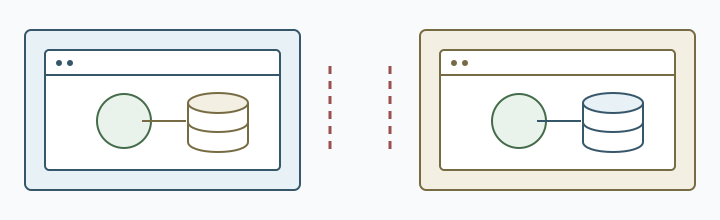
In browsers that partition embedded state, the top-level site can be part of the boundary: the same embedded origin may encounter separate browser-managed state under different top-level sites. This can reduce some cross-site state sharing, but the APIs, partition details, and exceptions vary by browser and release. A product should identify which state must be shared, which state must stay separate, and what the user sees when an embedded component starts without its previous context.
Partitioning is a browser privacy and compatibility behavior, not total isolation or a ban on every data exchange. A browser may offer a user-mediated access mechanism for some embedded storage, but its availability and scope depend on that browser's rules. Browser-managed storage is distinct from application and server data flows. Applications should not infer a person's or device's identity from whether an embedded storage lookup succeeds.
What the partition key changes
Cookies, script-created storage, and other client-side state can be associated with a partition that includes the top-level site. MDN's state partitioning overview describes the general model and its effect on embedded resources. Privacy Sandbox storage partitioning explains the same class of boundary in a Chromium privacy context. The precise set of APIs and access rules depends on the browser and release.
For an embedded service, the same origin can therefore encounter different state under site A and site B. A consent choice, cached preference, or session created in one context may not be available in the other. This is an intended consequence of isolating state by context, not necessarily an application failure. The embedded component should have a clear first-use path and should explain when a user must choose an account or preference again.
Top-level navigation has a different storage relationship from embedding. A service opened as the main site can use its first-party context, while the same service inside another page is subject to the embedded context's rules. A product that supports both flows should test them separately and avoid assuming that a successful first-party sign-in proves an embedded sign-in will have the same state.
The boundary is especially visible when an embedded component moves between tabs, windows, or application routes. A tab opened under a different top-level site may show a fresh consent state even when the user recognizes the same embedded brand. The interface should describe the action that restores continuity, such as opening the service page or choosing the account again. Do not make the user guess whether a missing preference means a browser problem, an expired session, or a new context.
Teams that use embedded SDKs should version the storage assumptions along with the SDK. A component update can change key names, cache formats, or the point at which it asks for access. Keep a migration path for drafts and preferences, and test an interrupted update. A browser release and an SDK release can arrive together, so preserve the application revision and fixture when comparing outcomes.
Partitioning can also interact with service workers, caches, IndexedDB, and client-side preferences. A worker that expects a cache populated in another context may need to fetch again. A cached model or language choice can appear absent even though the user selected it elsewhere. Define which assets can be downloaded again, which choices should be requested again, and how the interface reports a new context without losing the user's current task.
What each observation can establish
- Storage partitioning: A synthetic value readable in an owned embedded frame under site A but not site B is consistent with separate partitions; it does not identify a person or show that every API is partitioned. Compare the same-origin frame's write/read result in both contexts. Privacy Sandbox describes this boundary for storage APIs such as Local Storage and IndexedDB.
- Server-side authorization: An allowed response shows that the server accepted that request under the test account and policy; it does not show that browser storage is unpartitioned or that other endpoints are authorized. Compare the response to one authorized and one unauthorized test request.
- Storage Access exception: A successful Storage Access API request shows access was granted for that document and context; it does not establish permanent or universal access. Record the API result and one subsequent storage read in an owned test frame.
- Embedded data flow: An observed request shows which data reached that endpoint in that test; it does not show that no other data is sent or what the server retains. Inspect the destination and synthetic test data of one owned request, then compare them with the user's stated choice.
Embedded application design
Start with the user journey rather than with a storage API. Decide whether an embedded component should remember consent, keep a draft, show a signed-in state, or simply render public content. For each decision, state the context in which it is valid. A small, purpose-specific state record is easier to explain than a broad assumption that every embedded frame shares one account.
If a workflow needs a first-party relationship, provide a visible route to the service's own page. The user can then review the account, consent, or settings in a context where the product expects them. Returning to the embedding site should preserve the task through an explicit handoff, not through an undocumented dependency on a shared cookie.
Embedded components should handle an empty or new partition as a normal state. Show a sign-in or setup action when that is required, retain non-sensitive input long enough for the user to continue, and explain why a preference is not present. Do not silently copy state from another top-level site. A visible choice makes the data boundary understandable and avoids accidental cross-site linkage.
Permission and access prompts need a user-centered fallback. If the browser offers a mechanism for a user to grant embedded access, explain what the component needs and what will be shared. A denied request should leave unrelated page features usable. The product should not repeatedly prompt, block navigation, or imply that a user must grant access to read public content.
Storage partitioning does not replace server-side authorization. A service still needs to validate account permissions and request integrity on the server. Client storage is a convenience and a cache, not proof that a person is signed in. If an embedded session expires, show a recoverable state and ask for the appropriate action rather than treating a missing cookie as evidence about the browser.
Privacy and data minimization
Partitioning can reduce passive sharing of state between top-level sites, but it does not make every embedded interaction private. The embedded service can still receive the request data required to render its feature, and the top-level page can observe what it places in the page. Review the complete data path: URL parameters, postMessage messages, network requests, server logs, analytics, downloads, and deletion.
Collect only state needed for the embedded task. A preference that controls a local display can often stay in the partition without an account identifier. A draft may need a retention period and a visible clear action. A support record usually needs an outcome and application revision rather than the entire storage database. Avoid using partition behavior as a reason to preserve more data than the feature requires.
Do not turn storage availability into a stable identity signal. A missing key can mean a new context, a cleared profile, a browser setting, a denied permission, or an application change. A present key can reflect a shared first-party relationship without identifying a person. Use functional outcomes to choose a path and delete diagnostic state when its support purpose ends.
Third-party content often has a different owner from the top-level application. Contracts should explain which party controls account data, consent records, support access, and retention. If an embedded payment, media, or identity component needs a service boundary, tell the user before data leaves the page. Storage partitioning can limit local continuity, but it does not answer who can see a submitted value.
The cookie management guide covers session state and retention choices. Storage quota and privacy covers capacity observations. Keep those concerns separate from partition keys. A quota result is not proof of the top-level context, and a partition boundary is not a reason to collect quota information.
Testing partitioned state
Use two owned top-level test sites and one owned embedded service. Start with clean profiles so the initial state is known. Visit the embedded service under site A, create a non-sensitive preference, then repeat under site B. The expected result should be written as a user-facing rule, such as "each site starts with its own consent choice," rather than as a browser identity assertion.
Test first-party and embedded flows independently. A first-party visit should verify the service's normal account and settings journey. An embedded visit should verify the empty-partition path, denied access path, and return path to the service. Keep the fixture data synthetic and avoid sending a real user's account or document to a test endpoint.
Cover the lifecycle of state. Test a new context, a browser restart, a cleared site state, a changed consent choice, an expired session, and an application update. Check whether the product preserves user input, asks for a choice, or intentionally starts over. A state reset should not leave the interface claiming that an old operation is complete.
Embedded APIs can communicate across a frame boundary, but the protocol should be explicit and limited to the task. Validate message origin and message meaning on both sides. Do not use a broad message channel to recreate a hidden global storage layer. If a user chooses to continue in a first-party page, pass a short-lived handoff reference with a documented lifetime and server-side authorization.
Test browser differences without treating one result as universal. Record browser family, version, top-level site, embedded origin, application revision, and functional outcome. A change in support may require a visible fallback or a documentation update. It does not establish that every browser or every release uses the same partition policy.
Troubleshooting compatibility
When an embedded component appears signed out, first determine the context: top-level or embedded, clean or existing, and which site owns it. Then check application session expiry, server authorization, consent, and network response. Do not begin by copying cookies or merging profiles, because that can hide the boundary the product needs to handle.
A component should distinguish an empty partition from a failed network request. Both can look like a missing preference, but the user action differs. An empty context may need setup; a network failure may need retry; a revoked permission may need an explanation. Clear status messages reduce repeated prompts and support requests.
Caching can make a change appear inconsistent. A service worker or application cache may contain an older shell while a new partition fetches current resources. Version assets, handle an interrupted update, and keep a working path while a replacement is downloaded. Do not delete the only usable local draft merely because a new context lacks its cache.
If an embedded feature is optional, keep the rest of the page usable when storage access is unavailable. Offer a first-party route, a local non-account path, or a clear explanation of what cannot continue. Make a remote fallback visible before upload and state what retention choice applies. This connects browser behavior to a user decision instead of turning it into a hidden requirement.
Support evidence should be small. Record the affected task, top-level context, embedded origin category, browser release, application revision, and visible outcome. Ask for the underlying storage or account data only through an authorized process when the smaller record cannot explain the issue. Remove temporary evidence when the case closes.
Release review and operations
Review partition behavior when a browser release, embedded SDK, consent flow, account system, or storage schema changes. Retest the same synthetic journey with the same top-level and embedded origins. Compare the visible result and required user action, not an implementation guess about the partition key.
Keep a compatibility matrix for supported browser families and embedded workflows. It can list first-party sign-in, embedded first use, consent recovery, draft preservation, and first-party handoff. Include an owner and review date. Do not turn the matrix into a permanent record of every storage value created during testing.
Document migration rules for state that used to be available across contexts. A user may need to choose a preference again, sign in on the service page, or export a draft before an update. Give a clear action and keep the old path long enough to avoid silent data loss. Do not silently merge records from unrelated top-level sites.
Incident handling should preserve user work. If a partition change interrupts a draft, keep the input in the current context when possible, offer a user-controlled export or first-party continuation, and explain any upload. A support fix should not require collecting unrelated browsing history or permanently disabling isolation.
After a browser or integration update, repeat a synthetic draft workflow in each supported embedded context. A fresh partition should show setup rather than falsely announce that the old draft was saved; the original draft must remain available until the chosen export or first-party continuation completes. Compare the application and dependency revisions with the earlier successful run before attributing a failure to browser storage.
Operational ownership should cover deletion as well as creation. Define how a user clears an embedded draft, how support removes a temporary test record, and how a retired integration stops receiving requests. A clear deletion path prevents partitioning from becoming an excuse to leave old state in many contexts. Verify the user-visible confirmation and keep the action available when the embedded service cannot load its previous preference.
When a product offers a first-party continuation, show the data boundary before navigation. Tell the user whether the draft remains on the device, moves to an account, or will be uploaded to a service. Preserve the original input until the user confirms the result. This makes the browser context change a comprehensible product action instead of a silent transfer of state.
Analytics also needs a partition-aware design. A repeated visit to the same embedded service under two top-level sites may produce two local states without representing two people. Define reporting around completed application events, consent, and the relationship the service is allowed to observe. Do not join partitioned identifiers merely to recover a cross-site view. If aggregate reporting is required, document the measurement purpose, limit retention, and verify that opt-out and deletion work in every supported context.
Account recovery deserves its own test. A user who loses access to an embedded session should be able to reach an owned recovery page without losing the work already entered in the top-level application. The handoff should expire, reveal no credential in the URL, and return only the result needed to continue. Test cancellation, an expired handoff, a different signed-in account, and a browser restart. Each outcome should leave the user with a clear next action.
Accessibility checks should cover the context transition as well as the initial component. Announce when an embedded panel needs setup, move focus to a meaningful heading after first-party continuation, and preserve keyboard position when the user returns. Error text should distinguish denied access, expired state, and an unavailable service. These are application states, so they need the same accessible names, status messages, and recovery controls as any other sign-in or settings flow.
Finally, treat compatibility claims as dated observations. Record the browser release and the exact owned workflow that was tested, then schedule a review when the browser, identity provider, embedded SDK, or consent model changes. Public documentation states the supported task and fallback without speculating about a private mechanism. This keeps guidance useful when browsers adopt similar privacy goals through different APIs or release schedules.
Public sources
Related Articles
Take BotBrowser from research to production
The guides cover the model first, then move into cross-platform validation, isolated contexts, and scale-ready browser deployment.