CreepJS Headless Detection: Three Separate Verdicts
One probe on CreepJS: soft tells, hard headless bits and wrapper checks are scored separately, so a cleaned page still reports a percentage.
BotBrowser Team
Want the structured docs for Fingerprint?
This article lives in the editorial library. For step-by-step setup, reference material, and ongoing updates, jump into the docs section.
BotBrowser supports replaying an authorized same-origin fixture under a declared profile and keeping a bounded record of what a page reported about its own environment, but it cannot make a thin environment look thick, cannot turn a restored surface into a signal that was never checked, and cannot change how a library groups its own findings. This review reads CreepJS from its public source, reproduces the three verdict groups it computes, and records what a single signal is worth inside each group, how many soft tells a page needs before the soft group reads as headless, which hard bits survive a page that cleaned the obvious ones, and why a percentage in one group cannot be compared with a percentage in another.
TL;DR
- CreepJS reports headless as three separate percentages, not one:
likeHeadlessover 16 soft tells,headlessover 3 hard bits, and a wrapper group over 5 checks. - A headed desktop with a real window manager scores
likeHeadless=0% headless=0% wrapper=0%. - The classic headless profile reaches
likeHeadless=44% (7/16)while its hard group stays at0%, because the soft tells and the hard bits measure different things. - A driver that leaks its flag and its token scores
headless=100% (3/3), the only group that reaches full marks in this run. - One signal is worth 6% in the soft group, 33% in the hard group and 20% in the wrapper group, so the same finding weighs very differently by group.
- A page that restores the chrome object, plugins, mime types, UA data and PDF viewer still reports
likeHeadless=13% (2/16), because the screen geometry was left alone. - Setting a plausible window size drops it to
likeHeadless=6% (1/16), with a software renderer as the only remaining soft tell. - A wrapper that misplaces the chrome object, breaks its runtime and patches
Function.prototype.toStringscoreswrapper=60% (3/5)while both other groups stay at zero. - The
noTaskbartell is plain geometry equality, so a maximized window on a real desktop fires it too.
Contents
- Why the three groups are separate
- What one signal is worth in each group
- Which tells survive a cleaned page
- Where the soft tells overstate a case
- Record a headless reading
Why the three groups are separate
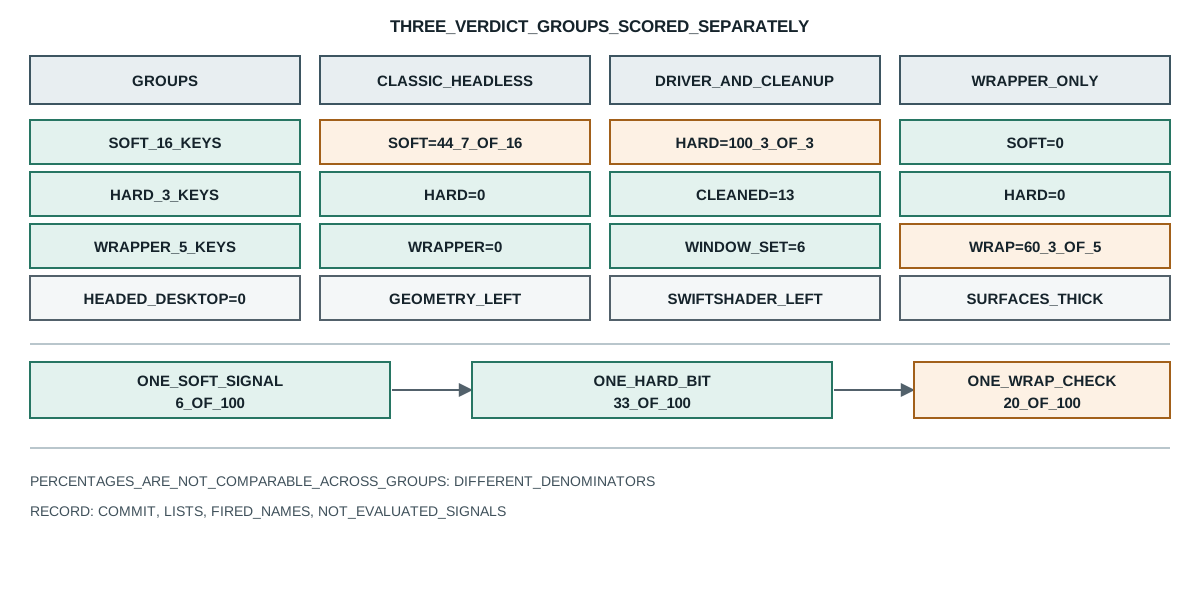
Headless detection is often described as a single question with a single answer, and CreepJS deliberately reports three answers instead. The groups come from the same module and measure different kinds of evidence:
node=v26.9.0
headed-desktop -> likeHeadless=0% (0/16) headless=0% (0/3) wrapper=0% (0/5)
headed-desktop:verdict -> likeHeadless=0 headless=0 wrapper=0
headless-classic -> likeHeadless=44% (7/16) headless=0% (0/3) wrapper=0% (0/5)
headless-driver -> likeHeadless=0% (0/16) headless=100% (3/3) wrapper=0% (0/5)
cleaned-obvious-tells -> likeHeadless=13% (2/16) headless=0% (0/3) wrapper=0% (0/5)
cleaned-plus-window -> likeHeadless=6% (1/16) headless=0% (0/3) wrapper=0% (0/5)
wrapper-wrapped -> likeHeadless=0% (0/16) headless=0% (0/3) wrapper=60% (3/5)
gpu-mismatch -> likeHeadless=0% (0/16) headless=0% (0/3) wrapper=20% (1/5)
weight:likeHeadless -> one signal = 6%
weight:headless -> one signal = 33%
weight:wrapper -> one signal = 20%
likeHeadless:1-of-16 -> 6%
likeHeadless:2-of-16 -> 13%
likeHeadless:4-of-16 -> 25%
likeHeadless:8-of-16 -> 50%
likeHeadless:12-of-16 -> 75%
likeHeadless:16-of-16 -> 100%
compare -> all-16-soft=100% vs one-hard=33% (groups are reported separately)
permissions-bug -> prompt+denied=true prompt+default=false granted+denied=false
no-taskbar -> 1080/1080+1920/1920=true 1080/1040+1920/1920=false
The first group holds sixteen soft tells: no chrome object, no plugins, no mime types, a blank client-hints platform, a disabled PDF viewer, a screen with no taskbar, a viewport equal to the screen, a software renderer, and a handful of capability gaps. Each is a surface that looks thin, and each is a surface a legitimate deployment can also have.
The driver flag in that group is the same value a lie detector reads when it checks whether a native still reports itself, which native override lies and what a toString whitelist sees records. The second group holds three hard bits, and they are hard in a different sense: the driver flag, a HeadlessChrome token in the user agent, and the same token inside a worker. Those do not describe a thin surface; they describe a browser that announced itself.
A decision string built from several groups is scored and gated differently from these three percentages, which why one odd signal never convicts a browser records. The third group holds five wrapper checks: whether an iframe proxy is detectable, whether the chrome object sits in an implausible position in the window key order, whether chrome.runtime behaves like a real object, whether Function.prototype.toString was patched, and whether the main-thread and worker GPUs disagree. Those describe a page that edited its own environment rather than one that simply looks thin.
Three groups, three kinds of claim. Collapsing them into one number would lose the distinction between "this environment is minimal", "this browser said it is automated", and "this page edited itself", and those three call for completely different responses.
What one signal is worth in each group
The percentages are not comparable across groups, because each is a share of a different denominator. The probe states the weight of a single finding in each:
weight:likeHeadless -> one signal = 6%
weight:headless -> one signal = 33%
weight:wrapper -> one signal = 20%
One soft tell moves the soft group by six points, while one hard bit moves the hard group by thirty-three. A report that prints "44%" and "33%" side by side invites a reader to treat them as the same scale, and they are not: 44% of the soft group is seven thin surfaces, and 33% of the hard group is one browser that announced itself.
The soft group also needs a lot of signals before it reads as mostly headless:
likeHeadless:1-of-16 -> 6%
likeHeadless:4-of-16 -> 25%
likeHeadless:8-of-16 -> 50%
likeHeadless:12-of-16 -> 75%
likeHeadless:16-of-16 -> 100%
Half the group requires eight separate thin surfaces at once. That is a meaningful bar for a page to trip by accident, and it is why the soft percentage is a description of how minimal an environment is rather than a probability that it is headless.
The comparison line makes the same point from the other side:
compare -> all-16-soft=100% vs one-hard=33% (groups are reported separately)
A page with all sixteen soft tells reads as 100% on its group, and a page with one hard bit reads as 33% on its group. Neither number is larger in any meaningful sense, because they answer different questions. A reader who sorts the two percentages is sorting two different units.
Which tells survive a cleaned page
The interesting result is what happens when a page tidies up the obvious signals. The probe feeds a state where the chrome object, plugins, mime types, client-hints platform and PDF viewer were all restored, and only the screen geometry was left as it was:
cleaned-obvious-tells -> likeHeadless=13% (2/16) headless=0% (0/3) wrapper=0% (0/5)
cleaned-plus-window -> likeHeadless=6% (1/16) headless=0% (0/3) wrapper=0% (0/5)
Restoring five surfaces still leaves 13 percent, because the two geometry tells were never touched. Setting a plausible window size takes it to six, with a software renderer as the last remaining soft tell. The hard and wrapper groups stay at zero throughout, which is the useful part: cleaning surfaces does not create wrapper findings, it only removes soft ones.
That asymmetry matters for anyone reading a report after a change. A page that went from 44% to 6% did not become more headless or less headless; it became less minimal. The hard group, which is the one that describes a browser announcing itself, did not move at all, and a reader who watches only the total will think something improved when the underlying claim did not change.
The reverse also holds. The wrapper group can rise without any soft tell:
wrapper-wrapped -> likeHeadless=0% (0/16) headless=0% (0/3) wrapper=60% (3/5)
A page that keeps every surface thick but misplaces the chrome object, breaks its runtime and patches Function.prototype.toString scores 60 percent on the wrapper group while the other two stay empty. That is a completely different finding from a thin environment, and it is only visible because the groups are separate.
Where the soft tells overstate a case
Several soft tells are ordinary conditions that a legitimate deployment also produces, and the probe pins two of them down.
The permissions-bug tell needs two independent conditions to agree before it fires:
permissions-bug -> prompt+denied=true prompt+default=false granted+denied=false
It fires only when a permissions query reports prompt while the notification permission is denied. Either condition alone does not fire it, which is a deliberate narrowing: a browser that simply denies notifications by policy is not flagged, and only the inconsistent pair is.
The taskbar tell is the opposite case, and it is the weakest signal in the group:
no-taskbar -> 1080/1080+1920/1920=true 1080/1040+1920/1920=false
It is plain equality between the screen and its available area, so any maximized window on a real desktop with the taskbar hidden fires it, as does a kiosk or a full-screen appliance. A single point of the soft group is not worth much on its own, and this one is worth even less than its 6 percent suggests.
The lesson for a deployment is about which surfaces to spend effort on. Restoring plugins and mime types moves the soft group, but the geometry and the renderer name are the ones that remain after everything else is tidied. A profile that gets the easy surfaces right and leaves the geometry alone reads as 6 percent soft, and a reader who does not know the group sizes will read that as "almost nothing" when it is in fact one specific tell.
Two more soft tells deserve a concrete reading, because both are ordinary conditions that a legitimate deployment produces and both are easy to over-read in a report. The prefersLightColor tell fires when the page reports a light color-scheme preference, which is the default on a freshly installed browser and on most corporate images; it says nothing about automation and it sits in the soft group for exactly that reason. The hasKnownBgColor tell fires when the CSS system color ActiveText resolves to a hard-coded red, which is a rendering detail of a stripped-down platform rather than a browser state.
The hasSwiftShader tell is the one that most often survives a cleanup, because it describes the renderer rather than the page. A machine without GPU passthrough reports a software renderer, and a software renderer name is a legitimate value for that machine even though it is unusual for a desktop with a discrete card. A deployment that fixes its plugins and its geometry and leaves the renderer alone lands on 6 percent soft with exactly this tell, and that is the number a report will show.
The hasVvpScreenRes tell is the mirror of the taskbar one and worth separating. It fires when the inner viewport equals the screen size, or when the visual viewport does, which is what a headless window that was told to be exactly the screen looks like. A real browser with a maximized window can also match it, so the tell is geometry again rather than a statement about the browser, and a page that sets a plausible window size removes both geometry tells at once.
A deployment reading a report after a cleanup therefore has three separate questions to ask. Did the soft percentage fall because surfaces were restored, or because a tell was never evaluated in this run? Did the hard percentage stay at zero because nothing announced itself, or because the driver that announced itself was replaced? And did the wrapper percentage stay at zero because nothing was edited, or because the edit was one the wrapper checks do not look at? Each question points at a different part of the signal list, and the three percentages answer them only when read together with the fired names.
The hard group has a detail worth stating because it changes how a zero should be read. Its first bit fires on a condition that includes the absence of the property rather than only its truth: a browser that supports a newer border-radius feature while navigator.webdriver is undefined sets it, because a current engine is expected to expose the property and a missing one is itself the anomaly. So a zero in that position means the property exists and is false, not that the check was skipped.
That has a practical consequence for a page that deletes the property. Removing navigator.webdriver outright does not clear the bit; it sets it, because the shape of the object then no longer matches what the engine version implies. The bit is therefore a statement about the pair, the feature set and the property, rather than about the property alone.
The worker bit has a similar shape. It fires when the worker scope reports a HeadlessChrome token, which means a page that fixed the main-thread user agent and left the worker alone still sets it. The two user-agent bits exist separately for that reason, and a report that shows the main-thread bit clear and the worker bit set is describing a specific, common mistake rather than a random inconsistency.
One more property of the reporting is worth spelling out, because it decides what a comparison across runs means. The three percentages are computed from fixed lists, so a library update that adds one key to the soft group lowers every score in that group without any change to the page. A run that drops from 13 percent to 12 percent after an update therefore tells you nothing about the browser unless the list length is recorded alongside it. The same applies in reverse: a page that gains a tell and a list that gains a key can cancel out and read as unchanged.
That is why the record keeps the list length with the percentage. A score of 6 on 16 keys and a score of 6 on 17 keys are different findings, and a report that prints only the percentage cannot tell them apart. The count of fired names is the more durable figure, because it survives a change in the denominator.
A last note about the worker side, because it is the part of the hard group that a page most often forgets. The main-thread user agent and the worker user agent are read in different realms, and a deployment that sets one and not the other produces a split that the two bits report separately. That split is useful evidence in its own right: it says the environment was configured in one place and inherited in another, which is a different mistake from a browser that announced itself everywhere.
Record a headless reading
A headless reading supports a narrow claim: this library version, these signal states, produced these three percentages. Four fields keep it checkable:
- The library commit and the three signal lists, because a list that gains or loses a key changes every percentage without any change to the page.
- The fired signal names per group, because 6 percent and thirty-3 percent describe different kinds of evidence and the number alone hides which.
- The group denominators, because a reader comparing a soft percentage with a hard percentage is comparing two different units.
- The signals that were not evaluated, because several tells need a live page and a static reproduction supplies them as inputs.
Public sources
- CreepJS
- CreepJS headless detection module
- MDN: Navigator.webdriver
- MDN: Navigator.plugins
- MDN: Permissions API
- BotBrowser: automation consistency reference
Practical conclusion
Read the three percentages as three separate findings rather than one score, because a soft percentage describes how minimal an environment is, a hard percentage describes a browser that announced itself, and a wrapper percentage describes a page that edited itself. Treat a fall from forty-4 percent to 6 percent as a change in how much of the environment is exposed, not as a change in whether the browser is headless, since the hard group did not move at all. When a report shows one group rising while the others stay empty, look for the wrapper checks rather than for missing surfaces. For how a library folds group results into one ordered decision, read CreepJS signal groups and how it combines them; for what a single source-text check can see, read native override lies and what a toString whitelist sees.
This article is part of the guide: What Is a Browser Fingerprint?
Related Articles
CreepJS Signal Groups and How It Combines Them
FingerprintHow to Read Browser Fingerprint Signals
FingerprintWhy One Odd Signal Never Convicts a Browser
FingerprintBotD Detector Registry: Which Checks Actually Run
FingerprintWhat Public Detector Suites Actually Test
FingerprintCrypto-JS Random Source: Which Branch Your Build Uses
Take BotBrowser from research to production
The guides cover the model first, then move into cross-platform validation, isolated contexts, and scale-ready browser deployment.