What Public Detector Suites Actually Test
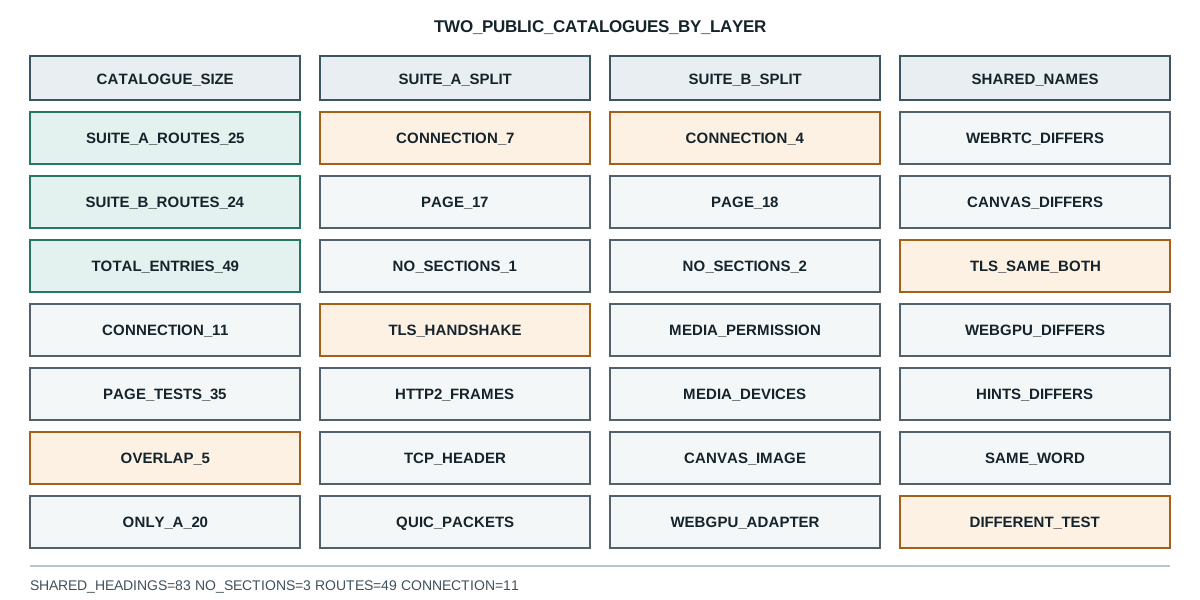
Two public suites publish 49 tests between them. Reading their own catalogues shows 11 read the connection, and four shared names are classified differently.
BotBrowser Team
Want the structured docs for Fingerprint?
This article lives in the editorial library. For step-by-step setup, reference material, and ongoing updates, jump into the docs section.
BotBrowser keeps a declared profile consistent across the surfaces a page can read and can keep a bounded record of what a page reported, but it cannot make a public suite's test list describe layers the suite never opens, and it cannot make two suites agree on what one test name means. This review reads two public detector suites from their own pages, counts what each one offers, and records which tests their own section headings place on the connection rather than in the document, because that split decides what a clean report from either site can support.
TL;DR
- BrowserLeaks publishes 25 test routes and BrowserScan publishes 24, which is 49 entries with no weighting for how much work each one does.
- Reading each page's own section headings, 7 of BrowserLeaks routes and 4 of BrowserScan routes name a connection-layer quantity such as a handshake, a cipher list, an HTTP/2 frame or a TCP header.
- That leaves 17 and 18 routes whose published sections stay inside the document, plus 1 and 2 routes that render no sections at all.
- The two catalogues share 5 route names: WebRTC, canvas, TLS, WebGPU and client hints. They differ on 20 and 19 routes respectively.
- The shared name TLS is the only one both suites classify as a connection test.
- The other four shared names are classified differently by the two suites, and in each case the difference is what the page's own sections talk about.
- BrowserScan repeats 83 headings of shared navigation on every page, so a raw heading count overstates how much each test page says.
- 3 pages across the two suites render no section headings, and the run reports them as unreadable rather than guessing what they test.
Contents
- What each suite publishes
- Where the connection appears in a test page
- Why one name can mean two tests
- What a clean report from a suite can support
- How the three groups fail differently
- Record a suite reading
What each suite publishes
Both sites publish their test list as navigation, which makes the catalogue readable without executing anything. The probe fetches each front page, extracts every internal route, then fetches each route and keeps only the section headings the page itself adds: A public suite catalogue is a different object from one library registry: what public detector suites actually test counts 25 and 24 published routes and finds 11 that name the connection. A public catalogue and a single-library registry are different objects, and BotD detector registry and component states shows the registry shape while CreepJS signal groups and how it combines them shows a group fold.
node=v26.9.0
parallel_pool=4
suite:BrowserLeaks -> front_status=200 bytes=12700 routes=25
suite:BrowserLeaks -> shared_chrome_headings=0
suite:BrowserLeaks -> routes=/ip /javascript /webrtc /canvas /webgl /fonts /geo /features /tls /proxy /settings /quic /http2 /tcp /chrome /webgpu /client-hints /dns /css /rects /donottrack /flash /silverlight /java /resource-urls
suite:BrowserScan -> front_status=200 bytes=134999 routes=24
suite:BrowserScan -> shared_chrome_headings=83
The two front pages differ in size by a factor of ten, and that difference shows up in the shared headings. BrowserLeaks renders its menu without heading tags, so every heading on a test page belongs to that page. BrowserScan repeats 83 headings of navigation on every route, and subtracting them is the difference between reading a test and reading the menu.
That subtraction is not cosmetic. Before it, every BrowserScan route looked like a connection test, because the shared menu contains the words DNS, HTTP2, SSL and TLS. A reader who counts headings without removing the shared block would conclude that all 24 routes test the connection, and the number would be an artifact of the template.
The sizes also say something about how each suite is built. A 12,700-byte front page that lists 25 routes is a directory: it names the tests and sends the reader onward. A 134,999-byte front page with 83 heading-bearing navigation entries is an application shell, and every route inherits it. Both choices are legitimate, and they produce different measurement problems. On the directory, a route count is close to a test count. On the application shell, the reader has to separate the shell from the page before any count means anything, and a reviewer who does not do that reports a number that belongs to the template.
Where the connection appears in a test page
The classifier reads each page's own headings and marks a page as a connection test when a heading names a quantity that exists on the wire: a handshake, a cipher list, an encrypted client hello, an HTTP/2 or HTTP/3 frame, a QUIC packet, an IPv4 or TCP header, a segment size, a DNS exchange, or a proxy address.
wire:BrowserLeaks/tls -> sections=5 TLS Fingerprint | TLS Handshake | Encrypted Client Hello | Supported Cipher Suites (in order as received)
wire:BrowserLeaks/http2 -> sections=2 HTTP/2 Fingerprint | HTTP/2 Frames
wire:BrowserLeaks/tcp -> sections=5 TCP/IP Fingerprint | IPv4 Header | TCP Header | Maximum Segment Size
wire:BrowserLeaks/quic -> sections=8 QUIC Fingerprint | QUIC Connection | QUIC Initial Packets | TLS Handshake
wire:BrowserScan/tls -> sections=7 HTTP/2 Fingerprint | TLS Fingerprint | TLS handshake | TLS protocol
split:BrowserLeaks -> wire=7 page=17 unreadable=1 total=25
split:BrowserScan -> wire=4 page=18 unreadable=2 total=24
Seven and four. Out of 49 published entries, 11 name a connection-layer quantity in their own sections. The rest describe things a script reads: the canvas rendering, the font metrics, the WebGPU adapter, the time zone, the user agent, the permissions state.
That ratio is the useful part of the measurement, and it is smaller than the catalogues suggest. A suite that publishes 25 routes invites the reading that it checks 25 things about a browser. What it actually does is check 17 things a page reports, 7 things a connection reports, and 1 thing it does not render sections for. The three groups answer different questions, and a single pass or fail badge across them hides which group produced the result.
Why one name can mean two tests
The overlap between the catalogues is five names:
overlap -> shared=5 webrtc canvas tls webgpu client-hints
overlap -> BrowserLeaks_only=20 BrowserScan_only=19
Five shared names out of 49 entries is the first finding: the two suites are mostly different products with a small common core. The second finding is what happens inside that core.
The five that do overlap are the ones a browser can be asked about cheaply from a page: what it renders on a canvas, what it reports about its graphics adapter, what it says in its client hints, what an ICE gathering pass produces, and what its handshake looks like. The 39 routes that only one suite publishes are the ones that need a decision about what to measure. One suite publishes pages for JavaScript objects, fonts, geolocation, media queries, element rectangles, Do Not Track and resource timing. The other publishes pages for port scanning, browser version vulnerability, gyroscope readings, time zone against IP location, and media device permissions. Neither list is a superset, so a reader choosing a suite is choosing which questions to ask rather than which site is more complete.
wire:BrowserScan/tls -> sections=7 HTTP/2 Fingerprint | TLS Fingerprint | TLS handshake | TLS protocol
page:BrowserLeaks/canvas -> sections=11 Canvas Support Detection | Canvas Fingerprint | Image File Details
page:BrowserScan/canvas -> sections=5 Canvas Function Detection | Image Details | The reason for the generation of Canvas fingerprints.
page:BrowserLeaks/webrtc -> sections=8 Your Remote IP | WebRTC Support Detection | Your WebRTC IP
page:BrowserScan/webrtc -> sections=24 After authorizing media device permissions, WebRTC will leak local IP | Media Devices API Support | Audio Permissions
TLS is the one shared name that both suites place on the connection, and both name a handshake and a fingerprint in their sections. Canvas is a page test in both, and both talk about the rendered image and its details. Those two are consistent.
WebRTC is where the classification diverges. BrowserLeaks heads its sections with Your Remote IP and Your WebRTC IP, which are values the page gathers. BrowserScan heads its sections with media device permissions and a statement that WebRTC will leak a local address after authorization. The same route name describes a page-gathered address on one site and a permission-gated media path on the other.
WebGPU and client hints diverge the same way. BrowserScan's WebGPU page names an adapter report and a report digest; BrowserLeaks' page names support detection and a fingerprint, which are page-side reads. For client hints, BrowserLeaks separates the JavaScript API from the HTTP headers, and BrowserScan lists the user agent and API support. A reader comparing the two sites by route name would be comparing different measurements.
That is the practical consequence of a shared vocabulary without a shared definition. A test named canvas on one site and canvas on another does not establish the same thing, and a report that cites "the canvas test" without naming which suite produced it leaves the reader unable to tell which of the two measurements was made.
The same problem appears inside one suite, which is why the section headings matter more than the route names. A canvas page that reports the rendered image and its file details is measuring rendering output. A canvas page that reports function detection and the reason a fingerprint is generated is describing a capability and its mechanism. Both are useful, and a result from one does not answer the question the other asks. Reading the headings is what separates them, and it is why the probe keeps the heading list alongside the classification rather than only the count.
What a clean report from a suite can support
A suite result supports a claim about the checks that suite ran. The probe reports wire=7 for one catalogue and wire=4 for the other, so the claim has a size: 11 of 49 published entries reach the connection on this date.
wire:BrowserLeaks/ip -> sections=5 IPv6 Leak Test | DNS Leak Test | TCP/IP Fingerprint | TLS Fingerprint
wire:BrowserLeaks/proxy -> sections=1 Proxy Detection
wire:BrowserLeaks/dns -> sections=1 DNS Leak Test
wire:BrowserScan/dns-leak -> sections=4 Introduction to DNS Leak Test | How DNS leaks happen | How to perform a DNS leak test | How to Fix a DNS Leak
The connection tests are not all the same shape either. Some are single-section pages that report one value, such as the proxy detection page, and some carry an explainer alongside the measurement, such as the DNS leak page with its introduction, its mechanism and its remediation steps. A page with a long explainer and a page with one measured field both count as one route in the catalogue, so route count and coverage are not the same number.
That difference decides what a result page is worth. A single-section page that reports one value is a measurement with no context: the reader gets a number and has to know what it should have been. A page with an introduction, a mechanism and a remediation section is a measurement plus an argument about what the number means. For a team validating a declared profile, the first kind is a fact to compare and the second is a claim to check, and a report that treats both as one pass or fail badge loses the distinction.
There is a third shape worth naming, because it is the one that misleads most easily. A page can render sections that describe a test without the page performing it, and the probe's classification follows the sections. The browser version page is the clearest case: its headings describe a vulnerability statement and a user agent, which are page-readable facts, and the measurement it supports is about version alignment rather than about the document's contents. A reader who sees a version warning and treats it as a signal about automation has read a page-side fact as if it were a verdict.
There is a boundary worth stating. The probe reads what each page publishes as its sections, which is the suite's own description of what it measures. It does not execute the suites' scripts, so a page whose sections stay inside the document may still read a header in code that its sections do not mention. The classification describes what the suite says it tests, which is the thing a reader uses when choosing a suite, and it is not a substitute for reading a specific result against a specific profile.
The same limit applies in the other direction. A page whose sections name a handshake is not thereby a complete connection audit, because the sections are a list of what the page displays, not a list of every field it inspects. What the split does establish is the size of the difference between the two groups: 11 routes name the connection and 35 stay in the document, and those two groups cannot be read as one score.
The three routes that render no sections show why the classification keeps them apart. A settings page, a tools index and a feedback page each return 200 with 12,047, 58,935 and 50,936 bytes and no headings at all. None of them is a test, and folding any of them into a group would change the denominator without changing what was measured.
Two of the routes that render nothing illustrate the limit from another side. A settings page and a tools index both return 200 with tens of kilobytes of markup and no section headings at all, and a feedback page does the same. None of the three is a test, and none is a measurement, so the run reports them as unreadable rather than assigning them to either group. That choice keeps the denominator honest: counting them as page tests would inflate the page-side total, and counting them as connection tests would inflate the side that carries the heavier claims.
A reader can use the split in two directions. Before running a suite, the split says which of its results will describe the document and which will describe the connection, so a plan can assign each result to the person who can act on it. After running one, the split says how much of a clean report belongs to the layer the reader cares about. A clean report from a suite whose catalogue is mostly page tests is evidence about the document, and reading it as evidence about the connection is the mistake the split exists to prevent.
How the three groups fail differently
The three groups have different failure modes, and knowing which group a result came from tells a reader how to interpret a change. The wire and page counts move independently, so a run that shifts one group says nothing about the other.
A page test changes when the document changes. A different canvas rendering, a different font list, a different time zone or a different permission state all show up as a different page-side value, and the same value on two runs means the document was the same both times. That makes page tests good for detecting drift inside one environment and weak for comparing environments, because two machines that agree on every page test may still differ in how they reached the site.
A connection test changes when the connection changes. A different cipher order, a different protocol list, a different header set or a different egress address all show up on the wire, and the document can be identical across two runs that differ in every one of those. That makes connection tests good for comparing environments and weak for detecting drift inside one, because a stable connection hides nothing about the document and a changed one says nothing about which page surface moved.
A page with no sections is not a measurement at all. It is a page, and the run reports it as such. A reader who folds it into either group is choosing an answer the page did not give.
That is the whole reason the split is worth measuring before a suite is run rather than after. A team that plans to validate a declared profile with a public suite can look at the catalogue first and see that most of what the suite reports will describe the document. That is a useful check, and it is not the check the team set out to perform. The gap between the two is the number the probe reports, and it is 11 out of 49 on this date.
Record a suite reading
A suite reading supports a narrow claim: this catalogue, read on this date, splits this way. Four fields keep it checkable:
- The front-page digest, because a suite that adds or removes a route changes every count on this page without any change to a browser.
- The shared heading block, because a template that repeats its menu as headings inflates every per-page count until it is removed.
- The classification rule, because the boundary between a page test and a connection test is a decision, and a different rule produces a different split.
- The routes that render no sections, because a page that says nothing in headings is not the same as a page that tests nothing.
Public sources
- BrowserLeaks
- BrowserLeaks TLS client test
- BrowserLeaks HTTP/2 fingerprinting
- BrowserScan
- BrowserScan HTTP2, SSL and TLS fingerprint
- BotBrowser: automation consistency reference
Practical conclusion
Read a suite result as a claim about the checks that suite ran, and check how many of them reach the connection before treating a clean result as a broad one. The catalogues here publish 49 entries, and 11 of those name a connection-layer quantity in their own sections, so a suite that looks comprehensive on its front page is mostly reading what a page reports. When two suites share a route name, treat the name as a label rather than a definition, because four of the five shared names here describe different measurements on the two sites. For what a single library does with the signals it collects before any verdict, read CreepJS signal groups and how it combines them; for the rules a page cannot evaluate at all, read edge-layer rules a page script cannot evaluate.
This article is part of the guide: What Is a Browser Fingerprint?
Related Articles
Edge-Layer Rules a Page Script Cannot Evaluate
FingerprintBotD Detector Registry: Which Checks Actually Run
FingerprintCreepJS Signal Groups and How It Combines Them
FingerprintWhy One Odd Signal Never Convicts a Browser
Fingerprintperformance.now: Timer Resolution and Fingerprinting
FingerprintCreepJS Headless Detection: Three Separate Verdicts
Take BotBrowser from research to production
The guides cover the model first, then move into cross-platform validation, isolated contexts, and scale-ready browser deployment.