HTTP Proxy Semantics and Browser Requests
Understand how browsers use HTTP proxies, CONNECT tunnels, headers, redirects, and DNS, with practical guidance for reliable proxy configurations.
Want the structured docs for Network?
This article lives in the editorial library. For step-by-step setup, reference material, and ongoing updates, jump into the docs section.
Why Proxy Semantics Matter in a Browser
An HTTP proxy is more than an address placed between a browser and a website. It changes the route, the request form, and sometimes the point at which a name is resolved. Those details affect authentication, cookies, redirects, TLS certificates, caching, logging, and the apparent source of a request. A configuration can look correct in a launch command while producing a different wire exchange than an application expects.
When a browser uses an HTTP or HTTPS proxy, request semantics affect authentication, cookies, redirects, TLS certificates, caching, logging, and the apparent source of a request. The guidance here follows standards and observable behavior rather than any particular vendor. For a practical configuration reference, see Browser Proxy Configuration: SOCKS5, HTTP, and HTTPS Guide. If your deployment also uses WebRTC, What Is a WebRTC IP Leak? covers a separate traffic path that HTTP proxy settings do not automatically govern.
The key ideas are:
- A request sent to a proxy can use an absolute URI, while a request sent through a tunnel uses the origin form.
CONNECTcreates a byte tunnel to a host and port. After a successful response, the proxy normally forwards encrypted TLS bytes without interpreting the HTTP messages inside.- Proxy authentication and origin authentication are different challenges with different headers.
- A browser may resolve a hostname locally or ask the proxy to resolve it, depending on the protocol and implementation.
- Redirects, service workers, caches, and non-HTTP protocols can create requests that are easy to miss in a simple test.
The standards are precise about message syntax, but they deliberately leave room for deployment policy. A proxy can restrict destinations, rewrite selected headers, or record metadata. Treat the proxy as a network service with its own contract, not as a transparent cable.
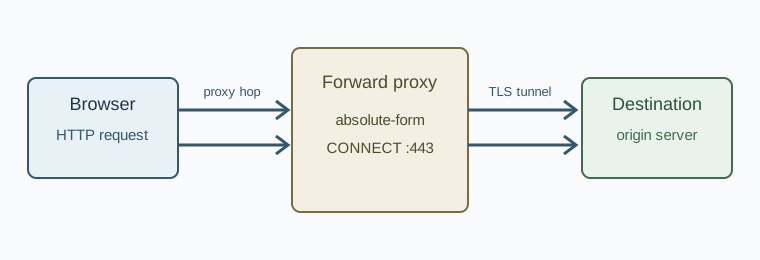
Request Forms and the First Hop
HTTP/1.1 defines four request-target forms in RFC 9110, section 7.1: origin-form, absolute-form, authority-form, and asterisk-form. A browser using a forward proxy commonly sends absolute-form for an ordinary HTTP request. For example, instead of sending GET /products HTTP/1.1, it can send:
GET http://shop.example/products HTTP/1.1
Host: shop.example
Accept: text/html
The proxy uses the complete URI to select the next hop. The Host header remains important because it identifies the authority expected by the origin server and is required for HTTP/1.1 requests. In a well-behaved request, the authority in the URI and the Host field agree. A proxy may reject a mismatch rather than guessing which destination the client intended.
When a browser connects directly to an HTTP origin, it normally uses origin-form. The first line contains only the path and query:
GET /products?sort=price HTTP/1.1
Host: shop.example
This distinction is useful when reading a packet capture or a proxy access log. Seeing an absolute URI in the request line is evidence that the first hop is a forward proxy, not evidence that the origin received that same form. A proxy generally converts the request to the form expected by the next hop.
Authority-form is used by CONNECT and consists of a host and port, such as shop.example:443. Asterisk-form, OPTIONS *, addresses the server itself rather than a particular resource. Browsers rarely generate the latter during ordinary page loads, but a diagnostic or compatibility test can.
HTTP and HTTPS URLs Are Different Cases
For an http:// URL, a browser can send the HTTP request to an HTTP proxy in readable HTTP. The proxy can inspect the method, path, headers, and response status. The connection from proxy to origin may also be HTTP, although a proxy can use TLS to the origin when the requested URL is HTTPS.
For an https:// URL, the browser usually asks an HTTP proxy to open a tunnel:
CONNECT shop.example:443 HTTP/1.1
Host: shop.example:443
The proxy returns a status such as 200 Connection Established. The browser then starts a TLS handshake through the established connection. The HTTP request, response headers, and response body are inside TLS and are not visible to a conventional forward proxy. The proxy still sees the destination authority, connection timing, byte counts, and any metadata required for its own policy.
The tunnel model explains why an HTTPS page can still fail before the page itself loads. A proxy can reject CONNECT, require authentication, refuse the port, or fail to resolve the destination. In those cases, there is no origin HTTP response to inspect. Browser developer tools may show a network error rather than a normal status code because the failure occurred while establishing the route.
HTTP/2 and HTTP/3 Considerations
RFC 9112 describes HTTP/1.1 messaging, including the parsing rules that protect message boundaries. Modern browsers can use HTTP/2 or HTTP/3 to an origin after a tunnel is established, subject to browser and proxy support. The request concepts remain similar, but the wire representation changes: HTTP/2 uses binary frames and pseudo-headers such as :method and :authority, while HTTP/3 runs over QUIC.
Do not infer the protocol used between every pair of participants from the URL alone. There may be one protocol from browser to proxy and another from proxy to origin. A proxy that accepts HTTP/1.1 CONNECT can carry an HTTP/2 TLS session as opaque bytes. Conversely, a proxy that understands HTTP/2 may represent proxy requests using extended CONNECT. When diagnosing a problem, record each hop separately.
CONNECT Tunnels, TLS, and Name Resolution
CONNECT is a method defined for creating a tunnel to a target authority. The target is not an arbitrary URL with a path. It is normally a host and port, most often port 443 for HTTPS. Once the proxy sends a successful response, it switches from HTTP message handling to forwarding data in both directions until the connection closes.
What the Proxy Can See
For a normal HTTPS tunnel, the proxy can see the proxy request itself, including the target host and port, and it can observe connection metadata. It cannot read the encrypted HTTP path, cookies, authorization values, or response body. It can still enforce a policy based on the target, limit ports, cap connection duration, or close the tunnel.
TLS certificate validation happens in the browser for an end-to-end tunnel. The browser checks the certificate name, validity period, and trust chain for the origin host. A proxy certificate is not involved unless the deployment intentionally performs TLS interception. Interception changes the trust model and requires a trusted certificate authority in the browser profile. It should be documented and tested as a separate architecture.
The browser's SNI value and other TLS handshake details can reveal the intended host to a network observer, depending on the TLS version and privacy features in use. A proxy that only forwards bytes does not remove those protocol-level signals. DNS privacy, TLS privacy, and HTTP proxying are related but distinct controls.
Where DNS Happens
Name resolution is a frequent source of confusion. With an HTTP proxy, the browser can send the hostname in the absolute URI or CONNECT authority and let the proxy resolve it. Some implementations resolve locally first, especially when applying local policies or selecting an address family. The exact behavior depends on the browser, proxy type, and configuration.
Local resolution means the local resolver may learn the destination even though the subsequent TCP connection uses the proxy. Proxy-side resolution keeps that lookup at the proxy, but it does not guarantee that every auxiliary request uses the same path. Certificate revocation checks, captive portal checks, DNS prefetch, speculative connections, and extensions can have separate networking behavior.
When DNS placement matters, test more than the address bar navigation. Observe a cold profile, a fresh browser process, redirects to a new hostname, an iframe, a worker, and a failed lookup. The MDN HTTP overview is a useful reference for separating HTTP semantics from browser-specific network scheduling.
Headers, Authentication, and Forwarding Policy
HTTP headers have different audiences in a proxy deployment. Some describe the request to the origin, some describe the connection to the proxy, and some are added by intermediaries. RFC 9110, section 5 defines general field rules and warns that intermediaries must handle hop-by-hop fields carefully.
Proxy Authentication Is Not Origin Authentication
A proxy that requires credentials responds with 407 Proxy Authentication Required and includes Proxy-Authenticate. The client answers with Proxy-Authorization. An origin that requires credentials responds with 401 Unauthorized, uses WWW-Authenticate, and expects Authorization.
These challenges can occur at different times. For an HTTP URL, the proxy challenge can arrive before the proxy forwards the request. For an HTTPS URL, the challenge usually occurs in response to CONNECT, before TLS begins. A browser may retry the connection with credentials, but an automation library may expose the challenge as a navigation failure unless proxy credentials were configured through its supported API.
Do not place origin credentials in a proxy credential field or proxy credentials in an Authorization header intended for a website. They have different scopes and are often logged by different systems. Use a credential store or the browser's documented proxy configuration mechanism instead of constructing headers in page JavaScript.
Forwarded Identity Fields
Headers such as Via, Forwarded, and X-Forwarded-For are commonly used by intermediaries, but their presence is a policy choice. A proxy may add them, preserve them, or remove them. Forwarded can describe the client address, protocol, and host as a request crosses intermediaries. Because these fields can contain sensitive network information, applications should only trust them from known proxy hops.
The browser itself does not guarantee that a proxy will add a particular forwarding header. If an application depends on the original client address, define the proxy and application contract explicitly. If an application does not need that address, avoid accepting arbitrary forwarding values from the public internet.
Hop-by-Hop Versus End-to-End Fields
Some fields describe one connection and must not be forwarded unchanged across a proxy. The Connection field can nominate hop-by-hop fields in HTTP/1.1. A proxy removes or consumes those fields before forwarding the request. End-to-end fields, such as Cache-Control, are intended to travel to the origin and back, subject to normal intermediary behavior.
This matters for debugging. A header visible in browser developer tools may not be identical to the header received by the origin. Conversely, a proxy can add a field that was never generated by the page. Capture the browser-to-proxy exchange and inspect an origin-side log when the distinction is important.
Browser Features That Create Additional Requests
A page load is a sequence, not a single request. The main document can trigger stylesheets, scripts, images, fonts, frames, preloads, workers, manifests, and API calls. Each URL can select a different destination and cache state. A proxy policy that works for the document can still fail on a font host or an API domain.
Redirects are a common example. A 301, 302, 303, 307, or 308 response can cause the browser to issue a new request to another authority. Method and body handling differs by status code and browser rules. The new request still uses the configured proxy, but it may require a second DNS lookup, a new proxy authentication decision, and a new TLS tunnel.
Cookies also cross request boundaries. A Set-Cookie response from one host can influence later requests according to domain, path, secure, and same-site rules. A proxy can see cookie values for plain HTTP but not for HTTPS inside a tunnel. A proxy log that records only the first request cannot explain every later state change.
Service workers add another layer. Once installed, a service worker can satisfy a fetch from its cache or generate a request programmatically. The absence of a network entry does not prove that proxy routing was skipped; it can mean that no network request was needed. Conversely, a service worker can contact an API host that is not obvious from the document source.
Non-HTTP traffic needs its own review. WebSocket handshakes begin as HTTP requests, but the connection then becomes a long-lived bidirectional stream. WebRTC media and data channels use ICE and can contact STUN or TURN servers outside ordinary page HTTP. The browser's WebRTC API documentation on MDN explains why those flows should be tested separately. A proxy guide that covers only GET and CONNECT is not a complete network inventory.
A Practical Verification Method
Reliable validation compares what the browser intended, what the proxy received, and what the origin observed. The following sequence keeps those observations separate.
1. Establish a Baseline
Start with a direct connection in a clean browser profile. Load an HTTP URL and an HTTPS URL, record the final URL after redirects, and note the negotiated protocol where the browser exposes it. Save the response status, selected request headers, and timing information. Do not reuse a warm cache when comparing proxy changes.
2. Test the Proxy Handshake
Use a proxy access log or a controlled test endpoint. For an HTTP URL, confirm whether the proxy receives absolute-form. For an HTTPS URL, confirm a CONNECT request with the expected authority and a successful tunnel response. A 407 means proxy authentication is incomplete. A connection refusal or timeout indicates a route or policy problem before the origin is involved.
3. Verify the Origin View
Have the destination record the source address, Host, forwarding fields, protocol version, and request path. Compare this record with the proxy log. The origin should see the proxy's egress address when the route is working as intended. It should not be expected to see the browser's local address unless an intermediary deliberately forwards it.
4. Exercise the Request Graph
Test a page with a redirect, a cross-origin image, a font, an iframe, a worker, and a fetch call. Include a failed hostname and a host with both IPv4 and IPv6 records. This reveals whether name resolution, address-family selection, and proxy authentication behave consistently beyond the first document.
5. Repeat With Warm State
Run the same navigation after cookies, a service worker, and cache entries exist. Compare network requests with the cold run. A missing request can indicate a cache hit, not a routing change. Clear state between controlled experiments and record which state was used.
Common Symptoms and Their Meaning
If HTTP pages load but HTTPS pages fail, inspect CONNECT authorization, destination port policy, and TLS certificate errors. If the document loads but an API call fails, inspect the API hostname, CORS response, and whether a service worker handled the call. If only some domains fail, compare their DNS records and proxy allowlist rules. If the origin reports an unexpected client address, inspect Forwarded and X-Forwarded-For handling at every intermediary.
Avoid treating a single external “what is my IP” page as a complete test. It usually measures one HTTP path and may be cached, redirected, or served by a CDN. Standards-based checks plus logs from both sides provide a much stronger explanation of browser behavior.
Configuration Choices for Consistent Requests
Use an HTTP proxy when you need a conventional forward-proxy interface and the provider supports HTTP and HTTPS destinations. Use a SOCKS configuration when the provider or application needs a more general TCP relay, and confirm how hostname resolution is selected. The proxy configuration guide documents protocol-specific URL forms and credential handling in BotBrowser.
Keep one source of truth for proxy settings. Mixing a command-line proxy, an automation framework proxy object, and page-level request interception can produce conflicting routes. Configure credentials through the supported browser or framework interface, then verify the resulting 407 and CONNECT behavior with logs.
Match the proxy's geographic exit with application expectations where location affects content, but do not assume that an IP address determines every browser signal. Locale, time zone, language, DNS, WebRTC, and address-family choices can be independent. For WebRTC-specific behavior, use a dedicated test based on the WebRTC IP leak guide.
Finally, document the boundary of the proxy service. Record which protocols it accepts, which ports it permits, where DNS is resolved, how credentials rotate, which headers it adds, and how logs are retained. That operational contract turns a vague “proxy problem” into a testable request path.
HTTP proxy semantics are predictable when each hop is identified. Read the request form, distinguish 407 from 401, understand when CONNECT creates a tunnel, and test the full browser request graph. Those habits make browser automation and everyday browsing easier to troubleshoot without relying on assumptions about what a proxy does behind the scenes.
Sources
Related Articles
Take BotBrowser from research to production
The guides cover the model first, then move into cross-platform validation, isolated contexts, and scale-ready browser deployment.