Storage Access API for Embedded Content
How an embedded document checks and requests unpartitioned cookie access, what user mediation and support mean, and how to design a fallback when access is denied.
Want the structured docs for Identity?
This article lives in the editorial library. For step-by-step setup, reference material, and ongoing updates, jump into the docs section.
The Storage Access API lets an embedded document ask the browser for access to its unpartitioned cookies, and in some browsers other storage, in a context where that access is otherwise blocked or partitioned. The embedded document checks its current state with document.hasStorageAccess() and asks with document.requestStorageAccess(). The browser, not the page, decides the outcome, usually after a user gesture and sometimes after a prompt. A grant is a narrow exception for one embedded document under one top-level site, and the page needs a defined path for denied and unsupported results.
What the Storage Access API decides
Many browsers separate or block the state that a third-party embedded document can reach. An embedded sign-in widget, a payment form, a comment service, or a support chat may find that cookies set when the user visited its own site are not sent from inside another site's page. The Storage Access API is the standardized way for such a document to ask whether that state can be made available again. MDN's overview of the Storage Access API and the PrivacyCG specification draft describe the model.
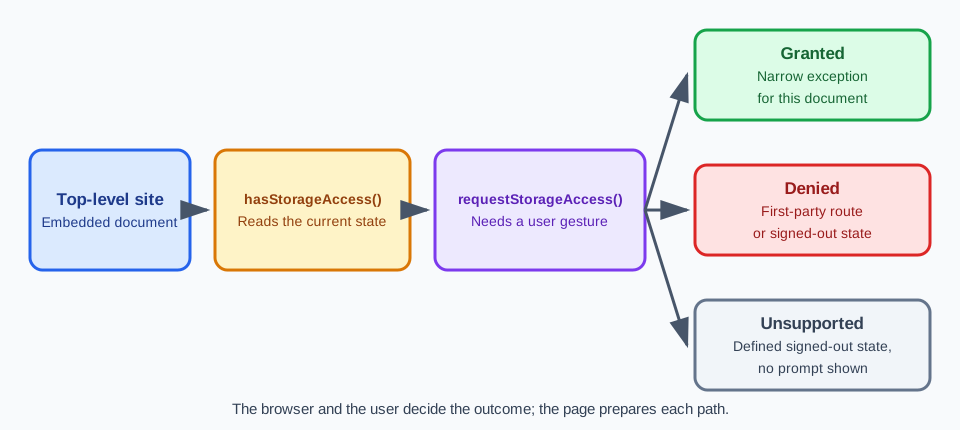
The word to focus on is request. The embedded document asks; it does not configure. The browser applies its own rules about whether the request is allowed, whether the user must be asked, and what earlier interaction the user has had with the embedded site. Those rules differ by browser and version, and they can change between releases. A page can describe what it asks for, but it cannot promise what the user will see.
User mediation is the reason the API is shaped this way. A person who browses a site that embeds a third-party service has not necessarily chosen to share that service's saved state with the site. The browser therefore asks, either through a prompt that names the embedded site and the page it appears on, or through its own rules about earlier interaction. The user's choice, not the page's preference, is what the grant records.
Scope matters as much as the decision. A granted request applies to that embedded document and to the top-level context in which it is embedded. It does not change what other frames can read, it does not carry over to another top-level site, and it says nothing about other storage APIs or about who the person is. Cookies are the core subject of the API. Whether other storage types are included depends on the browser and the version, so check the documentation for the browser you test.
Partition keys, the mechanics of how browsers separate state by top-level site, are covered in Browser Storage Partitioning and Privacy. The Storage Access API sits on top of that boundary as an exception and does not replace it. For the broader question of which storage mechanism fits which data, see Cookies, localStorage, and IndexedDB: Where State Belongs.
The API is also not a way to learn about a person or to link sessions across sites. It exists so that a legitimate embedded service, such as a sign-in or a payment widget that the user chose to interact with, can keep working when the browser limits third-party state. A document that requests access with no clear user-facing reason gives the user no basis for a decision, and it does not serve the person using the page.
Checking state and requesting access
document.hasStorageAccess() returns a promise that resolves to a boolean for the current document. It reads the current state and does not ask for anything, so it can run on load without a user gesture. A true result means the document currently has access to its unpartitioned cookies. That can be because access was granted earlier, because the document is not embedded, or because the browser does not restrict third-party cookies in this configuration, so a true value alone is not proof that a grant happened.
document.requestStorageAccess() is the request itself. It also returns a promise, which resolves when access is granted and rejects when it is not. It needs transient user activation, such as a click or key press inside the embedded document, so calling it from a timer or on load is expected to be rejected unless permission was already granted earlier, in which case some browsers resolve it without a gesture. The call can also be rejected after the user declines a prompt, when the browser's rules say the request is not allowed, or when an earlier denial is remembered. Handle the rejection as a normal outcome, not as an exception to hide. The requestStorageAccess() reference lists the conditions.
A small sequence works for most embedded widgets. On load, feature-detect the methods and call hasStorageAccess(). If the result is true, continue with the normal signed-in path. If it is false, render a control that explains what the widget needs, and call requestStorageAccess() only from the click handler of that control. After a resolved promise, reload or re-request the state that depends on the cookies, then confirm with hasStorageAccess() again before showing signed-in content.
async function showAccountState(button) {
  if (!('hasStorageAccess' in document)) return renderSignedOut('unsupported');
  if (await document.hasStorageAccess()) return renderSignedIn();
  button.hidden = false;
  button.addEventListener('click', async () => {
    try {
      await document.requestStorageAccess();
      return (await document.hasStorageAccess()) ? renderSignedIn() : renderSignedOut('denied');
    } catch {
      return renderSignedOut('denied');
    }
  });
}
Call hasStorageAccess() again on later visits instead of assuming that an earlier grant still holds. Browsers remember or expire decisions on their own schedule, a user can reset site permissions, and a profile can be cleared. A document that checks its state on each load starts from the browser's current answer and does not carry a stale assumption from one visit to the next. The guide to using the Storage Access API shows the same pattern with more detail.
Several page-level conditions also apply. The embedded document needs a secure context. If the frame is sandboxed, the embedding page must allow the storage access sandbox token (allow-storage-access-by-user-activation) together with the tokens the script needs, such as allow-scripts and allow-same-origin. A Permissions Policy can also restrict the storage-access feature for a frame. When a request is rejected immediately, review the frame attributes and the embedding page's policy before assuming that a user made a decision.
Where the browser supports it, the Permissions API reports a storage-access permission as granted or prompt; the specification does not reveal a denied state, so a declined request reads as prompt. It is a way to read the state before asking, and it is not a way to change it. Support for the query differs by browser, so treat it as an optional signal and keep hasStorageAccess() as the state you act on.
A grant does not rewrite the cookie rules. A cookie that should travel in a cross-site context needs SameSite=None and Secure in browsers that apply SameSite rules to the request, and the review should record the attributes it observes. If the widget still looks signed out after hasStorageAccess() returns true, check the cookie attributes and the request's origin before suspecting the API.
Browser differences and support
Browser behavior is the part of this topic that changes most. Chromium-based browsers, Firefox, and Safari ship the API, but they differ in when a prompt appears, whether earlier interaction with the embedded site as a top-level page matters, how long a decision is remembered, and which storage the grant includes. Some browsers also apply their own heuristics or site relationships that can grant or deny access without a visible prompt. Those are decisions by the browser, and a page script cannot force them.
Treat support as something you measure per browser and version. A feature check such as 'requestStorageAccess' in document tells you that the method exists. It does not tell you whether the call will prompt, resolve silently, or reject. Consult the compatibility tables on MDN and vendor guidance such as the Chrome guidance for the Storage Access API, and record the version you tested, because the same page can behave differently after a browser update.
Browsers also differ in their default posture toward third-party cookies. Some block or partition them by default, others leave the choice to the user, and enterprise policy can change the result again. In a browser that does not restrict third-party cookies, hasStorageAccess() can return true without any request. In a browser that restricts them, the same page needs the request. A test result from one configuration does not describe the other, which is why the review record names the browser and its settings.
The embedded site and the top-level site are both part of the decision. A user may see a prompt that names both, and a grant for one pairing says nothing about another pairing. If the same widget appears on several sites you operate, expect to test and explain each pairing, and expect users to see the request more than once.
Do not read a successful grant as evidence that third-party storage is unpartitioned in general. The grant is an exception for one embedded document, created because a user took a deliberate action with a service they chose to use. The default for other frames, other sites, and later visits remains whatever the browser's partitioning rules say. If a feature works in a test only because a grant was given, the design depends on an exception, and the product should state that dependence in its own documentation.
Designing for denied and unsupported results
Three outcomes need a designed path: granted, denied, and unsupported. Granted continues with the normal signed-in state. Denied means the user declined, the browser rejected the call, or an earlier denial was remembered. Unsupported means the methods are missing or the browser handles the feature differently. Each of the last two needs a visible, working state, not a blank frame or an error banner.
The most dependable fallback is a first-party route. The embedded widget shows a signed-out view with a clear action that opens the service in its own window or tab, where the browser applies first-party rules. After sign-in, the user returns to the embedding page, and the widget uses a state that does not depend on a third-party cookie, for example a short-lived value handed over through a message that the receiver checks against the expected origin.
Keep the signed-out state useful. Public content should render, drafts the user has typed should survive, and the interface should say what is missing in plain language: the service needs permission to use its saved sign-in inside this page, and the user can continue without it. Do not ask repeatedly. After a denial, offer the first-party action and let the user choose when to try again, because a repeated call may be rejected without a prompt anyway.
Write the explanation before the click, not after the browser has responded. The text next to the control should say what the embedded service will be able to use, that the browser will ask for confirmation in its own words, and what the user can still do if they decline. Keep it short, and avoid wording that presents the browser prompt as something the user must accept.
Do not build around a prompt. A page cannot answer, hide, or suppress a browser prompt, and it should not try to trigger one outside a genuine user action. Do not describe the prompt to users as required for the service to work when a first-party route exists. Prompt wording and timing belong to the browser. The page's part is the explanation shown before the click, which should say what the embedded service will be able to read and why.
Use feature detection and failure handling instead of user-agent checks. Branch on whether the methods exist and on the promise result, not on a browser name or version string, so that a browser update that adds or changes support does not require a code change. Log the category of the outcome for your own diagnostics, such as granted, denied, unsupported, or rejected without a gesture, and keep it free of cookie values and account identifiers.
Reviewing an owned embedded widget
Test the API with a widget you own, embedded in a test top-level site you also own, so that you control both origins and the cookies. Use two distinct registrable domains, or two local hostnames that the browser treats as separate sites, so the frame is truly cross-site. A test page on one subdomain that embeds another subdomain of the same registrable domain is same-site and does not exercise the restriction.
Record the conditions of each run instead of assuming parity across browsers: the browser name and version, the top-level site, the embedded origin, the SameSite and Secure attributes of the cookie under test, whether the iframe is sandboxed or has an allow attribute, whether a user gesture preceded the call, the observed result from hasStorageAccess(), the outcome of the call, and, where available, the permission state. Two runs with different records are different experiments.
Start each run from a known cookie state. Cookie management describes how cookies are pre-loaded for a browser session, and multi-account browser isolation describes keeping contexts separate. A clean starting state matters here because a cookie left over from an earlier run can make a denied path look like a granted one.
BotBrowser supports --bot-cookies, which injects cookies at launch or per BrowserContext, so each test context can start with its own documented cookie state while an owned embedded flow is reviewed. BotBrowser does not grant or deny Storage Access API requests, answer or suppress browser permission prompts, or change which embedded documents the browser allows to use unpartitioned storage; those outcomes stay with the browser and the user.
Run the granted case with a real user gesture and a real decision in the browser under test. If the prompt cannot be answered in an automated run, perform that case by hand and record it as a manual result. Do not substitute an injected cookie for a grant, because that would test the signed-in screen and say nothing about the request.
Interpret each result narrowly. A granted run shows that this browser version allowed this embedded origin under this top-level site after this gesture. It does not show how any other browser behaves, that other frames can read the cookie, or that third-party storage is open in general.
Repeat the matrix after a browser major release, a change to your cookie attributes, a change to the embedding page's frame attributes or policies, and a change to the widget's sign-in flow. The record from the last accepted run is the baseline, and a difference in browser behavior is a finding to read, not a failure to hide behind a retry.
Run the storage access checks
Run these checks on an owned embedded widget in each browser and version you support, and record a pass or fail for each one.
- State versus request. Pass if the page calls
hasStorageAccess()on load without prompting, callsrequestStorageAccess()only from a click handler, and the record shows both results separately. Fail if the request runs on load or the two results are merged. - Gesture and rejection. Starting from a state with no earlier grant, call the request once without a user gesture and once with one. Pass if the first call is handled as a rejection with a visible signed-out state and the second reports its real outcome.
- Granted path. After a granted result, confirm that
hasStorageAccess()returnstrueand the widget shows its signed-in state using the expected cookie. Fail if the signed-in state appears whilehasStorageAccess()isfalse. - Denied path. Decline the prompt, or use a configuration where the call rejects. Pass if the widget shows a defined first-party or signed-out fallback, keeps public content and typed drafts, and does not prompt again on its own.
- Unsupported path. In a browser or configuration where the methods are missing, pass if the widget reaches the same defined fallback through feature detection and does not branch on a browser name.
- Environment record. Pass if the record lists the browser and version, the top-level site, the embedded origin, the
SameSiteandSecureattributes, the sandbox andallowsettings, and the observed permission state. Fail if a result is reported without them or is assumed to carry over to another browser. - Scope of a grant. Embed the same widget under a second top-level test site. Pass if that site gets its own result and the first site's grant is not assumed to apply.
Sources
Related Articles
Take BotBrowser from research to production
The guides cover the model first, then move into cross-platform validation, isolated contexts, and scale-ready browser deployment.