Proxy Failover and User-Visible Continuity
Separate proxy-leg failures from destination failures, plan ordered approved routes with bounded retries, and record a route change as a new assignment.
Want the structured docs for Network?
This article lives in the editorial library. For step-by-step setup, reference material, and ongoing updates, jump into the docs section.
Why a failed route is not a continuous session
A browser session that goes through a proxy depends on two things that can fail independently: the route to the proxy and the destination behind it. When the route fails, a web operator needs three answers. What can the user still see? What can be repeated safely? Does a switch to another approved route still count as the same session? The short answer is that a failover can restore service, but it does not make the page, its in-flight requests, or its application state continue unchanged, and a change of exit route is a new network assignment that belongs in the record.
Browsers already ship a standard fallback behavior. A proxy auto-configuration file can return an ordered list of routes, and the browser tries the next entry after a connection failure. The MDN guide to PAC files describes the list format, and the Chromium proxy documentation describes how the list is evaluated. That behavior chooses where the next connection goes. It says nothing about whether the page that was loading, the form that was half submitted, or the media that was streaming survives the change. Keeping those two questions apart is the core of a sound failover plan.
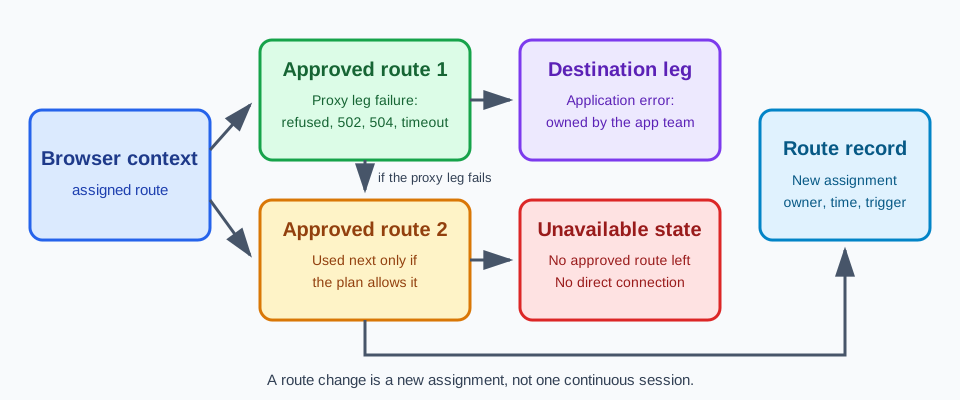
Three terms keep the rest of the discussion precise. A route is the approved path a browser context uses to reach destinations, including the proxy endpoint and the account behind it. A failure category names which part of the path failed and who owns the next action. A continuity statement describes what the user experiences afterward: the page completes, a bounded retry succeeds, a clearly labeled unavailable state appears, or a new route assignment starts a new journey. Per-context proxy explains route ownership at the context level. Failover begins after that assignment exists and asks what happens when the assigned route stops working.
The scope here is authorized work over approved routes. A failure never authorizes a silent direct connection or an unapproved route, and nothing in this guidance describes rotating providers to hide activity or avoiding a destination's access decisions. The goal is predictable behavior for the user and an accurate record for the operator.
Separating proxy-leg failures from destination failures
A request through an HTTP proxy crosses at least two legs: the client to the proxy, and the proxy to the destination. RFC 9110 defines the status codes that report trouble on the second leg when a proxy or gateway is involved. A 502 Bad Gateway means the proxy received an invalid response from the server it contacted, and a 504 Gateway Timeout means it did not receive a timely response from that server. The MDN reference for 502 explains the same gateway role. These codes come from the proxy and describe its upstream side. They are not the destination's own application errors.
Failures before the proxy leg completes look different. A refused connection to the proxy endpoint, a failed DNS lookup for the proxy host, or a timeout while connecting happens before any request reaches a destination. For HTTPS, the browser first asks the proxy to open a tunnel with the CONNECT method, and it starts the TLS conversation with the destination only after the proxy answers with a success status. A proxy that refuses the tunnel, answers 407 Proxy Authentication Required, or answers with a gateway status at that stage has failed the proxy leg even though the destination was never contacted. The MDN guide to proxy servers and tunneling describes this tunnel.
Destination failures are a separate category. Once the tunnel is open, an application error, a certificate error, or an application-level rejection belongs to the destination and its owner. A 503 can come from either side, so read which party sent it before assigning it. Retrying a destination error through another route rarely helps and may repeat an action the destination already processed. A useful incident category names the leg, the status or error observed, and the owner: provider support for proxy-leg failures, the application owner for destination failures.
For each category, write down the user-visible outcome in advance. When tunnel setup is refused, the page does not load and the user sees a connection error or the application's unavailable state. When a navigation receives a 502 or 504 from the proxy, the user sees an error document, and a later attempt may succeed. When a subresource times out, the page renders partially, with missing images or a feature that does not start. When the destination returns an application error, the user sees the application's own message. Naming these outcomes lets support explain what happened without inspecting traffic.
Browser-level fallback reacts to a narrow set of events. The Chromium documentation says that generally only connection-level failures are eligible for proxy fallback, such as failing to resolve the proxy's DNS name or failing to connect a socket to it, and that failures while establishing a CONNECT tunnel stopped being treated as fallback triggers starting with version 67. A proxy that answers 502 therefore does not make the browser try the next list entry by itself. An operator who expects the next route to be used after a gateway error is relying on behavior the browser does not provide.
The same documentation notes that fallback has no configuration options, and that a proxy marked bad is moved to the end of the list for a period instead of being removed. The order of attempts can therefore differ from the written order. Record the order you observe in a rehearsal rather than assuming the written one.
What the user can still see and safely repeat
When a route fails in the middle of a journey, three things are true of the page in front of the user. Content that is already rendered stays on screen, because it lives in the page and not in the route. Requests in progress end in an error or a timeout, and the page decides how to present that. Requests not yet sent use whichever route is current when they start. A failover therefore produces a page that is partly old and partly new, and the application should be explicit about which parts it trusts.
Rendered content is not proof of completion. A form that stays visible after a timeout may or may not have been received, and a loading indicator that never resolves tells the user nothing. Give each step of a journey a completion signal that both the user and the operator can see, such as a confirmation message, a request identifier returned by the server, or a state change on a status page. Without such a signal, the safest assumption after a timeout on a state-changing request is that its outcome is unknown.
Idempotency decides what can be repeated. The MDN glossary entry defines an idempotent method as one where making the same request once or several times has the same intended effect on the server. RFC 9110 classifies PUT, DELETE, and the safe methods such as GET and HEAD as idempotent, while POST is not. It allows a client to retry an idempotent request automatically after a connection fails, before it reads a response. It also says a client should not automatically retry a non-idempotent request unless it has some way to know the request semantics are actually idempotent, or some way to detect that the original request was never applied.
Those definitions describe a method contract and not what a particular application does. A GET endpoint that changes state breaks the contract, and a POST that carries a key the server verifies can be safe to repeat. Mark each operation in the journey as repeatable, repeatable only with a server-verified key, or not repeatable without user confirmation. A browser cannot tell from a timeout whether a non-idempotent action already took effect, so a retry of a payment, a message, or an account change should ask the user or check status first.
Idempotent does not mean free. Repeating a read through a different route can return a different regional version of a page, a different cached copy, or a different rate-limit state, and the destination may count the repeat as additional load. Keep repeats few and bounded, as described in the next section, and do not make a repeat silent when the difference would matter to the user.
Authentication needs the same attention. A session cookie set by the destination belongs to the browser context and not to the route, so it usually remains after a route change. A destination may still ask the user to confirm a sign-in after the network location changes. Treat that confirmation as a normal outcome and do not design the journey around the assumption that it will not happen. Keep proxy credentials out of failure records; browser proxy authentication and credential hygiene covers how to handle them.
Planning ordered routes and a bounded retry budget
A failover plan is a short written document with four parts: the ordered list of approved routes, the failure categories that allow moving to the next route, the retry budget for each route, and the end state when the list is exhausted. Write it before an incident and keep it with the route owner, because the provider contact, the network owner, and the application owner each hold part of it.
List only routes approved for the workload, the region, and the destination category, in the order they should be tried. A second route needs the same approval as the first, including target authorization and data handling. A route that happens to be reachable is not an approved alternate. If a PAC file or a browser proxy list expresses the plan, read the list as the plan's technical form: each entry is a route the plan accepts. A direct entry in that list is a decision to leave the proxy boundary. The Chromium documentation also says that when a PAC file cannot be fetched, resolution can fall back to the next option, often a silent direct connection, unless the script is marked mandatory, so check what your configuration does in that case.
Give each route a small, fixed number of attempts and a time limit for the whole journey, and write both down as policy values that the team chooses. The values belong to the application owner, because a document being read, a payment step, and a background sync tolerate different waits. Space the attempts out so that a recovering provider is not met with a burst of repeated requests, and repeat automatically only the operations marked repeatable. Operations that are not repeatable move to the user-confirmation path described above.
Decide in advance which failures allow a switch. Moving to the next route is reasonable when the failure belongs to the proxy leg: the endpoint is unreachable, the tunnel is refused, or the proxy repeatedly returns gateway statuses for different destinations. It is not reasonable when the failure belongs to the destination. It is also not reasonable when the proxy rejects credentials, since a 407 points to an account problem that another route will not repair and that the provider must resolve. A destination's access decision is a decision and not a failure to route around, and switching in response to one is outside approved use.
Show the user honest progress while the plan runs. A message such as reconnecting is accurate while attempts remain, and an unavailable message is accurate once the budget is spent. A loop with no end gives the user neither. If several browser contexts share one route, a failure reaches each of them, so apply the plan per context and keep the record per context as well.
Route changes and unavailable states
A route switch changes the exit that the destination sees. It is a new route assignment and not a continuation of the old one. Record it with the context identifier, the previous route name, the new route name, the time, the trigger category, and the approver. The destination observes a new network origin and may reasonably treat later requests as coming from a different place, so anything that depended on the earlier origin, such as a regional page, a rate-limit state, or a sign-in confirmation, should be treated as possibly changed. This record lets support explain why a user saw a new prompt and lets a release review compare journeys before and after a change.
Do not present the result as one continuous session. In reports and support notes, label the segment before the change and the segment after it as separate route assignments inside one browser context. Cookies and storage live with the context, so application state may remain while the network origin changed. Both facts belong in the record, because data continuity and route continuity are independent. A user-facing explanation should say what happened in ordinary terms: the connection was restored through another approved route, and you may be asked to confirm.
Requests that started before the change finish on the old route or fail, and requests that start afterward use the new route, so a page can combine responses from both. Do not send a non-idempotent request again just because the route changed. Apply the same rules as before: repeat only what is marked repeatable, and check status before anything else.
When no approved alternate route exists, the plan ends in an unavailable state, and that end state is explicit. It states that the service cannot be reached, names what the user can do next, such as trying again later or contacting support, and writes a log entry with the failure category and the route owner. It does not end in an implicit direct connection, an unapproved provider, or a silent loop. A page that loads over a direct connection after the proxy fails may look like success, but it changed the network boundary without a decision, may expose the organization's own address to the destination, and breaks the premise under which the journey was approved.
Design the unavailable state with care. Preserve what the user typed locally where the application allows it, disable controls that would repeat a non-repeatable action until status is confirmed, and link to a status page when one exists. Wording that says the service could not be reached through the approved route is more useful than a generic error, because it tells support which owner to contact.
Returning to the primary route after it recovers is another route change, and the same record applies. Avoid switching back and forth in response to short interruptions. Hold a route for the duration of a journey and reassess at a natural boundary such as a new task or a new browser context, so that each segment in the record has a clear start and a clear reason.
Operational review and product fit
Rehearse each failure category before relying on the plan. Use a destination you control and a test route that refuses connections, a test proxy that returns a gateway status, and a destination endpoint that returns an application error. Record the user-visible outcome of each rehearsal and the owner that the record names. Do not rehearse against third-party destinations in ways that load them or that they would not expect.
Repeat the rehearsal after a provider plan change, an endpoint migration, a region change, a browser major update, or a material change to the destination. Keep the last accepted plan available while you evaluate a candidate, and compare the same journey in both. The acceptance criteria are the user's outcome, the bounded failure, and the recovery owner, not a protocol label.
Several teams usually share this plan. The provider owns route availability, the network owner qualifies the routes and their order, the application owner decides which operations are repeatable and what the unavailable state says, and the context owner applies the assigned route and keeps the record. A short handoff between those owners is stronger evidence than a single log line, and it keeps credentials and detailed traffic in the controlled systems that already protect them.
BotBrowser documents per-context proxy assignment and runtime proxy switching through a CDP command for an existing browser context (ENT Tier3), where in-flight requests finish on the previous proxy and new requests use the updated one, so an operator can apply a controlled, recorded route change. BotBrowser does not document automatic proxy health checking or failover, cannot migrate in-flight requests or guarantee page continuity across a route change, and cannot repair a failing provider route.
In practice, treat the switch command as the step the plan authorizes and not as a recovery loop. The BotBrowser documentation says to wait for each command to resolve before sending another change for the same context or starting a navigation that depends on the new route, and that the command re-detects the exit address, unless the exit address is supplied with the command, and updates timezone, locale, and language for that context. Note those changes in the route record along with the new route, because they are part of what the destination sees after the switch. Dynamic proxy switching describes the command in more detail, and HTTP proxy semantics and browser requests covers how browsers use CONNECT tunnels and proxy responses.
Run the failover checks
Apply these checks to a staging rehearsal and record a pass or fail for each one.
- Rehearse a refused tunnel, a gateway status from the proxy, a connect timeout, and a destination application error. Pass if the record classifies each as a proxy-leg or destination failure, names an owner, and states the user-visible outcome. Fail if any of them is reported only as a generic page error.
- Run one case where the proxy returns a gateway status and one where the destination returns an application error for the same page. Pass if the two appear as separate results with different owners. Fail if they are merged into one failure count.
- Compare the written plan with the configured route list. Pass if the ordered routes match the approved routes, the retry budget and the journey time limit are written down, and no direct entry or unapproved route appears. Fail if the configuration contains an entry the plan does not list.
- During a rehearsed timeout, classify each operation in the journey as repeatable, repeatable only with a server-verified key, or not repeatable without confirmation. Pass if only repeatable operations were sent again automatically. Fail if a non-idempotent request was sent again without a key or user confirmation.
- Trigger a controlled switch to the next approved route. Pass if the record shows the context, the previous route, the new route, the time, the trigger category, and the approver as a new route assignment. Fail if a report presents both segments as one continuous session.
- Disable the alternate route and repeat the failure. Pass if the journey ends in the unavailable state with a logged failure category and route owner, and the network record shows no connection outside the approved route. Fail if the page loads over a direct connection or the attempts continue without an end.
Sources
Related Articles
Take BotBrowser from research to production
The guides cover the model first, then move into cross-platform validation, isolated contexts, and scale-ready browser deployment.