Same-Origin Policy and Site Isolation Explained
Understand origin identity, same-origin restrictions, embedded content, and site isolation without confusing browser policy with server authorization.
BotBrowser Team
Want the structured docs for Platform?
This article lives in the editorial library. For step-by-step setup, reference material, and ongoing updates, jump into the docs section.
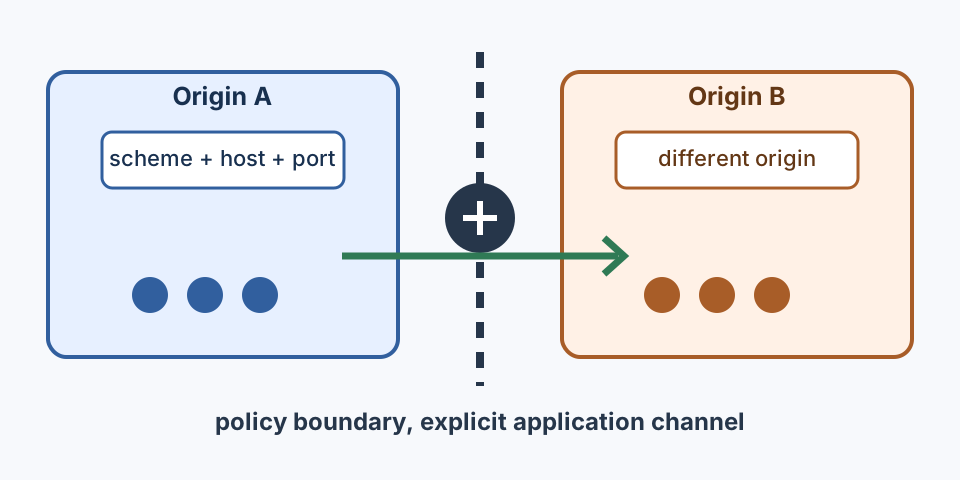
The same-origin policy is a browser rule that limits how a document or script can read and manipulate another origin. An origin is the combination of scheme, host, and port. A page at https://app.example.test is same-origin with another page at that exact origin, but a change to the scheme, host, or port creates a different origin. The policy is a boundary around script-visible data and document relationships. It is not a network firewall, a replacement for server authorization, or a promise that a response cannot be sent over the network.
Site isolation is a browser architecture and security defense that keeps documents from different sites in separate execution spaces when the browser can do so. It reduces the impact of a renderer compromise and helps contain cross-site data, while the same-origin policy still decides what scripts may read. These ideas reinforce one another but answer different questions. A process boundary does not validate an API caller, and a script restriction does not decide how a browser allocates processes.
This distinction matters during debugging. A request can reach a server while JavaScript cannot read the response. An iframe can render while its parent cannot inspect the child DOM. A browser can place pages in separate execution spaces while an application still accepts an unauthorized state-changing request. Record the browser observation, server response, and application result as separate facts. That separation keeps a compatibility report useful without implying a security property that was not tested.
How an origin is identified
The WHATWG HTML origin model defines an origin using scheme, host, and port for ordinary network documents. https://shop.example.test:443 and https://shop.example.test normally resolve to the same effective port, while http://shop.example.test differs because the scheme differs. https://cdn.example.test differs because the host differs, even when the same organization controls both hosts. A development alias, a staging hostname, or a non-default port can therefore create a boundary that does not exist in a local fixture.
Some documents have an opaque origin. A sandboxed iframe without an appropriate origin token, a data: document, or a document created from a blob: URL can have an origin that is not represented by the visible URL in the way a network document is. Treat the browser's origin value and the documented embedding relationship as test inputs. Do not infer trust from a familiar hostname, a certificate, or ownership of a parent domain.
Cookies, storage, permissions, service workers, and many web APIs use origin or site concepts with rules that are related but not identical. A cookie may be scoped to a registrable domain while localStorage is scoped to an origin. A site can contain multiple origins, and a cross-origin frame can still be same-site under a schemeful site definition. When a test changes a host or protocol, clear expectations for every state store and record the final location.origin. The the browser storage model guide covers storage boundaries in more detail.
An origin comparison should be an explicit assertion. In an owned fixture, report location.origin for the top-level document and each frame under test. For a message received from another window, compare event.origin with the expected value before using the message data. The check proves that a message came from the declared origin; it does not prove that the remote application authorized the action or that the message content is safe. Validate the message data schema and the current workflow state as separate application checks.
What the same-origin policy permits
The MDN same-origin policy reference describes the broad rule: scripts from one origin have restricted access to another origin's documents and data. Same-origin scripts can read DOM nodes, most storage for that origin, and response bodies returned to their own JavaScript context. Cross-origin scripts can often navigate a window or submit a form, but they cannot simply read the target DOM or arbitrary response bytes. The exact allowances depend on the API and its specification, so classify the operation instead of treating “cross-origin” as a single yes or no result.
Cross-origin network requests illustrate the boundary. The browser may send a request, and the server may return a successful status, while Fetch hides the response from the calling script unless the response satisfies CORS. This is why a network panel can show 200 alongside a page-level CORS error. CORS is a response-sharing contract; it does not grant server authorization or make an endpoint trustworthy. See the the CORS browser-boundaries guide when the question is response readability rather than document access.
Window relationships are also scoped. A page may hold a reference to a cross-origin popup and use a small set of window operations, but it cannot inspect arbitrary properties on that popup. postMessage provides an intentional communication channel. The receiver should check event.origin, validate event.source when possible, and parse a constrained message shape. Use a concrete target origin when sending. A wildcard target can be appropriate for a deliberately public message, but it should not be used for session or account data.
Frames have an independent document origin. A parent can render a cross-origin iframe without gaining permission to read its DOM, and the child cannot read the parent's DOM merely because it is embedded. A same-origin iframe still shares many script-visible surfaces with its parent, which means a compromised page can affect both documents. Set a clear ownership and trust boundary for every frame. If a frame needs a browser feature, evaluate Permissions Policy, secure-context requirements, and user permission separately from the same-origin decision.
Embedded content and communication
Treat an embedded relationship as a set of contracts. First identify the parent and child origins after redirects. Next identify which operation is required: visual rendering, navigation, form submission, message exchange, response reading, or DOM access. Then document the browser rule and the application authorization check for that operation. A page that only needs to display an image should not receive the same privileges as a frame that exchanges account state.
| Relationship or operation | Browser evidence | Application decision and non-claim |
|---|---|---|
| Same-origin DOM access | Both documents report the same scheme, host, and port | Allow only owned code; still validate state and authorization |
| Cross-origin frame rendering | Frame loads and reports its final origin | Rendering does not grant DOM or response access |
| Cross-origin response read | CORS response and request mode | Readability is not server authorization or business success |
| Window message | Expected event.origin, source, and schema | Accept only the declared message; do not trust origin alone |
| Site-isolated documents | Browser-visible context and declared build | Process separation is not proof of application security |
Redirects deserve particular attention. The URL a test begins with may not be the origin that returns the document. Follow the final response and any frame navigation, then assert the final origin. A server can also issue a redirect to a different site that changes cookie, storage, and CORS behavior. Keep redirect checks in the fixture so a later infrastructure change cannot silently move a trusted workflow across a boundary.
Do not use document.domain as a modern integration plan. It has historically relaxed access between subdomains, but it changes the effective origin model, has compatibility and security costs, and is being deprecated in web-platform guidance. Prefer explicit messaging, a same-origin application shell, or a server-mediated API with normal authentication and authorization. If an older integration still depends on it, record the dependency and test both the legacy path and its replacement.
What site isolation adds
The Chromium site isolation overview describes site isolation as a defense that separates pages from different sites in browser execution spaces. A site is a broader grouping than an origin in several web-platform contexts. Two subdomains may be different origins yet belong to one site, while pages with different registrable domains are different sites. Browser scheduling is an implementation decision that can change with platform, memory pressure, browser release, and document relationships.
Site isolation helps reduce the amount of cross-site data exposed if a renderer has a memory-safety problem. It does not make every site a separate operating-system account, and it does not turn a browser observation into an application guarantee. Do not build product authorization on an assumption about renderer behavior. The server must still authenticate the request, check the resource owner, enforce CSRF and token rules where relevant, and validate state transitions.
Browsing context groups and opener relationships can affect isolation. A popup opened across sites may not share the same group or script relationship as a same-origin popup. COOP and COEP can further change window relationships and resource loading, as described in the the cross-origin isolation guide. These headers are separate from the same-origin policy. A page can be same-origin with a child and still be non-isolated, or it can be cross-origin with a child that loads under a compatible policy.
Site isolation also has limits around extensions, privileged browser surfaces, service workers, and browser-specific behavior. A test should state the browser family, release range, operating system, and feature assumptions. Avoid claiming that a particular process count or internal allocation is stable. The useful public assertion is the visible security behavior: a cross-origin document cannot read the protected data, and an application rejects an unauthorized state change. Those outcomes remain meaningful when the browser changes its browser implementation.
A deterministic policy fixture
The following fixture uses two pages that the same team owns. The control page and candidate page each create a frame, attempt a declared message exchange, and render a visible result. The expected outcome comes from test configuration. It is not derived from the browser result. The fixture does not read private third-party content, inspect process internals, or send credentials.
async function checkOriginBoundary({ frameUrl, expectedOrigin, expectedMessage }) {
  const host = document.createElement('section');
  const status = document.createElement('output');
  status.setAttribute('aria-live', 'polite');
  const frame = document.createElement('iframe');
  frame.src = frameUrl;
  host.append(frame, status);
  document.body.append(host);

  const result = await new Promise(resolve => {
    const timer = setTimeout(() => resolve({ passed: false, reason: 'timeout' }), 3000);
    window.addEventListener('message', function onMessage(event) {
      if (event.source !== frame.contentWindow) return;
      clearTimeout(timer);
      window.removeEventListener('message', onMessage);
      const originMatches = event.origin === expectedOrigin;
      const messageMatches = event.data?.type === expectedMessage;
      resolve({ passed: originMatches && messageMatches, originMatches, messageMatches });
    });
  });

  try {
    status.textContent = result.passed
      ? 'PASS: declared origin and message'
      : `FAIL: ${result.reason || 'boundary mismatch'}`;
    console.assert(result.passed, status.textContent);
    return { ...result, visibleResult: status.textContent };
  } finally {
    host.remove();
  }
}

await checkOriginBoundary({
  frameUrl: 'https://owned-child.example.test/fixture',
  expectedOrigin: 'https://owned-child.example.test',
  expectedMessage: 'owned-fixture-ready',
});
The child fixture should send its message only after its own page is ready, and it should use the parent's declared origin as the postMessage target. The parent verifies the source window, exact origin, and message type before updating the visible result. A timeout is a fixture failure, not evidence of a same-origin block. Classify navigation errors, frame load errors, policy errors, and application errors independently so a network outage cannot be reported as a browser security decision.
To test a same-origin control and a cross-origin candidate, keep the page behavior and message schema identical while changing only the origin relationship. Use stable, owned URLs and a bounded wait. The control should show the expected message. The candidate should show the declared cross-origin behavior, such as a message arriving through postMessage while direct DOM access remains unavailable. Do not attempt to obtain protected data as proof. The visible result and the browser's documented access error are sufficient for this boundary test.
Cleanup belongs in a finally path. Remove the temporary frame, remove event listeners, clear timers, and close the isolated browser context in the test runner. If the fixture created a synthetic server record, delete that record through an owned test endpoint and report cleanup separately. Preserve the first assertion failure if cleanup also fails. A clean teardown does not prove that a remote system erased unrelated data.
Deploy, monitor, and roll back
Start with an origin inventory. List canonical application hosts, asset hosts, identity providers, customer frames, analytics endpoints, and redirect destinations. For each dependency, record whether the application needs rendering, navigation, messaging, response reading, or DOM access. Name the owner and the server-side authorization contract. This inventory prevents a same-site assumption from hiding a cross-origin relationship and gives the support team a concrete place to begin when a deployment changes.
Run the control and candidate fixture in staging using the final hostnames and response policies. Record the final origin, browser release, frame origin, visible status, network status, and application result. Verify that a successful HTTP response is not being mistaken for a readable response, and that a browser policy result is not being mistaken for a server denial. Keep reports free of account contents and credentials. Repeat the checks after a CDN, redirect, identity-provider, or browser-release change.
Roll out changes in a narrow sequence. First deploy the owned fixture and telemetry for visible outcomes. Next change the response or embedding policy for a staging origin. Then exercise login popups, payments, customer frames, uploads, and any flow that crosses origins. Confirm that the intended message channel works and that unauthorized DOM or response access remains unavailable. Promote only when the user-facing workflow and its fallback are both understood.
Rollback should restore the prior application and policy combination, not simply remove an assertion. Keep the previous headers, redirect map, and frame configuration available. If a change breaks an essential workflow, restore the last known-good configuration, rerun the same control and candidate fixture, and classify the failing boundary. Preserve HTTPS, authentication, and authorization controls during rollback. Do not broaden an origin allowlist or accept arbitrary message origins just to make a test green.
What BotBrowser can validate
BotBrowser supports authorized fixtures in controlled contexts, but it cannot grant server authorization or replace application security controls.
BotBrowser supports controlled browser contexts that can run authorized owned-origin fixtures, compare visible same-origin policy outcomes, and repeat site-isolation observations on a declared browser build. Its multi-account isolation documentation describes separate contexts for independent browser journeys. This can provide repeatable evidence for a page's final origin, frame message result, and application fallback while keeping synthetic state scoped to the test.
BotBrowser does not change an origin, grant server authorization, disable browser enforcement, guarantee a particular process layout, or replace application security controls. The browser, response headers, server authorization, and application code remain responsible for their respective boundaries. A passing controlled run shows what the declared browser and deployment exposed to the test. It does not certify every browser, every embedding partner, or every server-side permission decision.
For related boundaries, see the browser storage model guide, the CORS browser-boundaries guide, and the cross-origin isolation guide. They cover state partitioning, response readability, and isolation headers. This article focuses on origin identity, script access, embedded communication, and the role of site isolation.
See the CORS browser-boundaries guide and cross-origin isolation guide for adjacent policy boundaries.
Author: BotBrowser Team
Sources
Related Articles
Take BotBrowser from research to production
The guides cover the model first, then move into cross-platform validation, isolated contexts, and scale-ready browser deployment.