Secure Contexts: Why Advanced Browser APIs Need HTTPS
Understand secure-context eligibility, permissions, policy and origin boundaries, plus a deterministic deployment test for advanced browser features.
BotBrowser Team
Want the structured docs for Platform?
This article lives in the editorial library. For step-by-step setup, reference material, and ongoing updates, jump into the docs section.
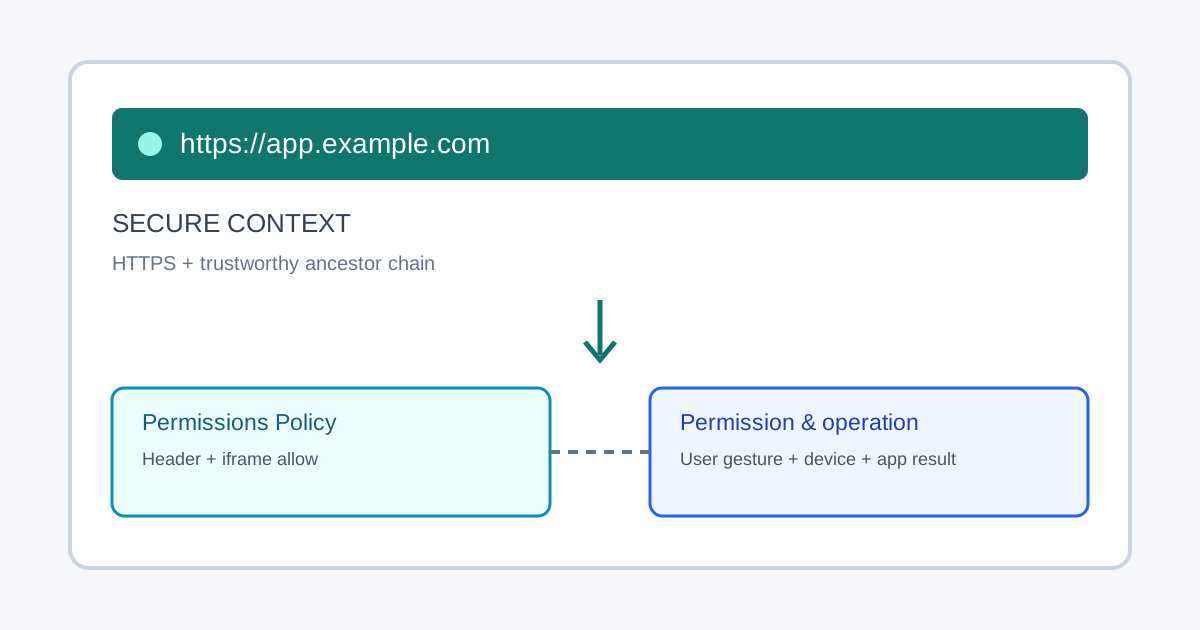
A secure context is a browser environment in which the user agent can reasonably trust that the page's origin was delivered with integrity and that its ancestors do not undermine that trust. The Secure Contexts standard uses this classification to gate web-platform features that could expose sensitive data or enable advanced device capabilities. HTTPS is the normal way to qualify a deployed site, but a secure context is only an eligibility condition: it does not grant permission, override an embedding policy, create user activation, guarantee API support, or prove that a device or remote service will complete an operation.
That distinction answers the common question “Why does this API work on my laptop but not after deployment?” Start by checking the origin and the complete embedding chain. Then check whether the browser exposes the relevant interface, whether Permissions Policy allows it in this document, whether the user or administrator has granted access, and whether the operation's own gesture, device, and application requirements are satisfied. Each check belongs to a separate boundary and can fail independently.
What a secure context means
The W3C Secure Contexts specification defines a context classification, not a user-facing lock icon and not a generic claim that every script on a page is safe. In broad terms, a potentially trustworthy origin can run as a secure context when the browser can establish trust in the origin and its relevant ancestors. A top-level page served over HTTPS with a valid certificate is the ordinary production case. A secure page embedded by an insecure or otherwise untrustworthy ancestor may not receive the same classification, because the ancestor could alter the embedding environment or its inputs.
The browser's decision is exposed through window.isSecureContext. It is useful evidence for the current global object, but it is deliberately narrower than “the feature works.” It does not report whether a specific API is implemented, whether a policy permits it, whether the user granted access, or whether a call will succeed. A page should check the exact capability it intends to use and handle the operation's documented outcomes as well as checking context eligibility.
The browser treats some development origins as potentially trustworthy even without a publicly trusted certificate. In particular, loopback origins such as http://localhost are generally considered trustworthy for local development. This exception makes local iteration practical; it does not make arbitrary remote HTTP hosts secure, and it should not become a deployment assumption. The MDN secure-context guide documents the developer-facing model and common trustworthy origins. Browser details can evolve, so a test should record the actual origin and browser version rather than hard-code an assumption from a hostname alone.
“Advanced feature” is a useful description for capabilities such as camera, microphone, geolocation, clipboard access, credential operations, and other APIs whose use can affect privacy, device access, or user data. It is not one uniform API class with one uniform permission prompt. Specifications set requirements individually. Some interfaces are exposed only in secure contexts; others additionally require transient user activation, an explicit permission, a focused or visible document, a particular document policy, compatible hardware, or a trustworthy response from an application server. Consult the specification for the exact operation instead of inferring its requirements from another API.
Eligibility is not authorization
Browser feature checks are easiest to reason about as separate gates. First, the current document must be eligible to expose a secure-context-only feature. Second, the browser build and platform must implement the relevant interface. Third, the document must be allowed to use it by embedding and Permissions Policy rules. Fourth, any user, browser, or managed-device permission must permit the request. Finally, the API call must satisfy its own invocation rules and the application must verify the result it cares about.
| Gate | Check | Record |
|---|---|---|
| Context | window.isSecureContext and final origin | Eligible or ineligible |
| Policy | Response policy and iframe allow | Allowed or blocked |
| Permission | User, browser, or managed-device decision | Granted, denied, or prompt |
| Operation | Interface, activation, hardware, and application result | Completed or failed |
These gates are not interchangeable. A true value for isSecureContext says nothing about whether a person has granted location access. A permission query may say prompt, but a later request can still be denied or rejected. A JavaScript method can exist while a policy blocks use in a particular iframe. A browser operation can resolve while an application request later fails. Keep the outcomes distinct in product state and test reports: ineligible, unsupported, blocked by policy, permission denied, user cancelled, operation failed, and application completed are different results and need different next actions.
The Permissions Policy specification lets a top-level response and an iframe's allow attribute express which origins may use certain features. The response policy is an upper bound: a child cannot use an ability that its ancestor has disallowed. An iframe delegation is not a permission grant. It only makes a feature available to the embedded document when the policy chain permits it; the user's decision and API-specific conditions still apply. A useful review therefore reads the top-level response header, the iframe attributes, the child origin, and the feature specification together.
The document origin also matters. Web security policies usually scope access to an origin, the tuple of scheme, host, and port. A development change from http to https, a different host alias, or a different port can create a different origin with separate storage, permissions, cookies, service-worker registrations, and application configuration. A successful check on one hostname should not be carried over to another without verifying the new origin. Sandboxed frames with opaque origins add another boundary; do not infer their API eligibility from the visible URL of the parent page.
User activation is a further independent requirement. An API may require a direct user action even after the page is secure and allowed by policy. Do not trigger an activation-gated operation during page load and then treat rejection as a TLS problem. Put the call behind a clear, keyboard-operable control, explain why the action is needed, and preserve a non-API alternative when possible. Permission prompts should be requested in context and only when the person can understand the choice.
Localhost, HTTPS, and embedded origins
Local development and production answer different questions. http://localhost is a convenient trustworthy development origin in many browser implementations, which is why APIs may appear available there while a remote HTTP deployment reports isSecureContext === false. This behavior is intentional and should not be “fixed” by changing application logic to assume that every HTTP origin is secure. A publicly reachable site should be deployed over HTTPS with a valid certificate and a consistent canonical host.
The protocol difference is only one possible cause. Local and deployed sites may also differ in hostname, port, browser version, permissions history, response headers, proxy behavior, feature flags, and iframe structure. Compare the full URL and the response policy. Avoid testing a remote deployment through an HTTP redirect and assuming the initial navigation's state represents the final page: assert after the final HTTPS document loads, then record its location.origin and isSecureContext result.
An HTTPS page can still be embedded in an insecure or policy-restrictive chain. Conversely, an iframe hosted at a different HTTPS origin may be a secure context while still lacking delegation to a particular feature. Cross-origin isolation, same-origin policy, and Permissions Policy answer different questions: isolation controls access to certain shared capabilities and cross-origin resources; same-origin policy constrains script access between origins; Permissions Policy constrains use of named features. Enabling one does not automatically satisfy the others.
For an embedded workflow, validate each document independently. Record the top-level origin, each frame origin, whether the relevant frame reports a secure context, the response's Permissions-Policy header, and any iframe allow declaration. If the child is intentionally cross-origin, grant only the named capability to the intended origin and keep the header restrictive for other origins. A wildcard is broader than a concrete origin and is rarely necessary for a controlled integration. Do not use allow="*" as a troubleshooting shortcut; it obscures which boundary made the feature available and can grant more than the product needs.
Treat mixed content as its own deployment defect. A secure top-level page that requests active content over HTTP may have that content blocked or otherwise constrained by the browser. Fix the resource URL and server configuration instead of weakening transport security. A lock icon alone is not a sufficient acceptance assertion; the page should load its intended resources without insecure requests, and the feature should be tested in the same top-level and embedded arrangement used by customers.
A deterministic eligibility fixture
A useful regression fixture proves a small claim without asking for a camera, microphone, location, clipboard write, or real user permission. The following helper creates a visible result, compares it with a test expectation, and removes its temporary DOM in every outcome. Run it on a controlled deployment matrix: a valid HTTPS origin should expect true; an ordinary remote HTTP origin should expect false; localhost should use a separately declared expectation for the browser under test. The assertion concerns context classification only. It does not claim that a particular API is implemented or authorized.
async function checkSecureContext(expected) {
  const host = document.createElement('section');
  const status = document.createElement('output');
  status.setAttribute('aria-live', 'polite');
  host.append(status);
  document.body.append(host);

  try {
    const actual = window.isSecureContext;
    const passed = actual === expected;
    status.textContent = `${passed ? 'PASS' : 'FAIL'}: expected secure context ${expected}; observed ${actual}`;

    console.assert(passed, status.textContent);
    console.assert(status.textContent.startsWith(passed ? 'PASS:' : 'FAIL:'));
    return { passed, actual, visibleResult: status.textContent };
  } finally {
    host.remove();
  }
}

// Set the expectation in the test case, not from the value being tested.
await checkSecureContext(true);
The expectation must come from the fixture's declared deployment case, not from window.isSecureContext itself. A production harness can pass an expected value through test configuration and collect the returned result. To test an iframe, load the same fixture in the child document and report its result to the parent with postMessage; validate event.origin against the expected child origin before accepting the message. Keep the child test page synthetic and make the parent assert both the expected origin and the child's visible result. This separates secure-context classification from feature delegation.
For policy behavior, use a separate owned fixture with a response header configured for the test origin, then verify that a child receives only the intended delegation. Do not use an API that prompts for sensitive access as the sole proof: a blocked prompt can reflect policy, user choice, browser settings, missing hardware, or an implementation-specific rule. If a feature-level smoke test is necessary, check the interface, request only with a user gesture where required, classify expected denial or cancellation, and retain an alternative path. Keep those assertions separate from the isSecureContext fixture so one result cannot mask another.
The test matrix should include the top-level HTTPS page, the intended embedded origin, a remote HTTP control where the environment permits it, and any localhost workflow developers rely on. For each case, state the exact URL, expected secure-context value, browser release, response policy, frame relationship, and visible assertion. A failed HTTP control is not a reason to remove the assertion; it is evidence that the deployed test origin differs from the declared expectation. A localhost pass is not production evidence. Keep the first failure, then clean up fixture nodes, temporary test data, and isolated browser contexts in a finally or equivalent teardown path.
For repeatability, store the fixture configuration beside the deployment test rather than in page code. Include the expected origin, expected context value, policy header, frame origin, and browser build as explicit inputs. That makes a changed staging hostname or browser policy visible in review and prevents a test from silently becoming self-fulfilling.
Deploy, observe, and roll back
Before release, verify the serving path from the public entry point through every redirect and reverse proxy. Install a valid certificate for each canonical hostname, redirect HTTP to HTTPS, and ensure the final document is served from the expected origin. Review Content Security Policy and Permissions Policy response headers, iframe allow attributes, and any host-specific configuration that differs between staging and production. Where the application is embedded by a customer, document the exact child origin and required delegation so the integrator can permit only that origin.
Run the deterministic fixture against staging after headers and redirects are final, then repeat the same assertions on the production candidate. Keep a non-sensitive report containing URL, browser build, secure-context result, relevant policy values, child origin, and visible application outcome. Do not store credentials or raw permission prompts in the fixture report. Treat an unavailable API, denied permission, blocked policy, and downstream transaction failure as separate statuses. A concise support report should let another engineer reproduce the same origin chain without needing access to a user's profile.
Deploy the application fallback with the feature. If a permission is denied, the policy blocks an embedded feature, or a browser lacks the interface, the core task should remain available where the product can provide an alternative. For example, a location-dependent page can let the person enter an area manually; a file operation can offer a conventional download; a device workflow can explain how to continue without device access. The alternative should preserve entered data, be keyboard accessible, and avoid repeated hidden permission prompts. Do not mislabel a transport or configuration problem as a user's refusal.
Prepare rollback around the component that changed. A certificate or redirect regression belongs to the hosting layer; a response-header regression belongs to server configuration; an iframe delegation error belongs to the embed integration; a broken fallback belongs to the application release. Revert the smallest relevant change, restore the last known-good HTTPS and policy configuration, and rerun the same fixture with the same expected origins. Never “roll back” by serving sensitive features over ordinary HTTP or broadly relaxing a policy. Keep the secure transport invariant while restoring the previous working application path.
What BotBrowser can validate
BotBrowser supports controlled browser contexts for authorized, repeatable checks of owned application pages. Teams can use those contexts to load the same synthetic fixture against declared origins, observe isSecureContext, exercise application fallback states, and compare visible results across supported browser releases. Its multi-account isolation documentation describes assigning isolated contexts for separate browser journeys. This is useful for reproducible QA when each run needs a clean, explicitly scoped page and test state.
BotBrowser cannot make an insecure remote origin trustworthy, grant a user's browser permission, override Permissions Policy, supply missing device hardware, or guarantee API availability on every browser and platform. It does not replace the W3C secure-context requirements, application-owned assertions, certificate operations, or production monitoring. A controlled context can provide evidence about the browser-visible result under recorded conditions; the site owner still controls HTTPS, response headers, embedding configuration, and fallback behavior. Keep that capability and limitation together when interpreting a successful run.
For this topic, BotBrowser supports isolated contexts that can load an owned HTTPS fixture and report its visible secure-context result, but it cannot make an insecure origin trustworthy or grant the permission requested by a user.
For adjacent questions, see the browser permission behavior guide and the browser API compatibility and fallback guide. Those pages cover permission state and compatibility planning; this page focuses on whether a document is eligible to attempt an advanced feature in the first place.
Sources
Related Articles
Take BotBrowser from research to production
The guides cover the model first, then move into cross-platform validation, isolated contexts, and scale-ready browser deployment.