Cross-Origin Isolation: Headers and SharedArrayBuffer
Learn what cross-origin isolation changes, how COOP and COEP work together, and how to validate embedded resources before enabling SharedArrayBuffer.
BotBrowser Team
Want the structured docs for Platform?
This article lives in the editorial library. For step-by-step setup, reference material, and ongoing updates, jump into the docs section.
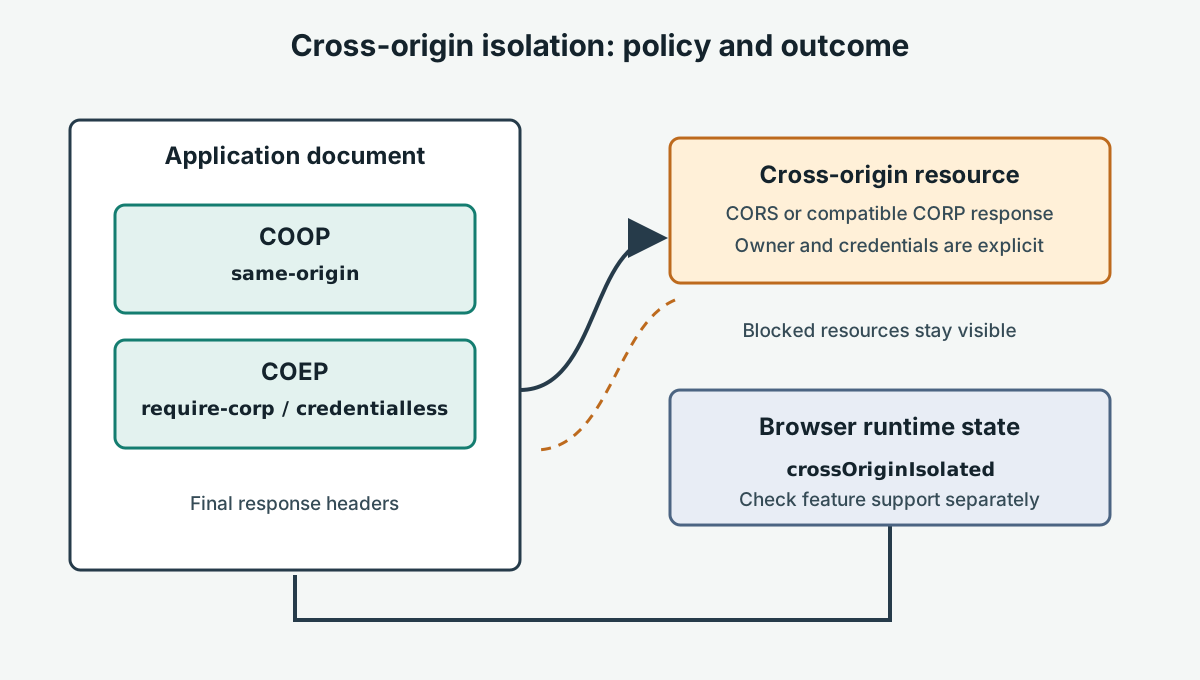
Cross-origin isolation is a browser security state created by a compatible set of response policies and document relationships. It can enable web features such as SharedArrayBuffer in supporting browsers, but it is not a single header and does not make every cross-origin resource usable. A typical top-level deployment combines Cross-Origin-Opener-Policy: same-origin (COOP) with a Cross-Origin-Embedder-Policy (COEP) value such as require-corp or, where supported and appropriate, credentialless. The document can then inspect window.crossOriginIsolated to confirm the browser's resulting state.
The deployment decision is broader than “add two headers.” COOP changes how a page relates to windows opened across origins; COEP changes which embedded cross-origin resources can load. Together they can affect sign-in popups, payments, analytics, media, fonts, frames, and vendor scripts. Inventory those dependencies, test their real response headers, and stage the policy before enabling code that depends on isolated-only features. Isolation is an application architecture choice with compatibility costs and should be deployed with an explicit fallback and rollback path.
What cross-origin isolation changes
The WHATWG HTML specification's cross-origin isolation model describes a browser state, not a network tunnel or a property that a script can set. A page opts into a stricter relationship with other browsing contexts and embedded resources. If the browser accepts the applicable policy and relationship requirements, it exposes the resulting state through crossOriginIsolated. That value is the runtime assertion to record; a server returning one header is not by itself proof that a loaded document is isolated.
The term “cross-origin” refers to a different scheme, host, or port. A first-party subdomain can therefore be cross-origin even when an organization owns both hosts. Origin boundaries are distinct from site boundaries, and deployment details such as a CDN hostname, an asset domain, or a customer-hosted frame can change which policy applies. A resource that works on a local development host may have a different origin and response configuration in production.
Cross-origin isolation is often discussed alongside SharedArrayBuffer, but the API is only one use case. Some applications need the feature for supported libraries or runtime capabilities. The exact availability rules can vary by browser and platform release; a secure context and an isolated document are common prerequisites, not a promise that every environment exposes every feature. Check the specific API support data and test the deployed document. Never infer feature availability from a user-agent string or from the presence of a response header alone.
window.crossOriginIsolated tells application code whether the current global environment is isolated according to the browser. It does not explain which header or embedded resource prevented isolation. A useful diagnostic report therefore pairs that boolean with the final document URL, relevant response headers, browser release, and a controlled resource inventory. Keep the report focused on configuration facts; it does not need user data or unrelated browser attributes.
COOP and COEP have different jobs
COOP controls a document's relationship with top-level browsing contexts, including opener relationships. With Cross-Origin-Opener-Policy: same-origin, a page is placed into a browsing context group that separates it from cross-origin documents in relevant cases. This improves isolation between windows, but it can change expected behavior for flows that rely on window.opener, such as a popup returning a result to its launching page. The MDN COOP reference describes the policy values and their effects. Test popup-based login, payment, and support flows instead of assuming those integrations are unaffected.
COEP controls the loading of cross-origin resources that a document embeds. With Cross-Origin-Embedder-Policy: require-corp, a cross-origin resource generally needs to be fetched through CORS with a successful CORS response, or be served with a compatible Cross-Origin-Resource-Policy (CORP) response. A resource that previously loaded through a no-CORS request can be blocked if it does not opt in. The resource owner or CDN may need to return Access-Control-Allow-Origin for a CORS request or an appropriate Cross-Origin-Resource-Policy value for an eligible no-CORS resource. The correct header depends on the resource type, credentials, and intended sharing boundary.
The credentialless COEP mode can relax the CORP requirement for eligible no-CORS resources by loading them without credentials. It changes request behavior: cookies and other credentials are not sent for those requests. Browser support and detailed behavior should be checked against current browser documentation before choosing it. It is not a generic compatibility switch, and it is unsuitable when a resource needs authenticated access. The MDN cross-origin isolation guide summarizes the policy pairing and the consequences for applications.
These responsibilities are complementary. COOP alone does not impose COEP's embedded-resource checks. COEP alone does not provide the top-level separation required in the common isolated deployment. The page's final runtime state is the outcome of the complete policy and document relationship, not a manual setting. Do not weaken the policy globally to make one vendor script load; identify the resource, determine who controls it, and choose a supported CORS, CORP, proxy, or alternative integration that matches the intended access.
Embedded resources and origin boundaries
Before applying COEP, inventory every resource the page can embed or fetch: scripts, stylesheets, fonts, images, audio, video, workers, nested frames, and resources loaded by third-party code. Classify each as same-origin, cross-origin with CORS, cross-origin with CORP, or an integration that cannot meet the selected policy. Inspect actual network responses in staging. A resource URL alone does not reveal whether its response contains the required header, whether redirects change the origin, or whether a credentialed request has a compatible CORS response.
Use a compatibility table with a named owner and a decision for each dependency:
| Dependency case | Evidence to inspect | Deployment decision |
|---|---|---|
| Same-origin application asset | Final URL and response status | Keep same-origin; verify redirects remain in scope |
| Cross-origin asset intended for public use | CORS mode and Access-Control-Allow-Origin, or suitable CORP response | Configure the resource owner and test the actual response |
| Cross-origin request needs credentials | Credential mode, exact allowed origin, and credential response headers | Use a deliberate CORS contract; do not use credentialless as a substitute |
| Vendor resource cannot opt in | Owner, purpose, and whether the feature is essential | Replace, proxy under an approved design, defer, or retain a non-isolated fallback |
| Popup or cross-origin frame workflow | Opener behavior, frame origin, and policy relationship | Test the complete user journey with the target policy |
A cross-origin iframe is an independent document with its own origin and policy relationship. Do not assume that a top-level page's crossOriginIsolated value automatically describes every child frame or grants the child every capability. Confirm the embedding rules and any required delegation for the exact feature, then check the child's own runtime state in a fixture that records the expected origin. A frame may also require its own compatible response policy. If you do not control the frame, coordinate with its owner before relying on an isolated-only feature inside it.
The policy should follow least privilege. Allow only the origins and resource types the application needs, and keep third-party integrations from silently widening access. A wildcard CORS response may be valid for a public, non-credentialed asset, but it is not a universal solution for authenticated data. CORP values also describe who may embed a response; select one that matches the intended relationship rather than using the broadest value by default. Document who owns every required header, especially when the page, CDN, identity provider, and embedded service are managed by different teams.
A deterministic deployment fixture
The following fixture makes the isolation state visible, asserts an expectation supplied by the test case, and removes its temporary DOM even if an assertion or reporting step fails. Serve it from the same origin and through the same response-header path as the application. In an isolated candidate environment, configure the expected value as true; in a control environment without the complete policy, declare the expected value separately. Do not derive the expectation from the value being tested.
async function checkIsolation(expected) {
  const host = document.createElement('section');
  const status = document.createElement('output');
  status.setAttribute('aria-live', 'polite');
  host.append(status);
  document.body.append(host);

  try {
    const isolated = window.crossOriginIsolated === true;
    const sharedMemoryAvailable = typeof SharedArrayBuffer === 'function';
    const passed = expected ? isolated && sharedMemoryAvailable : isolated === expected;
    status.textContent = `${passed ? 'PASS' : 'FAIL'}: isolated=${isolated}; SharedArrayBuffer=${sharedMemoryAvailable}`;

    console.assert(passed, status.textContent);
    if (expected) console.assert(sharedMemoryAvailable, 'Expected SharedArrayBuffer in this declared browser case');
    return { passed, isolated, sharedMemoryAvailable, visibleResult: status.textContent };
  } finally {
    host.remove();
  }
}

// The test configuration declares this expectation for the candidate origin.
await checkIsolation(true);
The fixture reports two separate facts: the browser's isolation state and whether this environment exposes SharedArrayBuffer. A supported browser case can assert both; a browser outside the application's declared support range may record the API as unavailable and exercise the product fallback. The fallback should be tested as its own expected outcome, not relabeled as an isolation pass. The snippet does not allocate shared memory, start workers, or perform measurements. Its purpose is to verify response configuration and runtime eligibility without adding an unrelated workload.
For a resource compatibility test, load a small owned page that references one representative cross-origin asset from each required category. Give each asset a stable fixture URL and assert a user-visible loaded or failed state. Keep one fixture per policy case so a failed font does not obscure a successful script or frame. Include redirects and credential behavior only where the production dependency uses them. In teardown, remove fixture nodes and close the isolated test context; do not mutate shared production data.
Deploy, monitor, and roll back
Roll out in stages. First inventory cross-origin dependencies and identify resource owners. Next configure a staging origin with COOP and the selected COEP value, then run the fixture and the complete application journey. Verify the headers on the final document response rather than only at a load balancer or source configuration file; redirects, CDN rules, service workers, and host-specific routes can change the delivered response. Confirm crossOriginIsolated in the actual page after navigation and test each essential resource in its production request mode.
Exercise workflows that cross browsing contexts before broad release: popup-based authentication, payment handoff, customer frames, help widgets, and any integration that expects an opener reference. Also test browser releases at the supported boundary and a control case that uses the fallback. Capture a small report with the final URL, browser build, COOP and COEP values, isolation boolean, resource failures, frame origins, and user-visible outcome. Keep secrets, account data, and unrelated profile information out of this report.
The rollout is acceptable only when the isolated state is observed where it is expected, required resources load under their declared policy, and users can complete the core task when the feature is unavailable. If a vendor resource blocks the release, keep the fallback or replace the integration; do not ship an undocumented global weakening. Treat an isolation failure as a configuration result to diagnose, not as a reason to silently change assertions. Make ownership visible in the deployment record: the application team owns the decision that requires isolation and its user-facing alternative; the hosting team owns the COOP and COEP values returned for each canonical host; a CDN or asset owner owns CORS and CORP behavior; and identity or payment providers own popup and frame compatibility. Name a release owner to reconcile these inputs, since a response-header change can be correct at the edge and still break an application journey. Record the final URL, status, redirect chain, header values, frame origins, and a link to each resource contract. This helps distinguish a stale CDN response from a policy incompatibility without collecting account contents or browser-profile data. Keep staging and production policy configuration comparable. If a staging-only resource uses a different host, it does not prove that the production host opts in. Likewise, a successful resource request through a developer proxy does not establish that the browser received the same CORS mode or credentials behavior from the public endpoint. The acceptance case should use the production hostnames or a documented equivalent and preserve the response evidence for each required asset category. When a dependency is optional, state that it may be blocked and assert the product's visible alternative; when it is essential, do not promote the policy until its owner provides a compatible response. This decision avoids treating an accidental test environment as proof of production readiness. Keep a named owner for comparing staging and production policy, reviewing CDN changes, and refreshing the compatibility record after a host, browser, or vendor release. That boundary prevents a previously successful fixture from becoming stale evidence and gives support teams a clear reference for the exact configuration that was accepted. It also gives the release owner a concrete trigger for revalidation: repeat the fixture when a CDN rule, canonical host, browser support range, or vendor contract changes, even if application source code remains untouched. The result should state whether the change affected isolation, a resource response, or only the fallback, so a later reviewer can choose the smallest corrective action.
Plan rollback before changing production headers. Keep the prior response policy and application version available. If the new policy breaks an essential integration, restore the previous known-good policy and application path together, then rerun the same fixture to verify the intended non-isolated state and fallback. Remove code paths that require the isolated-only feature from the rollback build or guard them behind the runtime check. Preserve transport security and unrelated security headers; rollback is not a reason to serve content over HTTP or erase the test evidence.
What BotBrowser can validate
BotBrowser supports controlled browser contexts for authorized application QA: teams can use isolated contexts to run an owned fixture against a declared browser build, verify the page's runtime isolation state, and compare user-visible fallback behavior without carrying state from an unrelated journey. The BotBrowser multi-account isolation documentation describes separate browser contexts for independent sessions. BotBrowser cannot make a document cross-origin isolated, supply COOP or COEP headers, change a third-party resource's CORS/CORP response, preserve popup behavior that the policy intentionally separates, or guarantee that SharedArrayBuffer is supported on every platform. The WHATWG HTML cross-origin isolation model and the site owner's deployment configuration remain authoritative. Use BotBrowser to observe a declared browser journey, while the application and infrastructure owners remain responsible for resource contracts, policy decisions, compatibility, and rollback.
For related work, see the browser release validation guide, the secure-context guide, and the browser API compatibility guide. They address release evidence, secure-context eligibility, and API fallback planning; this page focuses on the response-policy and resource changes needed for cross-origin isolation.
Record the release decision with the owner of each policy and resource contract. This makes a later rollback reviewable: the team can identify whether a document header, redirect, CDN response, or embedded dependency changed. Keep the record limited to technical responses and visible outcomes, and repeat the same checks after every policy change.
If an optional dependency fails, document the visible fallback. If it is essential, defer release until its owner confirms a compatible response.
Sources
Related Articles
Take BotBrowser from research to production
The guides cover the model first, then move into cross-platform validation, isolated contexts, and scale-ready browser deployment.