Permissions Policy for Embedded Browser Features
A practical guide to delegating browser features to embedded frames, separating policy checks from permissions, CSP, and cross-origin isolation.
BotBrowser Team
Want the structured docs for Platform?
This article lives in the editorial library. For step-by-step setup, reference material, and ongoing updates, jump into the docs section.
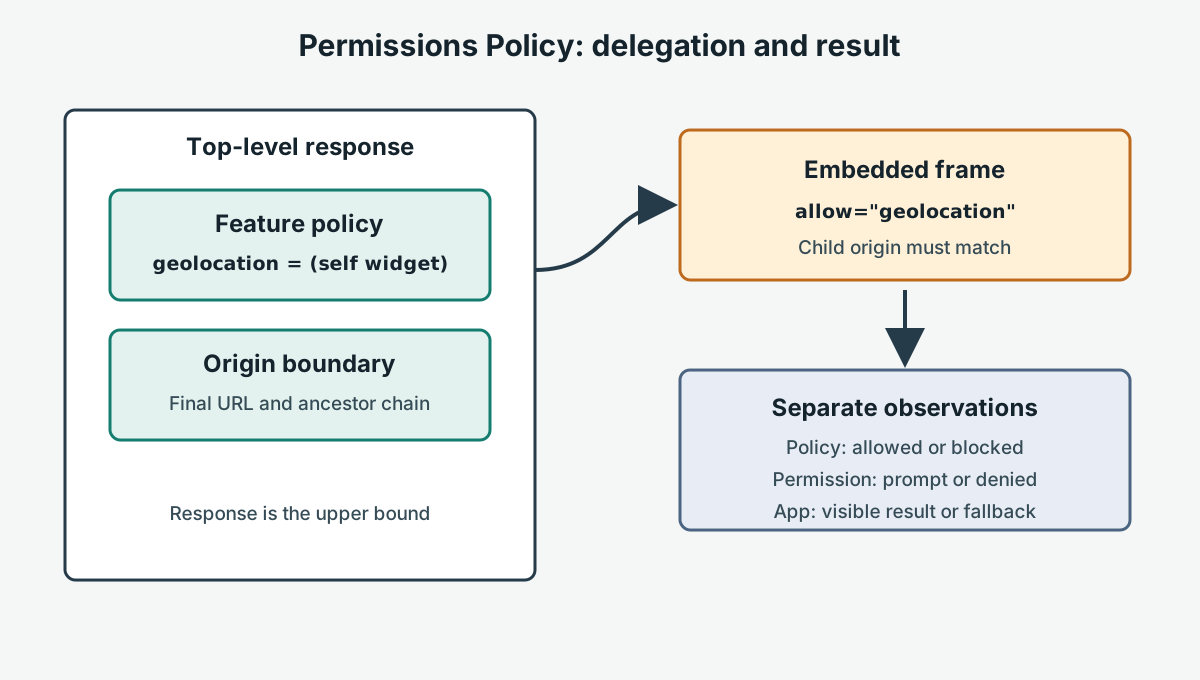
Permissions Policy is the browser mechanism for limiting which documents may use selected sensitive features. A top-level response establishes the maximum policy, and an iframe allow attribute can delegate an allowed feature to a particular child origin. The policy is a capability boundary, not a user permission grant and not an assertion that an API will succeed. A frame can pass the policy check and still require a secure context, user activation, a browser implementation, a device, or an application acknowledgement.
For an embedded camera, microphone, geolocation, fullscreen, or other feature, the useful question is not “did the iframe have allow?” It is “which policy was delivered, which origin was delegated, which browser gate was reached, and what visible outcome did the user receive?” Keeping those observations separate makes an integration diagnosable and avoids widening access simply because one vendor frame failed. This guide gives a decision model, a bounded fixture, and a clear boundary between Permissions Policy, Content Security Policy (CSP), Cross-Origin-Opener-Policy (COOP), and Cross-Origin-Embedder-Policy (COEP).
What Permissions Policy controls
The W3C Permissions Policy specification defines a policy controlled by the document response and, for nested frames, by container policy such as allow. A policy names a feature and an allowlist of origins. The browser evaluates the policy for the document that is trying to use the feature. A top-level page can therefore limit itself, delegate to a same-origin child, or delegate to a specific cross-origin child. The exact default allowlist differs by feature, so a deployment should consult the current feature definition instead of assuming that every capability starts enabled or disabled.
Consider a page at https://app.example embedding https://widget.example. A response such as Permissions-Policy: geolocation=(self "https://widget.example") says that the top-level origin and the named widget origin are eligible to use geolocation, subject to the browser's other rules. The iframe then needs a matching container declaration, for example allow="geolocation", or a feature-specific origin expression when the integration requires one. The response policy is an upper bound: an iframe cannot grant itself a feature that the ancestor response removed. A child can also be ineligible because a redirect changed its final origin, because an ancestor frame omitted delegation, or because the feature's own preconditions were not met.
Do not treat allow="*" as a harmless default. It delegates the named feature to every origin that can occupy that container, which may include a future redirect or an unexpected nested document. Use the narrowest origin list that matches the contract. Keep the page and frame on known HTTPS origins, document who owns the response header and embed code, and recheck the final URL after redirects. A feature policy is useful only when the resource and origin inventory behind it is current.
The policy result is also distinct from a permission state. A browser may expose navigator.permissions as prompt or granted while an iframe is still blocked by its policy. Conversely, a policy-eligible document may receive a user denial, an unavailable-device error, a timeout, or a browser-specific rejection. A successful policy check therefore means “this document is allowed to attempt the feature,” not “the feature is available” or “the business operation completed.” Record the stage at which a request stopped.
A feature request has several independent gates
Embedded features are easiest to troubleshoot when each gate has a named observation. First, confirm the final document origin and that the document is in the context required by the API, commonly a secure context. Next, confirm that the browser build exposes the interface. Then inspect the Permissions Policy chain: response header, parent container, ancestor frames, and the child document's final origin. If that gate passes, the browser may still require a transient user activation, a user or administrator permission, a supported device, or a feature-specific option. Finally, verify the application result, such as a visible location, a selected camera, or a completed fullscreen transition.
| Gate | Evidence to capture | What a pass does not prove |
|---|---|---|
| Final origin and context | Final URL, scheme, port, and secure-context state | It does not prove a feature is implemented |
| API implementation | A narrow feature test, such as typeof navigator.geolocation.getCurrentPosition | It does not prove the request will be allowed or succeed |
| Permissions Policy | Delivered response header, iframe allow, ancestor chain, and child origin | It does not grant user permission or create a device |
| User or platform decision | Permission state, prompt outcome, administrator setting, and device status | It does not prove application data was accepted |
| Application result | A visible status or owned acknowledgement with a bounded timeout | It does not prove a remote business record without server evidence |
The distinction matters for nested content. A top-level document may be eligible for geolocation while an embedded customer portal is not delegated that feature. A cross-origin frame may also be secure but unable to request a capability because the parent response selected a different allowlist. Ask the frame to report its own origin and runtime state through an owned test endpoint or a visible status element; do not infer the child's result from the parent's browser state.
Feature names are not interchangeable. camera, microphone, geolocation, and fullscreen have separate policy entries and separate API behavior. A declaration for one does not authorize another. If a vendor asks for several features, map each to a user-visible journey and remove any feature that the journey does not need. This reduces accidental delegation and gives support staff a concrete explanation when a request is refused.
The boundary with CSP, COOP, and COEP
Permissions Policy answers “which document may use this browser feature?” It does not decide which scripts, connections, images, or frames may load. Content Security Policy answers a different question: which resource types and destinations may the document execute, connect to, or embed, using directives such as script-src, connect-src, and frame-src. A CSP can block the frame before Permissions Policy is evaluated, and a permitted frame can still have its feature request rejected by Permissions Policy. Use both policies when their separate goals apply; never loosen CSP to compensate for a missing feature delegation.
Cross-Origin-Opener-Policy (COOP) changes relationships between top-level browsing contexts, especially opener relationships between windows. Cross-Origin-Embedder-Policy (COEP) controls whether cross-origin resources can be embedded under requirements such as CORS or CORP. They are commonly discussed with cross-origin isolation and SharedArrayBuffer, but neither header is a substitute for Permissions Policy. COOP does not delegate a camera to a frame. COEP does not authorize geolocation, microphone, or fullscreen. Conversely, adding a Permissions Policy declaration does not make a page cross-origin isolated and does not make a resource CORS-compatible.
The operational order should follow the dependency chain. Verify that CSP allows the intended frame and that the network response is reachable. Verify the final origin and the COOP/COEP state when the application depends on isolation. Then verify the Permissions Policy header and container delegation. Only after those policy checks should the application request a user-mediated feature. This ordering keeps a blocked network load, a policy denial, and a user denial as separate records. It also prevents the common mistake of treating a browser console warning from one policy as proof that another policy is responsible.
The distinction is important for security review. CSP helps reduce the impact of unexpected script or resource injection; Permissions Policy limits feature use by a document; COOP and COEP shape document and resource isolation. None is a replacement for server authorization, input validation, consent UX, or device controls. A frame that is allowed to call getUserMedia() still needs an application decision about which account may use the resulting stream and how long that stream remains available.
Design a least-privilege embed contract
Write an embed contract before changing headers. Name the top-level origin, each child origin after redirects, the feature, the purpose, the user action that starts it, and the owner for the response header and iframe markup. State whether the feature is essential or optional. If optional, define the visible alternative before deployment. If essential, identify the resource owner who must confirm the response and browser behavior.
| Integration case | Policy decision | Runtime fallback |
|---|---|---|
| Same-origin frame needs one feature | Delegate only that feature to self or the exact child | Keep a same-origin control and report an application error separately |
| Known cross-origin widget needs camera | Name the widget origin in the response and use a matching allow token | Offer a manual upload or support path if no camera is available |
| Customer-hosted frame has variable origin | Use an explicit onboarding allowlist; reject unknown origins | Show a clear “contact administrator” state without requesting the device |
| Nested frame needs fullscreen | Confirm every ancestor and the final child origin | Keep in-page navigation and keyboard controls usable |
| Feature is not required for the core task | Omit it from the policy | Do not prompt; use the non-feature path by default |
Avoid wildcard delegation for a multi-tenant system. A tenant URL can change host, scheme, or port, and a redirect can move content to a different origin. Resolve and validate the actual origin before writing policy configuration. Treat an origin string as configuration data, not as a value copied from an untrusted query parameter. Keep the allowlist reviewable and expire entries when a vendor contract ends.
Permissions Policy does not replace consent. Explain why the feature is needed before a user gesture, give a keyboard-accessible control, and handle denial without trapping focus or discarding entered data. For camera and microphone, stop tracks when the task ends. For geolocation, tell the user when a request timed out and allow retry without silently repeating a prompt. For fullscreen, preserve a normal layout when the transition is rejected. These behaviors are application responsibilities even when the browser reports a policy-eligible document.
A reachable control and candidate fixture
Use a small owned fixture served at a stable route such as /fixtures/permissions-policy/control.html and /fixtures/permissions-policy/candidate.html. Both pages should contain the same frame and visible status element; the candidate is served with the proposed response header and the control deliberately omits that delegation. The fixture must be reachable through the same public host and redirect path used by the application. A local file or an arbitrary third-party page is not evidence for the deployment.
The following Playwright example keeps control and candidate expectations in configuration, waits for a bounded visible result, and classifies network failures separately from policy outcomes. The child page should render policy=allowed or policy=blocked from an owned script that attempts a feature only after the test clicks its explicit button. The example uses geolocation because it has a clear error boundary, but the same structure applies to another feature with a documented result.
import { test, expect } from '@playwright/test';

const cases = [
  { name: 'control', url: 'https://qa.example.test/fixtures/permissions-policy/control.html', expected: 'blocked' },
  { name: 'candidate', url: 'https://qa.example.test/fixtures/permissions-policy/candidate.html', expected: 'allowed' },
];

for (const scenario of cases) {
  test(`Permissions Policy ${scenario.name}`, async ({ page }) => {
    let navigation;
    try {
      navigation = await page.goto(scenario.url, { waitUntil: 'domcontentloaded', timeout: 8000 });
    } catch (error) {
      throw new Error(`NETWORK_ERROR before policy assertion for ${scenario.name}: ${error.message}`);
    }
    expect(navigation?.ok(), `HTTP response for ${scenario.name}`).toBeTruthy();

    await page.getByRole('button', { name: 'Request location' }).click();
    const status = page.getByTestId('policy-result');
    await expect(status).toHaveText(new RegExp(`^${scenario.expected}$`), { timeout: 5000 });
  });
}
The control and candidate differ only in the declared policy and the expected result. The route, frame origin, button action, and status marker remain identical, so a result can be attributed to the policy change rather than a different page. Keep the browser's permission state fixed for the run and use an owned synthetic response or test permission profile; do not request a real person's location. The child should report a policy block as a policy result, while a missing route, DNS failure, certificate failure, or HTTP error must remain a NETWORK_ERROR and fail the test independently. Never turn an unreachable candidate into a passing “blocked” result.
Bound the navigation and status waits. A timeout means the fixture did not produce evidence within the declared window; it does not mean the browser denied the feature. Preserve the first timeout or network error as the primary failure, then include console and response details as diagnostics. On teardown, close the context and remove temporary fixture data. The fixture should not write account records, retain coordinates, or depend on a third-party service whose availability could mask the policy result.
For a frame that can be reached in both cases, add an optional diagnostic endpoint that returns the final child origin and a server-generated fixture identifier. Do not log cookies, authorization headers, or feature values. If the browser refuses the request before the child's script runs, report child-not-reached rather than guessing which policy token was missing. A browser console message can support triage, but the visible control and candidate result remain the acceptance boundary.
Roll out and troubleshoot safely
Start in a staging origin that uses the production routing and frame origins. Inspect the final response after redirects, CDN rules, service-worker responses, and reverse-proxy rewrites. Record the delivered Permissions-Policy value and the iframe's final allow attribute. Run the owned control and candidate fixture in a fresh browser context, then exercise the real user journey with a synthetic account and an approved device or test provider. Keep browser implementation, secure-context, user decision, and application acknowledgement as separate fields in the report.
When a candidate fails, classify the first failing gate. A missing or malformed header is a deployment configuration issue. A frame that loads but reports blocked has a policy-chain issue or a feature-specific restriction. An allowed frame followed by a permission denial needs consent or browser-state handling. A successful API result followed by an application error belongs to the product or server boundary. A navigation timeout or DNS error is an availability issue. These classifications lead to different owners and should not be collapsed into “Permissions Policy failed.”
Test the negative path deliberately. Remove the feature from the response policy in a temporary candidate and confirm that the child reports a policy result while the rest of the page remains usable. Then restore the policy and verify the allowed path. Test an unexpected origin and a redirect to an unlisted origin. Test a nested frame that omits its own delegation. These cases demonstrate that the allowlist is enforced without requiring a real device or collecting private values.
Keep rollback ready. Store the previous response configuration, frame markup, and application version. If an essential widget breaks, restore the prior known-good pair and rerun the same fixture to establish whether the visible fallback or the previous feature path is working. Do not solve a rollout issue by adding *, removing the entire header, or silently granting a feature to every tenant. A short-lived emergency exception should name the feature, origin, owner, expiry, and follow-up test.
Review the contract when a vendor changes its host, a CDN adds a redirect, a browser changes a feature's default allowlist, or the application adds a nested frame. Re-run the fixture after those changes even if application code did not change. Keep reports limited to policy values, origins, status markers, browser release, and visible outcomes. This is enough to explain a regression without creating a new browser or user profile.
What BotBrowser can validate
BotBrowser can support controlled browser contexts for authorized QA of an embedded-feature journey. Teams can use an isolated context to open the owned control and candidate fixtures, keep permission state and synthetic data separate between attempts, and compare the visible policy result on a declared browser build. BotBrowser cannot author or deploy the delivered policy, grant a user permission, or create a device. The BotBrowser multi-account isolation documentation describes separate contexts for independent sessions. This capability is useful for repeating the same header, iframe, and fallback assertions without carrying state from an unrelated test.
BotBrowser cannot author or deploy a site's Permissions-Policy response, change an iframe's origin, grant a user permission, create a camera or microphone, override CSP, or make COOP/COEP produce cross-origin isolation. It cannot repair a vendor response, guarantee an API on every browser or operating system, or prove that a remote business operation committed. The W3C Permissions Policy specification and the application's delivered headers remain authoritative. Use BotBrowser to observe a declared browser journey and its visible fallback; application, infrastructure, vendor, and consent owners remain responsible for policy design and server outcomes.
For related boundaries, read the secure-context guide, the Content Security Policy guide, and the cross-origin isolation guide. They cover context eligibility, resource execution policy, and isolation headers. This page focuses on feature delegation to embedded documents and on keeping policy outcomes separate from user and application outcomes.
Sources
- W3C: Permissions Policy
- MDN: Permissions Policy
- MDN: iframe
allowattribute - MDN: Content Security Policy
- MDN: Cross-Origin-Opener-Policy
- MDN: Cross-Origin-Embedder-Policy
- BotBrowser: Multi-account isolation
BotBrowser Team
Related Articles
Take BotBrowser from research to production
The guides cover the model first, then move into cross-platform validation, isolated contexts, and scale-ready browser deployment.