QUIC Proxy Routing for HTTPS and HTTP/3
A practical BotBrowser guide to authenticated QUIC proxy routes, CONNECT choices, HTTP/3 limits, and privacy-safe rollout checks.
BotBrowser Team
Want the structured docs for Network?
This article lives in the editorial library. For step-by-step setup, reference material, and ongoing updates, jump into the docs section.
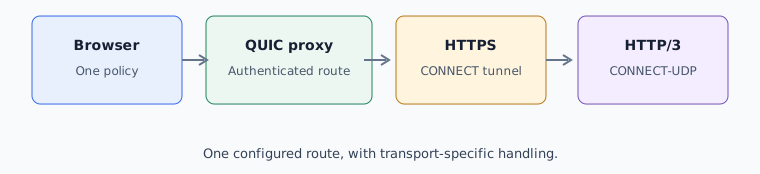
BotBrowser 154.0.8037.44 or newer with a matching profile package helps teams keep HTTPS and compatible HTTP/3 requests inside one approved browser route, but the provider still has to implement the required proxy operations. This guide answers which operation to choose, how to record the decision, and what the browser can and cannot guarantee.
TL;DR
- Use
CONNECTfor ordinary HTTPS tunnelling through a QUIC proxy. - Use MASQUE
CONNECT-UDPwhen the provider and workload require HTTP/3 over QUIC. - Do not infer HTTP/3 success from a
quic://URL. The site, browser policy, and provider all participate. - BotBrowser keeps an unavailable proxy from silently becoming a direct connection; retry, use an approved route, or stop.
Contents
- Choose the transport
- Configure a controlled route
- Validate limits and failures
- Roll out with a record
- Operational and protocol boundaries
- Conclusion
Choose the transport
CONNECT creates a tunnel for an HTTPS destination. It is the default choice when the workload is normal browser HTTPS and the provider advertises CONNECT over its QUIC proxy service. MASQUE CONNECT-UDP carries UDP flows and is the relevant choice for compatible HTTP/3 traffic. The two operations are related, but they are not interchangeable. For what CONNECT-UDP means and how HTTP Datagrams fit, see MASQUE and CONNECT-UDP for Web Operators, which also lists what operators should confirm with a proxy provider.
| Workload | Required operation | Decision evidence |
|---|---|---|
| HTTPS pages and APIs | CONNECT | Provider contract says CONNECT is supported |
| HTTP/3 where QUIC is allowed | CONNECT-UDP | Provider supports MASQUE and UDP forwarding |
| Mixed traffic | Both, or an approved fallback | Record expected protocol and fallback |
Configure a controlled route
Use BotBrowser 154.0.8037.44 or newer with a matching profile package, and keep the binary, profile, host policy, and proxy endpoint in one release record. The process-level launch setting is explicit:
chromium-browser \
  --bot-profile="/path/to/profile.enc" \
  --proxy-server="quic://user:[email protected]:443"
Encode reserved URL characters in credentials and keep real secrets in the deployment secret store. For a context-based integration, apply the same approved flags before creating the first page. See the QUIC Proxy Routing documentation and proxy configuration guide.
Per-context routing is available through BotBrowser ENT Tier3 with BotBrowser.setBrowserContextFlags; apply the approved flags before creating a page. This API and tier boundary is separate from the process-level CLI example above.
Validate limits and failures
HTTP/3 is negotiated per request. A site may select HTTP/2, a browser policy may disable QUIC, or the provider may expose CONNECT without CONNECT-UDP. Test the actual journey and record the observed protocol rather than treating an endpoint's advertised HTTP/3 support as proof. For how browsers negotiate HTTP/3 and fall back to other protocols, see HTTP/3 and QUIC Browser Compatibility Basics, which covers why one network path is not universal.
If the QUIC proxy is unavailable, BotBrowser does not silently switch to a direct connection. A controlled retry, a pre-approved backup route, or an explicit stop keeps privacy, consistency, and protection boundaries reviewable. BotBrowser provides the configured capability and context isolation; it does not guarantee provider availability, HTTP/3 negotiation, or a direct fallback. For how to plan ordered approved routes with a bounded retry budget, see Proxy Failover and User-Visible Continuity, which covers separating proxy-leg failures from destination failures.
QUIC proxy routing also differs from UDP over SOCKS5. SOCKS5 uses UDP ASSOCIATE, while a QUIC proxy uses its own CONNECT and MASQUE contract. Changing only the URL scheme does not add missing provider capability.
Roll out with a record
Before release, record the BotBrowser version, profile identity, provider support for CONNECT and CONNECT-UDP, credential ownership, expected HTTP/3 result, and the approved unavailable-proxy action. This makes a privacy or consistency review reproducible without exposing credentials or relying on page scripts.
FAQ
Does quic:// force every site to use HTTP/3?
No. Negotiation depends on the destination, browser policy, and provider. HTTPS can still use HTTP/2 over CONNECT.
Is CONNECT-UDP required for ordinary HTTPS?
No. Ordinary HTTPS uses CONNECT. CONNECT-UDP is needed for UDP forwarding such as compatible HTTP/3 traffic.
What happens if QUIC fails?
BotBrowser supports applying a configured QUIC proxy route to an authorized context, but it does not guarantee provider availability, HTTP/3 negotiation, or a direct fallback. It keeps the configured protection boundary and lets the operator retry, select an approved route, or stop.
For related deployment decisions, read proxy configuration. Treat SOCKS5 UDP as a separate provider capability.
Operational and protocol boundaries
Operational boundaries.
HTTP/3 maps HTTP requests and responses onto QUIC streams. That mapping is distinct from the proxy operation used to reach a destination. CONNECT establishes a tunnel whose inner application exchange remains between browser and origin. CONNECT-UDP lets a proxy carry UDP datagrams; the browser and origin still negotiate their own protocol through that path. Keeping these layers separate prevents “QUIC proxy” from being mistaken for a claim that the proxy terminates or understands the origin's HTTP/3 exchange. A successful CONNECT exchange can therefore carry ordinary HTTPS without making the origin speak HTTP/3, while a UDP-capable operation does not select HTTP/3 by itself.
HTTP/3 negotiation uses the protocol identifiers defined for HTTP/3 over QUIC, including h3 during application protocol negotiation. A site that supports HTTP/3 in general can still negotiate another protocol for a particular connection. The browser's offered protocols, the network path, proxy capabilities, and origin response all contribute. A deployment should therefore distinguish advertised support from an observed connection result and record the negotiated h3 value when present. The browser may learn that an origin supports HTTP/3 while a particular journey uses HTTP/2 because of current policy or path conditions. RFC 9114 defines HTTP/3 behavior; it does not promise that a particular origin, intermediary, or network will select it on every request.
QUIC streams provide separate ordered byte streams within a connection. This is different from treating all application data as one TCP byte stream, but it does not mean that all requests finish independently of congestion, host resources, or application dependencies. HTTP/3 uses this transport model for its request streams. A page can still wait on a critical response, and the application can still impose ordering. These protocol properties explain why HTTP/3 may behave differently from HTTP/2 under some network conditions, but they are not a general speed guarantee for a proxy route.
The MASQUE operation is another layer. CONNECT-UDP identifies a target and provides a way to carry UDP datagrams through an HTTP proxy context. RFC 9298 defines how the client and proxy use HTTP Datagrams or the Capsule Protocol for this purpose. It does not turn the proxy into a general-purpose tunnel for every protocol or remove provider policy. Destination access, supported ports, account entitlement, and datagram constraints remain part of the provider's service contract. Do not infer broad UDP reachability from HTTP/3 support, or HTTP/3 support from an endpoint that only offers a QUIC connection; another UDP application may need capabilities beyond HTTP/3.
With HTTPS through CONNECT, the tunnel does not mean the proxy becomes the TLS endpoint for the origin. The browser normally establishes its protected origin exchange through the tunnel. With HTTP/3 over a UDP-capable proxy path, the origin's QUIC and TLS negotiation is still distinct from the QUIC connection used to reach the proxy. Operators should avoid interpreting “encrypted tunnel” as “no metadata”: the provider may still learn the destination and connection timing, and its logging rules are outside BotBrowser's control.
These distinctions are useful when choosing measurements. A successful proxy handshake demonstrates reachability to the service. An accepted CONNECT or CONNECT-UDP demonstrates that the requested proxy operation was permitted. A completed HTTPS request demonstrates an application exchange, while an observed HTTP/3 protocol demonstrates origin negotiation. Each result answers a different question. A test should name which result matters instead of treating one successful step as evidence for every layer.
HTTP/2 fallback can be a normal compatibility outcome when the workload only requires HTTPS. It may also indicate that an HTTP/3-specific acceptance condition was not met. The protocol alone does not determine which interpretation is correct; the declared workload requirement does. Record whether HTTP/2 is acceptable before rollout, and do not infer a provider defect solely from an origin choosing HTTP/2. If HTTP/3 is mandatory, include both proxy operation support and the negotiated origin protocol in the acceptance result. State that requirement before testing so application, network, and privacy owners interpret the same observation consistently; an HTTP/2 response is not inherently a failure when successful HTTPS is the actual requirement.
The public standards describe protocol behavior, not the commercial terms of a particular proxy service. RFC 9114 explains HTTP/3 over QUIC, and RFC 9298 specifies CONNECT-UDP behavior for HTTP proxies. The provider remains the source for its endpoint, authentication method, destination policy, availability, and account limits. BotBrowser can apply its documented route option, but it cannot grant a provider feature or guarantee that an origin selects HTTP/3.
Treat protocol observations as connection-level evidence, not a label for an entire page. A page can contact several origins, and each connection can have its own protocol outcome. A main document served over HTTP/2 does not prove that an API or media connection used the same protocol; likewise, an HTTP/3 response from one origin does not establish that every subresource used HTTP/3. Define which origin and request are part of the acceptance requirement, and record the result at that scope. This avoids an ambiguous statement such as “the site is on HTTP/3” when the application uses a mix of origins or connections.
Performance comparisons need the same discipline. QUIC can change connection setup and loss handling, but a faster page is not proof that the proxy route caused the difference. Keep the destination, region, browser release, matching profile package, account tier, and workload constant. State whether the test measures a new connection or reused connection, and compare the same user-visible milestone, such as a completed API response or usable page. Repeat enough authorized runs to account for ordinary network variation, and report a range or distribution rather than selecting one unusually fast result. If the result changes, first identify whether the proxy hop, origin protocol, or application workload also changed.
Connection reuse also affects what a test demonstrates. Several requests may share an existing connection, so a later HTTP/3 response does not necessarily represent a new proxy negotiation. Conversely, a new connection can incur setup costs that are absent from a warm run. Keep cold-start and repeat-request observations separate when they matter to the application. Do not clear unrelated user data or change privacy settings just to produce a preferred protocol; use a controlled test context with an explicit lifecycle and compare equivalent runs.
A QUIC proxy capability is defined by the provider contract, not by the spelling of a URL. Before selecting an endpoint, confirm that the service supports the operation required by the workload: CONNECT for an HTTPS tunnel, CONNECT-UDP for UDP datagrams used by compatible HTTP/3, or both for a mixed workload. The contract should also identify authentication requirements, destination restrictions, UDP limits, service availability, and the account or tier to which those terms apply. A provider may advertise QUIC transport while excluding CONNECT-UDP from a particular plan. Treat that exclusion as a capability limit, not as a browser error.
Endpoint ownership matters when several teams share a service. Record which team owns the provider account, which team rotates credentials, and which team owns the BotBrowser profile package. The endpoint identifier, profile revision, and browser release belong in the same release record so a support handoff can distinguish a provider migration from a browser change. A hostname is not sufficient evidence of ownership because a provider can route different accounts or service classes behind the same hostname.
Credentials are deployment data. Encode reserved URL characters before placing a username or password in the proxy URL, and inject the value from an approved secret store at launch time. Do not place real credentials in source control, shell history, screenshots, support tickets, or routine diagnostics. When credentials rotate, retest the same operation and endpoint. An authentication failure should remain visible as an authentication failure; do not respond by changing to an unreviewed endpoint or widening egress.
The process-level CLI path and the context-level path have different ownership boundaries. The CLI example applies a route to the browser process. Per-context routing requires BotBrowser ENT Tier3 and BotBrowser.setBrowserContextFlags, called before the page is created. A context record should name its route owner and expected destinations. Creating a second context can establish a separate approved route, but changing route ownership after navigation has started makes the resulting journey difficult to interpret.
An unavailable proxy is a policy event. BotBrowser does not silently become a direct connection when the configured QUIC route cannot be used. The approved response can be a bounded retry, a reviewed backup route, or an explicit stop. A backup is acceptable only when its provider, geography, logging, credentials, and destination policy have already been reviewed for the same workload. Direct egress must not become an incident-time assumption merely because it is technically reachable.
Failure reporting is more useful when it preserves layers. Endpoint resolution can fail before a transport begins. QUIC transport can fail before authentication. Authentication can fail after transport succeeds. The proxy can reject CONNECT or CONNECT-UDP even when the endpoint is reachable. Finally, the destination can select HTTP/2 instead of HTTP/3 or reject the request. These outcomes have different owners and should not be collapsed into a single “QUIC failed” status.
Validation should be bounded and representative. Use an authorized endpoint and a small destination set in a non-production context, then run the real browser journey with the same profile and route policy. Record the required operation, expected protocol, observed protocol, route identifier, status category, and selected failure action. For ordinary HTTPS, HTTP/2 may be an acceptable result. For a workload that requires HTTP/3, record CONNECT-UDP support and destination negotiation separately.
Keep evidence proportional to the decision. A timestamp, route identifier, operation, and outcome are usually enough to demonstrate a routing choice. Do not retain credentials, cookies, full sensitive URLs, or unrelated page content in a network check. A provider may retain connection metadata under its own terms, and BotBrowser cannot set that retention policy. The deployment owner must obtain provider retention and access terms separately and decide which team may review the records.
Protocol evidence should be interpreted at the correct hop. A QUIC connection from the browser to the proxy proves something about the proxy hop. It does not prove that the origin selected HTTP/3. The origin can select HTTP/2, the browser policy can disable QUIC for a network condition, or the provider can limit UDP forwarding by account or destination. A release record can state whether HTTP/2 was acceptable and, when HTTP/3 was required, whether CONNECT-UDP and origin negotiation both succeeded.
After a provider migration, credential rotation, profile revision, or browser upgrade, repeat the bounded acceptance record. Compare declared inputs before changing policy: BotBrowser 154.0.8037.44 or newer, matching profile package, process or ENT Tier3 context scope, endpoint identifier, provider operation, and expected protocol. This keeps privacy, consistency, and protection decisions tied to the configuration that was actually reviewed.
Conclusion
Choose CONNECT for ordinary HTTPS and CONNECT-UDP only when the provider and workload require HTTP/3 over QUIC. Validate the real browser journey, because a QUIC proxy connection does not by itself prove origin-level HTTP/3 negotiation. Use BotBrowser 154.0.8037.44 or newer with a matching profile package; per-context routing is limited to ENT Tier3 with BotBrowser.setBrowserContextFlags, while the process-level CLI option remains separate. BotBrowser keeps the configured protection boundary but does not promise provider support, HTTP/3 success, or direct fallback.
Sources
This article is part of the guide: Proxy Configuration Overview: A Browser Network Decision Map
Related Articles
HTTP/3 and QUIC Browser Compatibility Basics
NetworkMASQUE and CONNECT-UDP for Web Operators
NetworkUDP over SOCKS5: Private QUIC and WebRTC Routing
NetworkBrowser Proxy Configuration: SOCKS5, HTTP, and HTTPS Guide
NetworkProxy, DNS, and WebRTC Consistency for a Coherent Browser Identity
NetworkProxy Failover and User-Visible Continuity
Take BotBrowser from research to production
The guides cover the model first, then move into cross-platform validation, isolated contexts, and scale-ready browser deployment.