Privacy-First Core vs Anti-Detect Browser
Compare privacy-first browser cores and anti-detect browsers. Learn how architecture, data privacy, and transparency affect fingerprint protection quality.
Want the structured docs for Documentation?
This article lives in the editorial library. For step-by-step setup, reference material, and ongoing updates, jump into the docs section.
Two architectures behind one label
If you have searched for "anti-detect browser," you are probably trying to keep several online identities apart, each with its own device characteristics, cookies and network settings. The term now covers any tool that offers separate browser profiles, and teams use such tools for multi-account management, ad verification, price monitoring, quality assurance and privacy research.
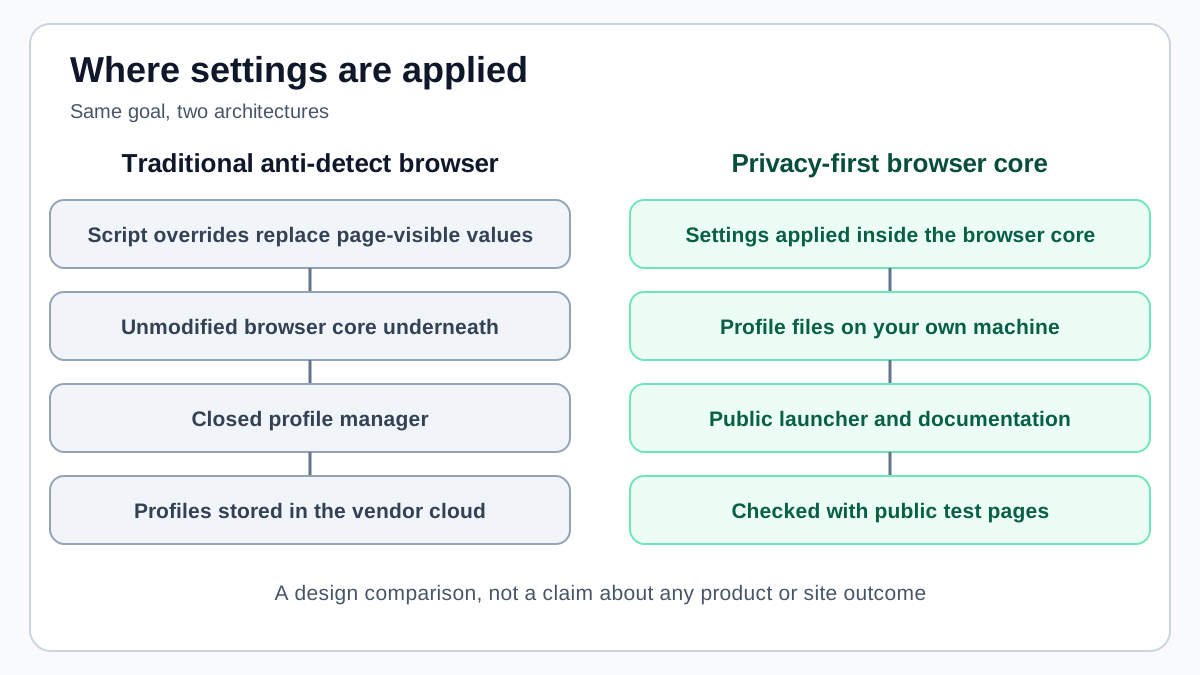
The need is the same across these uses: each session should be consistent on its own and unconnected to the others. The tools that serve it follow two different architectures. Traditional anti-detect browsers wrap a stock browser and apply their settings above it. A privacy-first browser core applies the settings inside the browser itself. That difference affects how consistent the result is, where your data lives, what you can verify and how the cost grows.
The sections below describe each architecture, compare them on the same criteria and end with a plain statement of what BotBrowser covers for separated identities and where its limits are. The comparison is about design trade-offs. It does not claim that any named product fails, and it does not promise how any website will treat a given browser.
How traditional anti-detect browsers work
Most traditional anti-detect browsers share one architecture. They wrap a standard browser, usually Chromium, and change what pages see through some combination of the layers described below.
JavaScript API overrides
The most common layer replaces browser APIs at the JavaScript level. When a page reads a property such as navigator.hardwareConcurrency or screen.width, the wrapper answers with the value stored in the profile instead of the value the real machine would report.
Typical implementation choices include:
Object.definePropertyto replace a native getter with a JavaScript function that returns the profile value- Wrapped prototype methods, for example around
HTMLCanvasElement.prototype.toDataURL - Scripts injected before the page's own scripts run, so that the replacements are already in place
Extension-style injection
Some tools work as browser extensions or use extension-like content scripts. These run in the page context and change fingerprint-related properties just before or just after the page loads. The approach is simple to ship, but it inherits the timing and visibility constraints of any script that runs inside the page.
Cloud profile storage
Traditional tools usually keep profile data on the vendor's servers, including cookies, fingerprint settings and session state. This makes collaboration easy, because team members can share profiles and open them from different machines.
Closed-source wrapper
The browser underneath is typically an unmodified Chromium build. The proprietary layer that handles profile management, overrides and the interface is usually closed source, so users cannot inspect how a given setting is applied.
Where the traditional approach reaches its limits
These limits follow from the architecture. They are properties of the design, not statements about the quality of any particular product.
Overrides leave structural traces
When a property is replaced with Object.defineProperty, its descriptor changes. A native getter reports [native code] from its toString() output, while a JavaScript replacement reports its own source. Any script running on the page can read that difference.
The same applies to wrapped prototype methods. Property descriptors, prototype chains, toString() output and call stack shape are all places where a replacement can differ from the native original. An override can match the value a target device would return, but it is harder to match how that value is delivered.
Whether a given site checks any of this is a separate question, and nothing here guarantees an outcome in either direction. The point is architectural: a layer that sits above the browser core can only imitate native behavior, while a layer inside the core does not need to.
Rendering output stays tied to the real machine
Canvas, WebGL and audio output depend on the rendering pipeline of the machine that produces them. If a wrapper reports a Windows platform string while canvas output still reflects macOS rendering, the two signals disagree.
An override can intercept the function that reads the output, such as toDataURL, but it does not change what the rendering pipeline actually produced. The underlying pixels, shader behavior and audio processing stay tied to the real hardware and operating system.
Cloud storage concentrates data
Keeping profiles and session cookies on a vendor's servers raises several questions:
- Data location: authentication cookies and session state sit on third-party infrastructure
- Continuity: if the vendor changes its terms or stops the service, access to your profiles can be affected
- Concentration: stored sessions from many customers form one valuable target
- Compliance: organizations under data protection rules may have to account for the vendor as a processor of browser sessions
Closed source limits auditing
When the layer that applies settings is closed, users cannot check:
- What data the tool collects and sends to the vendor
- How each setting is implemented
- Whether the settings cover every signal the vendor describes
- Whether the software contains data collection that was never disclosed
For security-conscious organizations, being unable to audit the tool that handles sensitive sessions is a real concern. It does not mean the tool misbehaves. It means you take the vendor's word for it.
Per-profile pricing grows with usage
Many traditional tools charge by the number of profiles and team seats. A plan might include a fixed number of profiles and a few seats, with extras billed separately. Cost then grows in step with usage, which matters most for large operations.
What a privacy-first browser core changes
A privacy-first browser core applies settings inside the browser itself instead of wrapping an unmodified browser. BotBrowser is an example. It modifies the Chromium source code so that signals are produced inside the browser according to a loaded profile, rather than patched afterwards by scripts.
Settings applied inside the browser core
When a page reads a property, the value comes from the browser's native implementation, configured by the loaded profile. No JavaScript replacement sits in between, so property descriptors, prototype chains and toString() output follow the native pattern.
Rendering works the same way. Canvas, WebGL and audio signals are produced by the browser according to the loaded profile instead of being intercepted after the fact. Dedicated, shared and service workers created in a context inherit that context's settings, so a page and its workers describe the same device.
Profiles stay on your machine
BotBrowser runs on your own infrastructure and does not require a BotBrowser cloud service during operation. Profile files are local files you own, and cookies, session state and settings stay on systems you control. The installation documentation notes that the browser may use the network for profile validation and updates, proxy authentication and timezone or locale detection, so review your firewall rules instead of assuming the browser is offline.
- Data location: all browser data stays on infrastructure you choose
- Continuity: profiles are ordinary local files, so they do not depend on a vendor account
- Smaller exposure: there is no central store of customer sessions
- Simpler compliance review: there is no BotBrowser cloud processing your sessions that you would have to account for
This describes where BotBrowser keeps its data. Your own proxies, accounts and the sites you visit are separate data flows that you still have to manage.
Separate identities in one browser instance
Many setups launch a separate browser instance for every identity, which costs memory and startup time. BotBrowser's per-context fingerprint feature, documented as ENT Tier3, instead assigns a profile, proxy, timezone and locale to each BrowserContext inside one browser instance. Each context keeps its own storage, cookies and session state, and pages in one context cannot read or influence the settings of another.
The assignment has to happen before the first page of a context is created, and the multi-account isolation documentation describes the exact sequence. When a proxy is set for a context, the documentation says BotBrowser detects the exit address and sets timezone, locale and language for that context, so the three values agree with the route.
Public launcher and documentation
The BotBrowser launcher, profile tools and documentation are published on GitHub. Because the browser runs locally, you can inspect its behavior with public fingerprint test pages and watch its network activity with your own monitoring tools.
- Checkable output: test what pages see with public tools instead of relying on a vendor's summary
- Inspectable launcher: the launcher source is available on GitHub
- Observable network behavior: capture traffic yourself to confirm what the browser connects to
- Community review: issues and questions go through the public repository
Pricing by profile volume and capability
BotBrowser plans are priced by profile volume and capability tier. They do not charge per browser, per seat or per launch, and runtime usage is unlimited on every plan. A short validation plan exists for evaluation, and larger profile volumes and deployment features sit in higher tiers. Check the current pricing page before budgeting, because tiers and limits change.
Choosing between the two
The table summarizes how the two architectures differ on the points that usually decide a purchase or an internal tool choice.
| Dimension | Traditional anti-detect browser | Privacy-first browser core (BotBrowser) |
|---|---|---|
| Where settings apply | JavaScript overrides on a stock browser | Modified Chromium source code |
| Property descriptors | JavaScript functions replace native getters | Native getters read the profile values |
| Canvas, WebGL and audio | API interception, real rendering unchanged | Produced by the browser according to the profile |
| Timezone and locale | Depends on the vendor, often set by hand per profile | Documented as derived from the proxy exit address for each context, unless you set them |
| Workers | May need separate handling | Inherit the settings of their context |
| Profile storage | Usually the vendor's cloud | Local files you own |
| Source visibility | Usually a closed wrapper | Launcher and documentation public on GitHub |
| Verification | Mostly vendor statements | Public test pages and your own network monitoring |
| Pricing | Often per profile and per seat | By profile volume and capability tier, with unlimited runtime |
| Cross-platform profiles | Varies by vendor | Documented: Windows, macOS and Android profiles run on Windows, macOS and Linux hosts, with Linux hosts needing ENT Tier1 |
| Team sharing and GUI | Usually a strength, with cloud sharing and GUI profile creation | Profiles are local files, so sharing is your own process |
| Per-context isolation | Varies by vendor | Separate profile, proxy, timezone and locale per BrowserContext, documented as ENT Tier3 |
Traditional tools may be enough when
- Basic multi-account management is the goal and the platforms involved do little fingerprint analysis
- Team collaboration such as profile sharing and role-based access is essential and cloud storage is acceptable
- Simplicity matters more than depth, and a GUI-based profile creator fits your workflow
- Low volume or short-term use keeps per-profile costs manageable
A privacy-first core fits better when
- Deep consistency matters, including property descriptors, worker contexts and rendering output
- Data location matters and sessions, cookies and settings must stay on your own infrastructure
- Verification matters and you want to test claims with public tools
- Volume is high and per-profile pricing would dominate the cost
- Cross-platform consistency is needed, such as Windows-profile sessions on Linux servers (see cross-platform browser profiles)
- Automation with Playwright or Puppeteer is a main use case
- Reproducibility matters for testing, research or continuous integration
Privacy researchers and security teams
If your work involves studying how fingerprint collection operates, testing the defenses of a platform you are authorized to test, or analyzing tracking behavior, a locally run core with a public launcher and public documentation gives you control and a way to check your own results. The background in What is browser fingerprinting explains which signals are involved.
Running a short evaluation
A short pilot tells you more than a feature table. Write down the workflows that matter to you before you start, so the result does not depend on whichever tool looks best on the first day.
- Workflows: choose two or three real tasks, such as a QA run against a staging site, a privacy research session or an authorized account review, and run the same tasks in each tool
- Isolation: open two identities at the same time and confirm that cookies and local storage do not carry over, since Playwright documents browser contexts as isolated environments with their own storage
- Consistency: compare what test pages report with the device the profile is meant to describe, and check that language, timezone and proxy location agree with one another
- Data location: list where profiles, cookies and logs are written, and which hosts the tool contacts while it runs
- Operations: note how profiles are backed up, how a teammate receives one and how the tool behaves after a browser update
- Cost at your size: price the plan for the number of profiles and people you expect to have in a year, not for the trial
Keep the notes from each run. After a browser or tool update, repeating the same short run shows what changed, and the notes give a colleague a way to follow how the choice was made.
What to verify yourself
Whichever type of tool you choose, verify instead of trusting a feature list:
- Run public fingerprint test pages and compare the results with the device the profile describes, as covered in how to verify a browser fingerprint
- Monitor network traffic during a session to confirm which hosts the browser contacts
- Read the public repository and documentation to see what is documented and what is not
- Repeat the tests after every browser update, because results change as browsers do
Common questions
Can an anti-detect browser be told apart from a stock browser? API overrides can leave structural traces such as non-native property descriptors, modified prototype chains and disagreement between script-visible values and rendering output. Whether a particular site looks for them is outside anyone's control, so treat this as a design property and not as a prediction.
Is cloud profile storage safe? It depends on the vendor's security practices, which you usually cannot audit. Local storage removes the third-party copy, but it also makes you responsible for securing the machine, backing up profiles and sharing them safely with teammates.
Can I use a privacy-first core for multi-account work? Yes, for authorized testing, quality assurance, research and authorized account management. The multi-account browser isolation guide shows how separate contexts keep identities apart.
Does local storage replace account hygiene? No. Separate profiles do not fix reused passwords, shared recovery emails or a proxy that many other people use.
What BotBrowser covers for separated identities
BotBrowser supports assigning an independent fingerprint profile, proxy configuration, timezone and locale to each BrowserContext inside one browser instance, and the profiles stay as local files. For a team doing authorized testing or research, that means separated identities can run side by side without a vendor cloud holding the session data. BotBrowser cannot guarantee that any platform will accept, trust or skip review of an account, it does not replace the quality of your own proxies, credential hygiene or compliance obligations, and per-context isolation is not available outside the documented ENT Tier3 license.
Use it for work you are authorized to do, such as quality assurance, privacy research and authorized multi-account operations. It is not a way around the terms of a platform or its account policies.
Public sources
Related Articles
Take BotBrowser from research to production
The guides cover the model first, then move into cross-platform validation, isolated contexts, and scale-ready browser deployment.