V8Log Forensics: Runtime Evidence for Privacy Validation
Capture local V8Log evidence during authorized validation, keep traces readable with API filters, compare against a baseline, and route support cases with facts.
BotBrowser Team
Want the structured docs for Fingerprint?
This article lives in the editorial library. For step-by-step setup, reference material, and ongoing updates, jump into the docs section.
A privacy review usually ends with a question that screenshots cannot answer. The page loaded, the workflow completed, the profile looked correct, and still nobody can say what the page actually asked the browser for. Network logs show requests. Console output shows what the application chose to print. Neither describes the browser behavior that a privacy owner is accountable for.
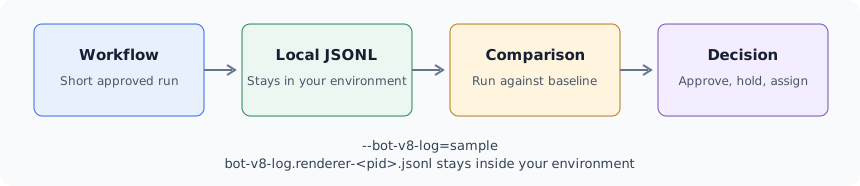
V8Log gives that answer inside the session you already run. It records browser runtime activity into local JSONL files during a short, authorized validation session, so a release owner can review what happened instead of reasoning about what probably happened.
TL;DR
- V8Log records browser runtime activity into local JSONL files during one authorized session, so the answer describes what the page asked for rather than what the source appears able to do.
--bot-v8-log=sampleis the working depth for most reproductions,fullis the second attempt, andnoneleaves normal browsing untouched;--bot-v8-log-exclude-api=String.charCodeAt,Array.joinremoves the calls that bury the interesting ones.- Each renderer process leaves its own
bot-v8-log.renderer-<pid>.jsonlfile, so two contexts in one session appear as two files that the context record has to map back to a profile and route. - A run becomes evidence only when the stored record carries the browser release, profile package, route policy, trace depth and exclusion list, because a trace without that context cannot be compared with a baseline.
- A separate
--logfiletrace writesisolate-<address>-v8.log, andgrep -c 'code-creation'on it counts compiled JavaScript across releases; the two formats answer different questions and cannot be mixed in one baseline.
Contents
- Start from the decision to support
- Record the run and pick a depth
- Build and repeat the comparison
- Triage support with evidence
- Approval and ownership
- Checks before approval
- Conclusion and decision
Start from the decision to support
What a validation session needs to show
Start from the decision the evidence has to support. A privacy owner approving a browser release needs to know whether the session stayed consistent with the selected profile. A QA owner needs to know whether a change in the browser altered what pages observe. A support engineer needs to know whether a customer report belongs to profile configuration, network routing, automation behavior, or the page itself.
Those three people need the same underlying record and different summaries of it. The record has to be specific enough to separate causes and general enough to discuss in a release meeting without turning into an implementation review.
A useful V8Log session answers four operational questions. Which broad signal families did the page touch during the run. Did the observed activity match the profile and release that were supposed to be in use. Did a browser update, profile change, or automation change move that activity. Is there enough here to assign an owner.
Keep the questions written down before the run starts. A trace collected without a question tends to become an artifact nobody reads. A trace collected against a stated question usually settles the case in one review pass.
Where source review runs out
Reading page source is the natural first step, and it works until the page stops being readable. Production pages ship packed bundles, VM-style interpreters, and WebAssembly modules. Third-party scripts load more third-party scripts. Remote configuration changes behavior between two loads of the same URL.
At that point static review becomes expensive and slow, and it still leaves gaps. A reviewer can spend a day on a bundle and be unable to say whether a particular branch executed during the customer's actual workflow.
Runtime evidence changes the question from what the code could do to what the session did. That is a smaller and more answerable question, and it is the one a release decision depends on.
It also scales differently. Static review effort grows with bundle size and obfuscation. A runtime record grows with the length of the workflow, which the team controls by keeping the reproduction short.
Public test pages remain useful for a quick sanity check, but they do not represent customer workflows. The value of V8Log is that the page under review can be the page that matters to the deployment, run with the profile that deployment uses.
Record the run and pick a depth
Record the run, not the page
V8Log is a session-scoped mode. It is off unless a run asks for it, and release use depends on profile entitlement and build policy. That gating matters operationally: a validation mode that could be left on by accident would become a performance and storage problem long before anyone noticed.
The unit of evidence is the run, not the URL. Two runs of the same page with different profiles are two different pieces of evidence, and comparing them is often the whole review. Store the browser release, the profile package, the route policy, the trace mode, and the workflow revision alongside the JSONL file. Without that context a trace is a file with no claim attached to it.
Keep the reproduction short. Open the page, perform the specific steps that reproduce the behavior, and close the session as soon as the target behavior appears. A long exploratory session produces a larger file and a weaker argument, because nobody can tell later which part of it mattered.
Name the files so a reviewer can find them months later. A case identifier, the date, the profile family, and the browser release are enough. Storage discipline is not a formality here. The value of a trace is that it can be re-read during a later disagreement, and a file nobody can identify has no value at that point.
Choose a trace depth that stays readable
V8Log has three settings, and choosing between them is a real decision rather than a default.
none is the normal state. Nothing is recorded, and normal browsing behavior is unchanged.
sample is the working setting for most reproductions. It produces a reduced trace that is small enough to review by hand and detailed enough to place activity in signal families.
full produces a fuller trace for short, guided reproductions where a reduced view left an open question. Treat it as the second attempt rather than the first, because file size grows quickly on complex pages.
--bot-v8-log=sample
--bot-v8-log-dir=/tmp/botbrowser-v8log
The practical failure mode is not missing detail. It is a file so large that the reviewer never finishes reading it and the case stalls. Start with the smaller setting, and escalate only when the review has a specific question that the reduced trace could not answer.
Write the chosen setting into the case record. A later comparison between two runs is only meaningful when both used the same depth, and that detail is easy to lose between one session and the next.
Keep high-volume APIs out of the way
The most common complaint about runtime evidence is volume. A page that calls a small number of string or array operations tens of thousands of times can bury the activity a reviewer is actually looking for, and the interesting calls end up outside the part of the file anyone reads.
--bot-v8-log-exclude-api addresses that directly. Pass a comma-separated list of exact API names, and those calls are left out of the trace:
--bot-v8-log=full
--bot-v8-log-exclude-api=String.charCodeAt,Array.join
Names are matched exactly, and whitespace around each name is ignored. Excluded calls are not written and do not consume the trace event budget, so the space they would have taken stays available for the activity under review. Other APIs remain in the trace, and so do events that carry no API name. The filter applies when V8Log is enabled and available in the active profile.
Use the exclusion list as a review instrument rather than a cleanup step. A reviewer who removes two known-noisy operations from a full trace often gets a readable file at the depth they actually wanted, instead of falling back to a reduced trace and losing the detail that prompted the escalation.
Record the exclusion list with the run. A trace with an undocumented filter can lead the next reviewer to conclude that a page never touched something that was simply filtered out. That mistake is expensive because it looks like a finding rather than a gap.
Keep the list short and specific. Filtering by broad guesswork removes the evidence value of the exercise, and an exclusion that was reasonable for one page can hide the important call on the next one.
Scope evidence per browser context
Concurrent validation sessions rarely want the same evidence scope. One context may be reproducing a customer report on a checkout flow while another runs a routine release check on a login page. Applying one filter list to both produces a trace that is wrong for at least one of them.
Each browser context can carry its own exclusion list, so the scope follows the review rather than the session. That keeps a targeted reproduction narrow while a broader check stays broad, without running the two at different times.
The file name is where that scope becomes verifiable. V8Log writes one file per renderer process as bot-v8-log.renderer-<pid>.jsonl, so two contexts in one session leave two files with different pid suffixes; the context record maps each pid to the context it served.
This pairs with per-context identity work already in place. A context has its own profile assignment, its own route, and its own storage. Giving it its own evidence scope keeps the whole context describable as one unit in the case record.
Note the context assignment in the file naming or the case record. When two traces from the same session reach a reviewer with no indication of which context produced them, the comparison that motivated the run becomes unavailable.
Build and repeat the comparison
Build the comparison baseline
A single trace describes a run. It does not tell anyone whether that run was normal. The comparison against a stored baseline is where the review produces a decision.
Pick a small set of workflows that represent the deployment. Signing in, running a search, completing a checkout, loading a dashboard, creating an account, and playing media are the usual candidates. Choose the ones the deployment actually depends on, not the ones that are easiest to script.
Run each workflow with the accepted browser release and the approved profile, and store the result as the reference. That reference is what later runs are read against, and it needs the same care as any other release artifact.
Separate the two logs that are easy to confuse. V8Log JSONL answers which API the page called with which arguments. A V8 trace written with --logfile answers a different question: it produces an isolate-<address>-v8.log file, and grep -c 'code-creation' on that file counts how much JavaScript was compiled during the run. A baseline that mixes the two formats cannot be compared with itself.
Keep the set short enough to run on every candidate. A small set that gets used on each release beats a large set that gets skipped when the schedule tightens. Add a workflow when a real customer path changes, when a support case exposes a gap, or when a browser update touches an area the release owner considers important.
Refresh the baseline deliberately. When an application intentionally changes its behavior, update the reference and note why. A baseline that silently drifts turns every later comparison into an argument about which run was correct.
Repeat the run after a browser or profile change
The comparison earns its value at change boundaries. A browser release, a profile package update, an automation framework change, and a host image change are each a reason to re-run the stored workflows and compare. For how to check real user journeys after such a change, see Browser Interaction Validation After Browser and Profile Changes, which covers journey baselines, small-group promotion, and rollback.
Change one component at a time when the schedule allows. A run that combines a browser update, a new profile package, and an application release produces a difference nobody can assign, and the review ends with a guess.
When the change is a browser release, keep the V8 trace beside the JSONL. A --logfile trace carries code-creation, map, ic, tick and deopt events, and a change in the code-creation count or in the first deopt entry across releases is runtime evidence that the page-level JSONL alone cannot show. Neither file replaces the other.
Read the comparison at the level of signal families first. A shift in which families a page touches is usually more informative than a change in call counts, and it maps more directly to an owner. Counts are worth reading second, when the family view already narrowed the question.
Not every difference is a problem. Pages change, third-party scripts change, and remote configuration changes without anyone shipping code. The output of the comparison is a decision about whether the difference is expected, not an automatic hold.
Record the decision with the evidence. A later reviewer needs to know that a difference was seen and accepted, otherwise the same difference gets re-investigated on every release.
Triage support with evidence
Route a support case with evidence
Support triage is where this pays off fastest. A customer report usually arrives as a screenshot and a sentence. Without runtime evidence, the first hours go into deciding which team owns the case.
A short reproduction with V8Log narrows that quickly. The evidence separates a profile configuration question from a network routing question, an automation behavior question from a page behavior question. Each of those has a different owner and a different fix. For sorting these cases by owner when the route, timezone, and language disagree with what the page reports, see Network-Layer Browser Consistency for Privacy Protection, which covers the layers a session exposes and a repeatable validation workflow.
Keep the reproduction inside the terms of the customer engagement, and use test accounts and approved pages. Evidence collected outside those terms is not usable in the case, whatever it shows.
Attach the trace to the case with its context record. Support cases move between people, and the second engineer needs to know which browser release and profile produced the file without asking the customer to repeat the run.
Close the loop when the case resolves. A resolved case with a stored trace and a stated cause becomes the reference for the next similar report, which is how triage time drops over a release cycle rather than staying flat.
Keep the evidence inside your environment
V8Log writes local JSONL files. They stay in the environment that produced them, which is the property that makes the mode usable in privacy-sensitive deployments at all.
Treat those files as sensitive material. A trace from a real workflow reflects a real session, and it belongs under the same access rules as other session evidence. Store it with the case, limit who can read it, and apply the same retention policy the organization uses for comparable records. For capturing and sharing traces from authorized tests safely, see Playwright Trace Viewer for Authorized Test Debugging, which covers bounding a capture and redacting before sharing.
Prefer test accounts and approved pages in every run. That keeps the evidence useful for the review and keeps customer material out of files that will be attached to internal cases.
Set a retention period when the case opens rather than when storage fills up. Traces accumulate quickly across a release cycle, and a rule agreed in advance is easier to apply than one invented under pressure.
Approval and ownership
Decide what counts as an approved result
An evidence workflow needs a stated approval condition, otherwise every reviewer applies a private standard and the results stop being comparable.
Write the condition in terms the release owner can confirm. The workflow completed through its user-visible steps. The observed signal families matched the stored reference for that workflow. Differences from the reference were reviewed and assigned an explanation. The browser release, profile, route policy, and trace settings in the record match the ones the deployment will use.
Make the trace settings checkable rather than descriptive. The record should carry the --bot-v8-log value, the --bot-v8-log-dir path, the --bot-v8-log-exclude-api list, and the bot-v8-log.renderer-<pid>.jsonl files with their sizes; a reviewer who cannot restate those four items cannot confirm that the run used the depth the approval assumed.
Write the failure condition too. A run that cannot complete, a trace that could not be collected, or a difference nobody can explain should each lead to a documented response rather than a second opinion in a chat thread.
Separate a privacy hold from a performance preference. A run that is slower under a fuller trace is not a privacy finding, and a run that is fast is not evidence of consistency. Keep the two judgments apart so neither one quietly overrides the other.
Name who can approve an exception. Urgent releases happen, and a documented approval path keeps an exception reviewable afterward instead of turning into an undocumented precedent.
Assign ownership and review dates
Every stored workflow needs an owner who can say whether a difference matters. Without that, comparisons produce findings that circulate without resolution.
The owner keeps the workflow current with the application, updates the reference when a change is intentional, and records the release decision. That role usually sits with the team that owns the customer path, not with the team that runs the browser.
Set a review date for the workflow set itself. Applications change faster than validation plans, and a reference that no longer matches the product produces differences that are about the plan rather than the release.
Keep the record readable by people outside the review. A privacy owner, a support lead, and an infrastructure owner will each read it, and none of them should need to open the raw trace to follow the decision.
Checks before approval
Questions before approval
When is V8Log the right tool. When a validation or support question is about browser runtime behavior during a specific workflow, and static review of the page has stopped producing answers.
Which setting should a first run use. Start with sample. Escalate to full only when a reduced trace left a specific question open, and keep that run short.
What belongs in the exclusion list. Exact names of high-volume operations that are outside the current review, recorded alongside the run so the next reviewer knows what was filtered.
How long should a reproduction be. As short as the behavior allows. Stop right after the target call appears, then close the session.
What makes a comparison trustworthy. Both runs used the same workflow revision, the same trace depth, the same exclusion list, and a recorded browser release and profile.
Who owns the result. The owner of the customer path being validated, with the evidence attached to the release or support record.
Related resources
- V8Log Forensics documentation
- CLI Flags reference
- Fingerprint Privacy Threat Model
- CanvasLab Forensics
- AudioLab Validation
BotBrowser supports bounded V8Log traces for authorized diagnostics; it does not make a trace deterministic or certify a production root cause.
Sources
Conclusion and decision
Practical conclusion
Answer the four questions in the record, not in the discussion: which signal families the page touched, whether that activity matched the release and profile in use, whether a change moved it, and who owns the answer. Write them down before the run, because a trace collected without a question becomes a file nobody re-reads.
For a first pass, launch with --bot-v8-log=sample and --bot-v8-log-dir=/tmp/botbrowser-v8log, keep the reproduction short enough to end right after the target call appears, and store the resulting bot-v8-log.renderer-<pid>.jsonl files with the browser release, profile package, route policy and exclusion list. When the reduced trace leaves a specific question open, escalate to --bot-v8-log=full and add the two known-noisy operations through --bot-v8-log-exclude-api instead of widening the workflow.
At the next browser release, repeat the same stored workflows and read the difference by signal family first. If the counts moved, keep the paired --logfile trace beside the JSONL, check code-creation and the first deopt entry, and record whether the difference was accepted and why. That habit turns a rerun into a decision a privacy owner, a support lead and an infrastructure owner can each follow without opening the raw trace.
This article is part of the guide: What Is a Browser Fingerprint?
Related Articles
What Private Browsing Does and Does Not Do
NetworkNetwork-Layer Browser Consistency for Privacy Protection
Getting StartedPlaywright Trace Viewer for Authorized Test Debugging
FingerprintBrowser Tracking Protection Settings Explained
FingerprintJavaScript Stack Depth: A Browser Privacy Signal
FingerprintMemory and Storage Signals in Browser Profiles
Take BotBrowser from research to production
The guides cover the model first, then move into cross-platform validation, isolated contexts, and scale-ready browser deployment.