Multiple Browser Profiles: What Stays Separate
One owned Chrome run measures what stays separate between multiple browser profiles: cookies, localStorage, IndexedDB, and what the host still shares.
BotBrowser Team
Want the structured docs for Getting Started?
This article lives in the editorial library. For step-by-step setup, reference material, and ongoing updates, jump into the docs section.
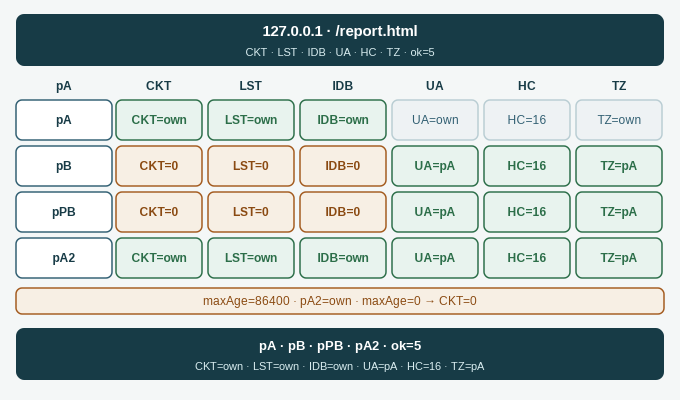
Opening a second profile inside the browser you already use feels like getting a second browser for free: a fresh start button, a clean session, no sign of the first profile's history. The feeling is half right. Multiple browser profiles do partition the data a page can read back, and they do it thoroughly: cookies, localStorage and IndexedDB written in one profile are absent from the next one. What the feeling hides is the other half of the split. A profile is a storage boundary inside one browser install, not a boundary around the machine, so every surface the host supplies, from the user agent string down to the CPU core count and the timezone, reads the same after the switch as it did before it.
The owned run behind these numbers draws that split with measurements. One stock Chrome build, version 158.0.8127.89, ran in a single headless process with all traffic on 127.0.0.1, and five cases recorded what a profile keeps to itself and what survives a switch. BotBrowser can keep cookies, localStorage, IndexedDB and pinned fingerprint surfaces separate for every profile it runs from one browser install; it does not change your IP address or anything outside the browser process, so host-level surfaces such as platform, core count or timezone travel with the machine, not with the profile. That pairing, a storage boundary that works and a host identity that persists, is exactly what the measured cases below show for stock Chrome, and it is the line a reader needs to predict what follows them across a profile switch and what stays behind.
TL;DR
- Cookies stay behind. Profile A wrote
pA-cookie=owned-by-profile-a; profile B, opened as a fresh context in the same browser process, read a cookie count of0and no trace of that cookie. - localStorage and IndexedDB stay behind too. Profile B read
0localStorage keys and nopA-dbdatabase, while profile A had storedpA-note=stored-in-profile-aand thepA-dblibrary. - The host survives the switch. The user agent string,
platform: MacIntel,hardwareConcurrency: 16,languages: ["en-US", "en"]and theAmerica/Torontotimezone were identical in profile A and profile B, and all five comparison flags recordedtrue. - Separate user data dirs do not change the split. Two persistent contexts under the same Chrome install showed the same boundary: profile B read nothing of profile A, and profile A reopened with its cookie, its localStorage entry and its
pA-dbdatabase intact. - A session cookie without
max-agedid not survive a profile close and reopen in the owned run; the cookie survived once it carriedmax-age=86400. Pin a lifetime on anything a persistent profile must keep. - The profile management page covers who owns and approves a profile over its lifecycle, and the multi-account isolation page covers how to plan identities; the run here measures the browser-level boundary itself, one install, several profiles.
- BotBrowser can keep cookies, localStorage, IndexedDB and pinned fingerprint surfaces separate for every profile it runs from one browser install; it does not change your IP address or anything outside the browser process.
Table of contents
- What one profile keeps to itself
- What the owned run measured
- What survives a profile switch
- Persistent profiles and the user data dir
- BotBrowser capability and limitation
- Practical conclusion
- Keep reading
The profile management guide treats a profile as a managed record: an owner, an approved package, a lifecycle. The multi-account browser isolation guide treats profiles as one layer of an identity plan that also covers routes, timing and account material. What follows sits underneath both: before a profile can be governed or planned, someone has to know what the browser actually separates when a second profile opens, and what it quietly carries over. The five cases below record exactly that, surface by surface, so the boundary can be predicted instead of assumed.
What one profile keeps to itself
Chromium partitions profile-scoped data at the storage layer. A cookie jar, a localStorage area and an IndexedDB database are each attached to the profile that wrote them, and a page running in another profile of the same install reads an empty jar, an empty storage area and an empty database list. The Chromium user data dir documentation describes where a profile's data lives on disk for each platform, and the MDN client storage pages describe the storage APIs themselves; the owned run verifies the partition between two profiles of one install rather than the disk layout. Reading the browser storage model page helps before this section, because the partition acts on exactly the three stores it covers.
Each store is its own boundary:
| Surface | Profile A wrote | Profile B read |
|---|---|---|
| Cookie jar | pA-cookie=owned-by-profile-a | 0 cookies |
| localStorage | pA-note=stored-in-profile-a | 0 keys |
| IndexedDB | pA-db | no databases |
The three rows were all read back from the same page, served from 127.0.0.1, in a fresh context of the same browser process. Nothing about the page changed between the two reads; the only variable was the profile the context belonged to. That is the shape of a storage partition: the origin is the same, the install is the same, and the data still does not cross. A second profile is not a second copy of the site, it is a second key to the same origin's stores, and the first key's entries are simply not present in the second keyring.
What the partition covers and what it does not
The measured partition covers the three stores above. It does not cover everything a profile notionally carries, and the honest answer for the unmeasured surfaces is that this run says nothing about them. Extensions were not loaded and not measured, so the record makes no claim about whether extension state follows one profile or another. Disk cache was not measured, so the record makes no claim about whether cache is shared or separate between the two persistent directories. Both are real profile-scoped questions, and both belong to a future run with its own cases rather than to an inference from this one. What the run does establish is the floor: whatever else a profile may carry, the three stores a page reads back with ordinary script calls are separate, and the host surfaces are not.
The floor matters because it is the part a site can observe without any cooperation. A page that sets a cookie, writes a localStorage entry and opens an IndexedDB database has three durable channels, and the run shows all three are bound to the profile. A team that relies on profiles to keep sessions apart is relying on a boundary that holds at those three channels, not on a vague sense that "another profile" is another browser.
What the owned run measured
The owned fixture docs/evidence/multiple-browser-profiles-what-stays-separate-fixture-20261125.mjs launched one installed stock Chrome build, version 158.0.8127.89, headless, through Playwright. A local HTTP server bound to 127.0.0.1 served one owned /report.html page whose script writes and reads three storage surfaces and reads five host surfaces: document.cookie, localStorage, indexedDB.databases(), navigator.userAgent, navigator.platform, navigator.hardwareConcurrency, navigator.languages, and the Intl timezone. Two cases ran as ephemeral contexts inside one browser process, and two more ran as persistent contexts with separate user data dirs under the same install, including a close and reopen of profile A's directory. No third-party request was made; all traffic stayed on 127.0.0.1.
The fixture prints a one-line summary of the five case outcomes to stdout; that line is:
{"status":"passed","cases":[{"case":"profile-a-stores","status":"passed"},{"case":"profile-b-same-process","status":"passed"},{"case":"host-survivors-a-vs-b","status":"passed"},{"case":"persistent-profile-b","status":"passed"},{"case":"persistent-profile-a-reopen","status":"passed"}]}
The measured record from docs/evidence/multiple-browser-profiles-what-stays-separate-run-20261125.json is:
| Case | Cookies | localStorage | IndexedDB | Host surfaces |
|---|---|---|---|---|
| profile-a-stores | pA-cookie=owned-by-profile-a | stored-in-profile-a | pA-db | host defaults |
| profile-b-same-process | 0 | 0 keys | none | identical to A |
| host-survivors-a-vs-b | not read | not read | not read | 5 of 5 match |
| persistent-profile-b | 0 | 0 keys | none | identical to A |
| persistent-profile-a-reopen | pA-cookie=owned-by-profile-a | stored-in-profile-a | pA-db | identical to A |
The page script that produced the storage and host readings is short enough to quote:
window.read = async () => ({
  cookie: document.cookie,
  cookieCount: document.cookie ? document.cookie.split(';').length : 0,
  local: localStorage.getItem('pA-note'),
  localKeys: Object.keys(localStorage).length,
  idbNames: (await indexedDB.databases()).map(d => d.name),
  userAgent: navigator.userAgent,
  platform: navigator.platform,
  hardwareConcurrency: navigator.hardwareConcurrency,
  languages: [...navigator.languages],
  timezone: Intl.DateTimeFormat().resolvedOptions().timeZone,
});
Every reading in the table came out of that one function, evaluated on the same owned page for every case, so a difference between rows can only come from the profile the page ran in, never from a different page or a different probe. The five case names map to five questions: what profile A wrote, what profile B saw in the same process, which host values matched, what a separate user data dir saw, and what survived a close and reopen.
The five host survivors
The comparison between profile A and profile B recorded five flags, one per host surface, and all five were true: userAgentMatch, platformMatch, hardwareConcurrencyMatch, languagesMatch and timezoneMatch. In the same browser process, profile B read Mozilla/5.0 (Macintosh; Intel Mac OS X 10_15_7) AppleWebKit/537.36 (KHTML, like Gecko) HeadlessChrome/158.0.0.0 Safari/537.36, platform: MacIntel, hardwareConcurrency: 16, languages: ["en-US", "en"] and America/Toronto, and profile A read the same five values. The two persistent profiles produced the same agreement, which is why the host columns of the table above repeat "identical to A" three times.
Five-for-five on one owned run is a measurement, not a law. The claim stops at what was recorded: one stock Chrome build, one macOS host, two profiles in one process and two persistent profiles in separate user data dirs, all agreeing on the five surfaces read. A different host with different hardware reports its own values, and a browser modified by an extension or a patched build may report something else. What the run establishes is that a plain profile switch, the kind every user of multiple browser profiles performs, does not move any of the five surfaces on an unmodified install.
What survives a profile switch
The two halves of the split answer the prediction question directly. When a profile switches, the storage stays: cookies, localStorage and IndexedDB belong to the profile that wrote them, and the run shows a second profile reading zeros across all three. The host goes along: the user agent string, the platform, the core count, the language list and the timezone are properties of the browser process and the machine it runs on, and a profile switch replaces neither. A reader who can list those two groups can predict what a site sees after any profile switch on a stock install.
The reason is architectural, and it is worth one paragraph. Chromium stores profile-scoped data keyed to the profile, but the host-facing values come from the process and the operating system: the user agent names the browser build, hardwareConcurrency reports the machine's cores, platform reports the OS, the language list comes from the browser's language settings, and the timezone comes from the system clock and its zone. None of those values lives in the cookie jar or the storage partition, so none of them changes when the partition changes. The multi-account browser isolation page names this gap as one of its five linkage dimensions, fingerprint signals, and treats it as a configuration problem; the owned run here puts numbers on the same gap for a plain profile switch, with no configuration beyond the profiles themselves.
Languages deserve a note of their own, because they sit between the two groups. navigator.languages reads from the browser's language settings, which in a desktop install belong to the install rather than to the profile, so both profiles reported ["en-US", "en"]. The timezone is the same pattern at the system level. A profile can be governed, approved and assigned, and the machine it runs on still answers America/Toronto, so a site comparing two profiles of one host sees one language list and one clock.
Same process, separate user data dirs
The run covered both layouts people mean when they say "profiles". The ephemeral pair, profile A and profile B as contexts of one browser process, is what automation gets from browser.newContext(): the boundary held at zero cookies, zero keys and no databases. The persistent pair, two launchPersistentContext calls with separate user data dirs under the same install, is what a person gets from the profile switcher in the browser UI: the boundary held there too, at the same zeros. The user data dir changes where the profile's data lives on disk, not what the profile keeps to itself. The Chromium user data dir documentation describes the disk layout; the run confirms the two directories do not leak into each other at the three storage channels.
The layout choice therefore changes operations, not the boundary. One process with several profiles costs less memory and starts faster; separate user data dirs give each profile a durable disk home and a cleaner account for audits. Both readings in the run agree on the split that matters: storage is per profile, host identity is per machine. The profile management page treats the disk-side and lifecycle-side consequences of that choice; this record stays on what the browser separates.
Persistent profiles and the user data dir
The persistent cases add the time dimension. Profile A ran in its own user data dir, wrote its cookie, its localStorage entry and its pA-db database, and closed. Profile B ran in a different user data dir of the same install and read nothing: 0 cookies, 0 keys, no databases. Then profile A reopened from the same directory and all three stores came back: the cookie, the localStorage entry and the pA-db database were present. Storage written by a persistent profile survives the profile's own shutdown, and storage written by one persistent profile stays invisible to another one on the same install.
One caveat came out of the first run of the fixture, and it is recorded here rather than smoothed over. The cookie that survived the reopen carried max-age=86400. An earlier attempt wrote the cookie without a lifetime, as a session cookie, and after the close and reopen the jar read empty: the session cookie did not survive, because the browser discards session-scoped cookies when the profile closes, even when the profile's data directory is kept. The cookie survived once it carried max-age=86400, and the recorded case uses that form. The practical rule follows directly: a persistent profile keeps what it was told to keep, and a cookie without a lifetime is told to end with the session.
The reopen also sharpens the boundary reading. Profile A's directory came back with exactly the three stores it had written, and profile B's directory, on the same disk, in the same install, never saw any of them. Two directories under one Chrome install behave like two keyrings: each keeps what was put in it, neither reads the other, and both report the same host identity because they run on the same machine. The disk layout that makes this work is documented in the Chromium user data dir documentation, and the storage APIs on both sides of the boundary are described by MDN's Web Storage page and IndexedDB pages.
BotBrowser capability and limitation
One profile file partitions cookies, localStorage, IndexedDB and everything it pins across the profiles of a single browser install, while the IP address and everything outside the browser process stay at the machine level, which is where platform, core count and timezone read from. In the vocabulary of the run above: the profile boundary that held at the three storage channels is the boundary BotBrowser builds on, and the host surfaces that matched five-for-five are the surfaces a profile, stock or BotBrowser-managed, does not move. The BotBrowser profile management documentation describes what a profile file carries, including the identity and hardware policy a pinned profile presents, and the run here shows which of those surfaces the partition touches and which it leaves at the host default.
The split also explains where a pinned profile ends. A profile that pins a user agent, a platform or a language list changes what pages read on those surfaces; it does not change the machine's clock, the network route or the address a site sees, because those live outside the browser process. A team that needs the host-level surfaces to differ has to change the host-level configuration, the route or the machine, and no profile setting does that for them. The profile management page treats who approves and assigns such configurations, and the multi-account browser isolation page treats the route side of the same question.
Practical conclusion
Predict a profile switch with two lists. On the "stays behind" list: cookies, localStorage and IndexedDB, all measured at zero in the fresh profile and all back on reopen. On the "comes along" list: the user agent string, the platform, the hardware core count, the language list, the timezone and the IP address, all measured identical across profiles of one install. A site that checks session continuity reads the first list; a site that compares environments reads the second. Planning around multiple browser profiles means naming which list each requirement belongs to before trusting the boundary.
Two rules finish the job. Pin a lifetime on every cookie a persistent profile must keep, because the owned run watched a lifetime-less session cookie vanish on reopen and watched the same cookie survive once it carried max-age=86400. And treat unmeasured surfaces as unmeasured: extensions and disk cache were not part of this run, so conclusions about them need their own cases. The measured boundary, three storage channels separate and five host surfaces shared, is the part that can be relied on as recorded, one install, several profiles.
Sources
- Chromium user data dir documentation
- MDN: IndexedDB API
- MDN: Web Storage API
- BotBrowser profile management documentation
Keep reading
- BotBrowser profiles: formats, rotation, and common failures: the governance layer above the boundary, ownership, approval and lifecycle.
- Multi-account browser isolation: the planning layer that turns this boundary into independent identities.
- The browser storage model: cookies, localStorage, IndexedDB: the three stores the partition acts on, in depth.
FAQ
Do multiple browser profiles have separate cookies?
Yes, and the run measured it. Profile A wrote pA-cookie=owned-by-profile-a; profile B, a fresh context in the same browser process, read a cookie count of 0. The same held for two persistent profiles with separate user data dirs under the same install. A profile switch on a stock Chrome install does not carry cookies across.
Do profiles share the user agent and hardware values?
The measured ones did. User agent, platform: MacIntel, hardwareConcurrency: 16, languages: ["en-US", "en"] and the America/Toronto timezone were identical in both ephemeral profiles and across the two persistent profiles, and all five comparison flags were true. Those values come from the browser process and the machine, not from the profile's storage partition.
Does a profile keep its localStorage and IndexedDB after closing?
A persistent profile does. Profile A closed and reopened from the same user data dir, and its pA-note=stored-in-profile-a entry and pA-db database were both present on reopen. An ephemeral context is the other case: its storage ends with the context, which is why the reopen case was run as a persistent profile with a kept directory.
Do session cookies survive closing a profile?
Not in the owned run. The cookie first written without a lifetime read empty after the close and reopen, and it survived only once it carried max-age=86400. A session cookie is told to end with the session, and a profile close ends the session even when the profile's data directory is kept. Give persistent cookies an explicit max-age.
Is a profile the same thing as a separate browser installation?
No, and the run keeps the two apart. The two persistent profiles shared one Chrome install and reported the same host identity, five-for-five, while keeping their storage separate. A separate installation adds its own binary and its own machine-level surface, which this run did not measure, so the record claims nothing about what an installation changes beyond what two directories under one install showed.
How can I verify this boundary in my own environment?
Repeat the run's shape with three steps. In profile A, write one cookie with an explicit max-age, one localStorage entry and one IndexedDB database, and read all three back. Switch to profile B and read the three counts: they should be zero, exactly as in the recorded run. Reopen profile A from its directory and read again: the three stores should come back, while navigator.platform, navigator.hardwareConcurrency and the timezone read the same as before the switch. When those readings hold, your environment's boundary has the same shape as the recorded one; when they do not, check first whether the two profiles share a user data dir, then whether the browser build is modified.
What about extensions and disk cache between profiles?
Both are outside the measured set. The run loaded no extensions and read no disk cache, so it shows nothing about whether extension state or cache follows a profile, is shared, or is separate. The record's claim stops at the three storage channels and the five host surfaces it actually read.
This article is part of the guide: Browser Automation Getting Started: A First Run Map
Related Articles
Cookies, localStorage, and IndexedDB: Where State Belongs
Getting StartedPlaywright Clear Cookies Versus a New Context: What Each Reset Removes
NetworkScraping Cookies: Keep State Across Browser Runs
Getting StartedPlaywright executablePath: Which Browser Actually Runs
FingerprintAnti-Detect Browser: What the Category Changes
Getting StartedBrowser Automation Getting Started: A First Run Map
Run the same check in BotBrowser
Load a profile, keep the signals you just read about consistent inside the browser, and confirm the result on your own machine before a rollout.