Multi-Account Social Media Management with Browser Isolation
How to keep each legitimately managed social media account on its own browser identity, proxy and persistent session, and what browser isolation cannot control.
Want the structured docs for Identity?
This article lives in the editorial library. For step-by-step setup, reference material, and ongoing updates, jump into the docs section.
How platforms can link one account to another
Running several social media accounts is an ordinary requirement for agencies, brands with regional pages, community managers and creators who keep personal and professional presences apart. The difficulty is that platforms look for relationships between accounts, and they can only judge by the signals a session exposes. When two accounts share too many of those signals, the platform may treat them as related, and the result can be reduced reach, limited features or a suspension, even when every account serves a separate and legitimate purpose.
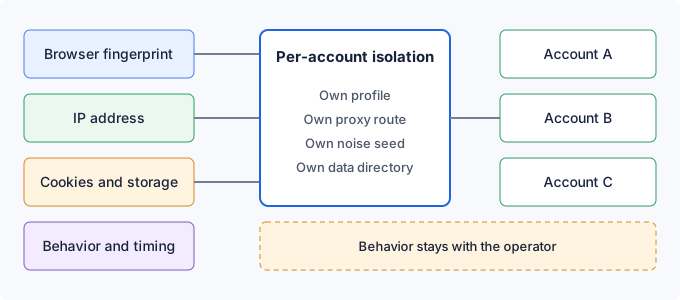
The first signal is the browser fingerprint. A page can read the Canvas output, the WebGL renderer name, audio behavior, installed fonts, screen size and many other browser properties. If two accounts report the same values across the board, that is a strong sign that one device or one browser installation sits behind both. Platforms do not publish which combinations they weigh, so the safe assumption is that every shared value adds to the link.
The second signal is the network. Accounts that sign in from the same IP address, especially within a short interval, are easy to associate. Rotating the exit address does not remove the problem if a single shared address appears in the history of two accounts even once, because a platform keeps its own records of where each account has signed in. Consistent, account-specific addresses are easier to explain than addresses that change from visit to visit.
The third signal is stored state. Cookies, localStorage and similar data tie a browser to an account session. If two accounts ever run in the same browser profile or context, the platform can see the same stored identifiers on both. This is the most direct kind of link, and it is also the one that is simplest to prevent, because storage can be separated completely.
The fourth signal is behavior, and no browser setting can fix it. Accounts that follow the same people, post at the same minute, reuse the same copy or sign in one after another from the same desk produce a pattern that has nothing to do with fingerprints. The same applies to device identifiers that an app or a platform stores after the first login and to verification steps such as phone numbers and recovery emails that two accounts have in common.
When a platform decides that accounts are related, the consequences vary. Content may be shown to fewer people, features such as posting frequency or messaging may be limited, an account may be asked for extra verification, and in the most serious cases every linked account can be suspended together. Because the rules are not public and change over time, a team should plan as if any shared signal could matter and should read each platform's terms on holding more than one account before it starts.
Why common setups still leave accounts linkable
Separate browser profiles are the first thing most teams try. They do split cookies and localStorage, which removes the direct storage link. They do not change what the browser reports about the machine, because every profile comes from the same installation on the same hardware. Canvas, WebGL, audio and font values stay identical across all profiles, so the fingerprint link remains.
Private windows give a clean session without earlier cookies or history, but they report the same fingerprint as the regular window. They also forget everything when closed, so each new session means a fresh sign-in. Repeated sign-ins from a new session are exactly the kind of event that triggers extra verification, which makes private windows a poor fit for accounts that need to stay logged in and look consistent over months.
Browser extensions that rewrite fingerprint values from inside the page change only what page scripts can read through those routes. Coverage depends on the extension, the values can disagree with what the browser reports through other routes, and a page can see that a script touched them. A half-changed fingerprint that contradicts itself is often harder to explain than an unchanged one. Teams that use this approach should test what actually changes instead of trusting a feature list.
Virtual machines separate the operating system, the hardware description and the network stack, which is strong isolation. They are also heavy. Each account needs a disk image, memory and updates, and keeping many images consistent is a real operational burden. For a handful of long-lived accounts a virtual machine is reasonable. For an agency with many client accounts it becomes difficult to maintain.
Commercial multi-account browsers vary widely. Some change fingerprint values through page scripts, some change them deeper in the browser, and some mostly offer a convenient window manager around ordinary profiles. Before adopting any of them, ask three concrete questions: which fingerprint values differ per account, how the proxy is bound to each account, and where the storage for each account lives. The answers matter more than the product name.
Building one browser identity per account
The principle is simple: every account gets its own bundle of settings, and no part of that bundle is shared. The bundle contains a browser profile, a proxy route, a timezone, a locale and language list, a noise seed and a place to keep storage. Write the bundle down in an account register when you create the account, and treat it as part of the account from then on. Changing it later changes what the platform sees, which is why it should be a deliberate decision and not a side effect of a tooling update.
A useful register lists, for each account, the platform, the owner, the profile file name, the noise seed, the proxy route label, the location of the data directory or saved storage state, the timezone and locale, and the date of the last check. Keep secrets such as proxy passwords in a secret manager and store only a reference in the register. When a colleague takes over an account, the register shows what must be preserved, so a handover never becomes a reason to rebuild the bundle from scratch.
There are two ways to apply the bundle with BotBrowser. The first is a dedicated instance. Each account has its own browser launch with its own profile file, proxy, timezone, locale, noise seed and user data directory. This is the strongest separation and the easiest to reason about, since nothing is shared except the machine. The cost is resources: every instance carries its own browser overhead, so this layout suits a moderate set of long-lived accounts better than a very large fleet.
The second way is a per-context bundle. One browser instance is launched with a base profile, and each account gets its own browser context. BotBrowser documents that each context can carry its own profile, User-Agent, timezone, locale, noise seed, proxy and most BotBrowser flags, and that pages in one context cannot see or change the fingerprint of another. The flags are applied through the BotBrowser.setBrowserContextFlags command on a browser-level session, and they must be applied before the first page of that context opens. The documentation lists an ENT Tier3 license as a requirement for this mode. Playwright contexts also keep cookies and localStorage separate by design, so the storage split comes along with the fingerprint split.
Choose the profile to match the account's real operating context. An account that represents a business in Germany fits a profile and exit route that make sense for Germany, and a regional brand page in the United Kingdom fits a United Kingdom setup. Use profiles that match your BotBrowser major version, and keep the same profile for the same account for its whole life. A new profile in the middle of an account's history changes the browser identity the platform has already recorded, and a platform may read that as a new device.
The noise seed is the part that is easiest to forget. It is an integer that makes the Canvas, WebGL and audio output reproducible: the same seed produces the same output after a restart, and a different seed produces different output. Give each account its own seed, store it in the register next to the profile and never reuse it for another account on the same platform. Using one profile for two accounts with different seeds is possible, but separate profiles give more variety and are the better default.
Proxy, locale and session storage for each account
The proxy is where network separation happens. Give each account a dedicated address where the provider can supply one, and avoid sharing addresses between accounts on the same platform. A sticky session, which keeps the same address for a long period, usually fits a normal user better than an exit that changes every few minutes. Choose the location to match the market of the account. Whether the address is residential or from a data center, and how clean its history is, depends on the proxy provider, not on the browser.
Timezone, locale and language should agree with the exit location. BotBrowser derives them from the proxy when they are left on automatic, so the proxy has to be configured through BotBrowser itself. The documentation advises setting the proxy in the BotBrowser flags and not through the automation library's own proxy option, because only the first lets the geographic values follow the exit. When a value must differ from the exit, for example a manager in one country running a page for another, set it explicitly and write down why.
Session storage keeps an account signed in. With a dedicated instance, give each account its own user data directory and keep that directory with the account. With per-context mode, save the storage state of each context when the session ends and load it again at the next start, which Playwright supports directly. Stored sessions behave like credentials: keep them in protected storage, never copy one into another account's directory, and delete them when the account is retired. A stable session also reduces repeated sign-ins and the verification prompts they invite.
Staff changes and account retirement need the same care. When a manager leaves, move the account's session and credentials through the team's normal access process instead of sending a browser folder by email. When an account is closed, remove its data directory, its saved storage state and its proxy assignment, and release the seed and the address so that nothing from the old account is attached to a new one by accident.
Two-factor authentication belongs to the account, not to the browser. Each account should have its own phone number or authenticator entry, and the backup codes should be kept with the person responsible for that account. BotBrowser does not generate codes, receive messages or complete verification, so a team has to design that process separately and keep it up to date when staff change.
Activity rhythm and platform terms are the operator's responsibility. Plan posting and engagement from a calendar that matches each account's real purpose, and do not use isolation to run coordinated activity across accounts that a platform would not allow. Some platforms permit several accounts for business use and others restrict it, so check the terms for each one. Isolation lowers the chance that technical signals connect accounts, but it does not make coordinated behavior acceptable.
Checking that accounts stay separate
Before an account goes live, run a short check from inside that account's own browser, using pages you control or public test pages. Start with the address. Open an IP echo service such as httpbin.org/ip and confirm that the address is the account's dedicated route and that it differs from every other account. If the address shows your office or home connection, the proxy was not applied and the account should not be used yet.
Next compare the timezone and language reported by the browser with the region of the account. A New York exit that reports a Berlin timezone, or the reverse, points to a configuration mistake. Fix it before the account is used for anything, because a mismatch is a signal that platforms can read, and it is easy to avoid when it is caught during setup.
Then compare Canvas and WebGL. On a test page that you control, draw a fixed shape and read the graphics renderer name in each account's browser. Accounts with different profiles should show different renderer values, and accounts that share a profile but use different noise seeds should show different Canvas output. If two accounts look identical, check that each one received its own bundle and that the context flags were applied before the first page opened.
Finally check storage. Sign in to a throwaway test site in one account, open the same site in another and confirm that no cookie or saved state carries over. This takes a minute and catches the most damaging mistake, which is two accounts sharing a data directory or a context by accident.
Run a shorter version of the same check whenever an account starts to behave differently, for example when sign-ins begin to trigger verification more often or a page loads in an unexpected language. A change in the proxy provider's pool, an expired data directory or an update that reset a setting are common causes, and the register tells you which bundle to compare against.
Record each result in the account register with the date, the browser version, the profile name, the noise seed and the proxy route label. Repeat the check after any change to the browser, the profile or the proxy provider. A passing check shows that the configuration is what you intended. It does not show how a platform will treat the accounts, because the platform's own signals and rules are outside what you can observe.
What BotBrowser covers and where it stops
BotBrowser can assign each account its own profile, proxy, timezone, locale and noise seed, either as a dedicated instance or as a per-context flag bundle set through BotBrowser.setBrowserContextFlags, so each account keeps a distinct, session-stable browser identity and separate storage. That helps a team keep fingerprint, storage and network signals from linking accounts. BotBrowser does not guarantee that a platform will not link or restrict accounts, and it cannot control behavioral patterns, shared or low-quality proxy IPs, account verification, 2FA or platform terms of service.
When the account count grows, the main constraints are memory and processor time. Keep a registry that lists each account with its profile, seed, proxy route label, data directory and platform, start accounts in small groups instead of all at once, and close sessions that are idle. Moving some accounts to a second machine is a normal way to keep each browser responsive, and the registry makes that move safe because every bundle is already written down.
For deeper reading, see multi-account browser isolation for the isolation model, per-context proxy for route assignment, noise seed reproducibility for seed handling and timezone, locale and language for regional settings.
Sources
Related Articles
Take BotBrowser from research to production
The guides cover the model first, then move into cross-platform validation, isolated contexts, and scale-ready browser deployment.