Noise Seed Reproducibility for Repeatable Fingerprint Runs
How a fixed integer noise seed makes Canvas, WebGL, Audio, and text-measurement output repeat across sessions, restarts, and CI runs, and how to verify it.
BotBrowser Team
Prefer the maintained product doc?
This article has a matching page in the docs center. Use the docs for the canonical setup flow, current flags, and long-term reference.
A noise seed makes Canvas, WebGL, audio and text-measurement noise repeat across launches, so runs can be compared. BotBrowser's --bot-noise-seed (ENT Tier2) does this for the same profile, build and launch arguments, but it does not choose the device identity, restore a login, or make a fingerprint anonymous.
TL;DR
Use an integer from 1 to 4294967295, store one seed per identity next to its profile file name, and never give two identities the same profile and seed. Verify by launching twice with one seed, where the values must match, then compare another seed and record whether it changes or collides; a seed of 0 gives no repeatability.
Contents
- Why repeatable seeds make runs comparable
- What the seed repeats and what it leaves alone
- Assigning seeds to identities without creating links
- Verifying the same seed across restarts
- Reproducing results in CI
- Separating a seed mismatch from a fixture drift
- What a matching result does and does not show
Why repeatable seeds make runs comparable
A fingerprint test that gives a different answer every time it runs is hard to trust. Fingerprint noise adds small variations to Canvas pixels, WebGL readback, audio samples, and text measurements so that a browser does not present the raw output of one machine. If that variation is drawn fresh at every launch, you cannot tell whether a changed result came from your configuration, from the page you are testing, or from the noise itself. A fixed noise seed removes the third possibility. BotBrowser can repeat Canvas, WebGL, audio, and text-measurement output for a fixed profile, build, and seed in a controlled context; it cannot make that output anonymous or guarantee the same result under a different build, profile, or arguments.
A noise seed is one integer that initializes a pseudo-random number generator. The generator produces the same sequence from the same starting value, so two launches that use the same seed apply the same variation to the same drawing or measurement, and a different seed applies a different but equally stable variation. You choose when the output should repeat and when it should change. For how to choose seeds for stable identities and verify that a seed repeats, see Deterministic Mode: Reproducible Browser Fingerprints, which covers what the seed controls and how to check reproducibility.
Four jobs usually justify a fixed seed:
- Session continuity. Returning to a service across several launches while presenting the same rendering output each time.
- Distinct stable identities. Giving separate accounts, tenants, or test users their own noise pattern that does not move between launches.
- Run-to-run comparison. Removing rendering noise as a variable when you compare two builds, two pages, or two profiles.
- CI reproduction. Rebuilding the conditions of an earlier run so that a failed comparison can be investigated instead of guessed at.
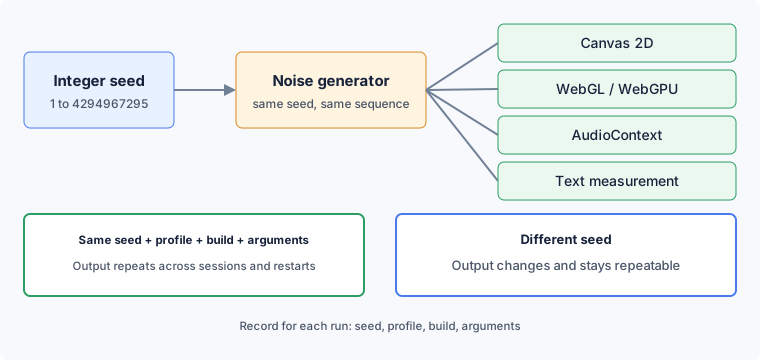
The sections below follow one seed from the surfaces it touches, through the assignment of seeds to identities, to a restart check and a CI record, and then to the limits you should state when you report a result. Reference values come from the public noise seed documentation and the command-line flag reference listed under the sources.
What the seed repeats and what it leaves alone
BotBrowser applies controlled noise to Canvas 2D, WebGL, WebGPU, AudioContext, ClientRects, and TextRects. The --bot-noise-seed flag (ENT Tier2) makes that noise deterministic. With the same profile, the same build, and the same launch arguments, a fixed seed gives the same Canvas readback, the same WebGL and WebGPU readback, the same audio samples, and the same text and element measurements in every session and after every restart.
Read-back is where a page sees the effect. HTMLCanvasElement.toDataURL() returns a data URL for the pixels the canvas currently holds, as a PNG unless the caller asks for another type, so any variation in rendering shows up directly in the returned string. An OfflineAudioContext renders a graph of audio nodes into a buffer without playing it, and the page reads the sample values from that buffer. Calls such as measureText() and getBoundingClientRect() return numbers instead of pixels, but they are read the same way: the page asks, the browser answers, and the answer either matches the last one or it does not. The seed applies to the answer, not to the question. For how audio output becomes a fingerprint and how to check audio consistency, see Audio Fingerprinting Explained: How AudioContext Tracks You, which explains why audio works as a tracking signal.
The repetition is tied to content. A page that draws the same scene under seed 42 in two sessions reads back the same pixels, and the same scene under seed 43 reads back different pixels that are just as stable. If the scene itself changes between runs, the output changes for reasons that have nothing to do with the seed, so every comparison needs a fixed scene. For why the same drawing differs between devices, see Canvas Fingerprinting: How It Works and What Helps, which covers what Canvas fingerprinting measures and how to check stability.
The accepted range is 1 to 4294967295, the largest unsigned 32-bit integer. A value of 0 keeps the profile defaults and does not seed the generator, so repeatability with 0 is not guaranteed and you should not use it as a baseline. When repeatability matters, pass a positive integer on every launch and check that your launcher or test framework really forwards the argument, because an accidental 0 or a dropped argument quietly turns a deterministic setup into a varying one.
The seed does not decide what kind of device is presented. The profile defines device identity values such as the user agent string, screen dimensions, and platform. The seed only shapes rendering and measurement variation on top of those values. Two sessions with the same profile and different seeds share the profile values and differ in noise, and a seed does not merge two different profiles into one identity.
Each noise channel has its own switch in the flag reference: --bot-noise-canvas, --bot-noise-webgl-image, --bot-noise-audio-context, --bot-noise-client-rects, and --bot-noise-text-rects. Each accepts true or false. The seed decides what the noise looks like, and the switches decide which surfaces receive noise, so the two controls answer different questions. Turning one channel off is a useful diagnostic step when a result stops repeating, as long as you turn it back on before you rely on the setup.
Several things sit outside the seed. Cookies, storage, and sign-in state live in the directory set by --user-data-dir, and a seed does not restore a login. Execution timing has its own control: --bot-time-seed takes an integer from 1 to 4294967295 for a reproducible timing policy, and 0 disables it. A noise seed alone does not make timing repeat, and a time seed does not change Canvas output. When a test needs both rendering and timing to repeat, set both values on purpose and record both.
Assigning seeds to identities without creating links
Treat the seed as per-identity configuration. A profile with seed 100 is one stable fingerprint. The same profile with seed 200 is a second one with its own noise pattern. That separation is the reason to keep one seed per account, tenant, or test user, and it is what lets each identity present the same rendering output on its next visit.
The reverse case is the one to guard against. If two identities use the same profile and the same seed, they produce identical rendering output, and that shared output can link them. A seed is configuration, not a secret that prevents correlation: anyone who holds the same build, profile, and seed reproduces the same output. What protects separate identities is that no two of them share a profile and a seed.
Keep a seed-to-identity table in version control next to the profile file names. Each row should hold the identity, the profile file name, the seed, and the date the pair was created.
[
  { "identity": "tenant-a", "profile": "profile-a.enc", "seed": 1001 },
  { "identity": "tenant-b", "profile": "profile-a.enc", "seed": 1002 },
  { "identity": "tenant-c", "profile": "profile-b.enc", "seed": 1003 }
]
In this table, tenant A and tenant B share a profile but carry different seeds, so their noise patterns differ. Tenant C uses another profile. If tenant B were moved to seed 1001, two identities would hold the same profile and the same seed, and that is the pattern to report as a linkage risk and fix before the next run by assigning a new seed to one of them.
Generate each seed once and store it. Do not derive a seed from a timestamp or from a counter that resets, because that quietly turns a deterministic setup into a different value on every launch. The seed cannot be recovered from the output later, so the table is the only record. Any positive integer in the valid range works, and there is no benefit in large, prime, or patterned values. Sequential values are fine, as long as the table shows who holds which one.
When one browser process has to carry several identities, per-context fingerprinting (ENT Tier3) lets each BrowserContext have its own --bot-noise-seed. The documentation sets the flags for a context before its first page is created, so the renderer starts with the correct values. A second context with a different seed produces a different pattern that is just as reproducible.
Verifying the same seed across restarts
The check below confirms that one seed repeats and that another seed changes the output. It needs a page you control, or a test page you trust to draw the same scene each time. The page should draw a fixed Canvas scene and read it back with toDataURL(), read back a fixed WebGL scene, render a fixed offline audio buffer, and measure a fixed string. Record each value, or a short digest of it, so comparisons are exact. Load the page the same way each time, with the same window size and load order, so that the seed is the only deliberate difference between runs.
A fresh user data directory keeps old browser state out of the comparison:
chromium-browser \
  --bot-profile="path/to/profile.enc" \
  --bot-noise-seed=42 \
  --user-data-dir="$(mktemp -d)"
Run the verification in this order:
- Launch with the profile and
--bot-noise-seed=42, load the page, and record the Canvas, WebGL, Audio, and text values. - Close the browser, launch again with the same profile and seed, and load the same page. Every recorded value should match the first run.
- Change the seed to 43 and run the page a third time. Record whether each value differs or collides with the first run; a changed value shows that the seed shapes that surface, while a collision shows that a new integer is not a uniqueness guarantee.
- Launch twice with
--bot-noise-seed=0. Repeatability with 0 is not guaranteed, so do not use these values as a baseline, because 0 does not seed the generator. - Save the build, the profile file, the host operating system, and the full argument list next to the results.
Step five is the one people skip, and it is the one that explains a later mismatch. A result is comparable with another result only when the build, the profile, the seed, and the launch arguments are the same.
When the second session does not match the first, rule out the usual causes before you suspect the seed:
- The scene changed: the text, the canvas size, or the drawing order differs between runs.
- The seed did not arrive: a launcher dropped the argument, or the value is 0.
- A different profile file or profile version was loaded.
- A different BotBrowser build or host operating system target was used.
- A framework or wrapper added extra arguments.
- A noise channel was switched off in one run and left on in the other.
The documentation gives the same advice for a setup that behaves differently on another machine: compare the BotBrowser build, the profile version, the host operating system target, and the full launch arguments. It also advises keeping the network route, the locale and timezone, and the machine load stable while you compare runs, because those can change what a page does even when the seed has not changed.
A mismatch is a finding, not noise to average away. Report it as a build, profile, or argument difference until you have shown otherwise, and keep both result sets with their records. Rerunning until the values happen to agree hides the cause and leaves the next run just as uncertain.
Narrowing a mismatch without guessing
| Step | What to compare first | A match here means |
|---|---|---|
| 1 | The full argument list | The seed and channel switches arrived |
| 2 | The profile file digest | The same profile bytes were loaded |
| 3 | The build string | The same binary produced both runs |
| 4 | The scene inputs | The page drew the same thing twice |
The six causes above are easy to list and hard to separate, because each of them produces the same symptom: two records that differ. Walking the four inputs in this order costs one comparison each and rules out the cheap explanations before you touch the page.
Compare the argument list first, and compare it as text rather than from memory. A launcher that drops a flag, a wrapper that appends its own, and a shell that expanded a variable differently all leave the same trace: the run that produced the mismatched values never had the seed you think it had. Print the effective arguments from both runs and diff them.
Compare the profile file next, by digest rather than by file name. Two files with the same name in different directories, or one file replaced during a profile update, produce a mismatch that looks like a seed problem and is a profile problem. A digest comparison turns that into a yes-or-no answer.
Then the build string, in full rather than by major version. A minor upgrade inside the same major can change a drawing path while every visible version number still looks familiar. If the build differs, stop treating the two records as comparable and keep both as separate baselines.
Only after those three match is the scene worth checking. Compare the canvas dimensions, the text string, the drawing order, and the audio buffer parameters, because any of those changes the input the generator receives and therefore the output it produces from the same seed. A scene change is the one cause where the seed is working correctly and the result still differs.
To isolate a surface that stops repeating, turn off one channel at a time, compare, and then restore it:
chromium-browser \
  --bot-profile="path/to/profile.enc" \
  --bot-noise-seed=42 \
  --bot-noise-canvas=false
If the other surfaces repeat while Canvas noise is off, the Canvas scene or its read-back is the part that varies. Restore the switch and keep the final command line in your notes, so the same arguments can be pasted into the next session.
Reproducing results in CI
A CI job is a launch with nobody watching it, so it needs the record that a person would otherwise carry in their head. Pin the BotBrowser build, the profile file, the seed, and the complete launch arguments in the job configuration, and write them into the job output along with the values the verification page reported. When a comparison fails weeks later, that output lets you reproduce the run on another machine instead of guessing.
A useful record has a few fields for each seed:
- The seed value and the identity or test case it belongs to.
- The profile file name and its version.
- The BotBrowser build.
- The host operating system target and the type of machine.
- The complete argument list, including any timing seed.
- The values the verification page reported, with the date of the run.
Use a fresh user data directory for each CI run, as in the launch above, so old cookies and storage cannot influence the comparison. Keep the seed in the job configuration rather than choosing it inside the job, since a seed picked at run time is a different value on every run.
Run the verification page as the first step of the job, before the tests that depend on it. If it reports values that match the stored baseline, continue. If it reports different values, stop and report which of the build, the profile, the seed, or the arguments changed, instead of letting later tests fail for a reason that is hard to see.
Upgrades are the other moment to verify again. After you update BotBrowser, replace a profile file, move to a different runner, or edit the arguments, run the page once with the stored seed and compare it with the stored values. If they match, carry on. If they differ, treat the new values as a new baseline, write down the build that produced them, and do not edit the seed to recover the old output, since the seed was not the part that changed.
Sometimes a new pattern is what you want, for example when you retire a test identity and start another. Change the seed on purpose, update the table and the baseline in the same commit, and keep the old row with its build number. The old seed remains a correct description of what that build produced for that profile.
Repeatability across machines and operating systems follows the same rule. Run the page on each runner under the same build, profile, and arguments, and compare the values. A match is evidence for those machines. A difference is reported as a build, profile, or argument mismatch to be traced, not ignored.
Separating a seed mismatch from a fixture drift
A repeated run is the only way to tell a seed change from a fixture change, and the comparison holds only while the scene, the build and the profile stay fixed. The measurements below come from one probe page on one machine: build Chromium 144.0.7559.97, a Windows 10 profile, a headless Linux host, a fixed 220×60 canvas drawing, a fixed 64×64 WebGL clear, and a fixed offline audio buffer. The digest is the first 32 hex characters of the SHA-256 of canvas.toDataURL().
| Seed | Canvas digest | Pairing | Reading |
|---|---|---|---|
| 42 | fd0881c19451370e66313f61e760c77c | run twice, identical | the same seed repeats |
| 43 | fd0881c19451370e66313f61e760c77c | matches seed 42 | a different seed can reproduce an earlier output |
| 44 | 06ff31e59678fe4d923a85d73479fe2e | new output | a different seed can produce a new output |
| 45 | 06ff31e59678fe4d923a85d73479fe2e | matches seed 44 | the collision is not a single accident |
| 46 | 5877be94c6969400c80033f0a2f4528d | new output | a third distinct output |
| 77 | 8138eccb72cb091408fc684572c3504a | new output | confirms the digest responds to the seed |
| 12345 | 5877be94c6969400c80033f0a2f4528d | matches seed 46 | a second collision |
Two conclusions follow, and both are narrower than they first look.
The same seed repeats exactly, which is the guarantee the flag makes. But two different seeds can also produce the same output: in this run three of the seven seeds collided with an earlier one. Changing the seed is therefore not a reliable way to obtain a different fingerprint. Treat the seed as one input to a finite mapping rather than as a unique identity token, and when two identities must not share rendering output, verify the output instead of assuming that a new integer is enough.
The same run left the WebGL digest, the audio samples and the text width unchanged across every seed, so only the Canvas digest moved. That is an observation under one build, one profile and one host, not a statement about which surfaces the flag covers on every platform; the noise channel switches are separate controls and this probe did not toggle them. Repeating the probe under a headful display, behind a macOS profile and with the WebGL noise channel enabled would show whether the same split holds elsewhere.
What a matching result does and does not show
A passing verification supports a narrow statement: a given build, profile, and seed repeated the same Canvas, WebGL, Audio, and text-measurement output on a given machine, while another seed either changed or collided on the measured surfaces. It does not support the claim that the same result holds on every machine, after every upgrade, or on every page. Write results in the first form and the record stays accurate months later.
A repeatable fingerprint is a trade-off. Presenting the same output on every visit is what gives session continuity, and it is also what lets repeated visits be recognized as repeated. A fixed seed does not make a fingerprint anonymous or unique, and it says nothing about how any particular site will treat it. Rendering is one group of signals. Device identity from the profile, the network route, timing, and what a site does with the visit are separate controls.
BotBrowser supports a fixed integer --bot-noise-seed from 1 to 4294967295 that makes Canvas, WebGL, AudioContext, and text measurement output repeat for the same profile across sessions and restarts, so teams can compare runs, reproduce CI results, and keep a stable rendering baseline for each identity. BotBrowser cannot make seeded output anonymous or immune to a site's own checks, cannot guarantee identical results under a different build, profile, or launch arguments, and does not replace per-identity seed assignment, network, or site-side controls.
For related background, see Deterministic Mode, Canvas Fingerprinting, Audio Fingerprint Protection, and Profile Management.
Beyond the reference page
The reference page lists the seed option, range, and affected surfaces. This article adds a reproducible comparison procedure: keep the profile, build, launch arguments, and test scene fixed; compare two launches with seed 42; then compare a launch with seed 43. This is a procedure to run, not a result reported here. When values differ, use the troubleshooting steps above to separate a changed scene or argument from a profile, build, or host difference before changing the seed.
Sources
- BotBrowser noise seed reproducibility documentation
- BotBrowser command-line flag reference
- MDN HTMLCanvasElement.toDataURL reference
- MDN OfflineAudioContext reference
Practical conclusion
When two runs with the same seed differ, treat it as a build, profile, argument or fixture difference until shown otherwise, and do not rerun until the values happen to agree. In CI, pin the seed in the job configuration and run the verification page first, stopping the job when it differs from the stored baseline. Change a seed only on purpose, updating the table and the baseline in the same commit.
This article is part of the guide: What Is a Browser Fingerprint?
Related Articles
Deterministic Mode: Reproducible Browser Fingerprints
FingerprintAudio Fingerprinting Explained: How AudioContext Tracks You
FingerprintCanvas Fingerprinting: How It Works and What Helps
FingerprintJavaScript Stack Depth: A Browser Privacy Signal
Fingerprintwebgl_debug_renderer_info: What Your GPU Reveals to Pages
FingerprintWebGPU Fingerprinting: The Next Generation of GPU Tracking
Take BotBrowser from research to production
The guides cover the model first, then move into cross-platform validation, isolated contexts, and scale-ready browser deployment.