DRM Capability Checks: Key System, Robustness, Output
A DRM capability overview for Widevine and EME: four checkpoints in order, which value to record at each, and where the browser evidence stops.
BotBrowser Team
Want the structured docs for Platform?
This article lives in the editorial library. For step-by-step setup, reference material, and ongoing updates, jump into the docs section.
Encrypted media fails for four different reasons, and a team that only asks whether DRM works cannot tell them apart. This overview orders the four checkpoints of a DRM capability review and links the cluster that owns each one: module negotiation, negotiated robustness, protected output, and the license decision.
BotBrowser can keep a declared profile and its per-context media policy consistent in an authorized context when the build and the entitlement support it. It cannot manufacture a content decryption module, overrule a provider's account decision, or promise that a specific title plays on every host.
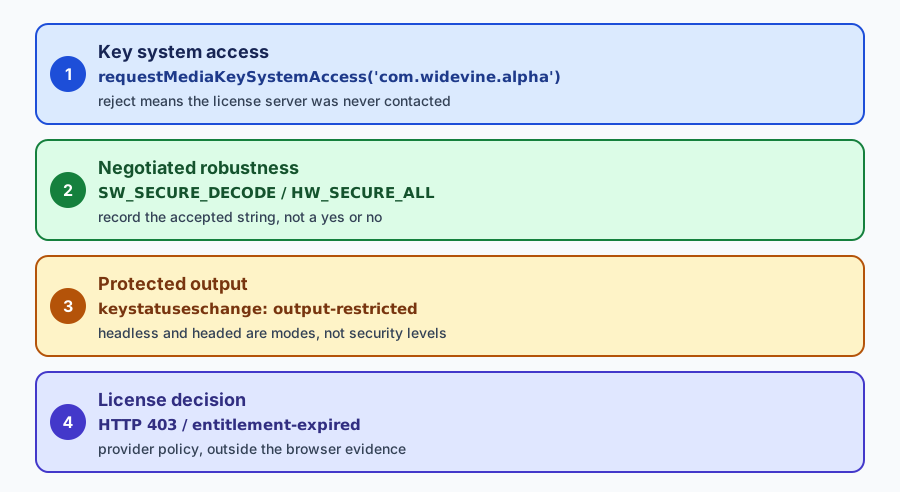
TL;DR
- Ask one question per checkpoint. A rejection at the access step and a rejection at the license step are different failures with different owners, and reporting either one as "DRM fails" sends the ticket to the wrong team.
- Record the accepted robustness string (
SW_SECURE_DECODE,HW_SECURE_ALL) rather than converting it into a yes or no answer. - Treat headless and headed as presentation modes. A virtual display is not a lower security level, and a physical monitor is not proof of a hardware-secure path.
- Keep the provider's status code in its own field. It is a policy decision about an account and a title, not a browser capability.
Contents
- Four checkpoints behind one question
- Name the module boundary first
- Read robustness as a range, not a verdict
- Keep output protection separate from display mode
- Decide who owns the license answer
- Record one table per release
Four checkpoints behind one question
The four checkpoints are sequential, and each one answers a different question about the same session. Confusing them is the most common reason a DRM investigation stalls, because the search for a cause starts in the wrong layer and never reaches the one that actually failed.
The first checkpoint is whether the browser will negotiate the key system at all. The second is which robustness level it accepts. The third is whether the output path is allowed to carry protected frames. The fourth is whether the license server grants a key for this account, region, and title.
The order matters for diagnosis, not just for tidiness. A rejection at checkpoint one stops the chain, so nothing downstream has been tested. A pass at checkpoint one and a rejection at checkpoint four proves the browser side negotiated successfully and the decision came from the provider. Those two results point at different owners, and a support ticket that reports only "DRM does not work" cannot distinguish them.
| Checkpoint | Browser call or event | Value to record |
|---|---|---|
| 1 Access | requestMediaKeySystemAccess() | supported or NotSupportedError |
| 2 Strength | getConfiguration() after a request | accepted robustness string |
| 3 Output | keystatuseschange on the session | usable, output-restricted, expired |
| 4 License | HTTP response for the license message | status code and provider error category |
Each row is a separate experiment with its own failure category. A reviewer who keeps them separate can name the first row that broke and hand it to the team that owns it, instead of reopening the whole configuration.
Each row also has a limit worth stating next to the value. A pass at checkpoint one proves the browser will negotiate the key system; it does not prove that a key can be decrypted or that a title will play. A pass at checkpoint two proves the module accepted a level; it does not prove the display path can carry protected frames. A usable status at checkpoint three proves the keys were released to the session; it does not prove the provider authorised the account. An HTTP 200 at checkpoint four proves one license response arrived; it does not prove the next request, another title, or another region will succeed. Writing those limits into the record is what stops a chain of four passes from being read as a playback guarantee.
Name the module boundary first
The module is the input that everything else depends on, and in an automated launch it is often absent without any error that mentions it. A browser that has no module rejects every configuration for the key system, so the probe reports a capability failure that looks like a configuration problem and is really a packaging problem.
Two facts about the module are worth stating explicitly in a review record. First, the binary matters before the arguments do: an open-source Chromium build typically does not ship the Widevine module, while a Google Chrome build does. A suite that launches a bundled Chromium build is likely to report no support whatever arguments it passes, and the fix is to launch a build that can carry a module at all.
Second, an automation framework's own defaults can disable the component that makes the module available. A default Playwright launch includes --disable-component-update, which is a sensible choice for a runner that does not want background network traffic, and it also means a freshly created profile in this environment reported no Widevine support in a measurement published in the cluster. The same probe with that single argument removed reported SW_SECURE_CRYPTO and SW_SECURE_DECODE as supported on the same machine, in both headless and headed mode. The measurement ran an installed Google Chrome build, not a bundled Chromium, so it says nothing about a build that ships no module at all.
That measurement is worth reading as a method rather than as a universal rule. It isolates one argument, changes nothing else, and compares the same probe before and after. Chrome's component system is Chrome's own, so a different release or operating system may behave differently, and the reproducible part is the comparison rather than the specific result.
For this review the consequence is a placement rule rather than a fact about Chrome: a missing module never reaches checkpoint one, so it must be recorded in the header's build field, not as a failed row. A table that shows a red NotSupportedError on row one against a bundled Chromium build is describing the header, and a reader who never sees the header will read it as a module or provider problem.
Two launches express the comparison, and the second is the only one that differs:
const base = { executablePath: '/opt/google/chrome/chrome', headless: true };
await chromium.launch(base); // framework defaults, --disable-component-update included
await chromium.launch({ ...base, ignoreDefaultArgs: ['--disable-component-update'] }); // the single change
Record whether the profile was fresh or persistent beside the result. A temporary profile repeats first-run registration on every launch, and a result from a long-lived desktop profile is not evidence about a CI container that creates a new directory per job. Compare like with like.
The in-page half of the probe is short enough to keep beside the record. Run it through page.evaluate after each launch above; it asks for one configuration, prints which key systems resolve, and never attempts playback:
const config = [
  {
    initDataTypes: ['cenc'],
    videoCapabilities: [{ contentType: 'video/mp4; codecs="avc1.42E01E"', robustness: 'SW_SECURE_DECODE' }],
  },
];
for (const keySystem of ['com.widevine.alpha', 'org.w3.clearkey']) {
  try {
    const access = await navigator.requestMediaKeySystemAccess(keySystem, config);
    const c = access.getConfiguration();
    console.log(keySystem, 'supported', c.videoCapabilities[0].robustness, c.persistentState);
  } catch (error) {
    console.log(keySystem, error.name);
  }
}
Clear Key in that loop is a control, not a platform marker. The specification defines it, so every conforming browser answers for it, and its job here is to separate a page or network problem from a DRM problem. If Clear Key resolves normally while the platform key system rejects every configuration, the CDM layer is the place to look and the page is not.
Read robustness as a range, not a verdict
Once the key system negotiates, the browser and the module agree on a robustness level. The strings are the vocabulary a provider uses to decide what it will serve: SW_SECURE_CRYPTO and SW_SECURE_DECODE keep the cryptographic work or the decoding in software, and HW_SECURE_ALL requires a trusted hardware path. Widevine calls the software-only case level 3, and the higher levels depend on hardware the host may not have.
A rejected hardware level is not a defect in the setup. Many desktop and virtual environments have no hardware-secure path, and a provider that serves ordinary content at software levels works there. The useful record therefore contains the string that was actually accepted, together with the configuration that was requested, because the pair is what a later reviewer needs in order to see that the answer moved.
Two habits make this row trustworthy. Repeat the identical configuration from run to run, so a difference in the output is a real difference rather than a different question. And read the returned configuration object rather than assuming the request was granted as written. DRM fingerprinting lists the fields that object carries and what each one reveals about the platform, so this hub does not repeat them.
One successful H.264 configuration is one cell of a matrix, not the matrix, and DRM fingerprinting covers how that matrix is read. What matters at this checkpoint is narrower: record which cell you asked for and which cell answered, because a provider that serves a lower resolution on a lower level is making a policy decision that shows up here only as an accepted level.
Keep output protection separate from display mode
Playback can begin and then stop when the display path does not meet a protected output requirement. The session reports that state through keystatuseschange, often as output-restricted, and the application is expected to show a fallback rather than an opaque failure. This checkpoint is about the display path, and it is independent of whether the key system negotiated.
The frequent mistake is to fold this row into headless versus headed. Headless is a presentation mode, not a security level. A virtual display can satisfy or fail an output requirement for reasons that have nothing to do with the mode switch, and a headed run on a physical monitor does not prove that a virtual display would fail. Run the comparison with the same profile, the same codec, and the same requested robustness, and let the display mode be the single independent variable.
The hub adds the reading order for a row three change: check the header's display-mode field first, then the codec field, then the requested robustness. A row three move that coincides with a display-mode change needs no further investigation; a move with an identical display mode points at the output fixture instead.
A clean way to keep this honest is to record the output state and the fallback the application presented, and nothing about a monitor model or a GPU identity. The browser can tell you that an output restriction occurred. It cannot tell you that a person is watching on a particular screen, and an inference of that kind turns a capability record into a claim the measurement does not support.
The state names worth recording come from the media key status map rather than from the player's own labels. A session reports usable when the key is available, output-restricted when the display path blocks protected frames, expired when the license window closed, and released after cleanup. Map the application's user-facing message back to one of those names in the record, so a later reviewer compares statuses rather than translating UI copy in four languages.
The negative path belongs in the fixture. Widevine headless boundaries lists the negative cases a fixture should exercise deliberately and explains why a tested fallback is worth more than a documented one. At this checkpoint the specific case to add is an output restriction, because it is the only failure that appears after a successful negotiation.
Decide who owns the license answer
The last checkpoint is the only one where the browser is reporting a message rather than making a decision. The page relays an opaque license request to the provider, the provider answers, and the session either becomes usable or does not. An HTTP error at this stage can mean an account, a region, a concurrency limit, an expired entitlement, or a service outage, and none of those is a browser compatibility fact.
Keeping browser evidence and provider evidence apart is what makes a handoff work, and the hub's contribution is the ownership split rather than the field mechanics: row one belongs to the binary and launch owner, row four to the provider owner. Widevine headless boundaries sets out which field holds which result; what this review adds is that a ticket naming only "DRM fails" gives the receiving team no way to tell those two owners apart, so the row has to travel with the ticket.
Retention follows the same split. Keep the build identifier, the test date, the profile label, the requested configuration, the result name, the status, and a timestamp. Remove cookies, account identifiers, license messages, access tokens, and raw key material. A record that keeps only categories can still compare releases, which is the reason to keep it at all.
An HTTP status alone is often too coarse to route a ticket. A 403 can be an entitlement that lapsed, a region mismatch, a concurrency cap already reached on the same account, or a signed-URL expiry, and the provider usually returns its own error code or message alongside it. Record that code as a category and keep the full message out of the shared artifact, because license messages can carry identifiers that belong to an account rather than to a release. A 429 and a 503 from the same provider need the same treatment and different owners: the first says the account hit a cap, the second says the service is down, and neither is fixed by changing the profile.
When a result changes, change one declared input per run and keep the rest fixed. Widevine headless boundaries already sets out the comparison order it recommends for the four rows; this hub adds only the rule that the header has to stay identical across both runs, so a moved row can be read as a moved input.
Record one table per release
The artifact that survives a release cycle is a small table with one row per checkpoint, kept next to a run header that never changes shape between releases. The header has to be fixed once and reused, because a header that drifts makes two tables impossible to compare. Eight fields cover the cases that move a capability result: browser product and full build string, automation library and version, operating system and version, display mode, codec string under test, whether the profile was created fresh, key system name, and requested robustness. Widevine headless boundaries lists the first six for its own matrix; the last two are what a capability review adds.
Repeat the table after a browser or automation upgrade, after a profile schema change, and after a runner or display change, and keep the previous table beside the new one. The first row that moved names the layer to investigate, which is why the header has to stay fixed: a row that moved because the header changed says nothing about the browser.
A worked example makes the comparison concrete. Suppose release A records supported at checkpoint one, SW_SECURE_DECODE at two, usable at three, and HTTP 200 at four with a test asset. Release B records supported, SW_SECURE_DECODE, then output-restricted at three, and the license row never runs because the session is not usable. Only one row moved, and it moved on the display path, so the next action is to compare the runner's display configuration rather than to reopen the module question or contact the provider.
The reverse case is just as clear. If checkpoint one moves from supported to NotSupportedError while the header shows the same build and the same profile lifecycle, the difference came from a launch argument or from a component update that did not run. Comparing the argument list with a plain launch answers that in one step. If the header shows a different build instead, the argument list is not the first thing to inspect.
The cluster gives each checkpoint its detailed treatment. The setup contract for installing a module and matching it to a profile is in Widevine DRM setup. The fingerprinting view, which explains which parts of the EME surface a page can read without playing anything, is in DRM fingerprinting. The matrix that separates the four boundaries with one fixture per row is in Widevine headless boundaries. The measurement that isolates the launch argument responsible for a missing module is in Widevine CDM availability in automated browsers.
Read them in that order when a review is starting from nothing: setup defines the inputs, fingerprinting explains what is observable, the boundary matrix turns observation into rows, and the availability measurement explains the most common zero result. Read only the one that matches the checkpoint that failed when a review is already under way, because the others would answer questions nobody asked.
Practical conclusion
A DRM capability review is four questions, asked in order, each with its own value and its own owner. Record the negotiation result, the accepted robustness string, the output state, and the provider status as separate fields, then compare releases by looking for the first row that changed. A passing row proves that one contract held; it does not prove that a title plays, and stating that limit is part of the result.
Public sources
- MDN Encrypted Media Extensions API
- W3C Encrypted Media Extensions
- Widevine documentation
- BotBrowser Widevine setup
Next reading
Start with Widevine DRM setup for the inputs, then follow the cluster link that matches the checkpoint that failed.
All guides on this topic
Related Articles
Widevine and Headless Browsers: The DRM Boundary Checklist
PlatformWidevine in Automated Browsers: Why EME Fails and How to Check
FingerprintDRM Fingerprinting: What EME and Widevine Queries Reveal
PlatformWhat Is Widevine DRM? Headless Browser Setup and Privacy
PlatformWeb Platform Surfaces: A Consistency Review Map
PlatformRecover a Browser Session After a Network Interruption
Take BotBrowser from research to production
The guides cover the model first, then move into cross-platform validation, isolated contexts, and scale-ready browser deployment.