Browser Session Lifecycle for Shared Workstations
Manage browser sessions on shared workstations with clear ownership, privacy boundaries, and verifiable cleanup.
BotBrowser Team
Want the structured docs for Identity?
This article lives in the editorial library. For step-by-step setup, reference material, and ongoing updates, jump into the docs section.
BotBrowser can repeat an authorized session journey in a declared profile, browser release, and context. It cannot identify a person, enforce workstation ownership, revoke a server session, or prove that every copy of data was erased. On a shared workstation, session lifecycle is therefore an ownership and privacy control, not just a browser-close action. The W3C privacy principles and NIST privacy framework support purpose limitation and accountability; this article applies those ideas to visible browser operations.
On a shared workstation, BotBrowser can repeat the declared session checkpoints for an authorized test; it cannot decide who may use the workstation or whether the cleanup policy is sufficient. Keep that product boundary beside the operational record so a repeatable browser observation is not mistaken for an identity or erasure guarantee.
For shared workstations, BotBrowser can repeat an authorized session checkpoint, but it cannot enforce the workstation owner's cleanup policy or certify deletion.
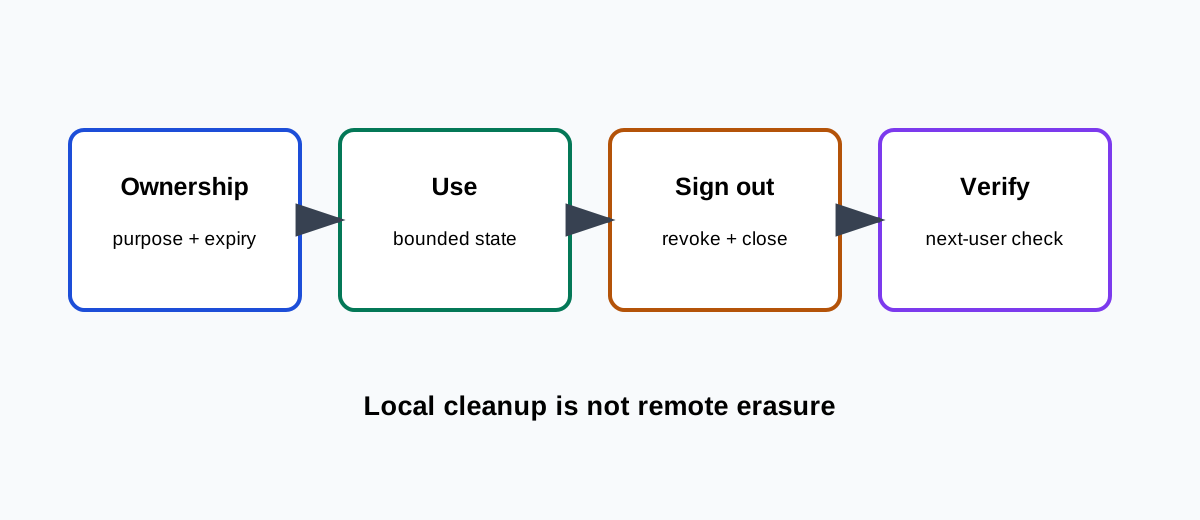
BotBrowser supports repeating an authorized shared-workstation checkpoint, but it cannot enforce host ownership or certify deletion.
Name the owner before opening a session
Record the workstation, session purpose, responsible team, expected end time, and whether the session is personal, organizational, or a synthetic fixture. The person using the keyboard is not automatically the owner of an account or its data. Use separate operating-system accounts or approved browser contexts where policy requires them. Do not rely on a profile name, language, or remembered cookie as proof of identity. OWASP Session Management recommends treating session identifiers as sensitive authentication material.
Keep state and authority separate
Cookies, Web Storage, IndexedDB, Cache Storage, service-worker registrations, permissions, downloads, and open pages have different lifetimes. A clean tab does not revoke a server session; clearing local storage does not delete a downloaded file or an account record. Map each category to an owner, purpose, retention rule, and cleanup action. Never copy credentials or tokens into a shared handoff or support ticket. Prefer synthetic data for shared-workstation tests.
Operate with an explicit boundary
Show when a session starts, which workspace it may access, and when it must end. Keep sensitive content out of previews, screenshots, URLs, and browser history where possible. A user may pause or transfer a task, but the transfer should name the next owner and expire at a declared time. If the workstation is unattended, lock it or stop the session according to local policy. A browser window that remains open is not a valid ownership record.
Sign out, then clean locally
End the application session through its supported sign-out or revoke action first. Close pages, stop downloads, clear only the categories covered by policy, and remove temporary files from the workstation-managed location. MDN Clear-Site-Data describes origin-scoped cleanup; it does not promise deletion of remote records or unrelated operating-system data. Keep a short result record without raw tokens, private URLs, or account names.
Verify the next-user boundary
Use a fresh context or approved test account to check that the next user cannot see the previous task, cached private content, autofill values, downloads, or an authenticated route. Distinguish an expected public page from an accidental authenticated response. If server revocation is asynchronous, record it as pending and give the service owner the follow-up. Do not claim complete erasure when only browser-visible state was checked.
BotBrowser capability and limitation
BotBrowser can repeat an authorized start, use, sign-out, and visible cleanup journey in a declared profile and context, and compare the next-user checkpoint. It cannot enforce operating-system account separation, revoke server-side sessions, inspect every host-level artifact, or certify deletion. The workstation owner remains responsible for access control, retention, incident response, and privacy review.
Practical checklist
- Name the owner, purpose, workstation, expiry, and data categories before opening.
- Separate local browser state, host files, and server authority.
- End the application session before local cleanup and close all task pages.
- Verify a fresh next-user context and record pending remote actions.
- Keep BotBrowser capability and limitation separate from the privacy decision.
Related reading: Browser site-data clearing and account boundaries and Privacy by design for browser workflows.
The record should distinguish a visible browser result from a server confirmation and a host confirmation. This keeps the final handoff explicit.
Sources
W3C Privacy Principles, NIST Privacy Framework, OWASP Session Management Cheat Sheet, MDN Clear-Site-Data, and BotBrowser profile management.
Make the runbook usable at handover.
A shared-workstation runbook should be short enough to follow during a busy shift and specific enough to survive a dispute. Put the workstation identifier, the approved application, the session owner, and the expected end time at the top. Name the contact who can revoke a server session and the contact who controls the workstation image. These owners may be different. A browser operator can close a page while an application owner must invalidate a token. A support technician can lock a screen while a records owner decides how long an audit event remains available. Naming the boundaries prevents a person from being asked to perform an action they cannot authorize.
Use state labels that describe what is known: not started, active, paused, signed out, local cleanup complete, remote action pending, and verified for next user. Do not use clean as a synonym for deleted. A local cleanup result should identify the categories checked and the time of the check. If the browser was restarted, say so. If a service worker or download directory was not in scope, say so. This language gives a later reviewer a useful observation without exposing the underlying session material.
Decide what may remain.
Not every artifact should be removed at the same time. An approved synthetic fixture may remain for the next test run, while a customer document must be removed or returned to its owner. A public bookmark can remain, but an authenticated bookmark may reveal a private route. A browser permission may be intentionally retained for a controlled lab, while a permission on a public kiosk should be reset. Write the decision by category before the session begins. This is a retention decision, not an implementation detail.
The decision should also name exceptions. For example, a fraud investigation may require a protected record of the visible error, while an ordinary support run should not retain a screenshot. Exceptions need an owner, a purpose, an access list, and an expiry. Never make the operator guess whether a diagnostic capture belongs in a general ticket. If a capture is required, use a protected location and reference it by an identifier rather than pasting its contents into chat.
Test interruption and recovery.
Shared sessions fail in ordinary ways: a network drops, a browser update restarts the process, a user closes the window, or a server response takes longer than the shift. Test interruption as part of the lifecycle. At each checkpoint, decide whether the safe action is to pause, sign out, lock the workstation, or discard the local fixture. A retry should not silently reuse an expired authentication value. A resumed task should show which owner accepted the continuation and which state categories are still present.
When a browser crashes, first protect the workstation and then classify the evidence. A crash report may contain URLs or page titles. Treat it as sensitive until reviewed. Recovery should begin with a fresh context whenever possible. If the application offers a server-side resume token, record only its lifecycle status, never the token itself. A visible “resume” result proves that the application accepted a request; it does not prove that every local page or cache was removed from the crashed process.
Keep verification proportionate.
Verification should match the threat and the policy. A low-risk synthetic test may need a fresh context and an authenticated-route check. A public kiosk may additionally require a host-level account reset, download-directory inspection, and a locked-screen check. A regulated workflow may require a second operator to review the result. Do not imply that a browser-only check covers host swap space, operating-system logs, backups, or server replicas. Those layers require their own owners and evidence.
Record the exact visible assertions: the sign-in page appeared, the previous workspace was unavailable, no download was listed, or a server revocation status was pending. Avoid recording a raw response body or a session identifier. A concise assertion is easier to compare across browser releases and less likely to become a new privacy incident. If the result differs between two declared contexts, preserve both observations and investigate the boundary instead of choosing the more convenient one.
Review after policy changes.
Revisit the lifecycle when the application changes its sign-out route, adds a new storage category, changes cookie attributes, introduces a service worker, or moves a download directory. Review it after a browser major, a workstation image update, a new identity provider, or a retention-policy change. The same visible page may now depend on a different storage partition or a different server timeout. Update the runbook and fixture together, then repeat the bounded checkpoints. Keep the previous observation marked as superseded rather than silently rewriting it.
The review should ask whether the next-user test still represents the real handoff. A controlled test account is useful, but it may not reveal a policy error affecting a real user. Conversely, a real account may contain data that should never enter a shared test. Choose the least sensitive fixture that can answer the question. Make the reason for that choice visible to the reviewer.
Accessibility is part of cleanup.
The end of a session must be understandable to keyboard and assistive-technology users. Announce sign-out and pending remote actions in an accessible status region. Move focus to a stable heading after a destructive local cleanup, and provide a clear next action. Do not hide a timeout or a failed revoke behind a spinner. A user who cannot see the browser window still needs to know whether it is safe to leave the workstation. Test the handoff with the same context and state categories used by the visual check.
What the record should contain.
Keep a compact record with the workstation class, application route, profile or context identifier, owner, purpose, start and end timestamps, categories in scope, visible assertions, cleanup actions, pending remote work, and reviewer. Exclude passwords, tokens, full URLs with identifiers, private document names, and raw storage exports. Use a retention period that matches the operational purpose. When the period ends, delete the record through the approved records process and note the deletion event without reproducing the sensitive content.
This record separates a browser observation from an organizational decision. BotBrowser may show that a fresh context reached a public page after sign-out. The application owner may still need to confirm server revocation. The workstation owner may still need to inspect a download directory. The privacy owner may still need to approve retention. Each statement remains true at its own boundary, and the handoff tells the next person which action is still open.
The same discipline applies when several teams share one physical desk. A morning operator may open a synthetic fixture, an afternoon operator may handle a support case, and an evening operator may run a release check. They should not inherit one another's assumptions. Give each run a new owner and a visible expiry. If a shift changes while a session is active, pause the task, record the state, and have the next owner accept the handoff. A generic “in progress” label is insufficient because it hides whether a page is authenticated, whether a download is pending, or whether the service has already received a destructive request.
Consider the difference between a browser context and a workstation. A context can isolate cookies and origin storage for a test, but the workstation may still expose downloads, screenshots, clipboard contents, notifications, accessibility history, or operating-system files. Conversely, an operating-system account can isolate files while an application server continues to recognize a session. The runbook should name both layers and identify which owner can verify each one. BotBrowser evidence belongs to the browser layer; it is useful, but it is not a substitute for host or server evidence.
When a user requests help, ask for the smallest visible fact that identifies the boundary. “The sign-out page appeared” is better than a complete network capture. “The next test account saw a public landing page” is better than a screenshot containing a customer name. Support staff can then decide whether the issue is a local cleanup gap, a server revocation delay, a policy exception, or an expected public response. This reduces the temptation to collect an unrestricted profile directory merely because it is convenient.
Plan for a user who leaves unexpectedly. A timeout should stop new activity, lock the workstation when policy permits, and expose a recovery contact. It should not silently transfer the session to whoever is nearby. If a browser process remains alive after a timeout, treat it as active until a responsible owner confirms termination. If the service continues a remote action after the local window closes, record that pending state and avoid promising that closing the window cancelled it. These distinctions protect both the next user and the person whose task was interrupted.
Review cleanup failures as process signals. Repeated authenticated pages after sign-out may indicate a missing revoke call, an unexpected cache path, or a test that never started from a fresh context. Repeated private downloads may indicate a host policy gap rather than a browser defect. Capture the narrow observation, assign it to the owner of that layer, and add a regression checkpoint only when the policy requires it. Do not broaden the browser automation until the ownership question is answered; more automation cannot create authority that the application or workstation policy does not grant.
Finally, make the lifecycle understandable to the person using the workstation. Tell them what the session can access, when it expires, how to stop it, and what the next user will see. Use plain labels for pending work and provide a contact for questions. A privacy boundary that is invisible in the interface is difficult to respect in practice. A bounded BotBrowser replay can support the check, while the people who own the application, workstation, and records make the final decision about access and retention.
Keep these instructions near the sign-out control, not hidden in a separate administration manual. Visibility is part of the control because it lets the next operator challenge an unexpected state before entering private information.
Related Articles
Take BotBrowser from research to production
The guides cover the model first, then move into cross-platform validation, isolated contexts, and scale-ready browser deployment.