BotD Detector Registry: Which Checks Actually Run
Read the pinned FingerprintJS BotD registry and run its detectors over explicit component states to see which automation checks fire, which stay silent, and which fail open.
BotBrowser Team
Want the structured docs for Fingerprint?
This article lives in the editorial library. For step-by-step setup, reference material, and ongoing updates, jump into the docs section.
BotBrowser supports replaying an authorized same-origin fixture under a declared profile and keeping bounded observations about which automation surfaces a page can read; it does not run a third-party detector service, decide a vendor's verdict, or promise that clearing one surface clears the others. This review follows the public FingerprintJS BotD source at commit 193c471ac70530afcebe5b09664c09f611d19218, reads its two registry files, and then executes its own detector functions against explicit component states so the claims below rest on observed output rather than on a reading of the code alone.
TL;DR
- BotD collects 23 named sources and exposes 18 detectors; one detector file in the pinned tree is exported but never registered, so its branch can never reach a verdict.
- A verdict is a fold over detectors, not a vote: the last detector that reports a bot name replaces the previous one, so the reported kind depends on registry order.
- A component whose source threw keeps a non-success state, and each detector guards on that state, so a missing value usually resolves to no verdict rather than to a guess.
- Running the pinned functions over synthetic states shows one surface clearing while another still reports automation, two exact false-negative branches, and a bare
trueresult that loses the detector's own name. - Observed behaviour belongs to this commit, not to every detector, and never to a hosted production decision.
Contents
- What one pinned registry actually contains
- Run the detector functions over explicit component states
- Where clearing one surface leaves another signal
- Which checks fail open when a value is missing
- Which branches narrow a verdict to one engine or value
- Make the run repeatable from the record
- Read a verdict without overclaiming
What one pinned registry actually contains
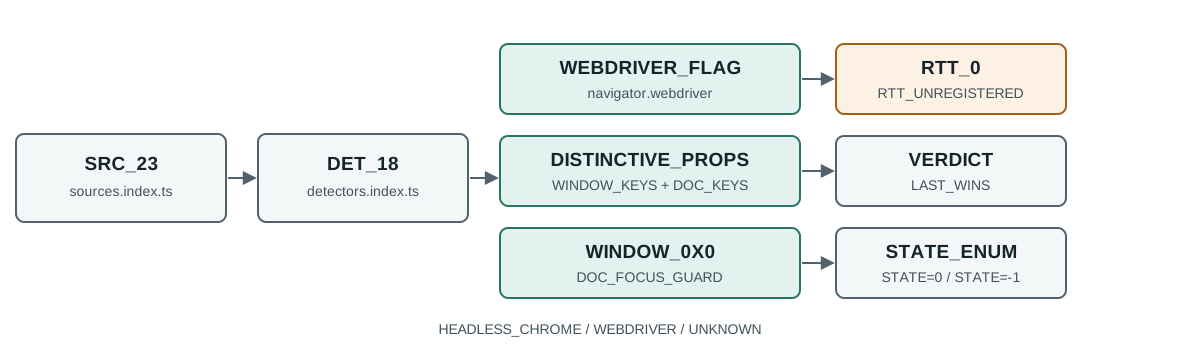
src/sources/index.ts registers 23 source functions: android, browserKind, browserEngineKind, documentFocus, userAgent, appVersion, rtt, windowSize, pluginsLength, pluginsArray, errorTrace, productSub, windowExternal, mimeTypesConsistent, evalLength, webGL, webDriver, languages, notificationPermissions, documentElementKeys, functionBind, process and distinctiveProps. Each source is a plain function returning a value or throwing. A source that cannot read its surface throws a BotdError carrying a State value, and collect() in src/api.ts converts that throw into a component of { state, error } instead of a value.
src/detectors/index.ts registers 18 detector functions in a fixed declaration order: detectAppVersion, detectDocumentAttributes, detectErrorTrace, detectEvalLengthInconsistency, detectFunctionBind, detectLanguagesLengthInconsistency, detectNotificationPermissions, detectPluginsArray, detectPluginsLengthInconsistency, detectProcess, detectUserAgent, detectWebDriver, detectWebGL, detectWindowExternal, detectWindowSize, detectMimeTypesConsistent, detectProductSub and detectDistinctiveProperties.
The detector directory holds 19 files. src/detectors/rtt.ts exports detectRTT, and detectRTT appears nowhere in that registry object. Comparing the registry keys against the exported names in the same checkout gives 19 files and 18 registered names, with rtt.ts the only file whose export is never reached. This is a source fact about one commit; it says nothing about a later release, and it says nothing about a hosted service that may import the function directly.
The fold in src/api.ts decides how a single verdict is produced. detect() walks detectors in declaration order, calls each one with the component dictionary, and assigns finalDetection every time a detector reports a bot. A detector that returns a string records that string as botKind; a detector that returns bare true records BotKind.Unknown. Because assignment wins over accumulation, the reported kind belongs to the last detector in the registry that fired, not to the most specific or most confident one. collect() runs the sources concurrently through Promise.all, so the component dictionary is complete before any detector sees it, and detector order alone decides the kind.
Run the detector functions over explicit component states
A component dictionary is the only input each detector reads, so the pinned functions can be executed against hand-written states without a browser, a profile or a network request. The command below bundles the pinned tree with esbuild and calls the exported detectors, printing one line per case:
npx esbuild src/detectors/index.ts src/api.ts \
  --bundle --format=cjs --platform=node --outdir=/tmp/botd-build
node /tmp/botd-probe.mjs
The probe supplies a base dictionary of android: false, browserKind: 'chrome', browserEngineKind: 'chromium' and documentFocus: true, then overrides one or two components per case. A success component carries { value, state: 0 } and an unreadable component carries { state: -1, error }, matching the State enum in src/types.ts (Success = 0, Undefined = -1, UnexpectedBehaviour = -3). The observed output of the pinned functions:
case 1 [detectWebDriver] bot: headless_chrome - driven browser: webdriver flag true
case 2 [detectDistinctiveProperties] bot: webdriver - sanitized flag but webdriver-shaped window property present
case 3 [detectDistinctiveProperties] bot: false - flag layer removed only, bridge gone too
case 4 [detectWindowSize] bot: headless_chrome - headless default window 0x0 while document has focus
case 5 [detectWindowSize] bot: false - headless report 0x0 but tab never focused
case 6 [detectPluginsArray] bot: headless_chrome - empty plugin list
case 7 [detectRTT] not-runnable: not registered in detectors/index.ts - connection rtt reported as zero
case 8 [detectWebDriver] bot: false - webdriver source unreadable instead of false
The eight cases above are decided by four small functions, which is worth reading directly instead of inferring from the output. src/detectors/webdriver.ts is a single line: it returns BotKind.HeadlessChrome only when webDriver.state === State.Success && webDriver.value. src/detectors/window_size.ts first checks that both windowSize and documentFocus are in State.Success, returns early when documentFocus.value is false, and only then compares outerWidth and outerHeight against zero. src/detectors/plugins_array.ts returns BotKind.HeadlessChrome when pluginsArray.state === State.Success && !pluginsArray.value. src/detectors/distinctive_properties.ts walks the returned object and returns the first bot name whose flag is truthy.
The same reading discipline applies when one detector clears and another does not. For the collection side of the same vendor, FingerprintJS OSS collection and provenance shows how components become a digest, while automation detection and prevention lists the wider set of surfaces a page can inspect, so a verdict from one function is never the whole picture.
Where clearing one surface leaves another signal
Cases 1 to 3 are the clearest result of the run. With webDriver set to a successful true, detectWebDriver reports headless_chrome. With webDriver set to a successful false but distinctiveProps carrying { webdriver: true }, detectWebDriver reports nothing and detectDistinctiveProperties reports webdriver instead. With both surfaces clean, detectDistinctiveProperties reports nothing and the case resolves to bot: false.
Two consequences follow, and both matter to anyone quoting a verdict from this library. The two checks are independent: clearing the flag does not clear the property list, because the list is read from Object.getOwnPropertyNames(window) and Object.getOwnPropertyNames(document) inside src/sources/distinctive_properties.ts, not from the flag. And the reported kind changes with the surface that survives: headless_chrome and webdriver are different labels produced by the same library from the same component dictionary, so a report that quotes one while the other existed is quoting registry order, not the set of signals present.
The property list is specific enough to check by hand. It covers 14 bot kinds and lists 26 window entries (one of them a pattern rather than a literal name) and 17 document entries, from awesomium and RunPerfTest on the CEF side to callPhantom and _phantom for PhantomJS. The WebDriver group alone carries webdriver, __webdriverFunc, __lastWatirAlert, _WEBDRIVER_ELEM_CACHE and ChromeDriverw on the window side, and __webdriver_script_fn, __driver_evaluate, __fxdriver_unwrapped, $cdc_asdjflasutopfhvcZLmcfl_ and $chrome_asyncScriptInfo on the document side. A review that inspects only window will miss the document group, and a review that inspects only the flag will miss both.
Which checks fail open when a value is missing
Case 8 shows the first false-negative branch. When the webDriver component sits in State.Undefined, detectWebDriver returns false, because the guard requires State.Success before it reads the value. An unreadable navigator.webdriver, such as a page that shadows the property, a realm where the read throws, or a wrapper that returns nothing, is therefore recorded as absent evidence of automation rather than as a positive signal. That is a defensible design for a library that prefers silence to a guess, but it means a missing value and a clean value are indistinguishable in the verdict.
Case 5 shows the second false-negative branch, and it is easier to miss because the components are present and valid. src/detectors/window_size.ts returns early when documentFocus.value is false, before the zero-size comparison runs. A headless window reporting outerWidth and outerHeight of zero is only flagged while the document is focused. A tab opened in the background, or a capture that runs before focus arrives, produces identical measurements and no verdict. The source comment states the intent, that a new background tab also reports a zero outer size, so the early return is deliberate, but the consequence for a reader is that the same numbers map to different verdicts depending on focus timing.
The third gap in this run is a different kind: not a false negative inside a detector, but a branch with no path to a verdict at all. detectRTT contains a real condition that returns BotKind.HeadlessChrome when rtt.value === 0, and the pinned registry never calls it. The rtt source is still collected, so the value is measured and placed into the component dictionary, but no registered detector reads it. Reading rtt.ts alone overstates the library; reading detectors/index.ts alone hides the branch. Only both files together show a collected signal that cannot reach the verdict.
Which branches narrow a verdict to one engine or value
The remaining cases make the specificity of each branch visible, and specificity is what a reader needs in order to know which verdict is even applicable. Each row below is a case the probe ran:
| Detector | Condition the run supplied | Result |
|---|---|---|
detectUserAgent | user agent string containing HeadlessChrome | headless_chrome |
detectUserAgent | ordinary Windows desktop Chrome string | false |
detectWebGL | vendor Brian Paul, renderer Mesa OffScreen | headless_chrome |
detectWebGL | ANGLE renderer on an NVIDIA adapter | false |
detectProcess | process object typed renderer with an electron version | electron |
detectNotificationPermissions | permission value true, browser kind chrome | headless_chrome |
detectEvalLengthInconsistency | evalLength 33 on the chromium engine | false |
detectEvalLengthInconsistency | evalLength 37 on the chromium engine | true |
detectLanguagesLengthInconsistency | empty language array | headless_chrome |
detectPluginsLengthInconsistency | zero plugins, chromium chrome | headless_chrome |
detectWindowExternal | external string containing Sequentum | sequentum |
detectMimeTypesConsistent | consistency value false | unknown |
detectDocumentAttributes | document element key list containing selenium | selenium |
detectProductSub | productSub value 20100101 in chrome | unknown |
Two rows deserve separate attention because they are counter-intuitive if you only read detector names. The detectEvalLengthInconsistency pair shows that the same function returns nothing for one length and a bot for another on the same engine: 33 is accepted because Chromium is in the allowed list for that length, while 37 is rejected because Chromium is not in the allowed list for that one. The function is not asking whether the value looks unusual; it is asking whether the value is unusual for the engine that was detected.
The detectNotificationPermissions row shows a browser gate that is easy to overlook. src/detectors/notification_permissions.ts returns nothing unless browserKind.value === BrowserKind.Chrome, so the same permission value can only ever produce a verdict in one browser family. A reader who tests that surface in a profile reporting another brand will see no verdict and could wrongly conclude that the value was accepted.
The bare-true rows behave differently from the named rows because src/api.ts maps true to BotKind.Unknown. detectEvalLengthInconsistency at length 37 prints bot: true in the case list, which becomes unknown in a final result, while detectMimeTypesConsistent with an inconsistent list already prints bot: unknown because it returns the name directly. A report that shows only unknown therefore carries less information than the detector that produced it, and the detector name is the part that survives the loss.
Make the run repeatable from the record
A probe is only useful if a second person can repeat it and reach the same lines. Four fields in the record make that possible, and each one closes a gap the others leave open.
The first is the commit 193c471ac70530afcebe5b09664c09f611d19218, because both detectors/index.ts and sources/index.ts are edited between releases and a registry key that exists today can be gone tomorrow. The second is the bundle step, because esbuild output is not byte-identical across versions, so recording the output digest lets a reviewer separate a source change from a tooling change. The third is the state convention, because the probe writes state: 0 for success and state: -1 for an unreadable source, and a reader who assumes a different mapping will read every result backwards. The fourth is the case list itself, because false from detectWebDriver means "the guard saw a non-success state" in case 8 and "the flag was false" in case 3, and only the case label tells the two apart.
Two habits keep the record honest. Prefer a discriminating pair over a single case: cases 3 and 2 together show that clearing the flag changes which detector speaks, which a lone case 3 does not show, and cases 1 and 8 together show that present-and-true and missing diverge in one branch while collapsing in another. And never describe the probe as a browser test. It runs pinned pure functions over dictionaries a reviewer wrote by hand; it reads no page, opens no profile and contacts no service, so a claim about what a real session reports still needs a separate authorized run.
The same discipline applies when the source is upgraded. Re-run the bundle step at the new commit, re-read the two registry files, and compare the case list rather than the summary line. A change in the registry changes which detectors can speak at all, a change inside one detector changes what a single case returns, and a change in a source changes which states are even reachable. Comparing only the final bot: true or bot: false line collapses all three into one, and the next reader then has to rediscover which one happened.
Read a verdict without overclaiming
A verdict from this library supports a narrow statement: in this commit, one of the registered detectors, given the component states it was handed, returned the named kind. It does not support a statement about a person, about intent, or about how a hosted service will treat the session. Because the fold is an overwrite, the reported kind can name a less specific signal than one that also fired, and because several detectors return bare true, a kind of unknown can stand in for a detector that had a specific reason.
Keep three things in a review record and the record stays useful. The immutable commit, because both the registry order and the property lists change between releases. The component states, because every detector guards on a state before it reads a value, and the false-negative branches live in that guard. The detector name, because one run can produce different kinds and only the name says which one produced the verdict. A fourth field helps when the question is about a specific surface: the count of sources collected, so a reader can see whether a missing signal was never measured or was measured and ignored.
The matching docs page for automation consistency describes how BotBrowser keeps navigator.webdriver consistent with the loaded profile and how to confirm that setting in a controlled page. This review adds the reading side: what a public detector does with that value, which companion surfaces it reads at the same time, and which of its own branches stay silent. The two halves answer different questions and neither replaces the other.
For any conclusion about a real service, use an authorized integration result from that service instead of extrapolating from this source review. A component state recorded in a fixture and a production verdict are different kinds of evidence, and the gap between them is where overclaiming happens.
Practical conclusion
Pin the commit, run the detector functions over explicit component states, and record the detector name beside the verdict. In this commit the registry exposes 18 detectors over 23 sources, detectRTT is exported but unregistered, a cleared WebDriver flag still leaves the property lists intact, and two guards, an unreadable component and an unfocused document, resolve to no verdict at all.
Sources
- BotD detector registry at the pinned commit
- BotD source registry at the pinned commit
- BotD verdict fold in
api.ts - BotD
webdriver.tsdetector - BotD
window_size.tsdetector - BotD
rtt.tsdetector - BotD
distinctive_properties.tssource - BotBrowser automation consistency documentation
Next reading
Use FingerprintJS OSS collection and provenance for the collection side of the same vendor, and automation detection and prevention when the question is which surfaces a page can read at all.
This article is part of the guide: What Is a Browser Fingerprint?
Related Articles
FingerprintJS OSS: Collection and Visitor Provenance
FingerprintHow to Read Browser Fingerprint Signals
FingerprintWhat Is a Browser Fingerprint?
FingerprintCrypto Randomness Observability and Browser Fingerprints
Fingerprintperformance.now: Timer Resolution and Fingerprinting
FingerprintV8Log Forensics: Runtime Evidence for Privacy Validation
Take BotBrowser from research to production
The guides cover the model first, then move into cross-platform validation, isolated contexts, and scale-ready browser deployment.