ua-parser-js: Client Hints, Bots and a 500-Char Cap
Run the pinned ua-parser-js bundle over fixed user agents and Client Hints to see which identity it reports, which markers it drops, and how a 500-character cap hides a bot token.
BotBrowser Team
Want the structured docs for Fingerprint?
This article lives in the editorial library. For step-by-step setup, reference material, and ongoing updates, jump into the docs section.
BotBrowser supports replaying an authorized same-origin fixture under a declared profile and keeping bounded observations about what a page reports, but it cannot make a third-party parser agree with the browser it is measuring, change a library's 500-character input cap, or turn a parsed label into a verdict about who is on the other end. This review pins the public ua-parser-js tree at commit bd7480198cd0d237b43a24a964f424727abb78e9 (package version 2.0.10), runs its bundled parser over a fixed list of user-agent strings and Client Hints header sets, and reports what the code actually returned.
TL;DR
- The pinned parser labels a headless user agent
Chrome Headlessand its own bot classifier still answersisBot=falsefor the same string. - An Electron application user agent is reported as plain
Chrome; the parser's browser name carries no automation signal there. - Supplying a user-agent string makes the parser ignore a contradictory
sec-ch-uabrand list, so Client Hints do not override what the string already said. - Input is trimmed at 500 characters, and a bot token that starts at index 500 is invisible to the classifier while a token starting at index 490 is found.
- All of this describes one commit and one bundle; it is not a statement about how any site scores a session.
Contents
- What the pinned package actually ships
- Run the parser over fixed user-agent strings
- Where the bot classifier disagrees with the browser name
- Where Client Hints stop mattering
- Where the 500-character cap hides a token
- Which rule lists feed the classifier
- What a mutation test would and would not show
- Read a parsed identity without overclaiming
What the pinned package actually ships
Version 2.0.10 splits src/ into seven directories. src/main holds the parser itself, src/bot-detection holds the classifier, src/browser-detection and src/device-detection hold separate matchers, src/extensions holds the bot, crawler and fetcher lists, src/enums holds the vocabularies, and src/helpers holds the small utilities. The published dist/ua-parser.pack.js bundle exports UAParser, VERSION and five enumerations (BROWSER, CPU, DEVICE, OS, ENGINE); the bot submodule is a separate entry that exports isBot, isAIAssistant and isAICrawler.
The two halves read the same string through different code paths, and that difference is the subject of this review. UAParser matches regular expressions against the user-agent text and, when it is given a headers object, against the Client Hints headers as well. isBot does something narrower: it parses the user agent through the extensions registry and then asks whether the resulting browser type is one of cli, crawler, fetcher or library. A library that produces a plausible browser name can therefore coexist with a classifier that says the string is not a bot, and the two results are answering different questions.
Two constants in src/main/ua-parser.js decide how much text either half can see. The parser declares UA_MAX_LENGTH = 500, and setUA applies trim(ua, UA_MAX_LENGTH) before any matching happens. Everything downstream, including the string the bot classifier re-parses, therefore works on at most the first 500 characters of whatever was handed in.
Run the parser over fixed user-agent strings
The probe loads the published bundle and the pinned bot submodule, then prints one line per input. It reads a fixed list; it loads no page, opens no profile and contacts no service:
node /tmp/uap-full-probe.mjs
The observed output, section by section:
section: user-agent parse
chrome-win: browser=Chrome/155.0.0.0 engine=Blink os=Windows device=desktop
safari-mac: browser=Safari/18.4 engine=WebKit os=macOS device=desktop
headless-linux: browser=Chrome Headless/155.0.0.0 engine=Blink os=Linux device=desktop
edge-win: browser=Edge/155.0.0.0 engine=Blink os=Windows device=desktop
electron-win: browser=Chrome/155.0.0.0 engine=Blink os=Windows device=desktop
googlebot: browser=undefined/undefined engine=undefined os=undefined device=desktop
iphone-safari: browser=Mobile Safari/18.4 engine=WebKit os=iOS device=mobile
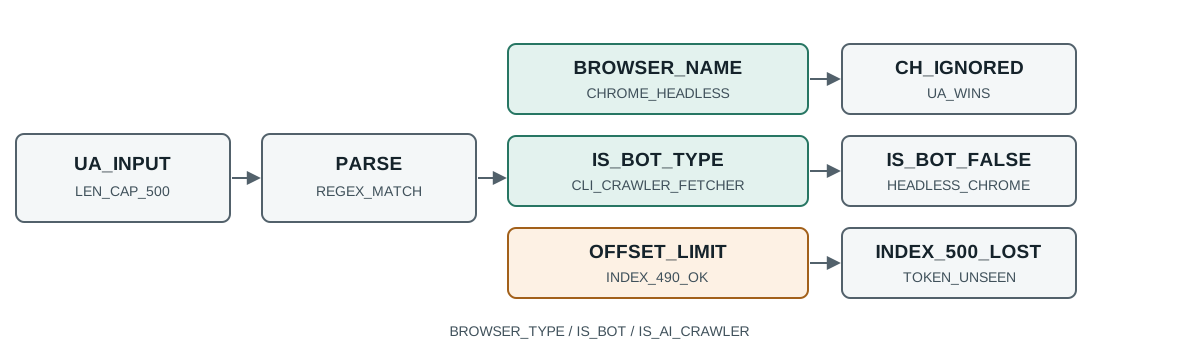
Three details in that block matter more than the rest. The headless-linux line reports a distinct browser name, Chrome Headless, which means the parser does carry an automation-shaped label for that string. The electron-win line reports plain Chrome, so an application built on Electron is indistinguishable from a desktop browser in this field. And googlebot reports undefined for browser, engine and OS while still reporting device=desktop, which shows that "no matches" is expressed as absent fields rather than as an error.
The device field deserves its own note because it is easy to read as a stronger claim than it is. googlebot and chrome-win both come back as desktop, and so does headless-linux; the field is a fallback bucket, not a measurement. A reviewer who reads device=desktop as "this really is a desktop machine" has read a default as evidence.
Where the bot classifier disagrees with the browser name
The second section of the same run asks the classifier about every string; the block below is an excerpt of the full output in the evidence file:
section: bot classifier
chrome-win: isBot=false isAIAssistant=false isAICrawler=false
headless-linux: isBot=false isAIAssistant=false isAICrawler=false
electron-win: isBot=false isAIAssistant=false isAICrawler=false
googlebot: isBot=true isAIAssistant=false isAICrawler=false
The headless-linux row is the interesting one. The parser calls that string Chrome Headless, and the classifier calls it not a bot. Both are correct statements about their own rule set: the classifier does not consult the browser name for HeadlessChrome; it consults the browser type, and a headless Chromium build still declares the ordinary browser type. A report that quotes one of those two answers and implies the other is misreporting the library.
The electron-win row repeats the pattern from the other direction. The parser gives no automation label at all, and the classifier agrees there is no bot. An Electron application is therefore invisible to both fields unless some other part of the stack looks at the Electron/ token directly, which this bundle does not do in either code path the probe exercised.
The googlebot row shows the classifier's strongest result, isBot=true, while the parser returns nothing. That is the inverse case: the crawler list recognises the string even though the generic browser matcher has no pattern for it. Reading only browser.name would make that row look like a parse failure rather than a bot match.
For contrast, the AI-oriented lists behave differently from the generic bot list. In the narrower probe the classifier answered isAICrawler=true for GPTBot and ClaudeBot, and isAIAssistant=true for ChatGPT-User and Claude-User, with isBot=true for all four. A plain HeadlessChrome string and an Electron string both stayed false on all three predicates, which is consistent with the table above.
Where Client Hints stop mattering
The third section feeds a Chromium-style brand list and platform headers, then changes only the user-agent string:
section: client hints
hints-only: browser=undefined/undefined os=undefined device=desktop
ua-safari-plus-chrome-hints: browser=Safari/18.4 os=macOS device=desktop
The first row is the one people expect: with no user agent and only sec-ch-ua headers, the parser returns nothing in this call path. The headers alone are not enough to produce a browser name here, because the brand list is consumed by the Client Hints parse step rather than by the generic matcher, and the probe called the plain result.
The second row is the surprise. The user-agent string says Safari, the headers say Chromium and Google Chrome on Windows, and the result is Safari/18.4 on macOS. In this path the string wins and the contradictory brand list is ignored, so a page whose user agent and Client Hints disagree is reported as whatever the string claimed. That is a useful property to know before treating a parser label as a cross-check: a mismatch you expected to be caught can pass straight through.
The reason the second row keeps the string is visible in parseCH(). When a brand list is present, the loop walks every brand, skips any name matching /not.a.brand/i, and only overwrites the current name under a narrow condition: the previous name must start with Chrom, or the previous name must be Edge and the new brand must be WebView2. With a previous name of Safari, neither condition holds, so every brand in the list is examined and none replaces the parsed name. The Chromium entry is used only for the engine version when the item type is ENGINE, not for the browser name.
getBrowser().withClientHints() exists and does consult the headers, and it returns a thenable rather than a plain object. The probe confirmed that shape, and also confirmed that awaiting it on the contradictory inputs still returned Safari/18.4, because the same reconciliation rule keeps the non-Chromium name. The important caveat for a reader is that a synchronous getResult() and an awaited withClientHints() are different call shapes with different answers, and a report should say which one produced the label.
A parser label is only one reading of the same session. When the question is what a detector does with the automation-shaped names this run produced, the BotD detector registry review runs a different public detector over explicit states, and automation detection and prevention lists the wider surface set a page can inspect. Reading them together keeps one library from standing in for the whole stack.
Where the 500-character cap hides a token
The last section tests the constant named in src/main/ua-parser.js:
section: marker position vs 500-char cap
pad=430: totalLength=500 markerStart=490 isBot=true
pad=440: totalLength=510 markerStart=500 isBot=false
Two strings differ only in how much padding sits before a GPTBot/1.2 token. At a total length of 500 with the token starting at index 490, the classifier finds it. At 510 characters with the token starting at index 500, the classifier does not. The boundary is exactly where trim(ua, UA_MAX_LENGTH) cuts the string, so the token is not misparsed; it is never seen.
That is a concrete failure mode with a clear shape: a page can be recognised as a bot when its token sits inside the first 500 characters and silently pass when the same token is pushed just past the boundary by a long comment or extension list. Nothing about the token changed, only its offset. A test that appends a marker to a realistic long user agent and then reports "not detected" is measuring the cap, not the token.
The mitigation is not to raise the constant in a copy of the library, because the pinned behaviour is what other code in the stack was written against. It is to keep the observation honest: record the input length beside the verdict, and when a marker is expected, confirm that its offset is inside the cap. A 10-character token at index 500 and the same token at index 490 are the same string content and different evidence.
Which rule lists feed the classifier
The classifier is not one list; it is three wrappers over three registries. BotTypes reads the browser type produced by the Bots extension and treats cli, crawler, fetcher and library as bot types. AIAssistants names specific entries in the Fetchers registry, and AICrawlers names specific entries in the Crawlers registry. The lists are long in a way that matters: the pinned AICrawlers array alone names 53 distinct crawler entries across vendors as different as Anthropic, ByteDance, Cloudflare, Hugging Face, Meta, OpenAI, Semrush and Zhipu, and the AIAssistants array names 8 entries, one each for Amazon, Anthropic, Cohere, DuckDuckGo, Google, Mistral, OpenAI and Perplexity.
That structure explains why the same string can be isBot=true and isAICrawler=false. isBot asks only whether the parsed type is a bot type, while isAICrawler asks whether the parsed browser name matches one of 53 enumerated names. A crawler that matches the Bots extension by type but is absent from the enumerated AI crawler list is a bot and not an AI crawler. Nothing is wrong with either answer; they are two queries against two different sets.
The lists also age. A name that exists in the pinned 53-entry array today can be removed or renamed in a later release, and a new crawler that appears after this commit is invisible to every predicate by construction. That is the same reason the review pins a commit rather than a branch: the answer is a property of the list revision as much as of the input string.
What a mutation test would and would not show
A tempting next step is to change one character in a user agent and claim the parser is brittle. The probe already suggests why that would be a weak claim. The Electron/33.0.0 token was present in the string and changed nothing, because neither code path the probe exercised looks for it; a mutation that removed the token would also change nothing, and the test would look like a demonstration of robustness rather than of an unused field.
The inverse is more informative. Appending a GPTBot/1.2 token to a Chrome string flipped isBot from false to true in the narrower probe, so a mutation on that token demonstrates that the classifier reads it. Testing the same token at two offsets, 490 and 500, then isolates the cap rather than the token. A single mutation cannot separate "the parser ignores this text" from "the parser never saw this text", and only an offset pair can.
The same logic applies to headers. A run that adds a contradictory sec-ch-ua brand list to a Safari user agent and observes no change is evidence that the string took precedence in that call path. A run that removes the user-agent string entirely and observes undefined is evidence that the headers alone are not consumed by the plain result call. Two runs, two different statements; one run would have conflated them.
Read a parsed identity without overclaiming
A parser result supports a narrow statement: this commit, given this string and these headers, produced this label. It does not support a statement that the session is a browser, a bot, or a person, and it does not support a statement that another site will reach the same conclusion, because another site may pin a different version, pass different headers, or ask a different question.
Keep four fields together and the record stays usable. The commit, because pattern lists and the cap are both edited between releases. The input, verbatim and with its length, because the cap makes offset part of the input. The call shape, because getResult() and withClientHints() can disagree. And the predicate, because isBot, isAIAssistant and isAICrawler are three separate answers that the probe showed splitting on the same string family.
The matching docs page on navigator properties describes how BotBrowser keeps navigator.platform, navigator.userAgentData and related values aligned with the loaded profile. This review adds the reading side: what a widely used parser does with the strings those values produce, where its browser name and its bot classifier disagree, and where its own input cap makes a marker invisible. Consistency of the reported values and correctness of a third-party parse are separate questions.
For any decision about a real session, use an authorized integration result from the system that makes the decision instead of extrapolating from this source review. A parsed label recorded in a fixture and a production verdict are different kinds of evidence, and the gap between them is where overclaiming happens.
Practical conclusion
Pin the commit, run the parser over fixed inputs, and record the length, the call shape and the specific predicate beside each label. In this commit a headless user agent is named Chrome Headless while the bot classifier answers false, an Electron string is named Chrome, a contradictory Client Hints brand list is ignored when a user-agent string is present, and a token that starts at index 500 is invisible while the same token at index 490 is found.
Sources
- ua-parser-js main parser at the pinned commit
- ua-parser-js bot-detection submodule
- ua-parser-js extensions registry
- MDN: User-Agent client hints
- MDN: navigator.userAgentData
- BotBrowser navigator properties documentation
Next reading
Use Client Hints fingerprinting for how the header set itself varies, and browser user agent reduction and Client Hints migration for what browsers removed from the string.
This article is part of the guide: What Is a Browser Fingerprint?
Related Articles
BotD Detector Registry: Which Checks Actually Run
FingerprintClient Hints Fingerprinting: HTTP Headers as Identity
PlatformUser-Agent Reduction and a Practical Client Hints Migration
IdentityUser-Agent and Client Hints: One Consistent Identity
IdentityBrowser Identity Surfaces: A Practical Consistency Overview
IdentityBrowser Brand Mismatches in Chrome, Edge, and Brave
Take BotBrowser from research to production
The guides cover the model first, then move into cross-platform validation, isolated contexts, and scale-ready browser deployment.