Compression Streams API: Browser Boundaries
Use CompressionStream and DecompressionStream with gzip or deflate while keeping backpressure, cancellation, and data limits explicit.
BotBrowser Team
Want the structured docs for Platform?
This article lives in the editorial library. For step-by-step setup, reference material, and ongoing updates, jump into the docs section.
The Compression Streams API can compress or decompress a web stream without loading all data into one JavaScript buffer. That sounds simple until a response body, a text decoder, a cancellation signal, and a server content-encoding policy share the same pipeline. BotBrowser supports replaying an authorized fixture that records visible success, cancellation, and error states; it cannot certify a remote server's compression policy or cryptographic integrity. Use browser performance measurement when the question is latency, and WebAssembly portability when a codec or fallback crosses a runtime boundary.
TL;DR
CompressionStreamandDecompressionStreamconvert bytes with a declaredgzip,deflate, ordeflate-rawformat; they do not validate application meaning.- A
ReadableStreampipeline keeps memory bounded only when the consumer applies backpressure and the owner cancels every branch it created. - Decode text after decompression, preserve byte ownership, and treat malformed input as an explicit error rather than an empty result.
- Browser support, server
Content-Encoding, and data integrity are separate questions that need separate records.
Contents
- Choose the format and owner
- Build a bounded byte pipeline
- Handle text, cancellation, and errors
- Verify browser boundaries with a fixture
- Practical conclusion
Choose the format and owner
The Compression Streams specification defines CompressionStream and DecompressionStream as TransformStream interfaces. The constructor receives a format string. gzip wraps DEFLATE with a header and trailer, deflate uses the zlib-wrapped form, and deflate-raw contains the raw DEFLATE stream. The format is part of the data contract. A producer and consumer that disagree about it do not have a recoverable negotiation merely because both APIs exist.
The MDN CompressionStream reference lists the supported formats and the conversion behavior. The MDN DecompressionStream reference describes the inverse conversion and browser availability. Feature-detect both constructors before choosing a native path. A missing constructor is a capability result, not evidence that the data is corrupt.
Assign ownership before connecting streams. The code that receives a Response.body owns the reader, the abort controller, the decompressor, and the text decoder until it hands a complete result to the application. A helper that returns only a promise but keeps a reader alive after navigation has created an ownership leak. Write the owner into a small record such as fixtureId, format, source, consumer, and outcome.
Do not confuse transport compression with application compression. A server may send Content-Encoding: gzip, in which case the browser's fetch implementation can transparently decode the response before JavaScript sees Response.body. A page that then applies DecompressionStream('gzip') to those bytes may be double-decompressing. Conversely, a custom endpoint may return a gzip member as opaque binary data with Content-Type: application/octet-stream; the application then owns decompression explicitly. Inspect the response headers and the API contract before adding a conversion.
The same boundary applies to uploads. If a service accepts a compressed request body, the application owns the byte stream and the server must document the expected format. A browser conversion does not set Content-Encoding by magic, and a header does not prove that the body bytes are valid gzip. Keep the request header, conversion format, and server response as three fields in the test record. This prevents a proxy or framework from being blamed for a mismatch that was created in the page.
The Chrome Developers Compression Streams article describes the API as a streaming alternative to bundling a compression library. Treat that article as an implementation introduction, not as a promise that every embedded browser, service worker, or server adapter exposes the same format list. Compatibility belongs in the fixture, while the specification defines the byte-level contract.
Build a bounded byte pipeline
The simplest native path uses pipeThrough() and pipeTo() so that queueing and backpressure remain part of the streams model:
const controller = new AbortController();
const input = new Blob([new TextEncoder().encode('owned fixture')]).stream();
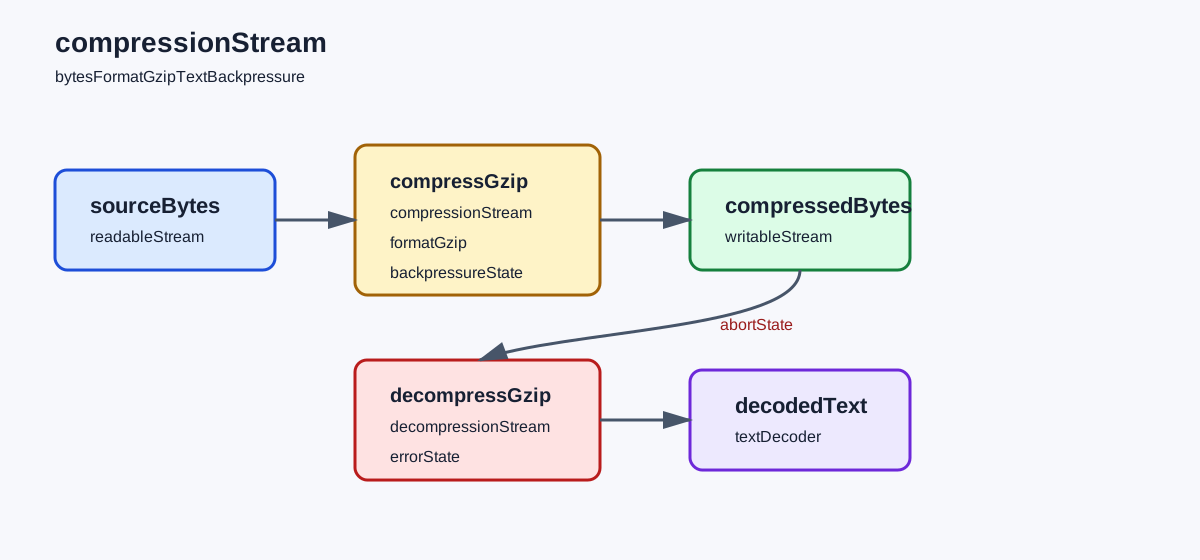
const compressed = input.pipeThrough(new CompressionStream('gzip'));
const output = new WritableStream({
  write(chunk) {
    recordChunk(chunk);
  },
  close() {
    record.outcome = 'compressed';
  },
  abort(reason) {
    record.outcome = 'aborted';
    record.reason = String(reason);
  },
});

await compressed.pipeTo(output, { signal: controller.signal });
The example records chunks instead of concatenating them into an unbounded array. A real application may write to a file, an upload request, or a bounded parser. The important contract is that the consumer controls demand and the owner can cancel the whole pipe. pipeThrough() returns a new readable side and keeps the conversion's writable side connected; pipeTo() completes only after the destination closes or the signal aborts.
For a useful replay, keep the fixture small enough to inspect and repeat it with the same byte limit. Compare the first differing state, such as a missing constructor, an aborted sink, or a decoder failure, before changing the implementation. This makes a browser boundary observable without retaining private response data.
Backpressure is not a compression ratio guarantee. It is a flow-control signal that lets a slower writable side reduce demand on upstream readable sides. Chunk boundaries can change between browser versions and do not identify the original network packets. Measure total bytes and visible completion, not a presumed number of write() calls. If a destination buffers without a limit, the pipeline can still exhaust memory even though every object is a stream.
Use a byte budget for application-owned buffers. For example, reject a fixture after 8 MB of compressed data, and stop reading a decompressed body after the application-specific maximum. The limit protects the consumer from expansion bombs and accidental unbounded retention; it is not a checksum. Record bytesIn, bytesOut, limitBytes, and outcome without storing the data itself. A small synthetic fixture is enough to test state transitions.
A stream can be readable while its decoded application result is invalid. JSON parsing, archive validation, and record schema checks belong after decompression and decoding. Do not infer “valid” from a successful pipeTo() alone. The conversion only proves that the byte sequence was accepted by the codec implementation. The application still has to validate content type, length, schema, and authorization.
When a stream has multiple consumers, teeing it creates two branches with separate demand and cancellation. Do not tee a response merely to log raw bytes and parse them later. If logging is needed, record lengths, format, and state labels. Raw compressed bytes may still contain credentials, identifiers, or private content, and decompressed copies multiply the retention risk. Keep one owner for the result and make diagnostics opt-in.
The pipeline also crosses page and worker boundaries. A worker can own compression work, but it cannot decide which page route still needs the result. Send a small state message such as compression-complete or compression-aborted, not the entire response body. If a service worker owns Response.body, document whether the page receives a decoded response, an opaque compressed member, or a stream that has already been consumed. A second reader cannot recover bytes after the first owner has closed the body.
Handle text, cancellation, and errors
Decompression yields bytes. Apply TextDecoder after the decompressor, and choose the decoder mode from the data contract. UTF-8 is common, but a successful byte conversion does not establish that the bytes are UTF-8. A decoder with { fatal: true } can turn an invalid sequence into an explicit error; replacement characters hide that boundary and may make damaged data look usable. Record decode-error separately from decompress-error.
const decoded = compressedResponse.body.pipeThrough(new DecompressionStream('gzip'));
const reader = decoded.getReader();
const decoder = new TextDecoder('utf-8', { fatal: true });
let text = '';
try {
  for (;;) {
    const { value, done } = await reader.read();
    if (done) break;
    text += decoder.decode(value, { stream: true });
  }
  text += decoder.decode();
  record.outcome = 'decoded';
} catch (error) {
  record.outcome = error.name === 'AbortError' ? 'cancelled' : 'decode-error';
} finally {
  reader.releaseLock();
}
The loop is intentionally small, but text += is not an appropriate strategy for a multi-megabyte response. A production parser should consume chunks incrementally or write to a bounded sink. The fixture uses short text so the state transition stays visible. It also keeps a single reader owner. Calling getReader() twice on the same stream is a lock error, not a decompression failure.
Cancellation has at least three meanings. The caller may abort before the conversion sees bytes, the destination may reject after partial output, or navigation may remove the component that requested the stream. Keep cancelled, sink-error, and owner-gone distinct when the recovery action differs. An AbortSignal stops the pipe, but it does not undo bytes already written to a server or erase a copy retained by another service.
When a decompressor rejects malformed input, preserve the original application state and expose a bounded recovery action. Do not retry the same bytes indefinitely, because a deterministic format error will never become a network success. A retry can make sense after a fresh response or a changed format negotiation. Record the attempt number and the first error class, then discard the reader and controller owned by the failed attempt.
A failed conversion can leave a downstream writable closed while upstream work still has a reference. Use the pipe options and the owner cleanup path to abort both directions, then verify that no task, reader, or timer remains. The cleanup assertion is part of the fixture. It catches a common leak where a cancelled navigation leaves a decompression promise waiting for a chunk that will never arrive.
The Response lifecycle is another error boundary. A body can be null, already consumed, locked by another reader, or interrupted by a network error before decompression starts. Classify those cases before constructing DecompressionStream. A body-null result is different from unsupported-format, decompress-error, and decode-error. The distinction tells support whether to inspect the server, the browser capability, or the application parser.
Do not use decompressed data as proof of authenticity. Compression formats have checksums for some framing errors, but they are not an application signature and do not identify the sender. If the application needs authenticity, verify a separate signature or authenticated transport record. Keep the integrity result next to the decompression result so a successful conversion cannot be mistaken for a security decision.
Verify browser boundaries with a fixture
Use one synthetic fixture with four rows: native gzip compression, native gzip decompression, an aborted pipe, and malformed bytes. Run it with the API available, with the constructors absent, and with a response body already consumed. The expected result is a state record, not a universal chunk order:
| Case | Expected state | Failure class to inspect |
|---|---|---|
CompressionStream('gzip') receives bytes | compressed with bounded bytesOut | unsupported-format or sink error |
DecompressionStream('gzip') receives the fixture | decoded and valid UTF-8 | decompress-error or decode-error |
| Abort signal fires during piping | cancelled and both owners close | leaked reader or partial-result overwrite |
| Malformed member reaches decompressor | decompress-error | retry loop or empty-success bug |
Response.body is null or consumed | body-null or body-locked | wrong owner assumption |
The fixture should also capture browserVersion, implementation, format, bytesIn, bytesOut, limitBytes, outcome, and fixtureId. implementation can be native, fallback-unavailable, or server-decoded; it explains why two runs followed different branches. Keep the values synthetic and bounded. Do not include a real response body, account id, endpoint, or compressed archive in the review record.
BotBrowser can replay this declared fixture in an authorized context and record visible states such as compressed, decoded, cancelled, and decompress-error. It cannot control a remote server's Content-Encoding, prove that a proxy preserved every byte, or certify cryptographic integrity. A successful browser fixture demonstrates the chosen page pipeline, not every server or browser combination.
Compare the first changed field after a browser or service change. If implementation changes, inspect feature detection and response headers. If format changes, inspect the producer contract and Content-Encoding. If bytesOut crosses limitBytes, inspect expansion and retention policy. If outcome changes to body-locked, inspect reader ownership. This order keeps a stream diagnosis smaller than a network capture.
Service workers deserve one explicit test. Fetch the same synthetic resource through a worker and through a window, then record who consumes Response.body. If the worker decompresses and returns a new Response, the page should not add a second decompressor. If the worker passes an opaque binary member through, the page owns the conversion. The test should state which contract is intended and fail when ownership changes silently.
Uploads need a separate row from downloads. A request body piped through CompressionStream may be cancelled when the user leaves the page, while a download body may be cancelled when the parser reaches its byte budget. The two paths share the conversion API but not the owner or recovery action. Keep request and response records separate so an upload retry cannot accidentally reuse a consumed download stream.
A fallback can be honest without pretending to be native. If a browser lacks CompressionStream, the application may use a vetted library, a server endpoint, or an uncompressed path. Label the implementation and preserve the same size, cancellation, and integrity checks. Do not quietly send a large uncompressed body when the server contract requires gzip, and do not claim that a library fallback has identical chunking or timing.
The closest reading on timing is Browser Performance Measurement with the User Timing API, which shows how to measure an owned interval without turning it into a device claim. WebAssembly feature detection and module portability covers capability probes and fallback records for another binary boundary. Compression Streams adds a different question: which owner controls bytes, decoding, cancellation, and integrity at each stage?
Keep the source claim, fixture result, and product decision separate. The specification can define gzip; MDN can describe browser availability; a fixture can show one successful decode; and the product team can decide whether to ship a compressed response. None of those records alone proves that a remote origin sends the expected bytes or that a user can recover from a malformed response. The separation is what makes the article useful during a rollout.
If an incident reports “compression broke the page,” ask for the smallest state record first. Request format, implementation, bodyState, outcome, bytesIn, bytesOut, and the first error class. Avoid requesting raw data until an authorized diagnostic requires it. A state record often identifies a double-decompression bug or a locked body without exposing private content.
Finally, review the fixture after changing text decoding, parser limits, service-worker ownership, or server headers. A codec upgrade can preserve decoded while changing expansion size, and a framework update can consume the body before the page sees it. Repeat the same rows, retain the previous record, and name the first changed field. This is enough evidence for a bounded release decision without treating stream internals as a fingerprint.
Public sources
- Compression Streams specification
- MDN: CompressionStream
- MDN: DecompressionStream
- Chrome Developers: Compression Streams API
- BotBrowser: Automation consistency
Practical conclusion
Declare the format, assign one owner to each stream, and keep decompression, text decoding, cancellation, and integrity as separate outcomes. Apply backpressure through the stream consumer, enforce a byte budget, and discard a failed reader instead of retrying deterministic corruption. Re-run the bounded fixture after browser, server, or service-worker changes, then decide from the first changed state rather than from chunk counts or a successful conversion alone.
This article is part of the guide: Web Platform Surfaces: A Consistency Review Map
Related Articles
WebTransport: Origin, Stream, and Privacy Boundaries
PlatformWebAssembly Feature Detection and Module Portability
PlatformWeb Share API: Permission Boundaries and Safe Fallbacks
PlatformBrowser API Integrity Across Realms
PlatformWebAssembly Behavior Across Browser Platforms
Platformscheduler.postTask Priorities for Responsive Browser Work
Take BotBrowser from research to production
The guides cover the model first, then move into cross-platform validation, isolated contexts, and scale-ready browser deployment.