BrowserLeaks WebRTC Test Report Fields
Map BrowserLeaks WebRTC support, ICE, SDP, and media-device fields to browser operations without treating one row as a leak verdict.
BotBrowser Team
Want the structured docs for Fingerprint?
This article lives in the editorial library. For step-by-step setup, reference material, and ongoing updates, jump into the docs section.
The BrowserLeaks WebRTC test displays several separate observations: interface support, gathered ICE candidates, a session description, and media-device state. BotBrowser documents browser-level WebRTC and media-device controls, but this report is not a BotBrowser compatibility test and one displayed row cannot establish identity, anonymity, or a universal leak verdict. The useful reading task is to trace each row to the operation that produced it and keep the evidence from one path separate from the others.
TL;DR
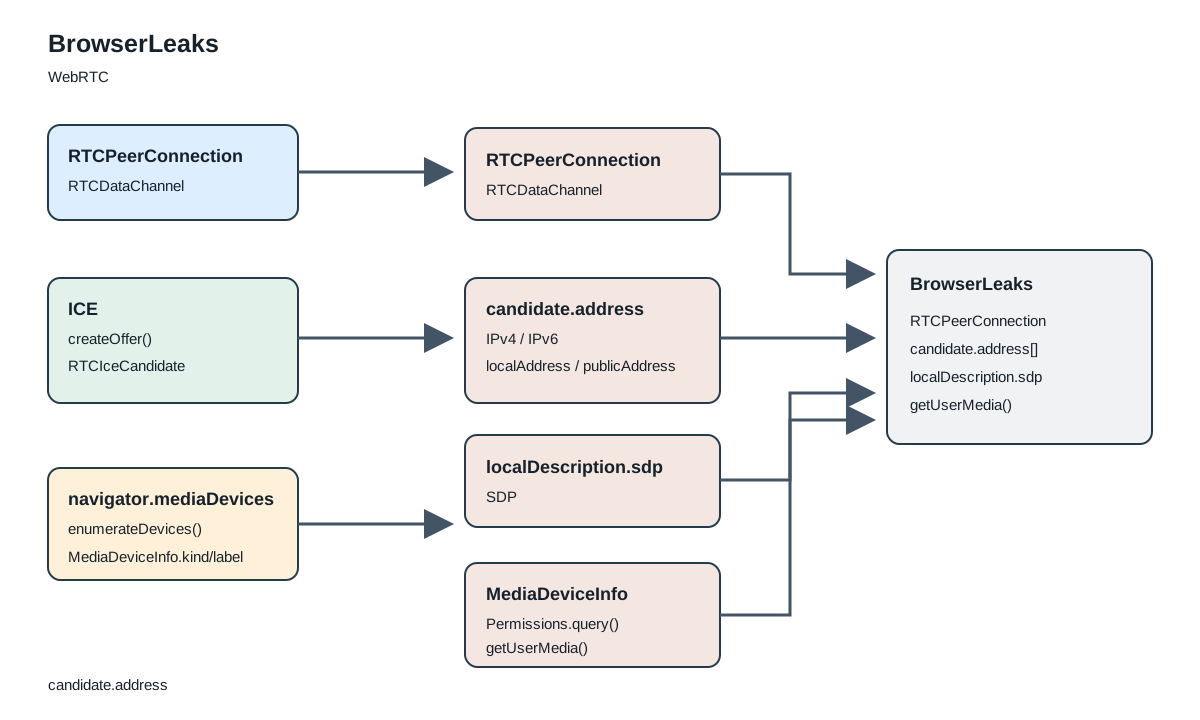
The public BrowserLeaks page labels separate interface checks, an ICE gathering result, an SDP log, and media-device information. Its page-versioned client script creates an RTCPeerConnection, requests an offer, listens for candidate events, and separately queries media devices and permissions. A candidate address, support flag, permission state, or device row is evidence about that operation in that context; it is not a complete account of a network path or a person's identity.
Contents
- The report is several paths, not one score
- Support checks and candidate gathering answer different questions
- Candidate labels are a projection of gathered data
- The SDP log is not a packet capture
- Media devices, permissions, and capture stay separate
- A field-to-operation reading table
- What the report cannot establish
- Practical conclusion
The report is several paths, not one score
The BrowserLeaks WebRTC page presents a report with distinct sections rather than a single numeric score. The visible headings include WebRTC support, local and public IP labels, a session description, and media devices. The page also contains separate buttons for requesting audio or video capture permission. This layout matters: each section is filled by a different browser-facing operation, and the report does not make all of those operations succeed merely because one section has a value.
The page loads a public client script whose URL currently carries version token 86970852. That script is a source for this description of the page's behavior, not a stable WebRTC standard and not an audited source repository. A later version could change the fields, timeouts, or parsing rules. The visible HTML and script therefore answer a bounded question: what this retrieved page version asks the browser to do and where it places the resulting values. They do not prove how every browser, network, extension, or future BrowserLeaks version behaves.
This differs from the BotBrowser WebRTC leak-prevention documentation, which explains controls for ICE and SDP behavior, and from the media-device documentation, which describes profile-backed enumeration. Here, the subject is the BrowserLeaks report itself. The separate CreepJS WebRTC field analysis follows another collector's transformations; its field names and branches should not be transferred to BrowserLeaks.
Keeping this scope narrow avoids a common interpretive error. A report can include both RTCPeerConnection: True and an empty address area, or show a media-device list while a capture request remains pending or denied. Those states are not internally contradictory. Support means the interface was found; gathering and permission actions are later operations with their own outcomes.
Support checks and candidate gathering answer different questions
The public page renders two support rows: RTCPeerConnection and RTCDataChannel. In the versioned client script, the constructor helper tries the standard and prefixed constructor names in the page context and in a sandboxed iframe. It then checks whether the resulting object exposes createDataChannel. These are capability checks on interface availability. They do not create a network route, establish that ICE gathering completed, or show that a remote peer received anything.
Candidate collection is a separate path. The script creates another peer connection configured with Google's public STUN endpoint stun:stun.l.google.com:19302, creates a data channel when that method exists, and requests an offer. The offer asks to receive audio and video; if that form fails, the script attempts a simpler offer. When an offer is accepted locally, the script sets it as the local description and starts processing candidate events. These calls explain why the page can produce candidate-related output without a user starting an application call, but they do not constitute a test of every application, TURN configuration, or peer-to-peer session.
The script collects values from both the icecandidate event and candidate-shaped lines in localDescription.sdp. It deduplicates parsed address strings, waits for the gathering path to finish or reach its timeout branch, writes the SDP text into the visible log, then closes the peer connection. The event stream and the SDP representation are related views of one negotiation, not two independent network scans. A value repeated in both places should not be counted as two independent interfaces or two separate leaks.
The browser API defines what an RTCPeerConnection and its ICE exchange represent; the page chooses which calls to make and which values to display. The W3C WebRTC specification and MDN's RTCPeerConnection reference describe the interface contract. BrowserLeaks' test-specific choices, such as its STUN endpoint, offer fallback, collection timeout, and display text, come from its own client script. A standard describing a candidate event does not certify the report's classification or its conclusion.
Candidate labels are a projection of gathered data
The page displays separate local and public address areas. The client script collects values from icecandidate events and localDescription.sdp, extracts address-shaped text, checks it against a local-range list, and places unique values into one of two display groups. The ICE candidate pooling analysis explains why candidate timing matters. This is a report-specific projection, not the complete candidate object, a packet trace, or an inventory of every address reachable by the operating system.
This distinction is important when the visible result is empty. The script may not receive a candidate that matches its parser, the browser may apply privacy behavior, the selected route may not produce an address in the expected form, or the report may exit through a timeout or error state. An empty area means that this page version did not render a parsed value in that field under this run. It does not prove that the host has no local address, that no network path exists, or that all remote observers see the same thing.
Likewise, a local-group value does not automatically expose a physical interface. The script's range check answers only whether the parsed text matched its own local-range rules. It does not establish which adapter supplied the address, who controls that adapter, or whether a separate peer could use it. Public-group values are report labels for parsed addresses outside those local rules; they should not be read as a complete map of public reachability or as proof that a proxy was bypassed.
Address parsing is also lossy. The parser searches for IPv4- or IPv6-shaped substrings rather than preserving a typed candidate record with every related field. The collector does not display a full provenance object alongside each address that would let a reader reconstruct its foundation, transport, component, related address, or candidate-pair selection. A list of unique address strings cannot answer those omitted questions. When an application needs ICE diagnostics, its own selected candidate pair and connection statistics are separate evidence, with their own scope and permissions.
The BrowserLeaks page is useful as a public observation surface because it shows what its current test collects. It is not a general detector verdict. For privacy reviews, distinguish the data source (event or SDP), the parser (address extraction), the grouping rule (local-range match), and the display field. Collapsing those steps into “the browser leaked” loses information about what the page actually observed.
The SDP log is not a packet capture
The Session Description section includes an SDP log taken from localDescription.sdp. SDP is a text description used in negotiation. It can include media sections, codec attributes, ICE parameters, and candidate lines; the exact fields depend on what the browser creates and what has been gathered by the time the report reads it. It is not a record of packets sent across the network and does not prove that a remote endpoint received, accepted, or used each line.
The script normalizes the initial SDP version line when needed, then renders the local description into a textarea. That text belongs to the browser's local negotiation state. It is distinct from the report's derived address lists: the same candidate text may appear in the SDP log and also be parsed into a local/public group. Treating the raw log and the grouped list as independent confirmations would double-count a single source.
The log also does not show every application-level property of a real call. This page creates its own peer connection, its own offer, and its own ICE configuration. A video-conference application may use a different SDP offer, different ICE servers, a relay policy, a different call lifecycle, or a different origin and permission context. The BrowserLeaks output cannot be generalized to those conditions without evidence from that application path.
A useful way to interpret the log is to ask three bounded questions. Which text was present in the local description? Which lines did this script parse into address-shaped strings? Which parsed values did its local-range helper place into a display group? Whether any peer actually received a packet cannot be answered by this textarea alone. That needs transport-level or application-level evidence that the page does not render in this field.
Media devices, permissions, and capture stay separate
The report's Media Devices section is a different branch from ICE candidate gathering. The client script checks whether navigator.mediaDevices.enumerateDevices() exists and calls it when available. For each returned MediaDeviceInfo, it formats kind, label, deviceId, and groupId. It separately records whether audio-input and video-input rows have non-empty labels. The browser can expose different row counts and labels depending on context, permission, policy, and implementation; these rows are not a hardware inventory.
The page also queries microphone and camera permission state through navigator.permissions.query() where that API and permission name are supported. These values are presented separately from the device rows. Permission query support can vary, and a rejected or unsupported query is not the same as a denied permission. A prompt state is not a capture grant. An empty label does not prove that the device does not exist; it may reflect disclosure rules or the current permission state.
Audio and video capture are explicitly separate actions. The page's buttons call getUserMedia() with an audio-only or video-only request. The script updates the corresponding result area from that promise's success or failure. Enumeration does not automatically open the microphone or camera, and a permission state does not prove that a usable stream can be acquired. Conversely, a successful capture request for one kind does not mean the other kind is granted or available.
The separation matches the browser API model. MDN's enumerateDevices reference describes a permission- and policy-filtered list, while MDN's getUserMedia reference describes a request that can prompt, reject, or return a stream. The report presents both surfaces because they answer related but different questions. Its interface does not turn a device row into a capture result.
The BotBrowser media-device guide describes how profile-backed enumeration differs from real system devices. That control does not create a physical camera, grant operating-system permission, or guarantee that BrowserLeaks will show a particular label. The WebRTC configuration guide likewise describes network behavior, not media capture. Keeping these controls separate prevents a profile setting from being mistaken for a user permission or a usable input stream.
A field-to-operation reading table
The table summarizes the report's visible fields and the operation that supplies them. It is a reading aid for this page version, not an instruction to reproduce a network scan or a claim that each row is a detector feature.
| Visible field | Page operation | What the field supports | What it does not establish |
|---|---|---|---|
RTCPeerConnection | Constructor lookup in the page and sandboxed iframe | Whether a supported constructor was found in that context | Whether gathering succeeds or a peer connection reaches another host |
RTCDataChannel | Check for createDataChannel on the constructed object | Whether that method is exposed on the object | Whether a data channel was opened with a remote peer |
Local IP Address / Public IP Address | Candidate and SDP parsing, deduplication, and local-range grouping | Which parsed address strings the report placed in each display group | A full interface inventory, complete route, physical-device identity, or universal leak verdict |
SDP Log | Read localDescription.sdp after the offer path | Text present in this page's local session description | A packet capture, remote answer, or successful media exchange |
API Support in Media Devices | Check for enumerateDevices() | Whether the method is present before enumeration | Whether any device exists or may be opened |
| Device rows | enumerateDevices() result formatting | The returned kind, label, deviceId, and groupId values | All hardware attached to the host or a permanent device identity |
| Audio/video permission | permissions.query() for the corresponding name | The permission state returned by that query | A granted stream, consistent support across browsers, or a usable device |
| Audio/video capture | User-triggered getUserMedia() promise | Whether that request resolved or rejected in the current context | The other media kind, future permission, or remote call quality |
The rows should remain independent when a result is summarized. For example, RTCPeerConnection: True, no displayed address, and enumerateDevices(): True can all be true together because they describe interface presence, a completed parser path, and a separate media API. A report note that combines those into one “pass” or “fail” erases which operation produced each observation.
What the report cannot establish
The WebRTC report does not identify a person. Candidate addresses can be shared, reassigned, translated, relayed, hidden, or unavailable to a page. Media-device identifiers and labels are contextual browser values, not proof of a physical device owner. A browser-facing report cannot authenticate an account, identify an app embedding a WebView, or determine what a server retained after a request.
The report does not establish anonymity. An address field is only one observable surface; the report does not measure every network route or every browser signal. An empty address field is not proof of a clean network path, and a public address value is not, by itself, evidence that a proxy was bypassed. The result needs a defined observer and a bounded test context before it can support a network privacy claim.
It also does not establish that a browser “passes” a bot detector. BrowserLeaks is a public diagnostic page, not a universal standard for automated-traffic decisions. A field may be collected for debugging or transparency without being used by any particular anti-bot service. No vendor decision, challenge outcome, or acceptance rate follows from the report alone.
Finally, the report is time- and context-sensitive. Browser version, origin permissions, network route, STUN availability, policy, extensions, and page-script changes can affect the visible result. The version token in the script URL identifies the retrieved asset path at the time it was inspected; it is not a permanent guarantee that every page visit serves the same code. The public page is therefore best cited with its retrieval date and a note of which section was read, not treated as an immutable specification.
FAQ
Does a BrowserLeaks WebRTC test always reveal a public address?
No. The page can display a parsed address only when its browser operation returns candidate or SDP text that its parser recognizes and the test reaches the rendering path. A blank result can have multiple causes and does not establish that no address or route exists elsewhere.
Is RTCPeerConnection: True proof that a WebRTC call works?
No. It is a support check. Candidate gathering, ICE connectivity, remote negotiation, and media transfer are later stages. This report's support row does not represent a completed call with another endpoint.
Does the media-device list mean the microphone is active?
No. enumerateDevices() returns a browser-filtered list. The page's capture buttons make separate getUserMedia() requests, which can succeed or fail independently. A device row is not evidence that capture has started.
Is the BrowserLeaks page an open-source detector?
The inspected page and its client script are publicly retrievable, which makes their displayed behavior inspectable. That alone does not establish an open-source license or repository. The report is described here as a public page with a public script, not as a source-licensed project.
Does the result tell whether a browser is detectable?
No. It shows selected WebRTC and media-device observations. Other pages and services can use different APIs, policies, or server-side signals, and this report does not state their decisions.
Sources
- BrowserLeaks WebRTC Leak Test and its page-versioned client script.
- W3C WebRTC 1.0 and MDN RTCPeerConnection.
- MDN MediaDevices.enumerateDevices() and MediaDevices.getUserMedia().
- BotBrowser WebRTC Leak Prevention and Media Devices Privacy.
Practical conclusion
Read the BrowserLeaks WebRTC page as a set of independent outputs. Trace support flags to constructor checks, address groups to candidate and SDP parsing, the session log to the local description, device rows to enumeration, permission labels to permission queries, and capture results to explicit getUserMedia() requests. The report provides a useful view of those operations in its own page context. It does not turn them into a person identity, an anonymity guarantee, a universal leak verdict, or a prediction of a bot-detection decision.
This article is part of the guide: What Is a WebRTC IP Leak? Prevention and Browser Privacy
Related Articles
CreepJS WebRTC Report: Trace the Fields
NetworkWhat Is a WebRTC IP Leak? Prevention and Browser Privacy
FingerprintWebRTC ICE Candidate Pooling and Privacy Timing
FingerprintBrowserLeaks Canvas Report: Signals and Limits
NetworkWebRTC mDNS Candidates and Local-Network Privacy
FingerprintWebRTC Codec Fingerprinting: Media Capabilities Leak
Run the same check in BotBrowser
Load a profile, keep the signals you just read about consistent inside the browser, and confirm the result on your own machine before a rollout.