Per-task Agent Profile Isolation: Storage and Network Proof
Assign one browser profile per agent task, prove storage separation, and identify the network-identity limits of a shared profile.
BotBrowser Team
Want the structured docs for Identity?
This article lives in the editorial library. For step-by-step setup, reference material, and ongoing updates, jump into the docs section.
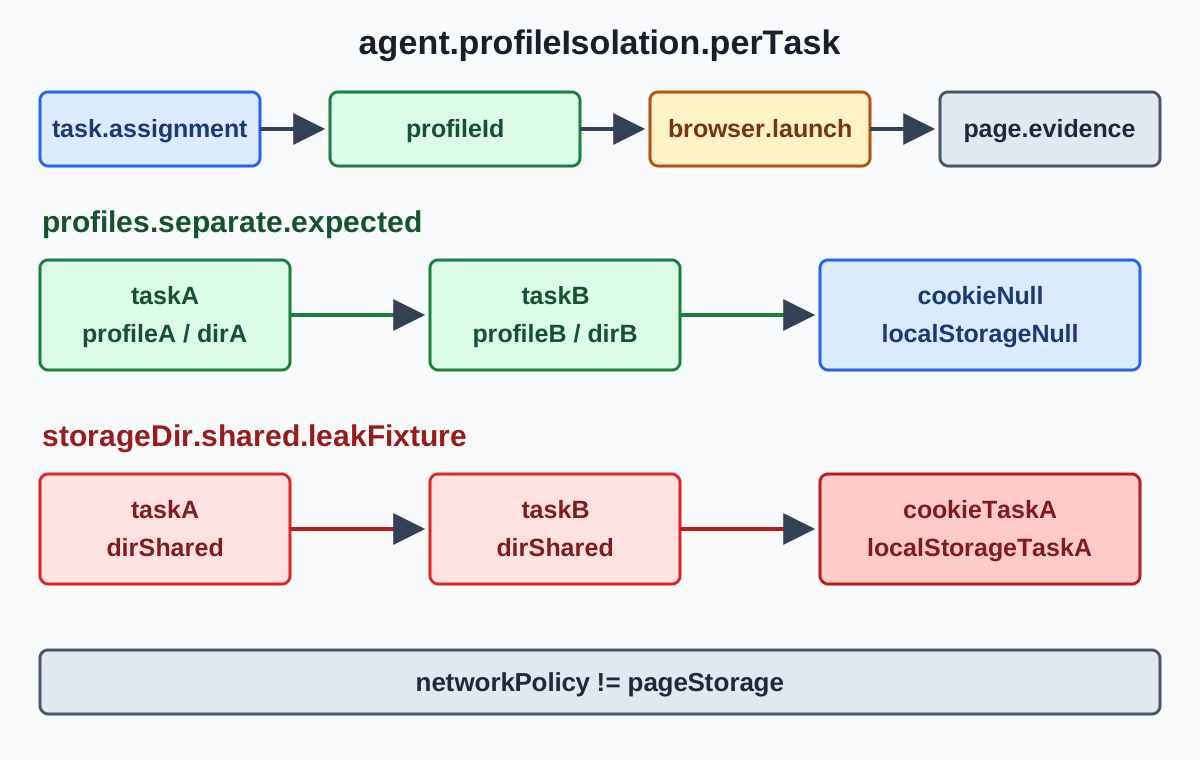
An agent that handles several tasks needs an explicit profile assignment before each browser starts. BotBrowser supports an operator-supplied profile at launch and exposes the resulting page, but it does not schedule tasks, choose the assignment, or guarantee how a detector classifies a session. The operator owns the mapping from taskId to profileId.
TL;DR
- Create the task-to-profile mapping before launch; do not let a retry silently inherit the previous task's profile.
- Give each profile its own storage partition and approved network policy. A shared profile can carry cookies, local storage, permissions, and the same configured route into the next task.
- Use the fixture below to prove storage separation with two persistent directories, then run the deliberately broken shared-directory variant.
- A passing fixture proves what the page can read. It does not prove a detector verdict, the browser process that launched it, or compliance with a third-party platform's limits.
Contents
- Why an agent loop needs a profile boundary
- Assign the profile before launch
- Run a storage-separation fixture
- Check network identity as a separate surface
- Close, retry, and audit each assignment
- Interpretation and limits
- Practical conclusion
Why an agent loop needs a profile boundary
An agent loop turns one browser workflow into a sequence of independently scoped jobs. Task A may authenticate to an approved test tenant, while Task B must start with no state from that tenant. If both launches point at one persistent profile, the second task can inherit cookies, local storage, permissions, cache entries, and other browser state before its first page action.
Playwright describes a BrowserContext as an isolated session with its own cookies and storage. That context boundary is useful, but it is not the same decision as selecting a BotBrowser profile. A profile is a launch input and can carry configuration beyond page storage. The profile management guide covers ownership, version pairing, retention, and lifecycle; agent schedulers apply these practices when assigning profiles to tasks.
The nearest multi-account browser isolation guide focuses on human workflows that keep accounts apart. An agent loop adds an assignment problem: every task, retry, and worker restart must receive a deliberate profile. The headless browser for AI agents guide covers the agent-to-browser handoff and process evidence; it does not establish identity separation between two runs.
Assign the profile before launch
Keep a small assignment record that the launcher can validate without opening the protected package. A useful record has a task identifier, profile identifier, storage directory, network policy reference, owner, and lifecycle state:
{
  "taskId": "tenant-a-checkout-042",
  "profileId": "profile-us-east-07",
  "storageDir": "/var/lib/agent-sessions/profile-us-east-07",
  "networkPolicyRef": "egress-us-east-07",
  "state": "approved"
}
Resolve this record before calling chromium.launchPersistentContext() or the equivalent BotBrowser launcher. Reject an absent, retired, or already leased assignment. A retry should refer to its own assignment event, not reuse whichever directory the worker happened to leave behind.
With Playwright, a persistent context gives one browser process a user-data directory. For a BotBrowser launch, the operator also supplies the profile argument and any approved network settings. Keep those values together in the assignment record and log only stable identifiers, not profile contents or proxy secrets.
The profile assignment is an operational control, not a promise about a site's decision. It makes the intended boundary reviewable. It cannot make two unrelated accounts permissible, disregard a platform limit, or guarantee that a third party will accept the session.
Run a storage-separation fixture
The following Node.js fixture uses Playwright's bundled Chromium and a local HTTP server. It writes a harmless cookie and localStorage value in Task A, reads the values in Task B, and prints whether the second task inherited them. The first run gives each task a different directory; the second intentionally reuses one directory to show the leak.
// save as profile-isolation-fixture.mjs
import { chromium } from 'playwright';
import { createServer } from 'node:http';
import { mkdtemp, rm } from 'node:fs/promises';
import { tmpdir } from 'node:os';
import { join } from 'node:path';

const server = createServer((request, response) => {
  response.setHeader('Content-Type', 'text/html');
  response.end('<!doctype html><title>profile fixture</title><p data-fixture="profile-isolation">owned fixture</p>');
});
await new Promise(resolve => server.listen(0, '127.0.0.1', resolve));
const port = server.address().port;
const origin = `http://127.0.0.1:${port}`;

async function runTask(taskId, storageDir, writeState) {
  const context = await chromium.launchPersistentContext(storageDir, { headless: true });
  const page = await context.newPage();
  await page.goto(origin);
  if (writeState) {
    await page.context().addCookies([{ name: 'task_marker', value: taskId, url: origin }]);
    await page.evaluate(value => localStorage.setItem('task_marker', value), taskId);
  }
  const observed = {
    cookie: (await context.cookies()).find(cookie => cookie.name === 'task_marker')?.value ?? null,
    localStorage: await page.evaluate(() => localStorage.getItem('task_marker')),
  };
  await context.close();
  return observed;
}

const root = await mkdtemp(join(tmpdir(), 'agent-profile-fixture-'));
const separateA = await runTask('task-a', join(root, 'profile-a'), true);
const separateB = await runTask('task-b', join(root, 'profile-b'), false);
console.log(JSON.stringify({ case: 'separate', taskA: separateA, taskB: separateB }));

const sharedA = await runTask('task-a', join(root, 'shared-profile'), true);
const sharedB = await runTask('task-b', join(root, 'shared-profile'), false);
console.log(JSON.stringify({ case: 'shared', taskA: sharedA, taskB: sharedB }));

await rm(root, { recursive: true, force: true });
server.close();
Run it with node profile-isolation-fixture.mjs. The expected shape is:
{"case":"separate","taskA":{"cookie":"task-a","localStorage":"task-a"},"taskB":{"cookie":null,"localStorage":null}}
{"case":"shared","taskA":{"cookie":"task-a","localStorage":"task-a"},"taskB":{"cookie":"task-a","localStorage":"task-a"}}
The separate case establishes a page-visible storage boundary: Task B cannot read Task A's marker. The shared case is the failure fixture; both values prove that the second run opened the same persistent storage. This is an example you can run locally, not an observation from a BotBrowser execution.
The fixture deliberately uses a local origin and synthetic data. It does not log credentials, visit a third-party service, or claim that a page can inspect every browser setting. For a production check, keep the same comparison structure, use an approved read-only endpoint, and preserve the assignment ID with the output.
What the fixture checks and what it omits
The fixture has one purpose: make a storage leak visible with values that have no business meaning. The cookie is scoped to the local origin, and the localStorage value is written by the page itself. Because both values are read after a fresh launch, a non-null result in Task B is easy to attribute to the persistent directory rather than to a variable held in the Node.js process. The cleanup at the end removes the temporary directories so that a later run starts from a known state.
It intentionally does not test cache partitioning, service-worker registrations, permissions, IndexedDB, downloads, or extension state. Those surfaces can matter to a production workload and should be included in a separate approved fixture when they are part of the task's identity boundary. Add one named marker at a time, record the expected empty value for a new task, and keep the fixture read-only from the perspective of any external service.
The fixture also does not select a BotBrowser profile. A production launcher can wrap the same task function with a resolved --bot-profile argument and an assigned user-data directory. Keep the wrapper outside the page code so the page observation cannot be mistaken for proof of the command line. The BotBrowser Playwright setup documents the launcher integration; the operator still owns the package selection and the assignment record.
Make the expected result machine-checkable
Do not rely on a human scanning two JSON lines. A scheduler can fail a job when the fresh task sees a marker, or when the intentionally shared case does not see one. For example:
function requireValue(value, expected, label) {
  if (value !== expected) throw new Error(`${label}: expected ${expected}, got ${value}`);
}

requireValue(separateB.cookie, null, 'separate cookie');
requireValue(separateB.localStorage, null, 'separate localStorage');
requireValue(sharedB.cookie, 'task-a', 'shared cookie');
requireValue(sharedB.localStorage, 'task-a', 'shared localStorage');
Keep this assertion next to the fixture output, not in a generic health check. A health check that only confirms that a page loaded can pass while the wrong storage is attached. When a failure occurs, include taskId, profileId, the storage path label, the browser release, and the fixture result in the restricted run record. Never include cookie values from a real account or a proxy credential in a general log.
Check network identity as a separate surface
Storage separation does not automatically separate network identity. Pair each assigned profile with an approved network policy and regional setting, then verify the route through an operator-controlled endpoint that reports the request's public address and region. Record the result beside profileId; do not infer it from cookies or from a successful page load.
If the operator maps two tasks to the same network-policy reference, both use that configured proxy and route; reusing a profile does not by itself prove that the network route is shared. BotBrowser's proxy configuration guide documents the separate launch and routing inputs. This is a configuration check, not a detector verdict. A different storage directory alone cannot turn one configured route into two routes.
Keep the checks independent:
| Surface | Example check | What it establishes | What it cannot establish alone |
|---|---|---|---|
| Storage | task_marker cookie and localStorage | The page-visible state is separate | The executable, profile package, or public IP |
| Network | Operator-owned echo endpoint | The request used the recorded route at that time | A third party's classification or future route stability |
| Launch | Redacted command and assignment record | The operator supplied the intended profile input | That every page signal matches the policy |
BotBrowser's per-context fingerprint documentation describes context-scoped identity inputs, while its profile-management documentation covers lifecycle and ownership. Use those references to define the approved assignment. The headless browser for AI agents article explains why page output and process evidence must remain separate; reuse that distinction here when reviewing network results.
An endpoint response should carry a timestamp and an assignment reference. Public address and region can change after a proxy rotation, an infrastructure failover, or an operator policy update. Treat the result as a measurement for that request, not a permanent property of the profile. If a task requires a stable region, the scheduler should reject a route outside the approved policy before opening a page and should close the session when the route becomes unavailable.
Do not substitute a browser-side guess for the route check. navigator.language, a timezone, or a page's own geolocation permission describes a browser setting or a permission result; none independently identifies the public network path. A route endpoint operated by the same organization as the scheduler can attach the response to the assignment without asking a third-party site to classify the session. Keep its response minimal, redact it in broad reports, and retain the full record only for the approved period.
Close, retry, and audit each assignment
Isolation depends on lifecycle discipline as much as on the launch command. Close a task in this order: stop accepting new work, let the page reach a controlled end state, collect the fixture or application result, close the context, and mark the storage disposition. Only then should the scheduler lease the worker to another task. A process that is still writing cookies when the directory is reassigned can create a race that looks like a random leak.
Use an immutable assignment event for every attempt. A retry receives a new event with a reason such as navigation-timeout, fixture-mismatch, or route-unavailable. Keep the previous event linked to its result instead of overwriting its profile ID. This preserves the evidence needed to decide whether the failure belongs to the application, the launcher, or the profile package.
The scheduler can apply a compact set of fail-closed checks:
| Check before launch | Reject when | Why it matters |
|---|---|---|
| Profile state | Missing, retired, or not approved for the workload | Prevents an unreviewed identity from receiving work |
| Storage lease | Directory is active for another assignment | Avoids concurrent writes and cross-task state |
| Network policy | Reference is absent or outside the task's region | Keeps route ownership explicit |
| Browser pairing | Release does not match the approved profile record | Avoids an unreviewed package and release combination |
| Teardown record | Previous owner did not close cleanly | Stops a dirty directory from being reused |
When a check rejects a launch, return a short reason to the queue and a detailed record to the restricted support channel. “Storage lease is active” is actionable; dumping a profile archive or a full browser command line into a shared log is not. The profile management guidance describes the ownership and retirement states that make these checks auditable.
At review time, compare three records: the assignment event, the page-visible fixture output, and the operator-side launch or route evidence. They should agree on the task ID and time window, but each answers a different question. A matching cookie does not prove a matching route. A matching route does not prove that the intended profile was opened. A matching command line does not prove that a page loaded the expected origin.
For a long-running worker, schedule a clean restart at a policy-defined boundary rather than carrying an assignment indefinitely. Restarting is not a substitute for separation, but it can expose teardown problems that remain hidden in one process. Record whether the restart was expected, which profile was released, and whether the next task got a new directory or a still-approved persistent one.
The same record helps during incident review. If a tenant reports seeing a previous task's banner, first compare the two assignment events and storage labels, then inspect the fixture output for the affected worker. If only one worker shows the marker, quarantine that directory and stop assigning new tasks to it while the owner checks teardown. If every worker shows the marker, inspect the scheduler's mapping and the shared volume configuration before changing any page code. A precise sequence keeps the investigation focused on ownership and state rather than on guesses about a site's classification.
Interpretation and limits
Treat a clean comparison as a narrow acceptance result. It says that this fixture, on this machine, observed the expected storage values and, if separately checked, that an operator-controlled endpoint returned the recorded network result. It does not say that a site will accept the session, that a browser is indistinguishable from another browser, or that a detector will return any particular verdict.
Investigate a failure in the layer that owns it. A non-null marker in the separate case points to a storage-directory, teardown, or assignment bug. A changed network result points to route policy, proxy health, or endpoint interpretation. A launcher mismatch is process evidence and should not be “fixed” by asking the agent to inspect page JavaScript.
Do not use per-task profiles to ignore account limits or a platform's terms. Isolation is appropriate for authorized tenants, test cases, and privacy boundaries. The operator remains responsible for credentials, consent, retention, rate limits, and the service rules that govern the workload.
FAQ
Is one Playwright BrowserContext enough for two agent tasks?
Only when the contexts are created and closed under an explicit assignment policy. A context can isolate cookies and storage, but it does not replace the decision about which BotBrowser profile, network policy, and owner belong to each task.
Does the fixture prove that two BotBrowser profiles were launched?
No. It proves only the storage values visible to the local page. Confirm the launcher executable, redacted profile argument, and assignment record through the operator-owned process evidence.
Can separate profiles guarantee a detector outcome?
No. Profile separation removes one class of accidental state sharing. Sites combine many signals, change their rules, and may classify a session for reasons unrelated to this fixture.
What should a retry do after a failed task?
Close the old context, retain its assignment ID and result, and obtain a new approved assignment according to the workload policy. Do not inherit a worker's leftover directory merely because it is available.
Sources
- Playwright BrowserType API
- Playwright browser contexts
- BotBrowser Playwright setup
- BotBrowser profile management
- BotBrowser per-context fingerprint
- BotBrowser proxy configuration
Practical conclusion
Assign profileId, storage, and network policy before each agent task starts. Prove the storage boundary with two directories and the deliberately shared-directory failure case, then verify network identity through an operator-controlled endpoint. Keep page observations, launch evidence, and third-party classifications as separate claims. That workflow makes per-task agent profile isolation reviewable without promising a detector result or bypassing any platform rule.
This article is part of the guide: Browser Identity Surfaces: A Practical Consistency Overview
Related Articles
Browser-Use Setup with a Controlled Browser
IdentityMulti-Account Browser Isolation: Independent Identity Settings
IdentityMulti-Account Social Media Management with Browser Isolation
Getting StartedHeadless Browser for AI Agents: Launch and Tool Boundaries
Getting StartedBotBrowser Profiles: Formats, Rotation, and Common Failures
IdentityBrowser Storage Partitioning and Privacy
Run the same check in BotBrowser
Load a profile, keep the signals you just read about consistent inside the browser, and confirm the result on your own machine before a rollout.